Minecraft version
Back to mods 
Modrinth · Minecraft mod
Chatbubbles
Chatbubbles is a highly customizable mod for Neoforge Minecraft that brings your conversations to life. With this mod, you show your messages right above your head.
Choose a version Pick your version below, then grab the matching file.
Quick answer
Which Chatbubbles release matches 26.1.2?
Best match for your filters 1.1.0+26.1.2
Game version 26.1.2
Loader NeoForge
Chatbubbles 1.1.0+26.1.2 targets 26.1.2 with NeoForge. Installation on the client is optional. Installation on the dedicated server is optional. No extra mods listed for this file.
Where it goes
Is Chatbubbles required on the client, server, or both?
Installation on the client is optional. Installation on the dedicated server is optional.
Client Optional
Dedicated server Optional
Loader for this release NeoForge
Required install it here Optional supported, not mandatory Not supported do not install here Source doesn’t say do not assume
The source marks this as usable on both the client and server.
What else does Chatbubbles 1.1.0+26.1.2 need?
1.1.0+26.1.2 on 26.1.2. Every mod below is checked against that same setup.
This file does not list any required mods. Do not add a library just because a different file uses it.
This file does not list any required or optional mods.
Before you install it
Add Chatbubbles without breaking your instance.
Built for Chatbubbles 1.1.0+26.1.2 on 26.1.2. Pick another file and the loader, install side or required mods may change.
- 01
Stick to this file
Use 1.1.0+26.1.2. It targets 26.1.2 with NeoForge; another release may have different loader, side or dependency requirements.
- 02
Bring the mods it needs
This file does not list any required mods. Do not add a library just because a different file uses it.
- 03
Put it on the correct side
Installation on the client is optional. Installation on the dedicated server is optional.
- 04
Pick the file you checked
Use the “Get this file” button beside 1.1.0+26.1.2. It opens that exact file at the source.
About this project
What does Chatbubbles add?
ChatBubbles is a mod that brings your chat messages to your head (literally), that means you can see any player's message on bubbles right above their head.
Perfect for roleplay server or simple SMP, this mod makes interactions more natural and immersive.
ChatBubbles is a highly customizable mod, that means you can change your bubble's appearence or set some server-related settings.
⚠️ Note: This mod must be installed on BOTH the Client and the Server.
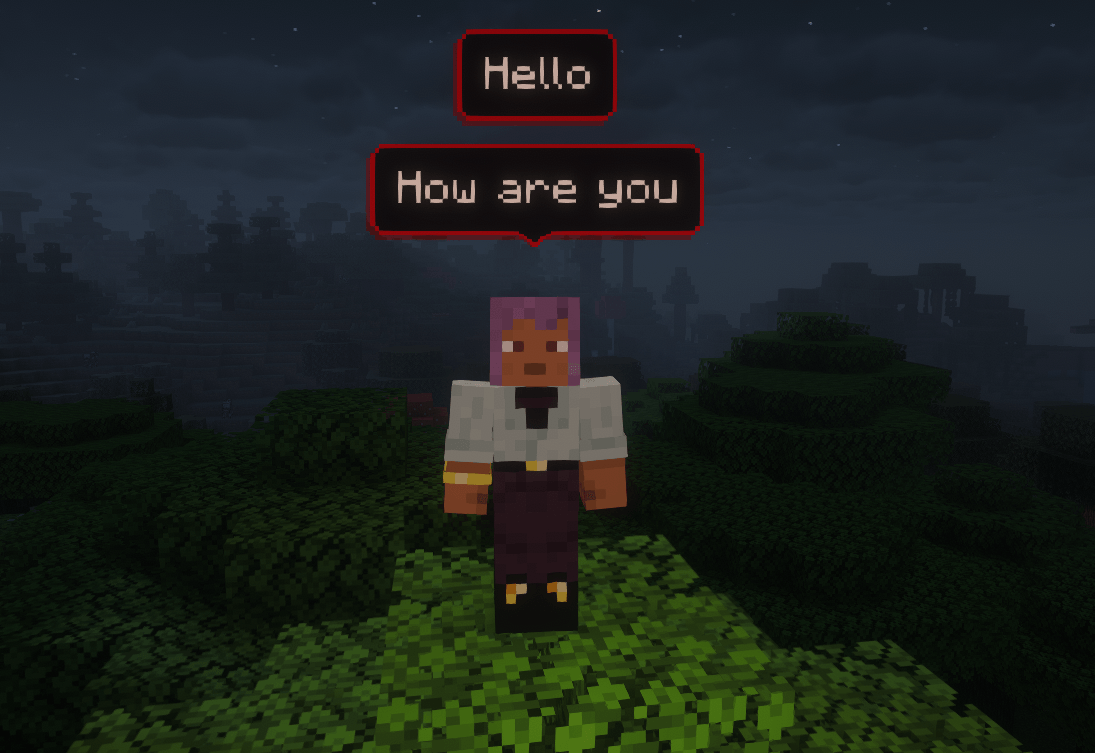

🌟 Latest Update: Settings GUI!
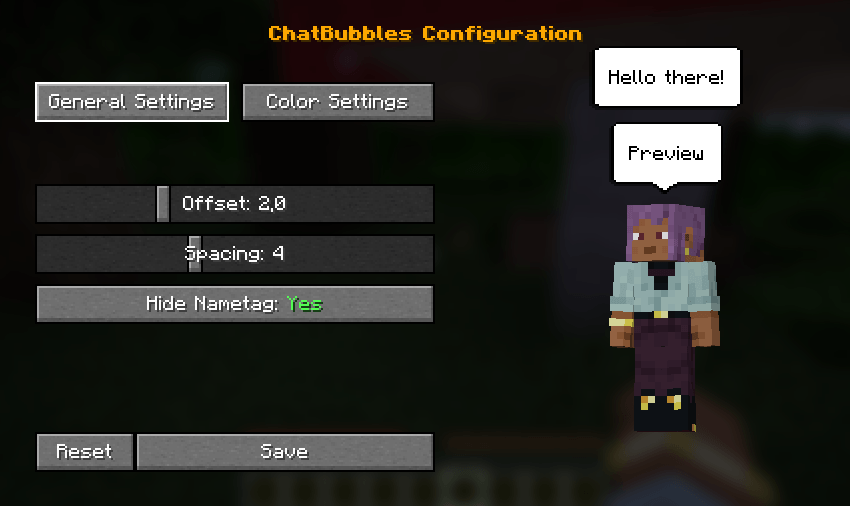
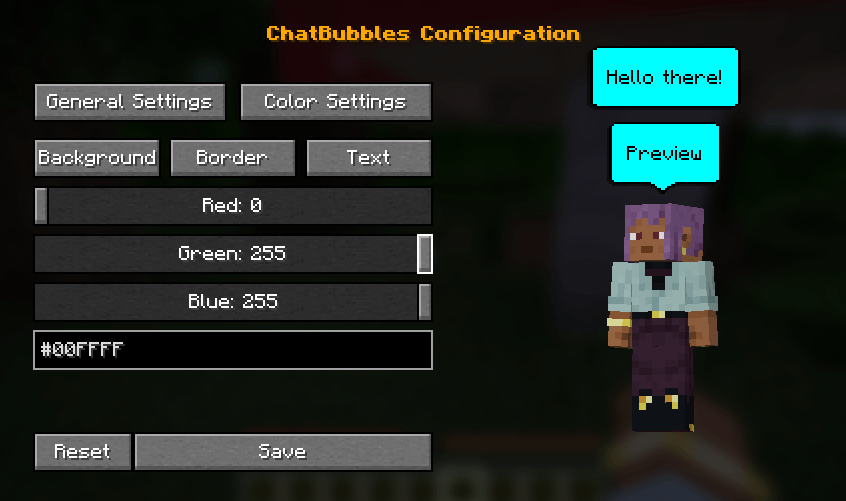
- In-Game Settings GUI: Easily configure bubble colors, spacing, and height offsets directly in-game.
- Live Preview: See your chat bubble changes update in real-time while tweaking the settings.
- Open the configuration menu using the default "C" keybind (can be changed in the controls menu) or via the
/chatbubbles settingscommand.
Features & Customization
🎨 Appearance Settings
Customizing your bubbles is easier than ever with our new in-game settings screen, which includes a live preview! Access it by pressing C (default keybind) or by typing /chatbubbles settings.
If you prefer using commands, you can still customize everything via chat:
- Color Customization: Change your bubble's colors to match your style.
/chatbubbles bgColor <hexCode>(Background color)/chatbubbles borderColor <hexCode>(Border color)/chatbubbles textColor <hexCode>(Text color)- Note: Do not include the
#symbol in the hex code (e.g., useFFFFFF).
- Height Offset: Adjust the distance between the bubble and your head.
/chatbubbles offset <value>- Note: Can be negative, but 2.0+ is recommended. Negative values are useful for custom models smaller than the vanilla player.
- Bubble Spacing: Control the distance between multiple active bubbles above your head.
/chatbubbles spacing <value>- Note: Value must be between 1.0 and 10.0.
- Hide Nametag: Choose to hide your vanilla nametag while a bubble is active for a cleaner look.
/chatbubbles hideNametag <true/false>
⚙️ Server-Side Settings
- Max. of bubbles above the players' head;
- Default values for offset, spacing and hideNametag;
- Bubble's padding;
- Duration of a bubble.
Project description from Modrinth.
Pick your setup
Chatbubbles by Minecraft version and loader
Choose the version and loader you play, then open the matching release.
Minecraft version
1.21.1
1 loader buildCheck the dependencies, then try the file in a copied instance before changing a world you care about.
Recent files
Chatbubbles versions and loaders
1.1.0+26.1.2
chatbubbles-1.1.0+26.1.2.jar
11 Jun 2026
Client Optional Server Optional Dependencies No extras listed Listed on Release listing
Check the 26.1.2 · NeoForge setup 26.1.2NeoForge release
Looking for an older file? The official Modrinth project page is in Resources.
 mod
Modrinth · Minecraft
Liteminer
Mine an entire vein of ore, chop an entire tree or break any group of blocks by holding a hotkey.
 mod
Modrinth · Minecraft
Afterburner
An all-in-one performance mod that makes Minecraft run smoother and faster by optimizing everything from chunk rendering to world simulation.
 mod
Modrinth · Minecraft
Pickable Pets
Allows owners to pick up their pets into an item form. Works on Fabric and Forge.