Fabric API Needed by Ultimate Glass 0.2.3
requiredMatching file found Matched file: 0.160.0+26.2

Modrinth · Minecraft mod
Tired of glass limitations in vanilla? This mod is for you
Quick answer
Ultimate Glass 0.2.3 targets 26.2 with Fabric. Installation on the client is optional. Installation on the dedicated server is optional. All 1 required mods have matching files.
Where it goes
Installation on the client is optional. Installation on the dedicated server is optional.
The source marks this as usable on both the client and server.
0.2.3. Change the file and its required mods may change too.
Install Fabric API first. We found matching files for this game-version and loader setup. 1 comes through another mod in the chain.
1 extra mod was pulled in by another dependency. Indented rows show who needs each one. We only count dependency files that match this setup. A file for another loader does not fill the gap.
Before you install it
Built for Ultimate Glass 0.2.3. Pick another file and the loader, install side or required mods may change.
Use 0.2.3. It targets 26.2 with Fabric; another release may have different loader, side or dependency requirements.
Install Fabric API first. We found matching files for this game-version and loader setup. 1 comes through another mod in the chain.
Installation on the client is optional. Installation on the dedicated server is optional.
Use the “Get this file” button beside 0.2.3. It opens that exact file at the source.
About this project
Ultimate Glass makes glass panes and glass blocks much more flexible for building.
Place panes along block edges, mount them horizontally, rotate them after placement, make proper
glass corners, add wooden frames, build larger framed windows, and even combine glass with stairs
and slabs.
It stays close to the vanilla look — just with glass that is much less annoying to build with.
New in 0.2.3: edge-pane corners are now built explicitly. Add matching panes
to free faces of an existing pane cell (up to six); Glass and
frame wood must match. Neighbours no longer create or remove edge faces. Multi-pane assemblies
rotate together and cannot switch to centred mode. Back up worlds before updating; existing
saved corners keep their faces, which become fully recoverable panes.
Smelt vanilla glass panes or full glass blocks in a furnace or blast furnace to create Tempered
Glass.
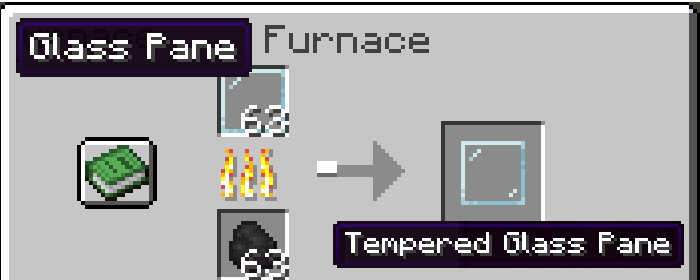
When placed normally, a Tempered Glass Pane snaps to the closest edge of the block face you
clicked.
Need more control? Shift + right-click places it directly against the clicked face instead.
Tempered panes can be:
Matching panes also connect seamlessly, without thick borders breaking up larger windows
(configurable in Mod Menu).
Clear, stained and tinted glass are all supported as both panes and full blocks.
Six matching Tempered Glass blocks can also be crafted into 16 Tempered Glass Panes of the same
colour, just like the vanilla glass pane recipe.
Combine any supported glass pane or full glass block with any plank to add a wooden frame.
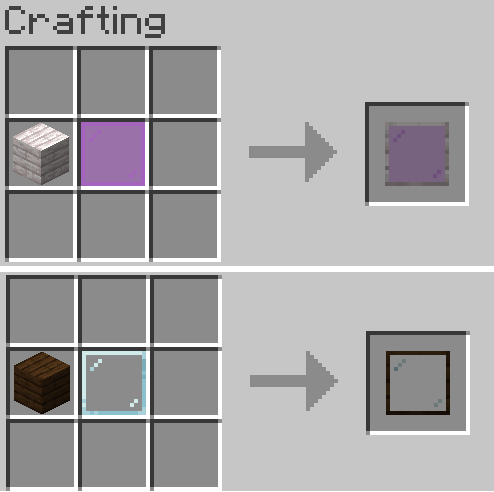
Both ordinary and Tempered glass can be framed. Ordinary framed glass keeps normal vanilla
breaking behaviour, while Tempered framed glass normally drops intact.
All vanilla wood types work, and modded planks are supported automatically. Frames made from
modded wood use that plank's texture, so they fit naturally with the rest of the wood set.
Matching framed full blocks remove their internal wooden borders, making it possible to build
larger clean windows. Different glass colours or wood types keep the divider between them.
Glazier's Tools:
The rotation-axis key can be changed in Controls and defaults to V.
Glass Chisel:
Press V while holding the Glass Chisel to switch between editing both sides of a shared seam and
editing only the clicked edge.
The Glass Chisel works with panes and framed full glass blocks.
Tempered Glass Panes can also share the same block space with stairs and slabs, making things like
angled windows and more unusual shapes possible.
Shift + right-click a stair or slab with a Tempered Glass Pane to combine them. Normal
right-clicking still places the pane beside the block.
These combined blocks support rotation and edge/centred switching with Glazier's Tools.
This feature is currently experimental and disabled by default. You can enable it through Mod
Menu.
Version 0.2.2 changes framed glass to a new component-based item system. Glass placed by older
versions still loads in 0.2.3, but those old blocks are now considered legacy.
If you plan to keep updating the mod, replace old framed glass with the current items. A future release may
remove the legacy block IDs.
Version 0.2.3 preserves the saved faces of existing automatic edge corners and counts each face
as a recoverable pane. Do not downgrade a world after adding multi-pane assemblies: older versions
cannot represent opposite-face panes and will resume automatically changing corner geometry.
Mod Menu is optional, but adds settings for seamless connections, experimental stair/slab glass,
Tempered Glass drops, reverse crafting, the Glass Chisel, and Glazier's Tool recipes.
Gameplay-related settings are synchronized by the server.
Ultimate Glass must be installed on both the server and connecting clients when playing
multiplayer.
Ultimate Glass is available under the MIT License. See LICENSE.
Project description from Modrinth.
Pick your setup
Choose the version and loader you play, then open the matching release.
Check the dependencies, then try the file in a copied instance before changing a world you care about.
Recent files
ultimate-glass-0.2.3.jar
9 Sept 2026
ultimate-glass-0.2.2.jar
27 Aug 2026
ultimate-glass-0.2.1.jar
25 Aug 2026
ultimate-glass-0.2.0.jar
21 Aug 2026
ultimate-glass-0.2.0-beta.5.jar
16 Aug 2026
ultimate-glass-0.1.8.jar
11 Aug 2026
ultimate-glass-0.1.7.jar
10 Aug 2026
ultimate-glass-0.1.6.jar
8 Aug 2026
Looking for an older file? The official Modrinth project page is in Resources.
 mod
modA complex laboratory pharmacology mod introducing authentic extraction tools, multi-stage crystal synthesis, and immersive post-processing visual effects.
 mod
modA different view of what the BBS mod is.
 mod
modReplacing the "Crates + Keys" with "Bundle Items + Right Click" And a user friendly item / command / kit gui setup ingame!