Minecraft version
Back to mods 
Modrinth · Minecraft mod
Torch Optimizer
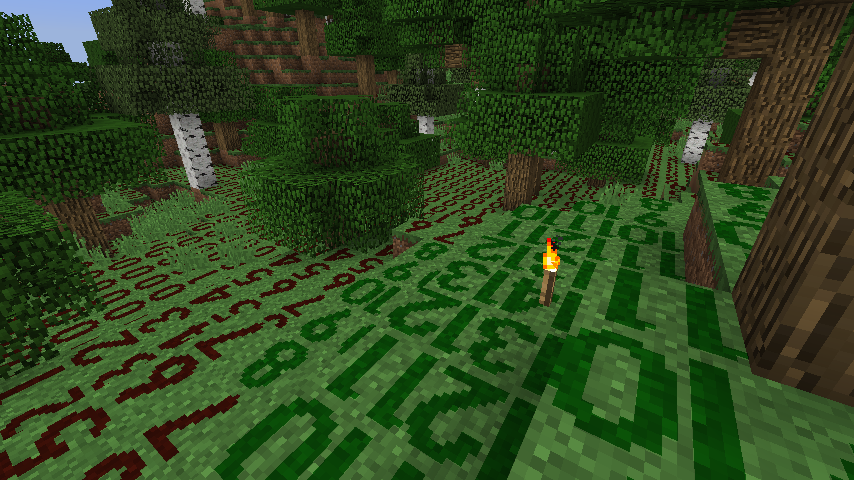
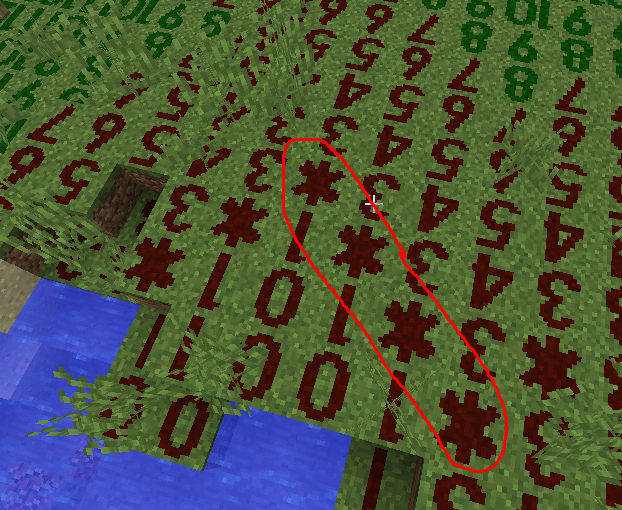
Allows you to visualize the intensity of light rendered as numbers on the top of blocks. There's a default optimal indicator for light placement set for torches. It can be adjusted for other light sources. Use the square brackets to control its position.
Choose a version Pick your version below, then grab the matching file.
Quick answer
Which Torch Optimizer release matches 1.14.4 Forge?
Best match for your filters 2.4.8+1.14.4
Game version 1.14.4
Loader Forge
Torch Optimizer 2.4.8+1.14.4 targets 1.14.4 with Forge. It must be installed on the client. Do not install it on the dedicated server. No extra mods listed for this file.
Where it goes
Is Torch Optimizer required on the client, server, or both?
It must be installed on the client. Do not install it on the dedicated server.
Client Required
Dedicated server Not supported
Loader for this release Forge
Required install it here Optional supported, not mandatory Not supported do not install here Source doesn’t say do not assume
This file is marked client-only.
What else does Torch Optimizer 2.4.8+1.14.4 need?
2.4.8+1.14.4 on 1.14.4 Forge. Every mod below is checked against that same setup.
This file does not list any required mods. Do not add a library just because a different file uses it.
This file does not list any required or optional mods.
Before you install it
Add Torch Optimizer without breaking your instance.
Built for Torch Optimizer 2.4.8+1.14.4 on 1.14.4 Forge. Pick another file and the loader, install side or required mods may change.
- 01
Stick to this file
Use 2.4.8+1.14.4. It targets 1.14.4 with Forge; another release may have different loader, side or dependency requirements.
- 02
Bring the mods it needs
This file does not list any required mods. Do not add a library just because a different file uses it.
- 03
Put it on the correct side
It must be installed on the client. Do not install it on the dedicated server.
- 04
Pick the file you checked
Use the “Get this file” button beside 2.4.8+1.14.4. It opens that exact file at the source.
About this project
What does Torch Optimizer add?


If you want a server setup for the Any mod pack with zero effort, get a server with BisectHosting and receive 25% off your first month as a new customer using the code kreezxil
Screens
Description
Torch Optimizer shows the block light level as numbers on the floor around you and marks the spots where a torch gives the best spawn protection. It can also place those torches for you.
It is client-side only. It works on any server, including servers without the mod, and does nothing when installed on a dedicated server.
What it does (26.3)
• Draws a number tile on top of floor blocks around you showing the light level of the space above. Red tiles (0-7) are spawnable, green tiles (8-15) are not.
• Tiles only appear where a mob could spawn. There are no tiles on leaves, glass, light sources, bedrock, barriers, rails, bottom slabs or upright stairs, and none under liquids, full blocks or anything taller than a carpet or one snow layer. Top slabs and upside-down stairs do get tiles. Mushroom fields never show tiles.
• With optimize on (the default), an asterisk marks the tiles whose light level equals optimizeValue (default 2, range 0-15). A torch placed there lights the area with the least overlap.
• Tiles show in both first and third person.
Instructions
All keys can be rebound in "Options -> Controls -> Torch Optimizer". A message on screen confirms each change.
F7 turns the overlay on or off.
Shift + F7 toggles counting sky light (sunlight and moonlight) in the shown number.
Ctrl + F7 cycles the display mode: Standard (green and red), Advanced (adds yellow where a spot is safe only because of sky light and becomes spawnable at night), and Minimal (no green tiles, sky-light-only safe spots in yellow).
[ (Left Bracket) moves the marker light level up by one.
] (Right Bracket) moves the marker light level down by one.
F8 toggles automatic torch placement.
Shift + F7, Ctrl + F7, [ and ] save their change to the config. [ and ] also turn on the overlay and the asterisk marker.
Automatic Torch Placement (F8)
While it is on, the mod places torches from your own inventory on floor blocks that currently show the asterisk, the same way a right click does.
• It only uses spots within your normal reach and in line of sight, and it places one torch every autoPlaceInterval game ticks (default 5, which is four per second).
• It takes torches from your hand first, then your off hand, the hotbar and the rest of your inventory. Torches, soul torches and copper torches count; redstone torches do not.
• It skips spots where a torch can't stand or something is in the way, and floor blocks that react to a right click, such as crafting tables, chests, doors and buttons.
• It turns itself off with a message when you run out of torches, when optimize is turned off, or when you leave the world. It pauses while a screen is open, while you are dead, and in spectator or adventure mode.
• Servers running anti-cheat plugins may object to automated placement; it has not been tested against any.
Configuration
The config file is config/torchoptimizer-common.toml, and you can also edit it in game from the Mods screen. Every option has a name and a tooltip in English, Czech, German, Russian and Chinese.
• optimize (default true) shows the asterisk marker.
• optimizeValue (default 2, 0-15) is the light level that gets the asterisk.
• pollingInterval (default 200, 1-20000) is the number of milliseconds between light scans.
• chunkRadius (default 3, 1-16) is how many chunks around you are scanned and drawn.
• displayMode (default 0) selects Standard, Advanced or Minimal.
• useSkyLight (default false) counts sky light.
• autoPlaceInterval (default 5, 1-200) is the number of game ticks between automatically placed torches.
Older Versions
Initial Version to 1.12.2-2.0.4: , (comma) changes the optimal torch position by plus one, and . (period) by minus one.
1.12.2-2.1.5+: [ (Left Bracket) changes the optimal torch position by plus one, and ] (Right Bracket) by minus one.
Ctrl + F7 display modes were available in 1.12.2 and below, and are back in 26.3. In older versions the asterisk option was called optimizeEnable in the GUI config.
Licensing
A derivative work based on the mod by oldjunyi known as Light level Overlay Reloaded which is also MIT LICENSED.
Original License by 4poc at https://github.com/4poc/lloverlay/blob/master/resources/LICENSE included here for posterity.
The source code is available at: https://github.com/4poc/lloverlay
Light Level Overlay is licensed 3-clause BSD.
Copyright (c) 2012-2013, Matthias Hecker <apoc@sixserv.org>
All rights reserved.
Redistribution and use in source and binary forms, with or without
modification, are permitted provided that the following conditions are met:
* Redistributions of source code must retain the above copyright
notice, this list of conditions and the following disclaimer.
* Redistributions in binary form must reproduce the above copyright
notice, this list of conditions and the following disclaimer in the
documentation and/or other materials provided with the distribution.
* Neither the name of the author nor the
names of the contributors may be used to endorse or promote products
derived from this software without specific prior written permission.
THIS SOFTWARE IS PROVIDED BY THE COPYRIGHT HOLDERS AND CONTRIBUTORS "AS IS" AND
ANY EXPRESS OR IMPLIED WARRANTIES, INCLUDING, BUT NOT LIMITED TO, THE IMPLIED
WARRANTIES OF MERCHANTABILITY AND FITNESS FOR A PARTICULAR PURPOSE ARE
DISCLAIMED. IN NO EVENT SHALL THE AUTHOR BE LIABLE FOR ANY
DIRECT, INDIRECT, INCIDENTAL, SPECIAL, EXEMPLARY, OR CONSEQUENTIAL DAMAGES
(INCLUDING, BUT NOT LIMITED TO, PROCUREMENT OF SUBSTITUTE GOODS OR SERVICES;
LOSS OF USE, DATA, OR PROFITS; OR BUSINESS INTERRUPTION) HOWEVER CAUSED AND
ON ANY THEORY OF LIABILITY, WHETHER IN CONTRACT, STRICT LIABILITY, OR TORT
(INCLUDING NEGLIGENCE OR OTHERWISE) ARISING IN ANY WAY OUT OF THE USE OF THIS
SOFTWARE, EVEN IF ADVISED OF THE POSSIBILITY OF SUCH DAMAGE.
Modpacks
Don't ask, just add. Link back appreciated but not required.
Note!! for 1.16.5
The 1.16.5-2.4.8 version has been archived. It will download for projects that depend upon it. I do not know how to fix it. It is broken. I recommend removing it from your packs and using Light Level Overlay Reloaded or a similar mod.
Project description from Modrinth.
Pick your setup
Torch Optimizer by Minecraft version and loader
Choose the version and loader you play, then open the matching release.
Minecraft version
1.17.1
1 loader buildMinecraft version
1.16.5
1 loader buildMinecraft version
1.14.4
1 loader buildMinecraft version
1.11.2
1 loader buildMinecraft version
1.10.2
1 loader buildCheck the dependencies, then try the file in a copied instance before changing a world you care about.
Recent files
Torch Optimizer versions and loaders
2.4.8+1.14.4
torchoptimizer-1.14.2-2.4.8.jar
26 May 2022
Client Required Server Not supported Dependencies No extras listed Listed on Release listing
Check the 1.14.4 · Forge setup 1.14.4Forge release
Looking for an older file? The official Modrinth project page is in Resources.