Minecraft version
Back to mods 
Modrinth · Minecraft mod
Vanilla Paxels
Paxels can now be made in vanilla Minecraft with no mods and only a datapack
Choose a version Pick your version below, then grab the matching file.
Quick answer
Which Vanilla Paxels release matches 26.2 Forge?
Best match for your filters 2.0+mod
Game version 1.21.11, 26.1, 26.1.1
Loader Fabric, Forge, NeoForge
Vanilla Paxels 2.0+mod targets 1.21.11, 26.1, 26.1.1 with Fabric, Forge, NeoForge. Installation on the client is optional. Installation on the dedicated server is optional. No extra mods listed for this file.
Where it goes
Is Vanilla Paxels required on the client, server, or both?
Installation on the client is optional. Installation on the dedicated server is optional.
Client Optional
Dedicated server Optional
Loader for this release Fabric, Forge, NeoForge
Required install it here Optional supported, not mandatory Not supported do not install here Source doesn’t say do not assume
The source marks this as usable on both the client and server.
What else does Vanilla Paxels 2.0+mod need?
2.0+mod on 26.2 Forge. Every mod below is checked against that same setup.
This file does not list any required mods. Do not add a library just because a different file uses it.
This file does not list any required or optional mods.
Before you install it
Add Vanilla Paxels without breaking your instance.
Built for Vanilla Paxels 2.0+mod on 26.2 Forge. Pick another file and the loader, install side or required mods may change.
- 01
Stick to this file
Use 2.0+mod. It targets 1.21.11, 26.1, 26.1.1 with Fabric, Forge, NeoForge; another release may have different loader, side or dependency requirements.
- 02
Bring the mods it needs
This file does not list any required mods. Do not add a library just because a different file uses it.
- 03
Put it on the correct side
Installation on the client is optional. Installation on the dedicated server is optional.
- 04
Pick the file you checked
Use the “Get this file” button beside 2.0+mod. It opens that exact file at the source.
About this project
What does Vanilla Paxels add?
Info
Since 24w12a introduced the abilty to allow any item have properties of a tool, I decided to make this datapack.
Paxels are Pickaxes, Shovels, and Axes combined! You can break all of the blocks at the same speed as you would with the correct tool. You can make paxels out of any material using the same crafting recipe.
You can do normal axe and shovel right click actions such as stripping logs, and creating paths. (v26.3+ only)
Pre v26.3 description
I wish Mojang will add a way to have the right click functionality of shovels / axes work on other items. This is what these paxels are missing. You can currently only use the shovel functionality (The item without the resourcepack is a shovel) to make path blocks. I will add the axe stripping wood functionality once it is implemented into the game.
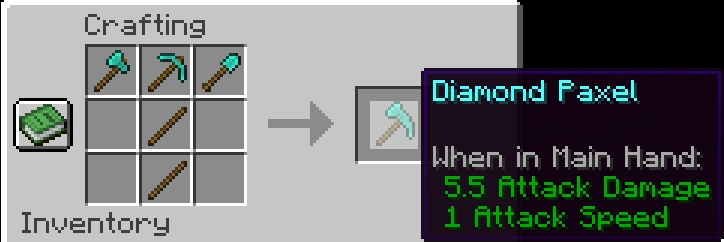
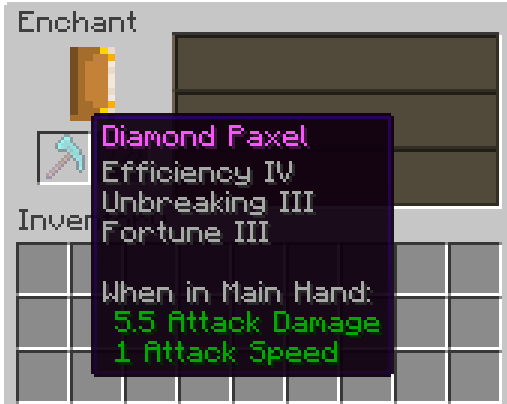
You can enchant Paxels just like any other tool!
Upgrade it to netherite like any other netherite tool! (v2.0+ only)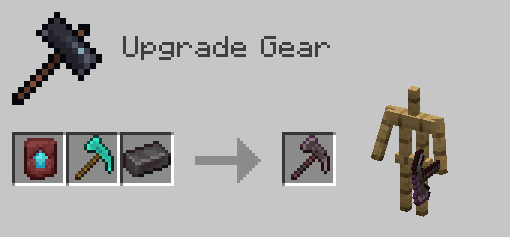
Pre v2.0 Netherite Info
I would recommend upgrading the Diamond Paxel to Netherite the way you normally upgrade a diamond tool. The recipe for the one below is a placeholder until Mojang adds custom components to crafting recipes. One downside to this is it won't have the right name and the right mining speed. (Fun Fact: Netherite has 1 more mining speed than diamond).
This is the Netherite Paxel recipe for now until Mojang adds custom components in Crafting recipes support: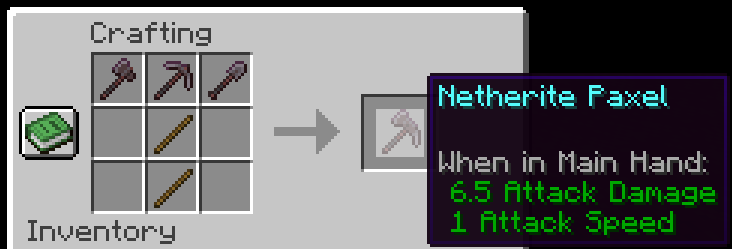
If you have any problems check the FAQ below and if that doesn't help join the discord and ask
FAQ
Q: I get a missing texture when trying to use this how do I fix it?
A: Make sure to download the resourcepack
Q: Where can I download the resourcepack?
A: Those who click the big download button at the top of the screen are only prompted to download the datapack and not the resourcepack. Modrinth does not show both of them in that menu. You instead have to go to the versions tab.
Where to download the resourcepack
First you have to go to the versions tab

Then you go to the version you want
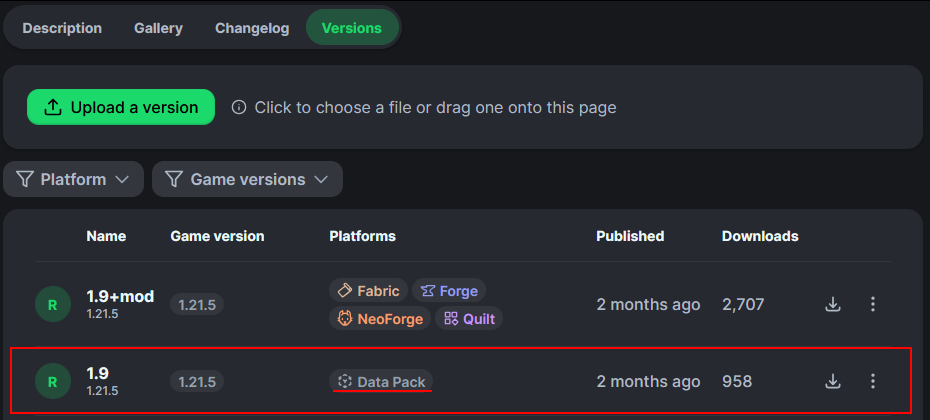
Then underneath the datapack download is the resourcepack download
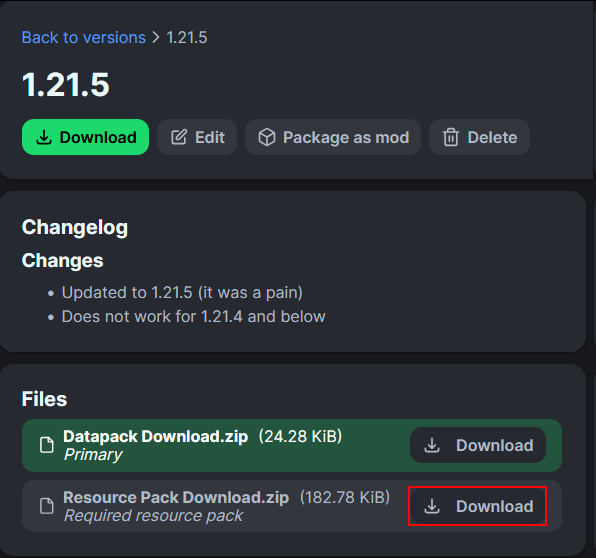
Project description from Modrinth.
Pick your setup
Vanilla Paxels by Minecraft version and loader
Choose the version and loader you play, then open the matching release.
Minecraft version
26.2
5 loader buildsMinecraft version
26.1.2
5 loader buildsMinecraft version
26.1.1
5 loader buildsMinecraft version
26.1
5 loader buildsMinecraft version
24w19b
1 loader buildMinecraft version
24w19a
1 loader buildMinecraft version
24w18a
1 loader buildMinecraft version
24w14potato
1 loader buildMinecraft version
24w14a
1 loader buildMinecraft version
24w13a
1 loader buildMinecraft version
24w12a
1 loader buildShowing the newest 12 of 36 game versions. Older files are in the list below.
Check the dependencies, then try the file in a copied instance before changing a world you care about.
Recent files
Vanilla Paxels versions and loaders
2.0+mod
vanilla-paxels-2.0.jar
24 Sept 2026
Client Optional Server Optional Dependencies No extras listed Listed on Release listing
Check the 26.2 · Forge setup 1.21.1126.126.1.126.1.2 release
1.4+mod
vanilla-paxels-1.4.jar
1 Oct 2025
Client Optional Server Optional Dependencies No extras listed Listed on Release listing
Check the 26.2 · Forge setup 1.21.101.21.111.21.926.1 release
Looking for an older file? The official Modrinth project page is in Resources.
 mod
Modrinth · Minecraft
where
beams, indicators on lodestone, treasure, structure, abandoned camp maps, coordinates list, waypoint, recovery compass, player locator bar tracking lodestone, vanilla-like navigation mod, compass
 mod
Modrinth · Minecraft
ConfigGuard
Automatic snapshots of your config folder with a line-by-line diff and one-click restore. Undo any config change, on the client or on a server.
 mod
Modrinth · Minecraft
Jacaranda - Enchantment Outlines
Adds outlines to all enchanted items!