Back to mods
Keep Inventory Orbs project artwork

Modrinth · Minecraft mod

Keep Inventory Orbs

A fully server-side approach to the gravestone concept introducing 'orbs' to store your inventory upon death.

Choose a version Pick your version below, then grab the matching file.

Quick answer

Which Keep Inventory Orbs release should I use?

Updated 4 days ago
Latest stable file v1.3.2-mc1.21.x-26.2+mod
Game version 1.21, 1.21.1, 24w33a
Loader Fabric, Forge, NeoForge

Keep Inventory Orbs v1.3.2-mc1.21.x-26.2+mod targets 1.21, 1.21.1, 24w33a with Fabric, Forge, NeoForge. Installation on the client is optional. Installation on the dedicated server is optional. No extra mods listed for this file.

Where it goes

Is Keep Inventory Orbs required on the client, server, or both?

Installation on the client is optional. Installation on the dedicated server is optional.

Client Optional
Dedicated server Optional
Loader for this release Fabric, Forge, NeoForge
Required install it here Optional supported, not mandatory Not supported do not install here Source doesn’t say do not assume

The source marks this as usable on both the client and server.

What else does Keep Inventory Orbs v1.3.2-mc1.21.x-26.2+mod need?

v1.3.2-mc1.21.x-26.2+mod. Change the file and its required mods may change too.

No extra mods listed for this file

This file does not list any required mods. Do not add a library just because a different file uses it.

This file does not list any required or optional mods.

Before you install it

Add Keep Inventory Orbs without breaking your instance.

Built for Keep Inventory Orbs v1.3.2-mc1.21.x-26.2+mod. Pick another file and the loader, install side or required mods may change.

  1. 01

    Stick to this file

    Use v1.3.2-mc1.21.x-26.2+mod. It targets 1.21, 1.21.1, 24w33a with Fabric, Forge, NeoForge; another release may have different loader, side or dependency requirements.

  2. 02

    Bring the mods it needs

    This file does not list any required mods. Do not add a library just because a different file uses it.

  3. 03

    Put it on the correct side

    Installation on the client is optional. Installation on the dedicated server is optional.

  4. 04

    Pick the file you checked

    Use the “Get this file” button beside v1.3.2-mc1.21.x-26.2+mod. It opens that exact file at the source.

About this project

What does Keep Inventory Orbs add?

Keep Inventory Orbs logo with blurred background

Keep Inventory Orbs

A fully server-side approach to the gravestone concept introducing 'orbs' to store your inventory upon death.

Upon death:

  • An Orb will spawn that will keep your inventory safe. [Incompatible with Backpack mods]
  • A compass to help you locate your last orb will be given to you. [Customizable]

Recovering Inventory:

  • When an Orb is broken, it will attempt to restore its inventory only to its owner.

    If the Orb's owner is not nearby (within 6 blocks), nothing will happen and the orb will not break.

    Orb Stealing is [OFF] by default. To steal an Orb that is not yours, an Admin needs to enable it in the Menu [see below]

  • Orbs will re-equip your armor and items exactly into the slot they were.

    If the slot is occupied by something else, the item will drop in the player's position.

Orb behavior:

  • Orbs will always spawn on the player's death position
  • Orbs will spawn in the world's minimum height if the player dies in the void
  • Orbs will never despawn.
  • Orbs have gravity and will fall if they have no support.
  • Orbs will move upwards if they are inside of a block.
  • Orbs cannot be moved by pistons

Server-side advantages

If you are a server owner or admin, installing this datapack/mod into the server makes it work for everyone!

There is no need to install it on the client side!

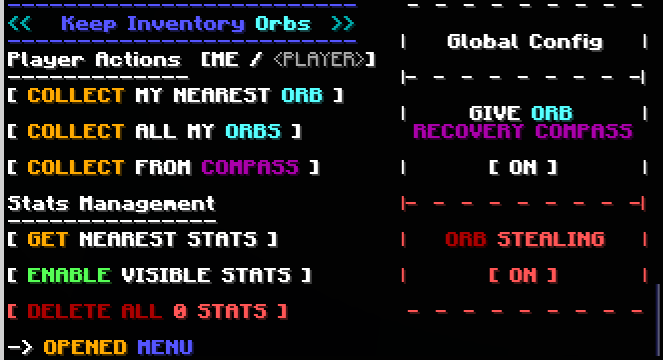
Menu (for Server Admins)

The following command opens the built-in Chat Menu:

/function #keep_inventory_orbs:menu

an image of the Menu showing all the options mentioned below

Orb Stealing

Orb Stealing will enable all players to steal an Orb even if it is not theirs
Buttons:

  • Toggle [ON/OFF] orb stealing for all players


Give Orb Recovery Compass

Toggles whether players will receive an orb recovery compass pointing towards their last orb after respawning
Buttons:

  • Toggle [ON/OFF] orb recovery compass for all players


Player Actions

These actions will apply to your own player only and orbs in loaded chunks

Buttons:

  • Collect My Nearest Orb
    • Collects your nearest orb
  • Collect All My Orbs
    • Collects all your orbs


Stats Management

Orbs keep 'Stats' with information about the player's death. These stats are kept even after the orbs are collected.

Buttons:

  • Get Nearest Stats
    • Shows the Stats from the nearest Stats/Orb
    • Gives you options to:
      • Show the inventory saved by the Stats/Orbs
      • Collect/Destroy/Respawn specific Orbs
      • Erase specific Stats
  • Enable/Disible Visible Stats
    • When enabled, shows particles locating Stats/Orb within 16 blocks, and points towards the nearest selected one
  • Delete All Stats
    • Counts all Stats/Orb in currently loaded chunks and deletes them

Project description from Modrinth.

Pick your setup

Keep Inventory Orbs by Minecraft version and loader

Choose the version and loader you play, then open the matching release.

145 available setups

Showing the newest 12 of 29 game versions. Older files are in the list below.

Check the dependencies, then try the file in a copied instance before changing a world you care about.

Recent files

Keep Inventory Orbs versions and loaders

12 of 12 releases match

Looking for an older file? The official Modrinth project page is in Resources.