Project SQoni9E3 Optional for OffersHUD 2.6.0
optionalStill checking

Modrinth · Minecraft mod
Display a list of villager's trading offers as a HUD.
Quick answer
OffersHUD 2.6.0 targets 1.21.9 with NeoForge. It must be installed on the client. Do not install it on the dedicated server. No extra mods listed for this file.
Where it goes
It must be installed on the client. Do not install it on the dedicated server.
This file is marked client-only.
2.6.0. Change the file and its required mods may change too.
This file does not list any required mods. Do not add a library just because a different file uses it.
We only count dependency files that match this setup. A file for another loader does not fill the gap.
Before you install it
Built for OffersHUD 2.6.0. Pick another file and the loader, install side or required mods may change.
Use 2.6.0. It targets 1.21.9 with NeoForge; another release may have different loader, side or dependency requirements.
This file does not list any required mods. Do not add a library just because a different file uses it.
It must be installed on the client. Do not install it on the dedicated server.
Use the “Get this file” button beside 2.6.0. It opens that exact file at the source.
About this project
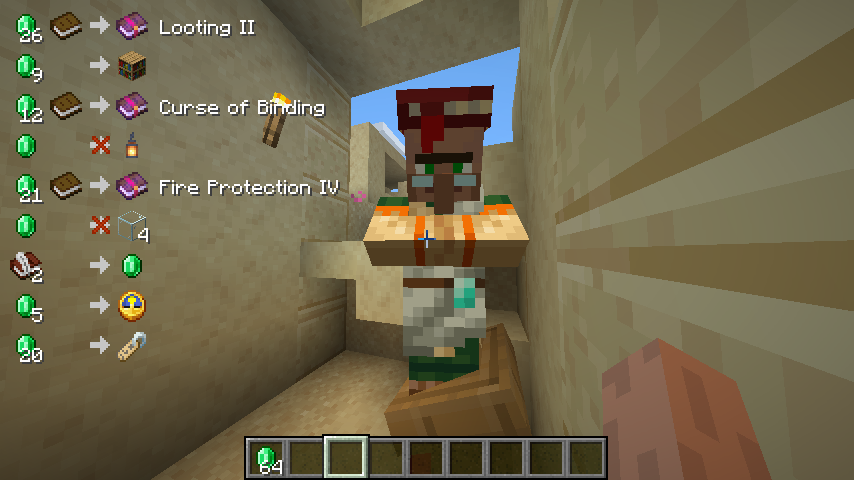
OffersHUD is a client-side mod which display a list of villager's trading offers as a HUD, without a right-click.
Supports both Fabric and NeoForge.
The latest releases of OffersHUD are published to these services.
When you focus on a villager with profession (or wandering trader), the offers will be displayed in the upper left corner of the screen.
This can be very useful, for example, for carefully selecting the details of a villager's trading offers.
You don't have to right-click on the villager every time you reposition the job site block.
Access the configuration screen from the Mods menu.
Ignore villagers who do not have a profession: falseProject description from Modrinth.
Pick your setup
Choose the version and loader you play, then open the matching release.
Showing the newest 12 of 19 game versions. Older files are in the list below.
Check the dependencies, then try the file in a copied instance before changing a world you care about.
Recent files
offers-hud-2.6.0+1.21.9-neoforge.jar
16 Sept 2026
offers-hud-2.6.0+1.21.1-neoforge.jar
16 Sept 2026
offers-hud-2.6.0+1.21.5-neoforge.jar
16 Sept 2026
offers-hud-2.6.0+1.20.6-neoforge.jar
16 Sept 2026
offers-hud-2.6.0+1.21.8-fabric.jar
16 Sept 2026
offers-hud-2.6.0+1.21.9-fabric.jar
16 Sept 2026
offers-hud-2.6.0+1.21.4-fabric.jar
16 Sept 2026
offers-hud-2.6.0+1.20.6-fabric.jar
16 Sept 2026
offers-hud-2.6.0+26.2-fabric.jar
16 Sept 2026
offers-hud-2.6.0+1.21.8-neoforge.jar
16 Sept 2026
offers-hud-2.6.0+26.3-neoforge.jar
16 Sept 2026
offers-hud-2.6.0+1.21.4-neoforge.jar
16 Sept 2026
Looking for an older file? The official Modrinth project page is in Resources.
 mod
A Minecraft mod that adds giant swords and shields to the game. A re-make of the original Asgard Shield, made popular by the 1.5 modpack Hexxit.
 mod
litematica-printer, following multiple revisions by Hana
 mod
This mod is an add-on SlashBlade: Resharped, adding a legendary ultimate weapon — the Annihilation Blade.