Minecraft version
Back to mods 
Modrinth · Minecraft mod
PackPing
A minimal in-game update checker for Minecraft modpacks.
Choose a version Pick your version below, then grab the matching file.
Quick answer
Which PackPing release matches 26.2 NeoForge?
Best match for your filters 1.3.0-mc26.2-release+neoforge
Game version 26.2
Loader NeoForge
PackPing 1.3.0-mc26.2-release+neoforge targets 26.2 with NeoForge. It must be installed on the client. Do not install it on the dedicated server. No extra mods listed for this file.
Where it goes
Is PackPing required on the client, server, or both?
It must be installed on the client. Do not install it on the dedicated server.
Client Required
Dedicated server Not supported
Loader for this release NeoForge
Required install it here Optional supported, not mandatory Not supported do not install here Source doesn’t say do not assume
This file is marked client-only.
What else does PackPing 1.3.0-mc26.2-release+neoforge need?
1.3.0-mc26.2-release+neoforge on 26.2 NeoForge. Every mod below is checked against that same setup.
This file does not list any required mods. Do not add a library just because a different file uses it.
This file does not list any required or optional mods.
Before you install it
Add PackPing without breaking your instance.
Built for PackPing 1.3.0-mc26.2-release+neoforge on 26.2 NeoForge. Pick another file and the loader, install side or required mods may change.
- 01
Stick to this file
Use 1.3.0-mc26.2-release+neoforge. It targets 26.2 with NeoForge; another release may have different loader, side or dependency requirements.
- 02
Bring the mods it needs
This file does not list any required mods. Do not add a library just because a different file uses it.
- 03
Put it on the correct side
It must be installed on the client. Do not install it on the dedicated server.
- 04
Pick the file you checked
Use the “Get this file” button beside 1.3.0-mc26.2-release+neoforge. It opens that exact file at the source.
About this project
What does PackPing add?
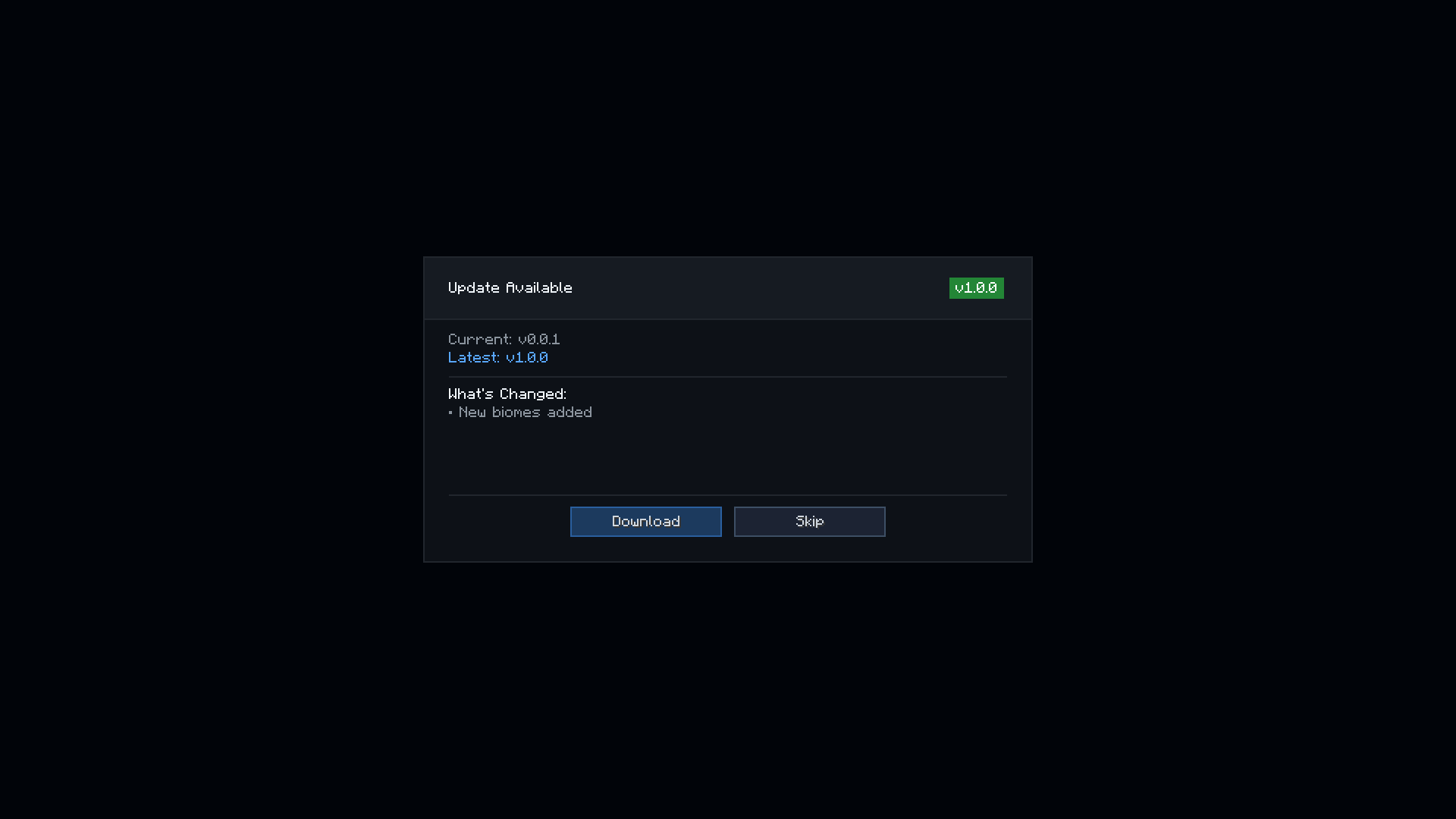
PackPing is a minimal update-checking utility for Minecraft modpacks. It allows a modpack to define its current version and compare it against a remote/latest version source. If a newer version is detected, the player receives a notification in-game. The mod is intended to provide a clean and lightweight update notice system for modpack maintainers
Local Config (config/packping.json)
{
  "updateUrl": "",
  "localVersion": "0.0.1",
  "delay": 3000
}
Server JSON
[
  {
    "minecraft": "1.21",
    "loader": "fabric",
    "version": "1.0.0",
    "download": "https://example.com/modpack-1.0.0.zip",
    "changelog": "New biomes added\nPerformance fixes\nNew mods included",

    "toast": {
      "title": "§eMC 1.21.1 is out!",
      "subtitle": "§7New modpack version coming soon"
    },

    "settings": {
      "notifications": {
        "checkOnStartup": true,
        "showFullscreen": true,
        "showChat": true,
        "showToast": true
      },
      "fullscreen": {
        "title": "Update Available",
        "downloadButton": "Download",
        "skipButton": "Skip",
        "closeGameAfterDownload": false
      },
      "chat": {
        "chatTitle": "§e▶ Modpack update available!",
        "chatVersionText": "§7Version: §f%current% §7→ §a%latest%",
        "chatChangesText": "§7Changes: §f%changelog%",
        "chatDownloadText": "§7Download:",
        "chatLinkText": "§b[Click here]"
      }
    }
  },
]
Project description from Modrinth.
Pick your setup
PackPing by Minecraft version and loader
Choose the version and loader you play, then open the matching release.
Minecraft version
26.1.2
2 loader buildsMinecraft version
26.1.1
2 loader buildsMinecraft version
26.1
2 loader buildsMinecraft version
1.21.11
2 loader buildsMinecraft version
1.21.10
2 loader buildsMinecraft version
1.21.9
2 loader buildsMinecraft version
1.21.8
2 loader buildsMinecraft version
1.21.7
2 loader buildsMinecraft version
1.21.6
2 loader buildsMinecraft version
1.21.5
2 loader buildsMinecraft version
1.21.4
2 loader buildsShowing the newest 12 of 16 game versions. Older files are in the list below.
Check the dependencies, then try the file in a copied instance before changing a world you care about.
Recent files
PackPing versions and loaders
1.3.0-mc26.2-release+neoforge
packping-neoforge-1.3.0-mc26.2-release.jar
18 Jun 2026
Client Required Server Not supported Dependencies No extras listed Listed on Release listing
Check the 26.2 · NeoForge setup 26.2NeoForge release
Looking for an older file? The official Modrinth project page is in Resources.
 mod
CurseForge + Modrinth · Minecraft
VeinMiner Enchantment
Veinminer Addon - Adds veinminer enchantment to enchanting tables & trades. Only tools with the enchantment can veinmine
 mod
CurseForge + Modrinth · Minecraft
VeinMiner Hotkey
Veinminer Addon - Use a hotkey to veinmine with a dynamic crosshair & block highlighting & shape selector
 mod
Modrinth · Minecraft
VeinMiner
Mine the whole vein on mining a single ore/block. Make the tedious mining experience to something satisfying and fun! FTB Ultimine alternative