Minecraft version
Back to mods 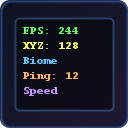
Modrinth · Minecraft mod
InfoHUD+
A beautiful F3 replacement — shows FPS, coordinates, GPU, CPU, RAM, biome, speed, ping and more on a clean customizable HUD.
Choose a version Pick your version below, then grab the matching file.
Quick answer
Which InfoHUD+ release should I use?
Latest stable file 1.0.0
Game version 26.1
Loader Fabric
InfoHUD+ 1.0.0 targets 26.1 with Fabric. It must be installed on the client. Do not install it on the dedicated server. No extra mods listed for this file.
Where it goes
Is InfoHUD+ required on the client, server, or both?
It must be installed on the client. Do not install it on the dedicated server.
Client Required
Dedicated server Not supported
Loader for this release Fabric
Required install it here Optional supported, not mandatory Not supported do not install here Source doesn’t say do not assume
This file is marked client-only.
What else does InfoHUD+ 1.0.0 need?
1.0.0. Change the file and its required mods may change too.
This file does not list any required mods. Do not add a library just because a different file uses it.
This file does not list any required or optional mods.
Before you install it
Add InfoHUD+ without breaking your instance.
Built for InfoHUD+ 1.0.0. Pick another file and the loader, install side or required mods may change.
- 01
Stick to this file
Use 1.0.0. It targets 26.1 with Fabric; another release may have different loader, side or dependency requirements.
- 02
Bring the mods it needs
This file does not list any required mods. Do not add a library just because a different file uses it.
- 03
Put it on the correct side
It must be installed on the client. Do not install it on the dedicated server.
- 04
Pick the file you checked
Use the “Get this file” button beside 1.0.0. It opens that exact file at the source.
About this project
What does InfoHUD+ add?
InfoHUD+
A lightweight, optimized F3 replacement that displays all the information you need on a clean, color-coded HUD.
Why InfoHUD+?
The default F3 screen is ugly and cluttered. InfoHUD+ replaces it with a minimal, beautiful overlay that shows only what you want.
Information Displayed
Performance
- FPS counter
- RAM usage (percentage + MB)
- GPU name
- CPU name
- Java version
World
- XYZ coordinates
- Facing direction + degrees
- Biome name
- Light level (block + sky)
- Movement speed (blocks/sec)
- Loaded chunks
- Entity count
Server
- Ping (ms)
- Player count
- Server brand
Time
- In-game time
- Day counter
- Real-world clock
Features
- Replaces F3 — press F3 to see your clean HUD instead of the vanilla debug screen
- Color-coded lines — each info type has its own color for easy reading
- Every element toggleable — show only what you need
- Dark background — semi-transparent panel for readability
- 4 anchor positions — top-left, top-right, bottom-left, bottom-right
- Optimized — data updates every 500ms, not every frame. Zero FPS impact
- GUI settings — press Right Shift or use Mod Menu
Keybinds
| Key | Action |
|---|---|
| F3 | Show/hide InfoHUD+ (replaces vanilla F3) |
| F6 | Toggle HUD on/off |
| Right Shift | Open settings |
All keybinds are rebindable in Controls settings.
Supported Versions
Fabric: 1.20 — 1.21.11, 26.1
Requirements
- Fabric Loader
- Fabric API
Optional
- Mod Menu (for settings button)
Client-Side Only
No server mod needed. Works on any server.
Project description from Modrinth.
Pick your setup
InfoHUD+ by Minecraft version and loader
Choose the version and loader you play, then open the matching release.
Minecraft version
1.21.11
1 loader buildMinecraft version
1.21.10
1 loader buildMinecraft version
1.21.9
1 loader buildMinecraft version
1.21.8
1 loader buildMinecraft version
1.21.7
1 loader buildMinecraft version
1.21.6
1 loader buildMinecraft version
1.21.5
1 loader buildMinecraft version
1.21.4
1 loader buildMinecraft version
1.21.3
1 loader buildMinecraft version
1.21.2
1 loader buildMinecraft version
1.21.1
1 loader buildShowing the newest 12 of 20 game versions. Older files are in the list below.
Check the dependencies, then try the file in a copied instance before changing a world you care about.
Recent files
InfoHUD+ versions and loaders
1.0.0
infohud-plus-1.0.0-mc26.1.jar
6 Apr 2026
Client Required Server Not supported Dependencies No extras listed Listed on Release listing
Check the 26.1 · Fabric setup 26.1Fabric release
1.0.0
infohud-plus-1.0.0-mc1.21.jar
6 Apr 2026
Client Required Server Not supported Dependencies No extras listed Listed on Release listing
Check the 1.21 · Fabric setup 1.21Fabric release
1.0.0
infohud-plus-1.0.0-mc1.21.11.jar
6 Apr 2026
Client Required Server Not supported Dependencies No extras listed Listed on Release listing
Check the 1.21.11 · Fabric setup 1.21.11Fabric release
1.0.0
infohud-plus-1.0.0-mc1.21.10.jar
6 Apr 2026
Client Required Server Not supported Dependencies No extras listed Listed on Release listing
Check the 1.21.10 · Fabric setup 1.21.10Fabric release
1.0.0
infohud-plus-1.0.0-mc1.21.9.jar
6 Apr 2026
Client Required Server Not supported Dependencies No extras listed Listed on Release listing
Check the 1.21.9 · Fabric setup 1.21.9Fabric release
1.0.0
infohud-plus-1.0.0-mc1.21.8.jar
6 Apr 2026
Client Required Server Not supported Dependencies No extras listed Listed on Release listing
Check the 1.21.8 · Fabric setup 1.21.8Fabric release
1.0.0
infohud-plus-1.0.0-mc1.21.7.jar
6 Apr 2026
Client Required Server Not supported Dependencies No extras listed Listed on Release listing
Check the 1.21.7 · Fabric setup 1.21.7Fabric release
1.0.0
infohud-plus-1.0.0-mc1.21.6.jar
6 Apr 2026
Client Required Server Not supported Dependencies No extras listed Listed on Release listing
Check the 1.21.6 · Fabric setup 1.21.6Fabric release
1.0.0
infohud-plus-1.0.0-mc1.21.5.jar
6 Apr 2026
Client Required Server Not supported Dependencies No extras listed Listed on Release listing
Check the 1.21.5 · Fabric setup 1.21.5Fabric release
1.0.0
infohud-plus-1.0.0-mc1.21.4.jar
6 Apr 2026
Client Required Server Not supported Dependencies No extras listed Listed on Release listing
Check the 1.21.4 · Fabric setup 1.21.4Fabric release
1.0.0
infohud-plus-1.0.0-mc1.21.3.jar
6 Apr 2026
Client Required Server Not supported Dependencies No extras listed Listed on Release listing
Check the 1.21.3 · Fabric setup 1.21.3Fabric release
1.0.0
infohud-plus-1.0.0-mc1.21.2.jar
6 Apr 2026
Client Required Server Not supported Dependencies No extras listed Listed on Release listing
Check the 1.21.2 · Fabric setup 1.21.2Fabric release
Looking for an older file? The official Modrinth project page is in Resources.
 mod
CurseForge + Modrinth · Minecraft
Runeborn | Soulslike RPG progression
A soulslike RPG overhaul: earn runes, level eight attributes at Ember Shrines, wield 74 scaling armaments and hunt seven Sovereigns.
 mod
Modrinth · Minecraft
Pickable Villagers
This mod gives you the ability to pick up Villagers, keep them as Items and place them back where you want.
 mod
Modrinth · Minecraft
Kill Confirmed
Mint fire-resistant Dog Tags on player death and store, search, and sort up to 108 in a vanilla Dog Tag Case. Zero dependencies.