Minecraft version
Back to mods 
Modrinth · Minecraft mod
Chat Calc
The *fastest* calculator around; built right into your chat; just type in and you'll see your answer!
Choose a version Pick your version below, then grab the matching file.
Quick answer
Which Chat Calc release matches 23w43b?
Best match for your filters 3.0.23a
Game version 1.20.2, 23w40a, 23w41a
Loader Fabric, Quilt
Chat Calc 3.0.23a targets 1.20.2, 23w40a, 23w41a with Fabric, Quilt. It must be installed on the client. Do not install it on the dedicated server. No extra mods listed for this file.
Where it goes
Is Chat Calc required on the client, server, or both?
It must be installed on the client. Do not install it on the dedicated server.
Client Required
Dedicated server Not supported
Loader for this release Fabric, Quilt
Required install it here Optional supported, not mandatory Not supported do not install here Source doesn’t say do not assume
This file is marked client-only.
What else does Chat Calc 3.0.23a need?
3.0.23a on 23w43b. Every mod below is checked against that same setup.
This file does not list any required mods. Do not add a library just because a different file uses it.
This file does not list any required or optional mods.
Before you install it
Add Chat Calc without breaking your instance.
Built for Chat Calc 3.0.23a on 23w43b. Pick another file and the loader, install side or required mods may change.
- 01
Stick to this file
Use 3.0.23a. It targets 1.20.2, 23w40a, 23w41a with Fabric, Quilt; another release may have different loader, side or dependency requirements.
- 02
Bring the mods it needs
This file does not list any required mods. Do not add a library just because a different file uses it.
- 03
Put it on the correct side
It must be installed on the client. Do not install it on the dedicated server.
- 04
Pick the file you checked
Use the “Get this file” button beside 3.0.23a. It opens that exact file at the source.
About this project
What does Chat Calc add?
Note: This is a complete revamp of the mod ChatCalc by Kokeria, which is most likely abandoned. This mod features almost everything you'd need in a calculator, and if you want something to be added, just ask!
Firstly, I should clarify how you use ChatCalc, simply type an expression into chat, and it'll show the answer above. If you need to get the answer in text, just press tab. If you need the answer and the expression, type an equals sign and press tab.
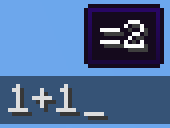
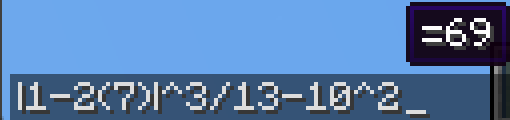

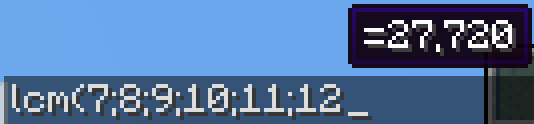
1+2 (will make a tooltip showing =3 above)1+2 → TAB → 31+2= → TAB → 1+2=3
(Do note that ChatCalc evaluates the block of text that your cursor is in [separated by spaces], this means that you can type one thing beside another and ChatCalc will work completely fine [as long as there are some spaces in between])
ChatCalc also lets you define your own functions and constants, for example:f(z)=2z-1 → TAB → (empty to give feedback that it's defined that function)f(4) → TAB → 7
c=sqrt(2)/2 → TAB → (empty to give feedback that it's defined that constant)arcsin(c) → TAB → 45
You can also remove functions and constants like this:f(z)= → TAB → (empty to give feedback that it's removed that function)c= → TAB → (empty to give feedback that it's removed that constant)\
Functions can support as many parameters as you want, each separated by a semicolon (they cannot use a comma due to commas being permitted in constants, i.e. 1,000*2 → TAB → 2,000)
Here's an example function that can do some very complex behavior:angle(a;b)=round((((arctan((b-(z-0.5))/(a-(x-0.5)))+90+(min(1;cmp(a;(x-0.5))+1)*180)+180)%360)-180)*10)/10 (credit to thecolonel63)
This function takes in the x and y coordinates of a block and tells you the yaw to put your camera at to walk toward that block.
You can view the list of defined functions and constants by typing functions? or constants? into chat and pressing TAB.
ChatCalc features several config settings, each configurable by typing in the chat window; for example:radians → TAB → false (by default)radians= → TAB → radians=false (by default)radians=true → TAB (empty to give feedback that the value is set)
To change the format that values are outputted in, you can change the decimal_format; for example:decimal_format → TAB → #,##0.## (by default)decimal_format=#0.## → TAB → (to remove commas)decimal_format=#,###.## → TAB → (to remove the leading 0 on values like 0.23)decimal_format=#,##0.#### → TAB → (to get 4 decimal places of accuracy)
By default, ChatCalc stores previously evaluated expressions in the chat history (chat_history). You can set copy_type to none or clipboard to change this to the respective values.
If you (for whatever reason) want to disable the tooltip showing expressions above, you can change display_above to false.
Appendix A (function list)
sqrtcbrtsincostancscseccotarcsinasinarccosacosarctanatanarccscacscarcsecasecarccotacotfloorceilroundabsloglnexpsgnminmaxgcflcmclampcmp
Appendix B (constant list)
randomrandraddegyawpitchpitauephixyz
Project description from Modrinth.
Pick your setup
Chat Calc by Minecraft version and loader
Choose the version and loader you play, then open the matching release.
Minecraft version
23w45a
2 loader buildsMinecraft version
23w44a
2 loader buildsMinecraft version
23w43b
2 loader buildsMinecraft version
23w43a
2 loader buildsMinecraft version
23w42a
2 loader buildsMinecraft version
23w41a
2 loader buildsMinecraft version
23w40a
2 loader buildsMinecraft version
1.20.4
2 loader buildsMinecraft version
1.20.3-rc1
2 loader buildsMinecraft version
1.20.3-pre4
2 loader buildsMinecraft version
1.20.3-pre3
2 loader buildsShowing the newest 12 of 23 game versions. Older files are in the list below.
Check the dependencies, then try the file in a copied instance before changing a world you care about.
Recent files
Chat Calc versions and loaders
3.0.23a
chatcalc-3.0.23a.jar
2 Dec 2023
Client Required Server Not supported Dependencies No extras listed Listed on Release listing
Check the 23w43b · Fabric setup 1.20.223w40a23w41a23w42a release
3.0.22a
chatcalc-3.0.22a.jar
2 Dec 2023
Client Required Server Not supported Dependencies No extras listed Listed on Release listing
Check the 23w43b · Fabric setup 1.20.223w40a23w41a23w42a release
3.0.21
chatcalc-3.0.21a.jar
2 Dec 2023
Client Required Server Not supported Dependencies No extras listed Listed on Release listing
Check the 23w43b · Fabric setup 1.20.223w40a23w41a23w42a release
Looking for an older file? The official Modrinth project page is in Resources.
 mod
mod Modrinth · Minecraft
faun - chat & privacy options
unblock chat, lift restrictions, send no telemetry and more. make your account yours! (supports snapshots)
 mod
mod Modrinth · Minecraft
Simple Voice Chat
A working voice chat in Minecraft!
 mod
mod Modrinth · Minecraft
Enhanced World Creation
Adds more settings when creating a world and allows to apply saved settings