Minecraft version
Back to mods 
Modrinth · Minecraft mod
Seed Viewer
Allows you to preview an entire seed in game or during world creation with several map types
Choose a version Pick your version below, then grab the matching file.
Quick answer
Which Seed Viewer release should I use?
Latest stable file 1.0.0
Game version 26.2
Loader NeoForge
Seed Viewer 1.0.0 targets 26.2 with NeoForge. It must be installed on the client. Do not install it on the dedicated server. No extra mods listed for this file.
Where it goes
Is Seed Viewer required on the client, server, or both?
It must be installed on the client. Do not install it on the dedicated server.
Client Required
Dedicated server Not supported
Loader for this release NeoForge
Required install it here Optional supported, not mandatory Not supported do not install here Source doesn’t say do not assume
This file is marked client-only.
What else does Seed Viewer 1.0.0 need?
1.0.0. Change the file and its required mods may change too.
This file does not list any required mods. Do not add a library just because a different file uses it.
This file does not list any required or optional mods.
Before you install it
Add Seed Viewer without breaking your instance.
Built for Seed Viewer 1.0.0. Pick another file and the loader, install side or required mods may change.
- 01
Stick to this file
Use 1.0.0. It targets 26.2 with NeoForge; another release may have different loader, side or dependency requirements.
- 02
Bring the mods it needs
This file does not list any required mods. Do not add a library just because a different file uses it.
- 03
Put it on the correct side
It must be installed on the client. Do not install it on the dedicated server.
- 04
Pick the file you checked
Use the “Get this file” button beside 1.0.0. It opens that exact file at the source.
About this project
What does Seed Viewer add?


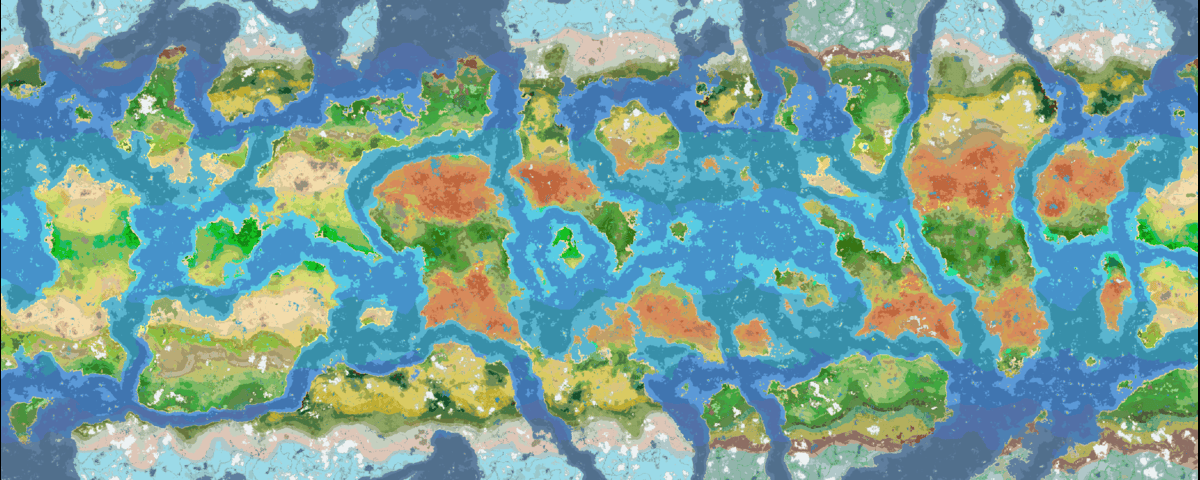
A map of Still Life 1.0 using Seed Viewer
Usage
There are two ways to open the preview:
- World creation screen: a new Seed Viewer tab appears next to Game, World, and More. Open it and the map of your seed starts loading immediately. Type a seed into the field at the top of the tab and hit enter to start loading that seed instead.
- In-game: press the Seed Viewer keybind (default: o, keybind is i on 26.2+) to open the Seed Viewer. The map opens centered on your position.
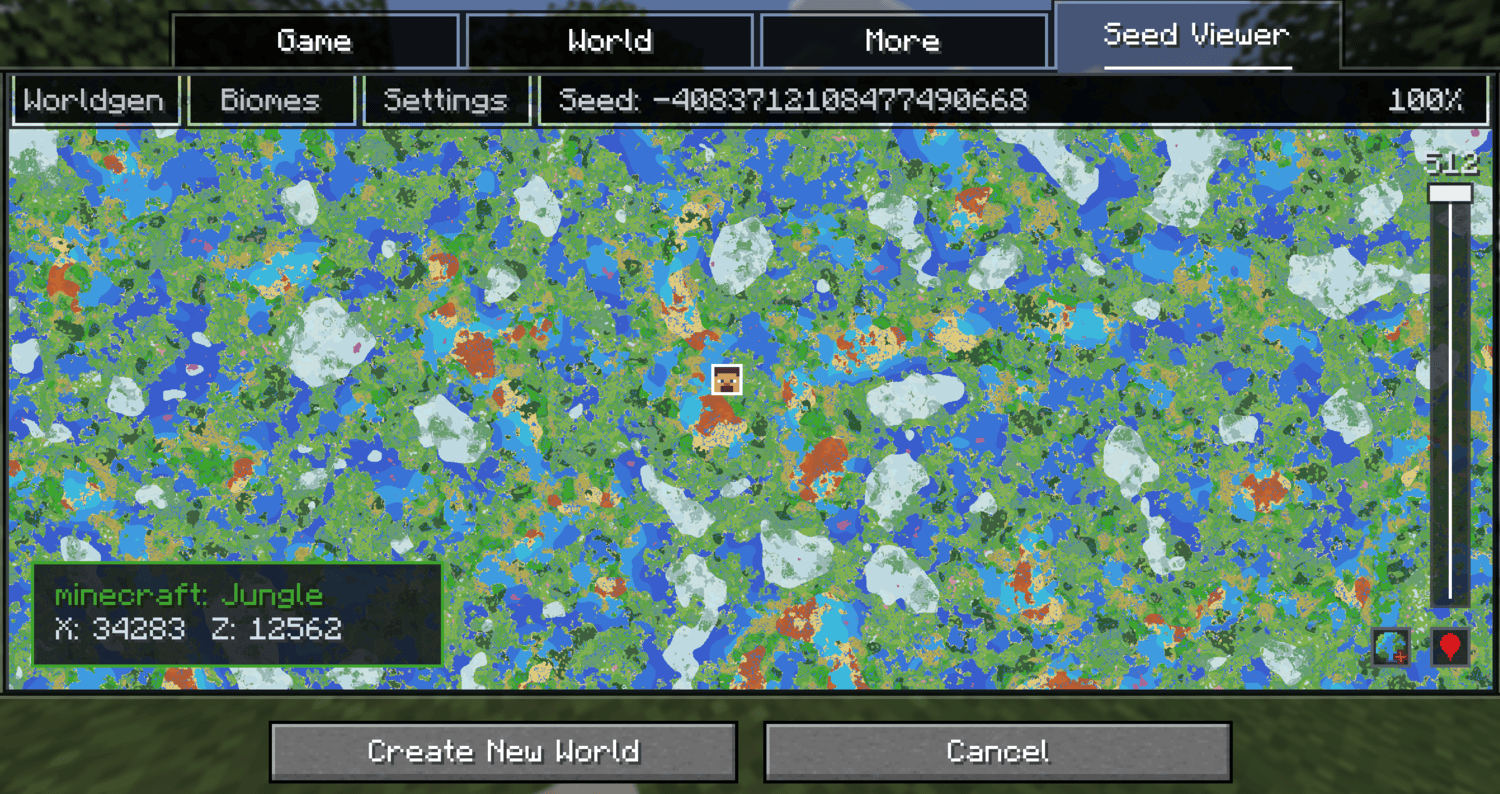
Moving on the preview
- Left Click + Drag to pan.
- Scroll to zoom.
- Use the height slider on the right to change the Y level.
- Click the location button in the bottom right to center on your player in game or on world spawn during the world creation screen.
- Right Click anywhere on the in game map to copy a tp command to that position.
Other features
- Map modes:
Besides biomes, the Settings tab also has noise views for temperature, humidity, continentalness, erosion, weirdness, and peaks & valleys. Hovering shows the biome name or exact noise value with its coordinates.
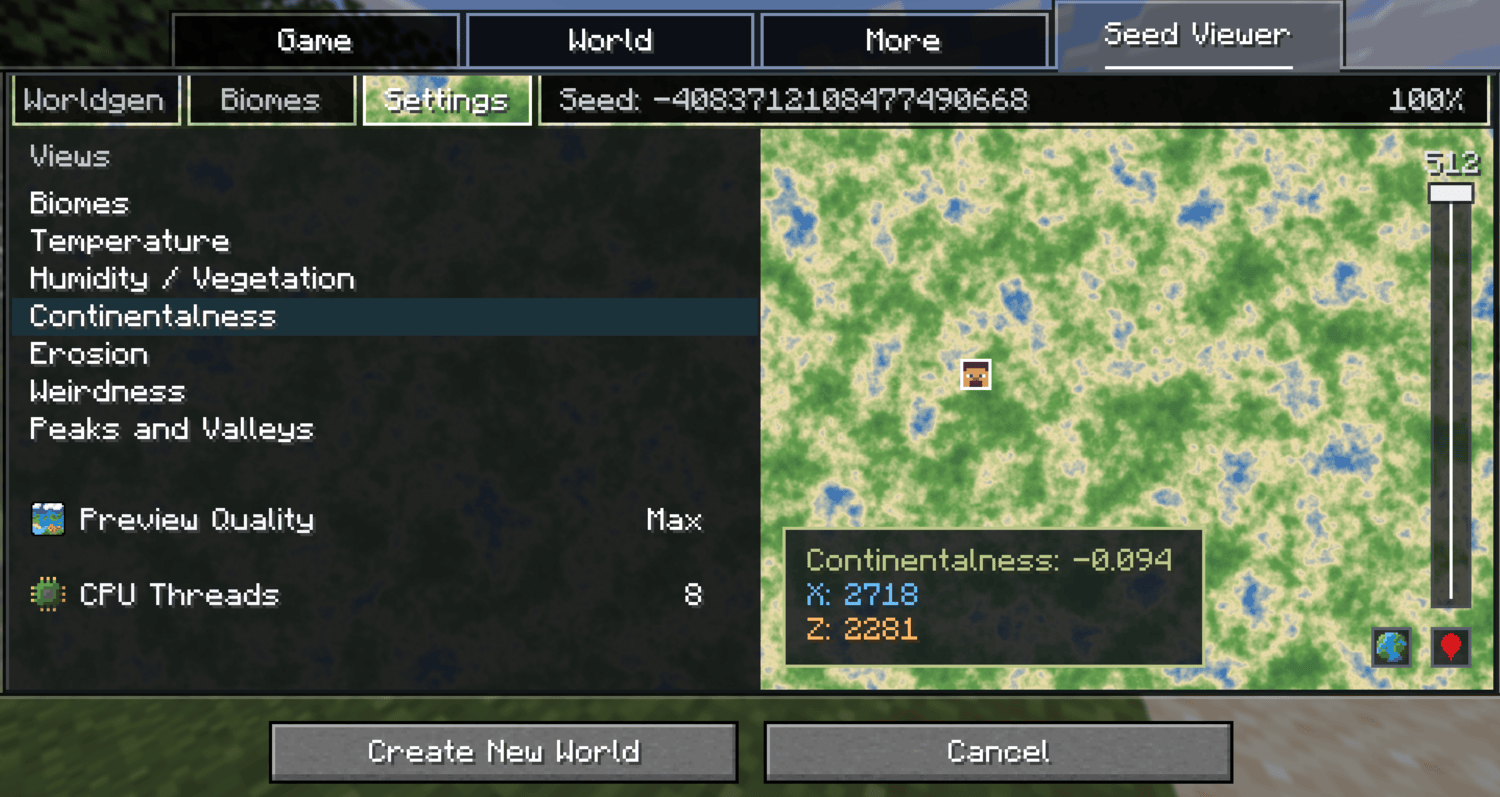
- Biome highlighting:
The Biomes tab lists every biome that can or cannot currently generate in the overworld (or whatever dimension you are currently in). Search and click biomes to highlight them on the map; everything else turns grayscale.
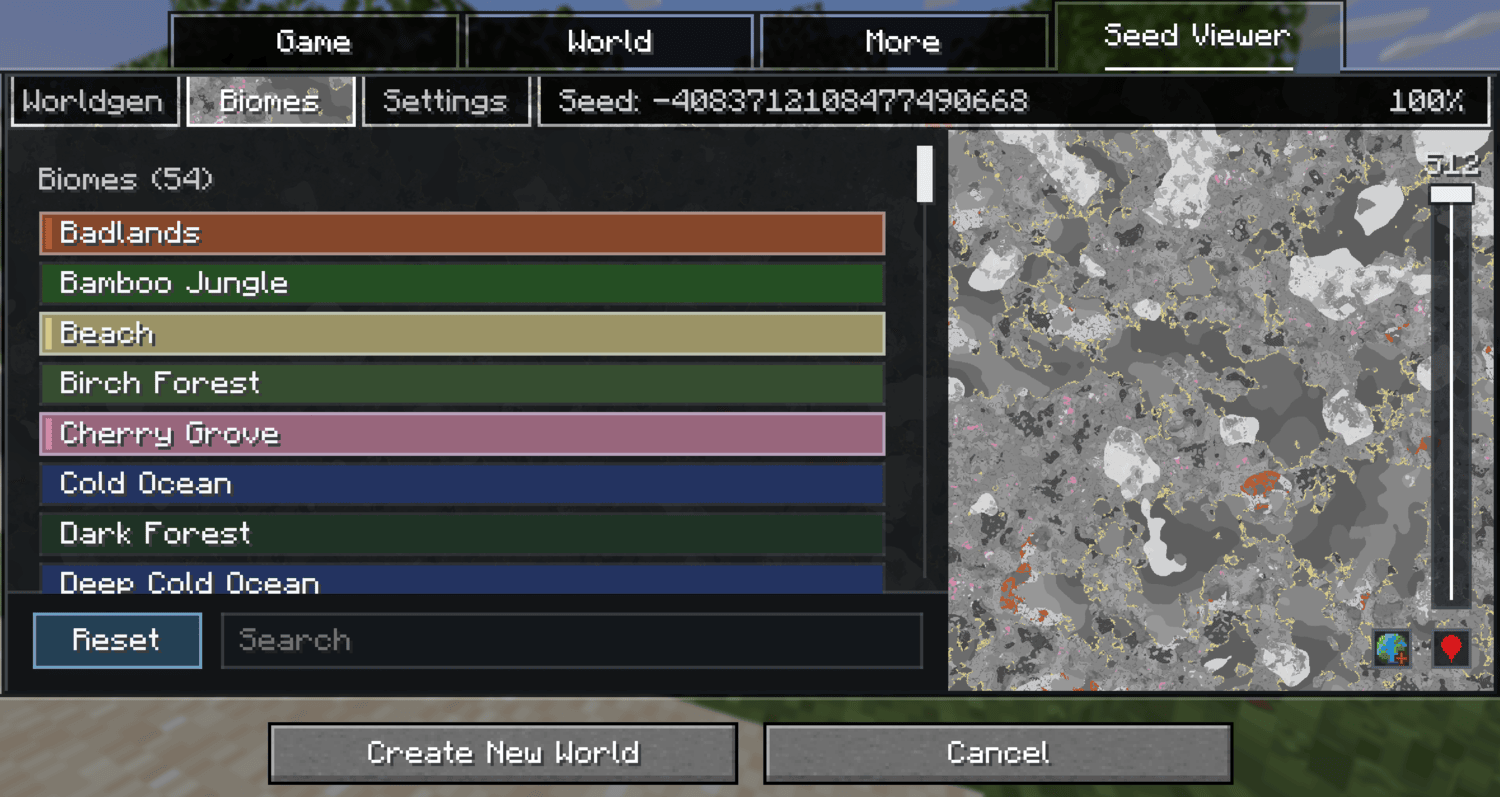
- Worldgen editor: (world creation only)
The Worldgen tab lets you edit numeric values of your worlds worldgen datapacks to see how the change in values would affect the world. A compare button toggles between original and edited terrain. This is preview only and does not actually modify your world.
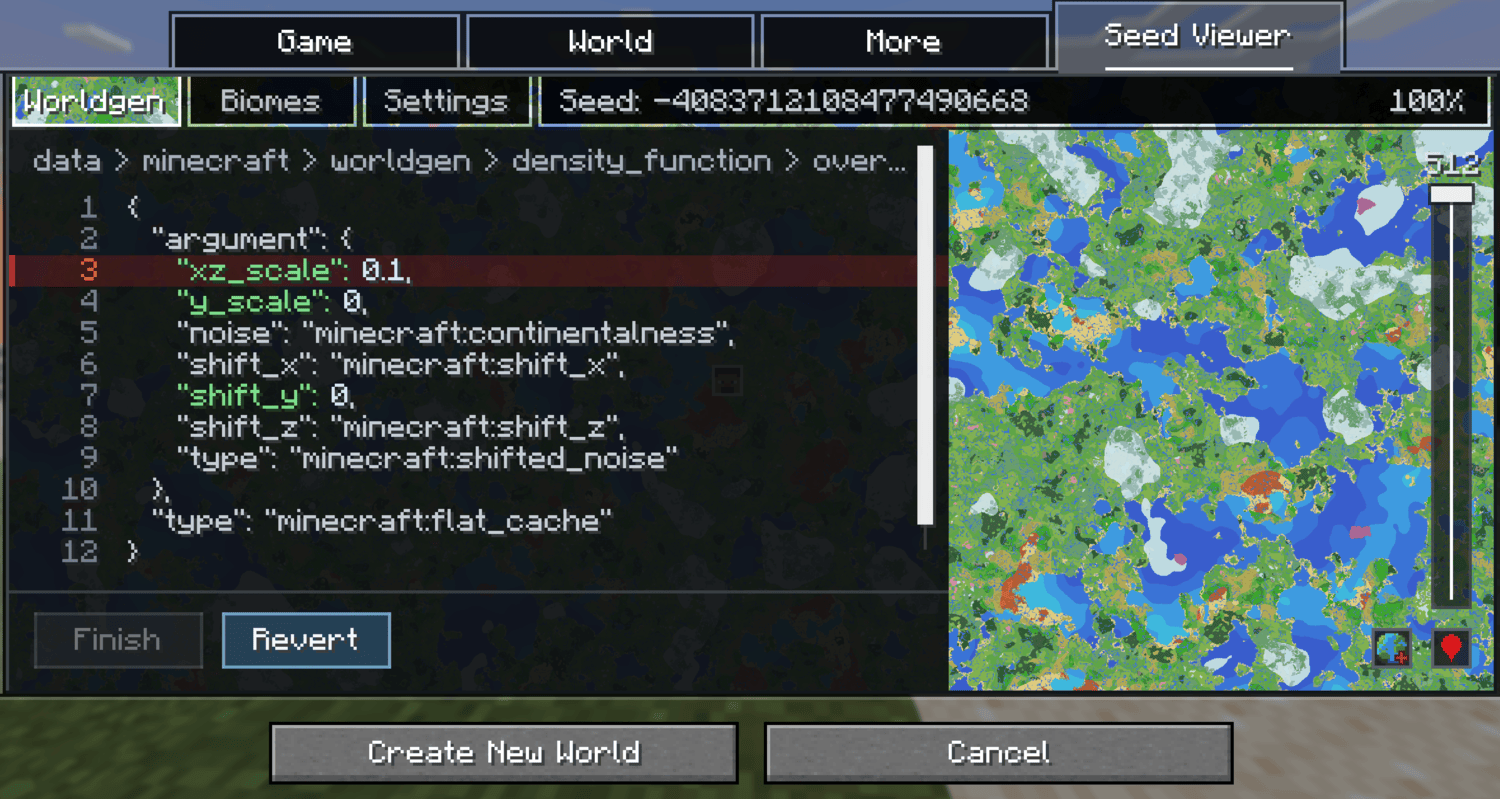
- Performance controls: Five preview quality levels (Performance to Max) and a CPU thread slider, both in the Settings tab. In heavier worldgen datapacks like Still Life or JJThunder To The Max it is recommended to lower the quality level.
Note: The in game map works in singleplayer only. It does not work on multiplayer servers.
✅ Supported Versions
| Minecraft | Status |
|---|---|
| 1.21.1 | Supported |
| 1.21.5 | Supported |
| 1.21.6 | Supported |
| 1.21.9 | Supported |
| 1.21.11 | Supported |
| 26.1 | Supported |
| 26.2 | Supported |
❓ FAQ
Does this work with modded biomes?
The in game viewer works with all biomes, however the preview on the create world screen currently only works with worldgen datapacks. An update to bring compatibility for mods in the create world screen is planned.
Is an update planned for viewing structures?
Yes, I plan to eventually add a toggle that lets you see the location of structures.Can the worldgen editor break my world?
No. Editor changes are preview only and are never written to the created world. Use it to see how changing certain values would affect the datapack. To have the actual changes show up in your world you must change the datapack values manually.
The preview uses a lot of CPU while loading, is that normal?
If you are experiencing freezing or high cpu loads, lower the CPU threads in either the config or the settings tab. If loading the map is slow, lower the preview quality which is also found in the config or settings tab.Mod Compatibility
On the create world screen, all worldgen datapacks should be functional. Mods that modify worldgen may not be reflected until the world exists, open the in game preview for an exact map for modded worlds. The in game viewer should work with most if not all worldgen mods.
Custom Biome Colors
Map colors for custom biomes are generated automatically, but you can override them: add data/<namespace>/worldgen/biome_colors.json to a datapack, mapping biome IDs to r / g / b values for custom colors.
Project description from Modrinth.
Pick your setup
Seed Viewer by Minecraft version and loader
Choose the version and loader you play, then open the matching release.
Minecraft version
26.1.2
2 loader buildsMinecraft version
1.21.11
2 loader buildsMinecraft version
1.21.9
2 loader buildsMinecraft version
1.21.6
2 loader buildsMinecraft version
1.21.5
2 loader buildsMinecraft version
1.21.1
2 loader buildsCheck the dependencies, then try the file in a copied instance before changing a world you care about.
Recent files
Seed Viewer versions and loaders
1.0.0
seedviewer-neoforge-26.2-1.0.0.jar
17 Jul 2026
Client Required Server Not supported Dependencies No extras listed Listed on Release listing
Check the 26.2 · NeoForge setup 26.2NeoForge release
1.0.0
seedviewer-fabric-26.2-1.0.0.jar
17 Jul 2026
Client Required Server Not supported Dependencies No extras listed Listed on Release listing
Check the 26.2 · Fabric setup 26.2Fabric release
1.0.0
seedviewer-neoforge-26.1.2-1.0.0.jar
15 Jul 2026
Client Required Server Not supported Dependencies No extras listed Listed on Release listing
Check the 26.1.2 · NeoForge setup 26.1.2NeoForge release
1.0.0
seedviewer-fabric-26.1.2-1.0.0.jar
15 Jul 2026
Client Required Server Not supported Dependencies No extras listed Listed on Release listing
Check the 26.1.2 · Fabric setup 26.1.2Fabric release
1.0.0
seedviewer-neoforge-1.21.11-1.0.0.jar
6 Jul 2026
Client Required Server Not supported Dependencies No extras listed Listed on Release listing
Check the 1.21.11 · NeoForge setup 1.21.11NeoForge release
1.0.0
seedviewer-neoforge-1.21.9-1.0.0.jar
6 Jul 2026
Client Required Server Not supported Dependencies No extras listed Listed on Release listing
Check the 1.21.9 · NeoForge setup 1.21.9NeoForge release
1.0.0
seedviewer-neoforge-1.21.6-1.0.0.jar
6 Jul 2026
Client Required Server Not supported Dependencies No extras listed Listed on Release listing
Check the 1.21.6 · NeoForge setup 1.21.6NeoForge release
1.0.0
seedviewer-neoforge-1.21.5-1.0.0.jar
6 Jul 2026
Client Required Server Not supported Dependencies No extras listed Listed on Release listing
Check the 1.21.5 · NeoForge setup 1.21.5NeoForge release
1.0.0
seedviewer-neoforge-1.21.1-1.0.0.jar
6 Jul 2026
Client Required Server Not supported Dependencies No extras listed Listed on Release listing
Check the 1.21.1 · NeoForge setup 1.21.1NeoForge release
1.0.0
seedviewer-fabric-1.21.11-1.0.0.jar
6 Jul 2026
Client Required Server Not supported Dependencies No extras listed Listed on Release listing
Check the 1.21.11 · Fabric setup 1.21.11Fabric release
1.0.0
seedviewer-fabric-1.21.9-1.0.0.jar
6 Jul 2026
Client Required Server Not supported Dependencies No extras listed Listed on Release listing
Check the 1.21.9 · Fabric setup 1.21.9Fabric release
1.0.0
seedviewer-fabric-1.21.6-1.0.0.jar
6 Jul 2026
Client Required Server Not supported Dependencies No extras listed Listed on Release listing
Check the 1.21.6 · Fabric setup 1.21.6Fabric release
Looking for an older file? The official Modrinth project page is in Resources.
 mod
CurseForge + Modrinth · Minecraft
Simple Auto Farm
A simple planting machinery mod: insert seeds, provide energy, and the machine automatically plants, grows, and harvests crops.
 mod
CurseForge + Modrinth · Minecraft
TokorotenSlime
A core mod adding a few items and blocks, serving as the foundation for addons.
 mod
CurseForge + Modrinth · Minecraft
CarianStyle
An enchantment type mod based on the Elden Ring game