Minecraft version
Back to mods 
Modrinth · Minecraft mod
visbarrier
Visible barriers mod for Forge 1.8-1.12 with better rendering
Choose a version Pick your version below, then grab the matching file.
Quick answer
Which visbarrier release matches 1.8 Forge?
Best match for your filters 2.1.0
Game version 1.8, 1.8.1, 1.8.2
Loader Forge
visbarrier 2.1.0 targets 1.8, 1.8.1, 1.8.2 with Forge. It must be installed on the client. Do not install it on the dedicated server. No extra mods listed for this file.
Where it goes
Is visbarrier required on the client, server, or both?
It must be installed on the client. Do not install it on the dedicated server.
Client Required
Dedicated server Not supported
Loader for this release Forge
Required install it here Optional supported, not mandatory Not supported do not install here Source doesn’t say do not assume
This file is marked client-only.
What else does visbarrier 2.1.0 need?
2.1.0 on 1.8 Forge. Every mod below is checked against that same setup.
This file does not list any required mods. Do not add a library just because a different file uses it.
This file does not list any required or optional mods.
Before you install it
Add visbarrier without breaking your instance.
Built for visbarrier 2.1.0 on 1.8 Forge. Pick another file and the loader, install side or required mods may change.
- 01
Stick to this file
Use 2.1.0. It targets 1.8, 1.8.1, 1.8.2 with Forge; another release may have different loader, side or dependency requirements.
- 02
Bring the mods it needs
This file does not list any required mods. Do not add a library just because a different file uses it.
- 03
Put it on the correct side
It must be installed on the client. Do not install it on the dedicated server.
- 04
Pick the file you checked
Use the “Get this file” button beside 2.1.0. It opens that exact file at the source.
About this project
What does visbarrier add?
Visbarrier
Toggle barrier block visibility in Minecraft Forge 1.8 - 1.12 with better performance
Uses better rendering methods:
- Seamless rendering
- Connected Textures
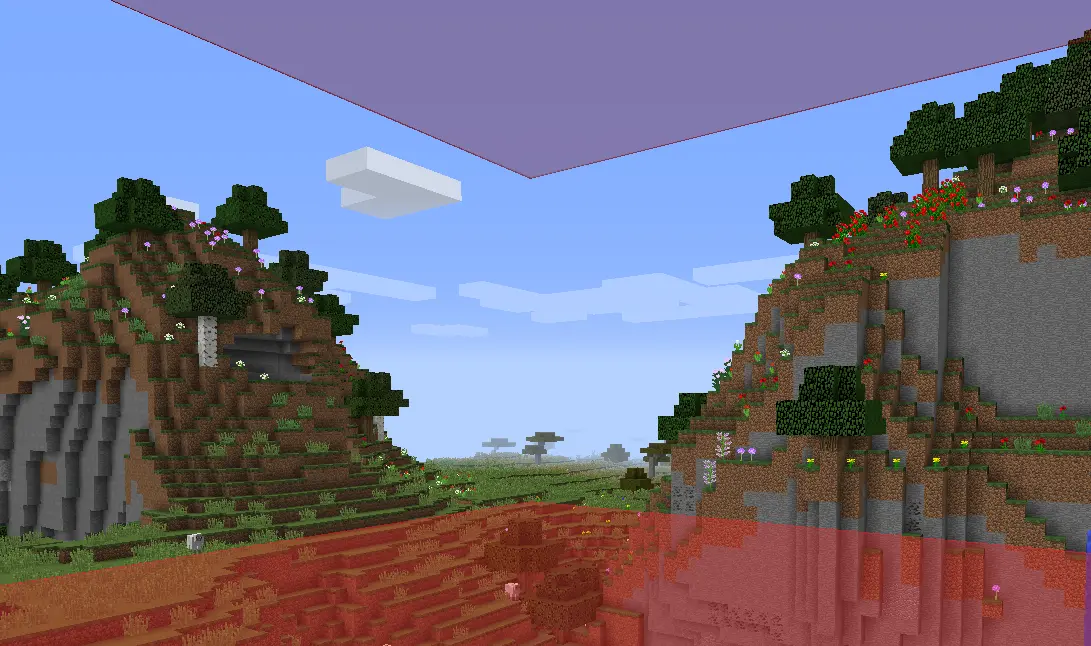
Note: Did not really test for 1.9 - 1.11 so let me know if it works well. I know 1.8.9 works great and 1.12.2 doesn't have connected textures right now
Features
- Optimized Rendering
- Keybind Toggle
- Connected Textures
- Optional Chat Notifications
- Resource Pack Compatible
Usage
Press B to toggle barrier visibility on/off
(Rebind in Options → Controls → Visbarrier)
You'll see a chat notification confirming the toggle:
| Barriers ON | Barriers OFF |
|---|---|
 |
 |
Commands
Mod settings in /visbarrier commands
| Command | Alias | Effect |
|---|---|---|
/visbarrier connect |
/visbarrier ct |
Toggle connected textures on/off |
/visbarrier notify |
/visbarrier n |
Toggle keybind chat notifications on/off |
Customization
Override the barrier appearance with a resource pack:
- Texture:
assets/minecraft/textures/blocks/barrier.png - Model:
assets/minecraft/models/block/barrier.json
If a resource pack provides its own barrier texture, Visbarrier's connected textures are automatically bypassed so the resource pack renders as intended.
TODO
- Maybe fix 1.12.2 connected textures but honestly I don't know who uses it
- Also let me know if other versions broken and maybe I'll fix it maybe I won't :)
Credits
v2 is originally forked from Diabet/olvend's barrier mod (MIT License)
Project description from Modrinth.
Pick your setup
visbarrier by Minecraft version and loader
Choose the version and loader you play, then open the matching release.
Minecraft version
1.12.1
1 loader buildMinecraft version
1.12
1 loader buildMinecraft version
1.11.2
1 loader buildMinecraft version
1.11.1
1 loader buildMinecraft version
1.11
1 loader buildMinecraft version
1.10.2
1 loader buildMinecraft version
1.10.1
1 loader buildMinecraft version
1.10
1 loader buildMinecraft version
1.9.4
1 loader buildMinecraft version
1.9.3
1 loader buildMinecraft version
1.9.2
1 loader buildShowing the newest 12 of 24 game versions. Older files are in the list below.
Check the dependencies, then try the file in a copied instance before changing a world you care about.
Recent files
visbarrier versions and loaders
2.1.0
visbarrier-2.1.0.jar
14 Apr 2026
Client Required Server Not supported Dependencies No extras listed Listed on Release listing
Check the 1.8 · Forge setup 1.81.8.11.8.21.8.3 release
Looking for an older file? The official Modrinth project page is in Resources.