Minecraft version
Back to mods 
Modrinth · Minecraft mod
ForceGL20
Forces the game to use OpenGL 2.0!
Choose a version Pick your version below, then grab the matching file.
Quick answer
Which ForceGL20 release should I use?
Latest stable file v1.1.0-forge
Game version 1.17.1, 1.18, 1.18.1
Loader Forge
ForceGL20 v1.1.0-forge targets 1.17.1, 1.18, 1.18.1 with Forge. It must be installed on the client. Do not install it on the dedicated server. No extra mods listed for this file.
Where it goes
Is ForceGL20 required on the client, server, or both?
It must be installed on the client. Do not install it on the dedicated server.
Client Required
Dedicated server Not supported
Loader for this release Forge
Required install it here Optional supported, not mandatory Not supported do not install here Source doesn’t say do not assume
This file is marked client-only.
What else does ForceGL20 v1.1.0-forge need?
v1.1.0-forge. Change the file and its required mods may change too.
This file does not list any required mods. Do not add a library just because a different file uses it.
This file does not list any required or optional mods.
Before you install it
Add ForceGL20 without breaking your instance.
Built for ForceGL20 v1.1.0-forge. Pick another file and the loader, install side or required mods may change.
- 01
Stick to this file
Use v1.1.0-forge. It targets 1.17.1, 1.18, 1.18.1 with Forge; another release may have different loader, side or dependency requirements.
- 02
Bring the mods it needs
This file does not list any required mods. Do not add a library just because a different file uses it.
- 03
Put it on the correct side
It must be installed on the client. Do not install it on the dedicated server.
- 04
Pick the file you checked
Use the “Get this file” button beside v1.1.0-forge. It opens that exact file at the source.
About this project
What does ForceGL20 add?
🚧 Updates Halted Indefinitely
As I can no longer locally test if the fix method used by this mod is still effective in newer Minecraft versions, the mod will be unsupported for the time being. You can still play Minecraft versions 1.17.x - 1.20.x using the latest version of ForceGL20, but the mod is not supported in any newer versions.
Possible alternatives for newer Minecraft releases:
- ForceGL2.0-Remapped - A fork of ForceGL20 maintained by Coredex
Even though I am not personally working on the mod anymore, pull requests to the mod's repository are still welcomed. I may come back to updating ForceGL20 in the future, and this section of the page will be removed when I decide to do so.
⚠️ Disclaimer
This mod only fixes GLFW error 65543; it will NOT work for any other error codes! If you are getting this message when you launch Minecraft, this mod may resolve your issue: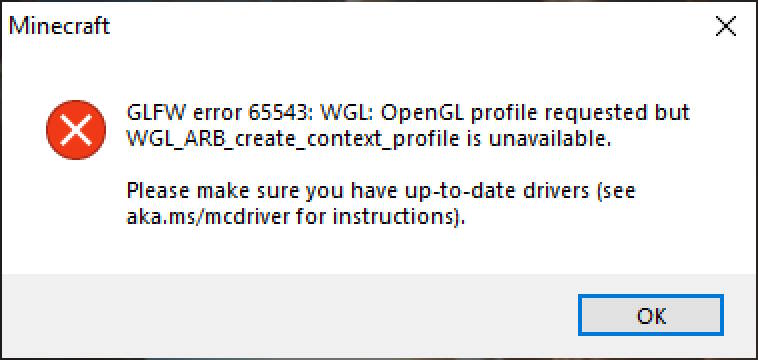
With that said, please read the mod's description below at least once, so that you understand why this mod may fix your issue with the game.
ForceGL20
ForceGL20 is a mod that allows running newer versions of Minecraft on old computers by forcing the game to use OpenGL 2.0.
Why?
Since Minecraft 1.17, the game's required OpenGL version was updated from 2.0 to 3.2. However, some graphic cards on old computers do not support OpenGL 3.2, making the game unable to launch for some players.
This Minecraft mod lowers the required OpenGL version to 2.0, just like how it was prior to Minecraft 1.17. So, if your computer can play Minecraft 1.16 fine but has issues running Minecraft 1.17, this mod is for you.
But does it work?
There have been no major issues with forcing the game to run on older OpenGL. However, note that you are forcing the game to run in an unsupported way by installing this mod, so there might be unexpected issues with other mods or resource packs.
In addition, this mod would be useless if Minecraft starts using new OpenGL features that your computer can't run in a future update. I will discontinue the support for this mod as soon as this band-aid solution stops working.
While you are free to use this mod to run newer versions of Minecraft, please do consider upgrading to a newer graphic card as soon as possible.
I found an issue!
Due to the statement above (that you are running the game in an unsupported way ), I cannot provide support for issues you may experience in this mod. This mod's only purpose is to change the OpenGL version and it does not apply any other fixes to the game's code.
It doesn't work!
Please check that you are getting GLFW error 65543 (this exact number) when you launch the game. If that number differs even by 1, it is an entirely different error that's out of this mod's scope.
Project description from Modrinth.
Pick your setup
ForceGL20 by Minecraft version and loader
Choose the version and loader you play, then open the matching release.
Minecraft version
1.20.3
2 loader buildsMinecraft version
1.20.2
2 loader buildsMinecraft version
1.20.1
2 loader buildsMinecraft version
1.20
2 loader buildsMinecraft version
1.19.4
2 loader buildsMinecraft version
1.19.3
2 loader buildsMinecraft version
1.19.2
2 loader buildsMinecraft version
1.19.1
2 loader buildsMinecraft version
1.19
2 loader buildsMinecraft version
1.18.2
2 loader buildsMinecraft version
1.18.1
2 loader buildsShowing the newest 12 of 15 game versions. Older files are in the list below.
Check the dependencies, then try the file in a copied instance before changing a world you care about.
Recent files
ForceGL20 versions and loaders
v1.1.0-forge
forcegl20-forge-1.1.0.jar
23 May 2023
Client Required Server Not supported Dependencies No extras listed Listed on Release listing
Check the 1.20.4 · Forge setup 1.17.11.181.18.11.18.2 release
v1.1.0-fabric
forcegl20-fabric-1.1.0.jar
23 May 2023
Client Required Server Not supported Dependencies No extras listed Listed on Release listing
Check the 1.20.4 · Fabric setup 1.17.11.181.18.11.18.2 release
v1.0.0
ForceGL20-1.0.0.jar
1 May 2022
Client Required Server Not supported Dependencies No extras listed Listed on Release listing
Check the 1.19.4 · Fabric setup 1.171.17.11.181.18.1 release
Looking for an older file? The official Modrinth project page is in Resources.
 mod
CurseForge · Minecraft
Useless-Generators
Fluid-fueled power generation and multiblock machinery for the Useless ecosystem on Minecraft 1.20.1 Forge.
 mod
CurseForge · Minecraft
Useless-Core
Shared APIs and client UI infrastructure for the Useless-CE-Unofficial Forge 1.20.1 mod family.
 mod
CurseForge · Minecraft
Useless-CE-Unofficial
This is an unofficial Forge 1.20.1 port/community edition, not an official upstream release.