Minecraft version
Back to mods 
Modrinth · Minecraft mod
Status
The status mod used on the Hermitcraft server.
Choose a version Pick your version below, then grab the matching file.
Quick answer
Which Status release should I use?
beta file fabric-1.1.0+26.3
Game version 26.3
Loader Fabric, Quilt
Status fabric-1.1.0+26.3 targets 26.3 with Fabric, Quilt. Installation on the client is optional. Installation on the dedicated server is optional. No extra mods listed for this file.
Where it goes
Is Status required on the client, server, or both?
Installation on the client is optional. Installation on the dedicated server is optional.
Client Optional
Dedicated server Optional
Loader for this release Fabric, Quilt
Required install it here Optional supported, not mandatory Not supported do not install here Source doesn’t say do not assume
The source marks this as usable on both the client and server.
What else does Status fabric-1.1.0+26.3 need?
fabric-1.1.0+26.3. Change the file and its required mods may change too.
This file does not list any required mods. Do not add a library just because a different file uses it.
This file does not list any required or optional mods.
Before you install it
Add Status without breaking your instance.
Built for Status fabric-1.1.0+26.3. Pick another file and the loader, install side or required mods may change.
- 01
Stick to this file
Use fabric-1.1.0+26.3. It targets 26.3 with Fabric, Quilt; another release may have different loader, side or dependency requirements.
- 02
Bring the mods it needs
This file does not list any required mods. Do not add a library just because a different file uses it.
- 03
Put it on the correct side
Installation on the client is optional. Installation on the dedicated server is optional.
- 04
Pick the file you checked
Use the “Get this file” button beside fabric-1.1.0+26.3. It opens that exact file at the source.
About this project
What does Status add?
A Fabric mod that enables you to set a status.
This mod must be installed on the server. Vanilla clients are still able to join a server with this mod. If you want to
set a status, you need this mod installed on your client.
It requires Fabric API
Features
By pressing the U key, you will be able to set your status.
The status consists of multiple parts:
- The availability
- If you don't want to get disturbed
- If you are open for collaboration
- The base status
- If you are recording
- If you are streaming
- Additional stuff
- If you don't want others to skip the night
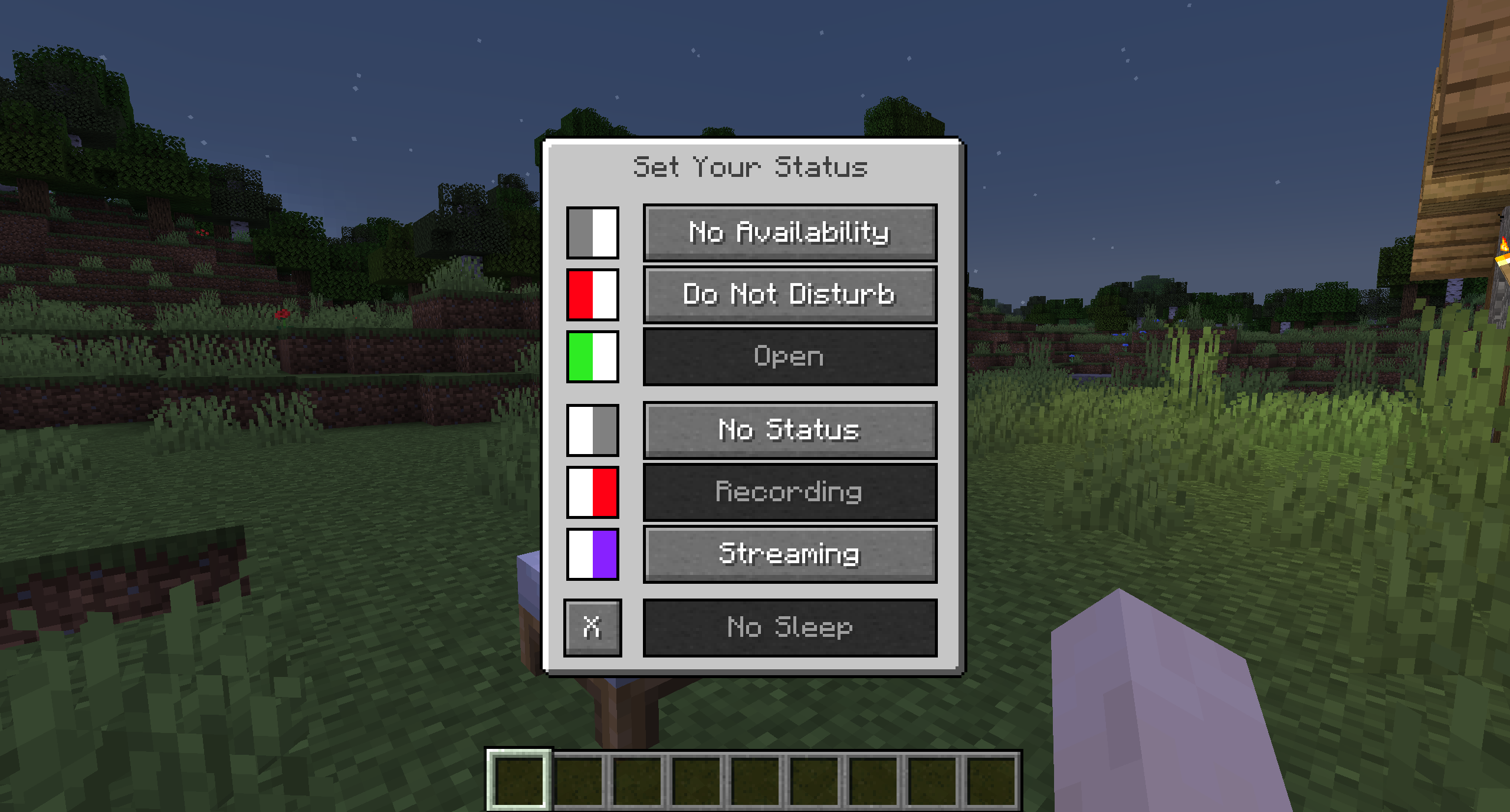
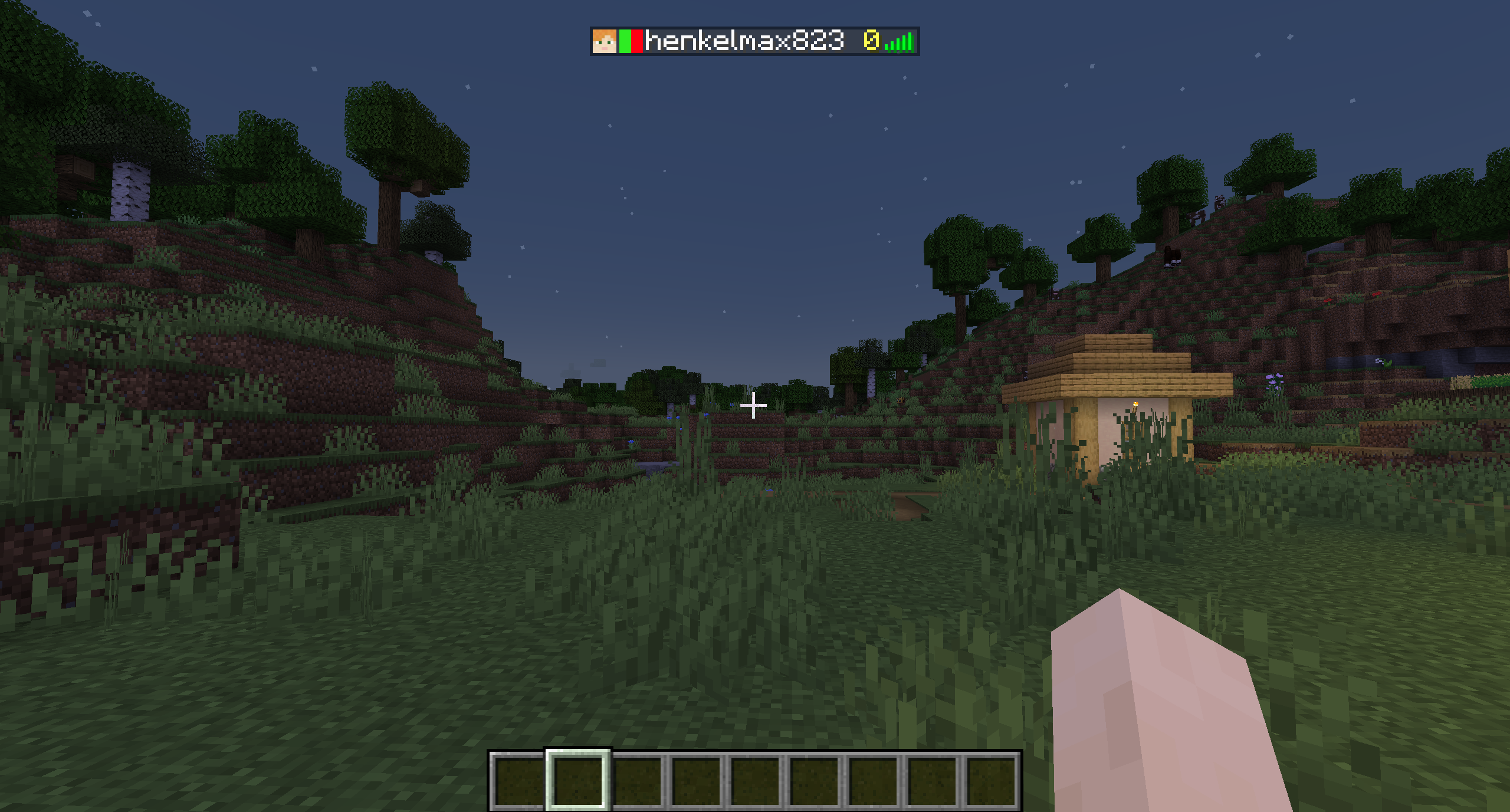
These icons will show up next to the players head in the tab list.
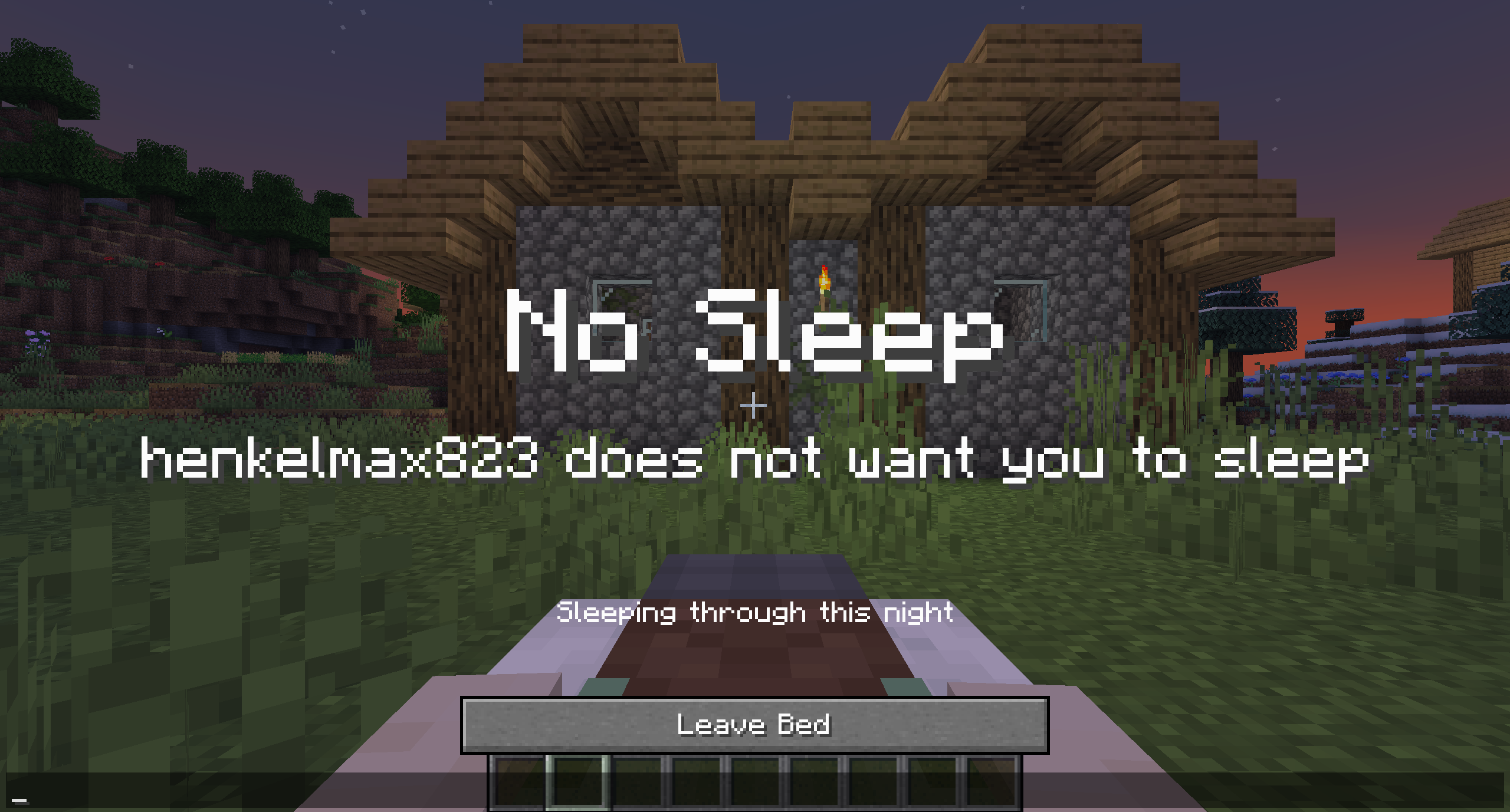
If no sleep is activated, players lying in bed will see a message that someone doesn't want the night to be skipped.
This message will also be shown to players that don't have the mod installed.
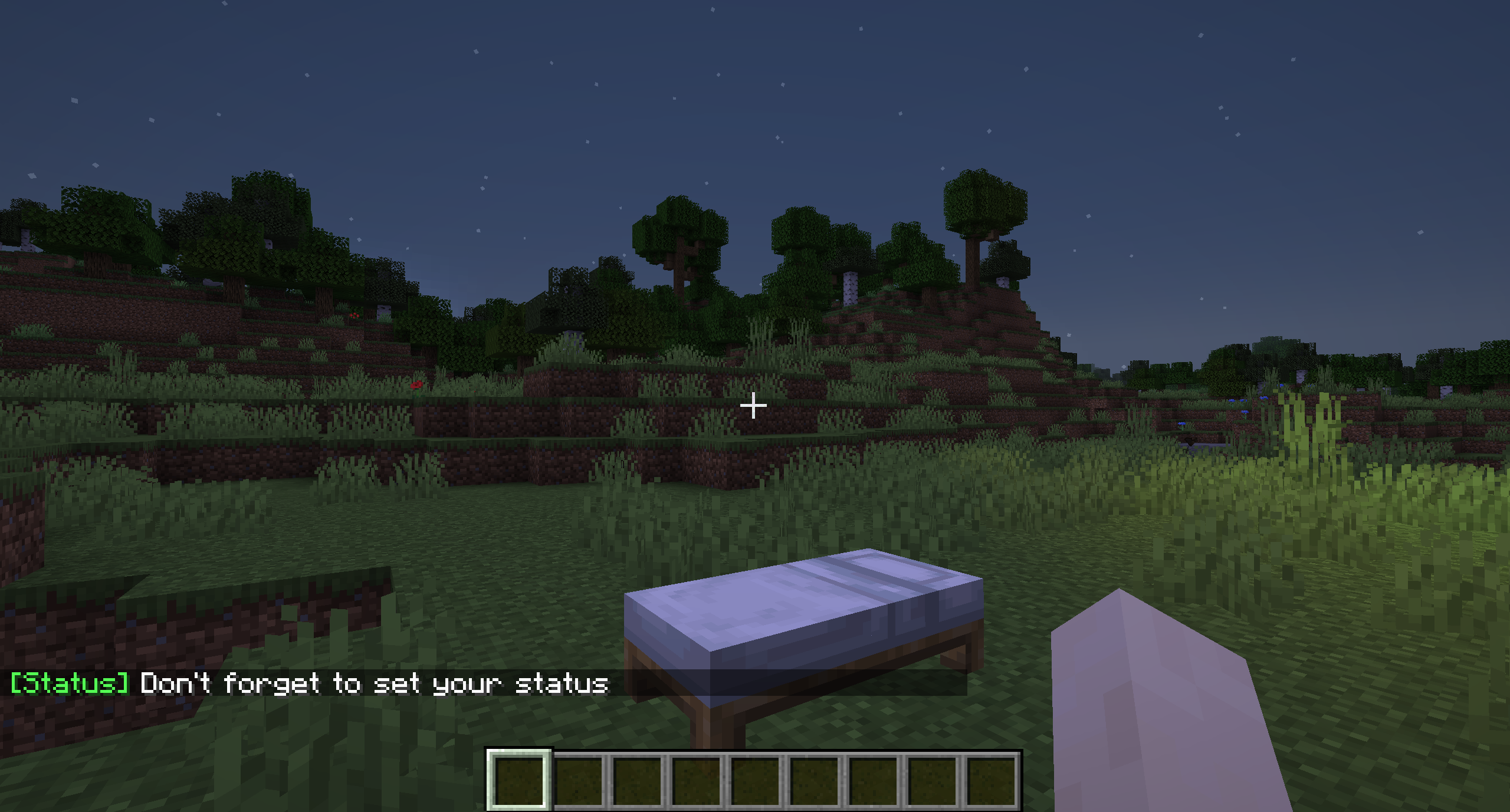
When joining a server the first time in your playing session, you will get a message that will remind you to
set your status. The status is not persisted between playing sessions by default.
Configuration
Client Configuration.minecraft/config/status/status-client.properties
| Key | Default Value | Description |
|---|---|---|
persist_state |
false |
If the status should be persisted between playing sessions. |
show_join_message |
true |
If the reminder when joining the server should be shown. |
Server Configuration<your-server-directory>/config/status/status-server.properties
| Key | Default Value | Description |
|---|---|---|
no_sleep_title |
No Sleep |
The title of the no sleep popup |
no_sleep_player_subtitle |
%s does not want you to sleep |
The subtitle of the no sleep popup if one player does not want to skip the night |
no_sleep_multiple_subtitle |
Some players do not want you to sleep |
The subtitle of the no sleep popup if multiple players do not want to skip the night |
Project description from Modrinth.
Pick your setup
Status by Minecraft version and loader
Choose the version and loader you play, then open the matching release.
Minecraft version
26.2
2 loader buildsMinecraft version
26.1.2
2 loader buildsMinecraft version
26.1.1
2 loader buildsMinecraft version
26.1
2 loader buildsMinecraft version
1.21.11
2 loader buildsMinecraft version
1.21.10
2 loader buildsMinecraft version
1.21.9
2 loader buildsMinecraft version
1.21.8
2 loader buildsMinecraft version
1.21.7
2 loader buildsMinecraft version
1.21.6
2 loader buildsMinecraft version
1.21.5
2 loader buildsShowing the newest 12 of 27 game versions. Older files are in the list below.
Check the dependencies, then try the file in a copied instance before changing a world you care about.
Recent files
Status versions and loaders
fabric-1.1.0+26.3
status-fabric-1.1.0+26.3.jar
15 Sept 2026
Client Optional Server Optional Dependencies No extras listed Listed on Release listing
Check the 26.3 · Fabric setup 26.3FabricQuilt beta
fabric-1.1.0+26.2
status-fabric-1.1.0+26.2.jar
16 Jun 2026
Client Optional Server Optional Dependencies No extras listed Listed on Release listing
Check the 26.2 · Fabric setup 26.2FabricQuilt beta
fabric-1.1.0+26.1.2
status-fabric-1.1.0+26.1.2.jar
10 Apr 2026
Client Optional Server Optional Dependencies No extras listed Listed on Release listing
Check the 26.1.2 · Fabric setup 26.126.1.126.1.2Fabric beta
fabric-1.1.0+26.1.1
status-fabric-1.1.0+26.1.1.jar
1 Apr 2026
Client Optional Server Optional Dependencies No extras listed Listed on Release listing
Check the 26.1.2 · Fabric setup 26.126.1.126.1.2Fabric beta
fabric-1.1.0+26.1
status-fabric-1.1.0+26.1.jar
24 Mar 2026
Client Optional Server Optional Dependencies No extras listed Listed on Release listing
Check the 26.1 · Fabric setup 26.1FabricQuilt beta
fabric-1.21.11-1.1.0
status-fabric-1.21.11-1.1.0.jar
9 Dec 2025
Client Optional Server Optional Dependencies No extras listed Listed on Release listing
Check the 1.21.11 · Fabric setup 1.21.11FabricQuilt beta
fabric-1.21.10-1.1.0
status-fabric-1.21.10-1.1.0.jar
8 Oct 2025
Client Optional Server Optional Dependencies No extras listed Listed on Release listing
Check the 1.21.10 · Fabric setup 1.21.10FabricQuilt beta
fabric-1.21.10-1.0.8
status-fabric-1.21.10-1.0.8.jar
7 Oct 2025
Client Optional Server Optional Dependencies No extras listed Listed on Release listing
Check the 1.21.10 · Fabric setup 1.21.10FabricQuilt beta
fabric-1.21.9-1.0.8
status-fabric-1.21.9-1.0.8.jar
30 Sept 2025
Client Optional Server Optional Dependencies No extras listed Listed on Release listing
Check the 1.21.9 · Fabric setup 1.21.9FabricQuilt beta
fabric-1.21.8-1.0.8
status-fabric-1.21.8-1.0.8.jar
17 Jul 2025
Client Optional Server Optional Dependencies No extras listed Listed on Release listing
Check the 1.21.8 · Fabric setup 1.21.8FabricQuilt beta
fabric-1.21.7-1.0.8
status-fabric-1.21.7-1.0.8.jar
30 Jun 2025
Client Optional Server Optional Dependencies No extras listed Listed on Release listing
Check the 1.21.7 · Fabric setup 1.21.7FabricQuilt beta
fabric-1.21.6-1.0.8
status-fabric-1.21.6-1.0.8.jar
17 Jun 2025
Client Optional Server Optional Dependencies No extras listed Listed on Release listing
Check the 1.21.6 · Fabric setup 1.21.6FabricQuilt beta
Looking for an older file? The official Modrinth project page is in Resources.
 mod
mod CurseForge + Modrinth · Minecraft
Create Cobblestone
Adds a block generating cobblestone using SU, stopping cobblestone generators from eating your frames.
 mod
mod Modrinth · Minecraft
BetaMoon
A Lua Script Loader that allows for the easy addition of custom content or functionalities with an easy-to-use and well documented API.
 mod
mod Modrinth · Minecraft
TabListExtension
扩展TAB列表显示功能 Extended TAB list display