Minecraft version
Back to mods 
Modrinth · Minecraft mod
Elementarium
A fully configurable material expansion mod for Minecraft (Perfect for Modpacks)
Choose a version Pick your version below, then grab the matching file.
Quick answer
Which Elementarium release matches 1.20.5?
Best match for your filters 1.0.1
Game version 1.20.1, 1.20.2, 1.20.3
Loader Forge
Elementarium 1.0.1 targets 1.20.1, 1.20.2, 1.20.3 with Forge. Installation on the client is optional. Installation on the dedicated server is optional. No extra mods listed for this file.
Where it goes
Is Elementarium required on the client, server, or both?
Installation on the client is optional. Installation on the dedicated server is optional.
Client Optional
Dedicated server Optional
Loader for this release Forge
Required install it here Optional supported, not mandatory Not supported do not install here Source doesn’t say do not assume
The source marks this as usable on both the client and server.
What else does Elementarium 1.0.1 need?
1.0.1 on 1.20.5. Every mod below is checked against that same setup.
This file does not list any required mods. Do not add a library just because a different file uses it.
This file does not list any required or optional mods.
Before you install it
Add Elementarium without breaking your instance.
Built for Elementarium 1.0.1 on 1.20.5. Pick another file and the loader, install side or required mods may change.
- 01
Stick to this file
Use 1.0.1. It targets 1.20.1, 1.20.2, 1.20.3 with Forge; another release may have different loader, side or dependency requirements.
- 02
Bring the mods it needs
This file does not list any required mods. Do not add a library just because a different file uses it.
- 03
Put it on the correct side
Installation on the client is optional. Installation on the dedicated server is optional.
- 04
Pick the file you checked
Use the “Get this file” button beside 1.0.1. It opens that exact file at the source.
About this project
What does Elementarium add?
Elementarium
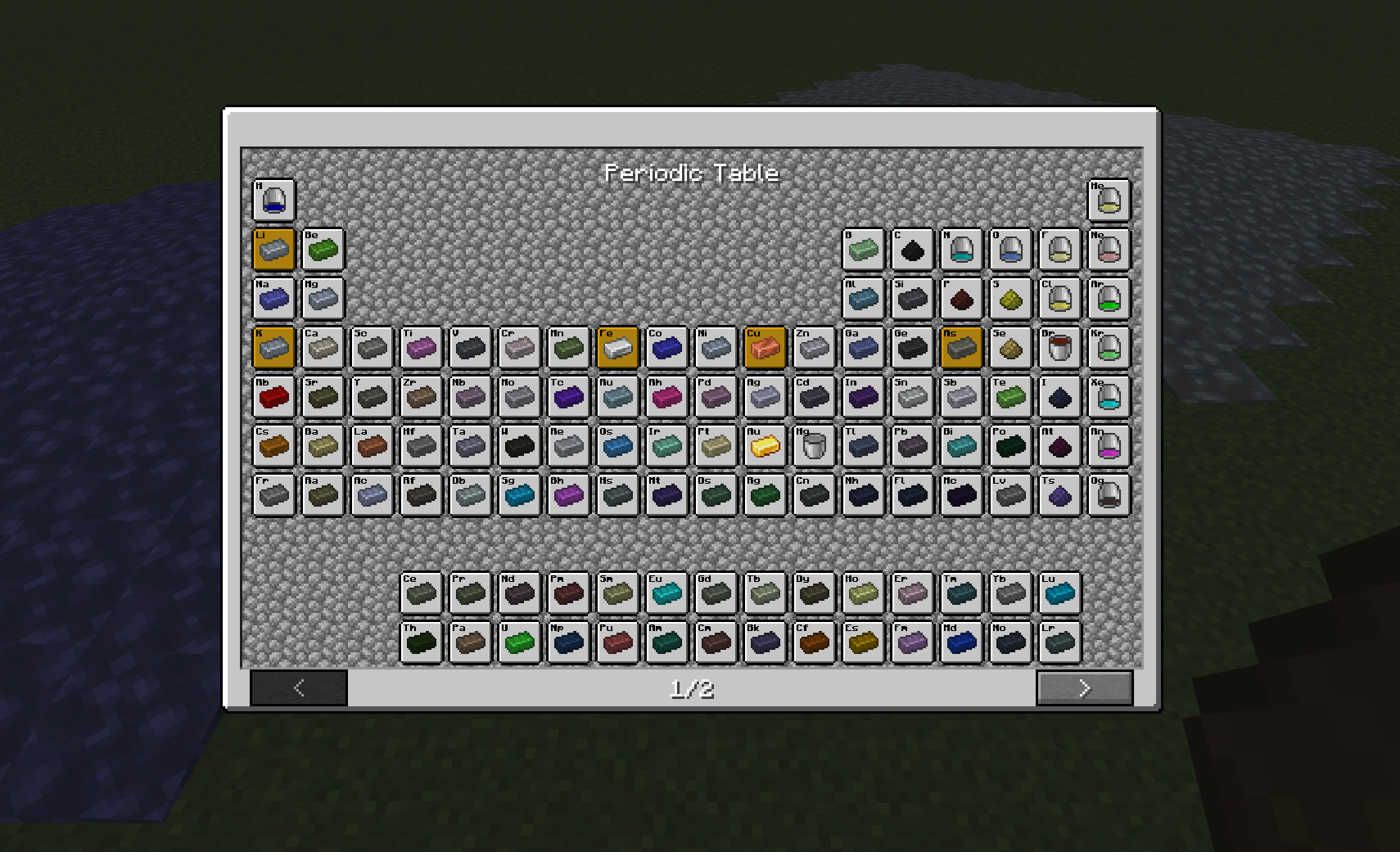
The whole periodic table, ready to use, and everything you add works exactly the same way.
Elementarium is a data-driven material library for Forge 1.20.1. Out of the box you get all 118 elements as ingots, plates, gears, dusts, fluids and more, with recipes, tags and a clean, consistent look already wired up. Need your own alloys? Add them in JSON or KubeJS with a few lines and get the full treatment for free. Don't need something? Turn it off in one config file.
The point is, no two mods shipping three different Steel Plates anymore :)
Highlights
- All 118 elements included, as defaut, configurable too.
- Every material becomes a full set of forms automatically:
- Ingot, Nugget, Block
- Dust, Small Dust, Tiny Dust
- Plate, Double Plate, Rod, Gear, Wire
- Fluids: Molten, Liquid, Gas (each with a fluid block + bucket)
- Recipes generated as defaut too… the full compaction web
- Cross-mod
forge:tags on everything (forge:ingots/steel,forge:plates/steel,forge:gears/steel, …) so your items and other mods' items just work together. - Add your own materials in seconds — JSON or KubeJS, same result: real items with recipes, tags and models.
- Fully modular — disable any material, any form, globally or per-material, from one config file.
- JEI built in — element info pages plus every item and recipe in the catalog.
- In-game periodic table — a collectible element browser (default key: P).
- Lightweight & optional everywhere — JEI, KubeJS and CraftTweaker are all soft dependencies.
Add a material
Ready-made templates ship with the mod. On first launch, look in
config/ptmaterials/examples/forbronze.jsonandmaterial.jsthis is exemples how it work
With JSON, no other mods required
Drop any *.json file into config/ptmaterials/:
{
  "materials": [
    {
      "name": "bronze",
      "displayName": "bronze",
      "color": "#4A4A4A",
      "style": "metallic",
      "state": "solid",
      "forms": ["ingot", "nugget", "block", "dust", "plate", "rod", "gear", "wire", "molten"]
    }
  ]
}
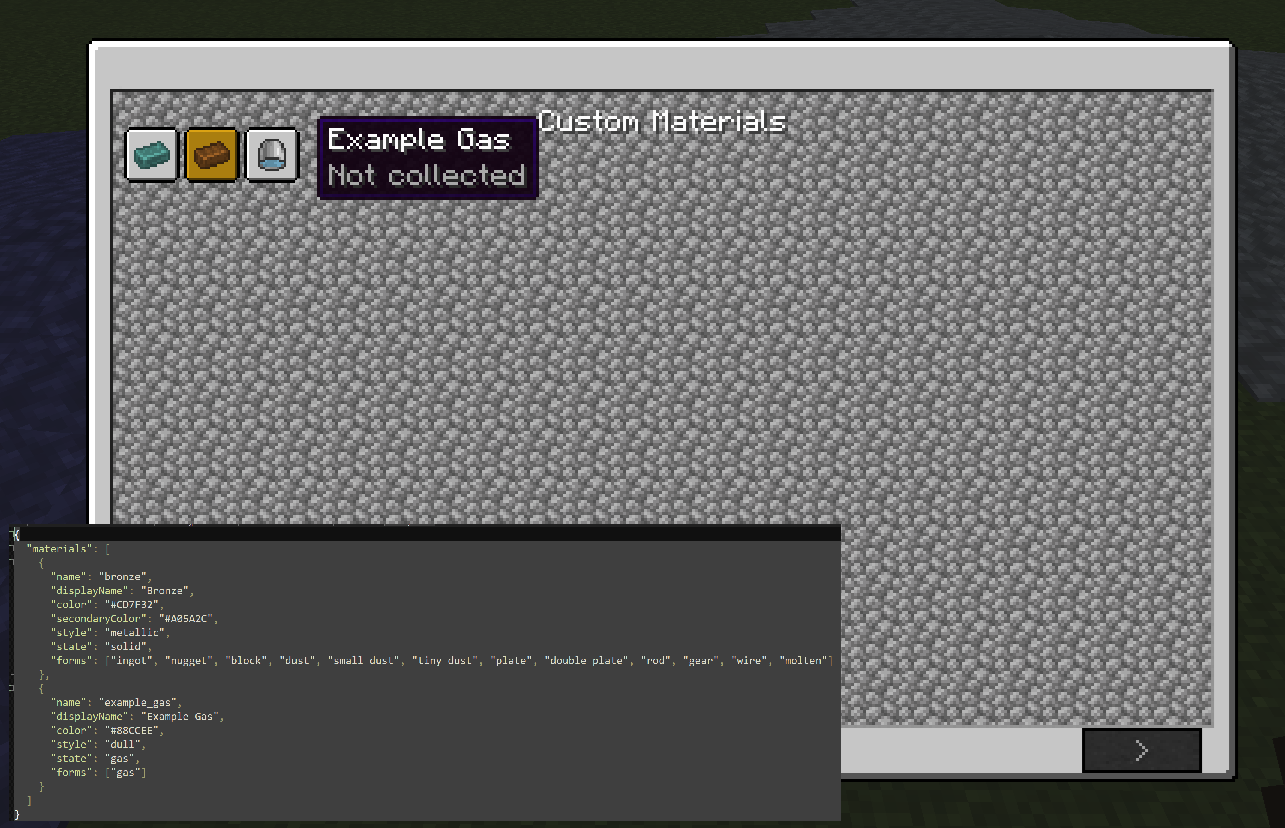
That's it restart and you have tinted bronze items, a bronze block, a molten bronze fluid + bucket, all the compaction recipes and every forge: tag.
| Field | What it does |
|---|---|
name |
Lowercase id, unique. Required. |
forms |
Which forms to generate (see the list above). Required. |
color |
Tint as #RRGGBB. |
style |
metallic, shiny, dull (or your own texture folder). |
state |
solid, liquid or gas. |
displayName |
Shown in-game (optional — derived from name otherwise). |
symbol |
Chemical symbol, shown in JEI (optional). |
atomicNumber |
Used for ordering (optional). |
secondaryColor |
Overlay/secondary tint (optional). |
With KubeJS same thing, in a script
Put this in kubejs/startup_scripts/ (KubeJS installed):
PTMaterials.create('adamantium')
    .displayName('adamantium')
    .color('#4A4A4A')
    .style('metallic')
    .state('solid')
    .forms('ingot', 'nugget', 'block', 'dust', 'plate', 'rod', 'gear', 'wire', 'molten')
    .register()
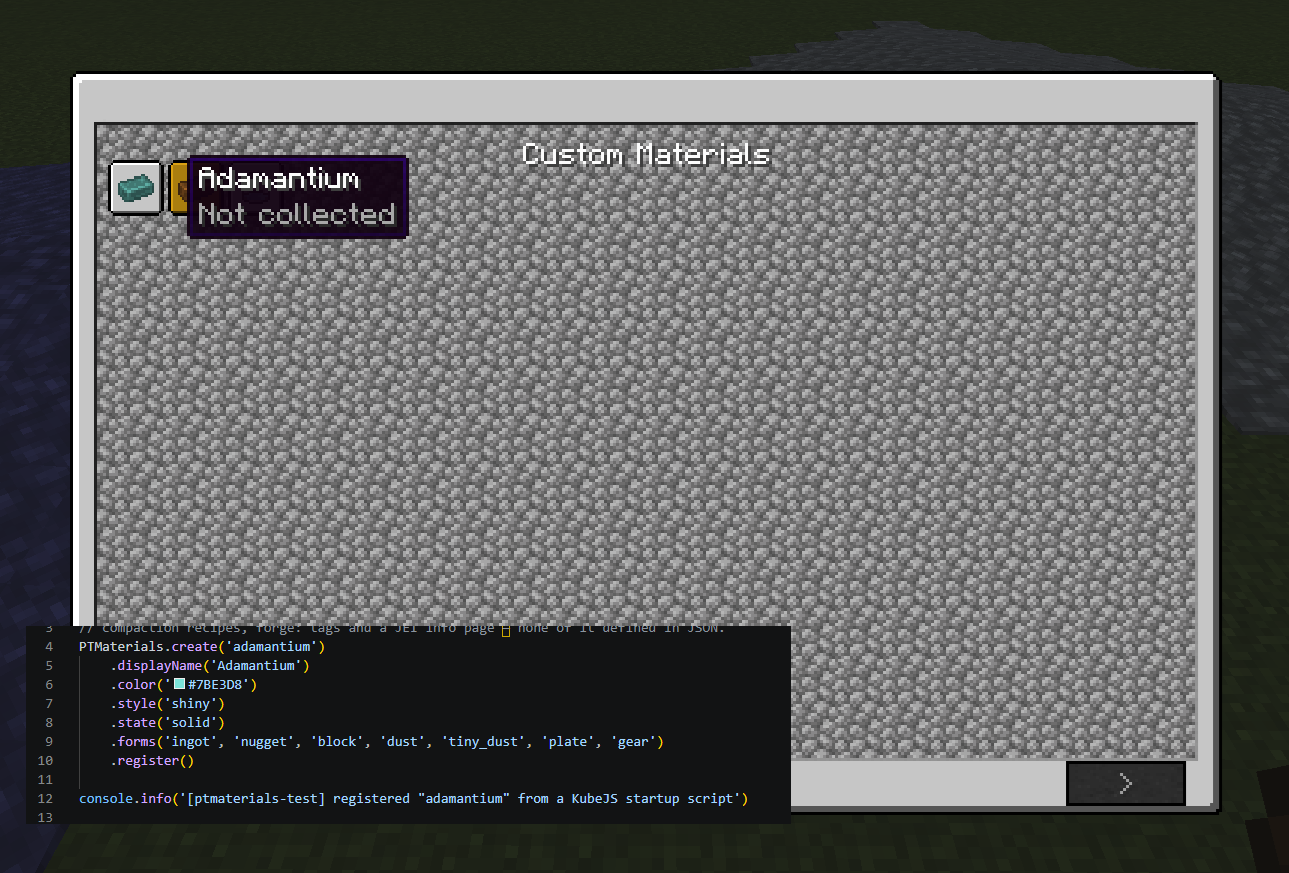
Scripted materials merge on top of JSON, so a script can override a default
Modularity
Trim anything you don't want in config/ptmaterials/config.json no need to edit the element data:
{
  "disabledMaterials": ["titanium"],
  "disabledForms": ["wire"],
  "materials": {
    "iron": { "disabledForms": ["gear"] }
  }
}
disabledMaterialsremove whole materials (no titanium at all).disabledFormsremove a form from every material (no wires anywhere).materials.<name>.disabledFormsremove forms from one material (no iron gear).
Removed content disappears cleanly, items, recipes, tags, loot and periodic-table entries all go together, with no leftovers. Perfect for tailoring the mod to exactly what your pack needs.
Tweak the recipes
Every Elementarium item is a normal, forge:-tagged item, so CraftTweaker and KubeJS can retweak the generated recipes with zero special support:
// CraftTweaker: replace the default block recipe
recipes.remove(<item:ptmaterials:steel_block>);
Want to create new materials from a script? Use JSON or KubeJS (above), CraftTweaker is for tweaking existing content, since its scripts run after the game's registries are built.
Built for modpacks
Most tech mods reinvent the same basic resources, duplicate items, clashing textures, incompatible IDs. Elementarium is a shared material foundation: one naming scheme, one look, one set of tags for your whole pack. Define materials once, keep everything consistent, and let mods speak a common language instead of each rolling their own Copper Gear.
Compatibility
| Mod | What it adds |
|---|---|
| JEI | Optional. Element info pages + full item/recipe catalog. |
| KubeJS | Optional. Create materials from startup scripts. |
| CraftTweaker | Optional. Tweak the generated recipes/tags out of the box. |
Everything runs fine with none of them installed.
License
You are free to include Elementarium in any public or private modpack without asking for permission.
The only requirement is that you provide proper credit by linking back to this project page.
If you'd like to further support the project, I'd greatly appreciate including a link to my YouTube channel as well. https://www.youtube.com/@Navaronee It helps the project grow and supports the development of future mods.
Thank you for your support! ❤️
MIT.
Project description from Modrinth.
Pick your setup
Elementarium by Minecraft version and loader
Choose the version and loader you play, then open the matching release.
Minecraft version
1.20.5
1 loader buildMinecraft version
1.20.4
1 loader buildMinecraft version
1.20.3
1 loader buildMinecraft version
1.20.2
1 loader buildMinecraft version
1.20.1
1 loader buildCheck the dependencies, then try the file in a copied instance before changing a world you care about.
Recent files
Elementarium versions and loaders
1.0.1
ptmaterials-1.0.1.jar
14 Jul 2026
Client Optional Server Optional Dependencies No extras listed Listed on Release listing
Check the 1.20.5 · Forge setup 1.20.11.20.21.20.31.20.4 release
Looking for an older file? The official Modrinth project page is in Resources.
 mod
mod CurseForge + Modrinth · Minecraft
EnchantOnce
A configurable mod that reworks enchanting and repairing (anvils): fixed XP costs, enchant extraction, book copying, full gear duplication, and more — all using vanilla mechanics.
 mod
mod CurseForge + Modrinth · Minecraft
Safra
Don’t mess with the server Play Minecraft with your friends in 2 clicks
 mod
mod CurseForge + Modrinth · Minecraft
Stable FPS
Minecraft mod to fix long-standing FPS stability issues.