Cloth Config API Needed by Inventory Search 26.3.0
requiredNo matching file Version asked for: 26.2.155+fabric

Modrinth · Minecraft mod
Allows the player to search and highlight specified item name inside containers and inventory.
Quick answer
Inventory Search 26.3.0 targets 26.3 with Fabric. It must be installed on the client. Do not install it on the dedicated server. 2 required mods need a matching file.
Where it goes
It must be installed on the client. Do not install it on the dedicated server.
This file is marked client-only.
26.3.0. Change the file and its required mods may change too.
Install Cloth Config API, Mod Menu first, but 2 required mods have no matching file for this setup. Do not mix loader builds to force a match.
We only count dependency files that match this setup. A file for another loader does not fill the gap.
Before you install it
Built for Inventory Search 26.3.0. Pick another file and the loader, install side or required mods may change.
Use 26.3.0. It targets 26.3 with Fabric; another release may have different loader, side or dependency requirements.
Install Cloth Config API, Mod Menu first, but 2 required mods have no matching file for this setup. Do not mix loader builds to force a match.
It must be installed on the client. Do not install it on the dedicated server.
Use the “Get this file” button beside 26.3.0. It opens that exact file at the source.
About this project
Allows the user to seach inventories for specified items. Use the search bar to type what you are looking to search for.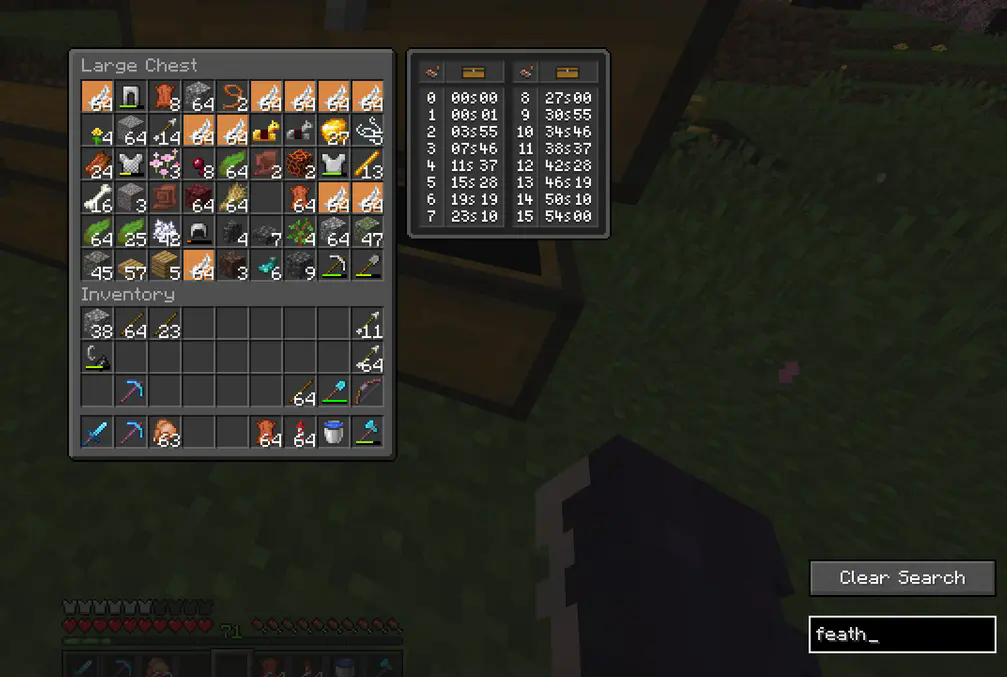
The mod settings are handled by Mod Menu and AutoConfig.
By default, the highlight color in GUIs is orange and the search will persist automatically through GUIs.

Project description from Modrinth.
Pick your setup
Choose the version and loader you play, then open the matching release.
Showing the newest 12 of 14 game versions. Older files are in the list below.
Check the dependencies, then try the file in a copied instance before changing a world you care about.
Recent files
inventory-search-26.3.0.jar
16 Sept 2026
inventory-search-26.2.0.jar
9 Jul 2026
inventory-search-26.1.0.jar
26 Apr 2026
inventory-search-1.8.0.jar
30 Dec 2025
inventory-search-1.7.0.jar
8 Oct 2025
inventory-search-1.6.0.jar
4 Oct 2025
inventory-search-1.1.1.jar
24 Sept 2025
inventory-search-1.2.1.jar
24 Sept 2025
inventory-search-1.3.1.jar
24 Sept 2025
inventory-search-1.5.1.jar
24 Sept 2025
inventory-search-1.4.1.jar
24 Sept 2025
inventory-search-1.5.0.jar
5 Sept 2025
Looking for an older file? The official Modrinth project page is in Resources.
 mod
This is my first client side mod that adds a fps counter
 mod
A lightweight client-side mod for effortless inventory management in Minecraft.
 mod
Allow users to link their Minecraft accounts to various services and automatically whitelist them based on specified conditions