SWAY API Needed by Interactive Foliage 1.3.0-fabric+26.2
requiredMatching file found Matched file: 2.4.0-fabric+26.2

Modrinth · Minecraft mod
Plants physically react to players, mobs and items — no shaders required.
Quick answer
Interactive Foliage 1.3.0-fabric+26.2 targets 26.2 with Fabric. It must be installed on the client. Do not install it on the dedicated server. All 2 required mods have matching files.
Where it goes
It must be installed on the client. Do not install it on the dedicated server.
This file is marked client-only.
1.3.0-fabric+26.2. Change the file and its required mods may change too.
Install SWAY API, Fabric API first. We found matching files for this game-version and loader setup.
We only count dependency files that match this setup. A file for another loader does not fill the gap.
Before you install it
Built for Interactive Foliage 1.3.0-fabric+26.2. Pick another file and the loader, install side or required mods may change.
Use 1.3.0-fabric+26.2. It targets 26.2 with Fabric; another release may have different loader, side or dependency requirements.
Install SWAY API, Fabric API first. We found matching files for this game-version and loader setup.
It must be installed on the client. Do not install it on the dedicated server.
Use the “Get this file” button beside 1.3.0-fabric+26.2. It opens that exact file at the source.
About this project
Las plantas reaccionan físicamente a jugadores, mobs e items — no se requiere shaders.
Dale vida a la vegetación de Minecraft.
Interactive Foliage añade movimiento natural a la hierba, flores, cultivos y otros tipos de vegetación a medida que las entidades se desplazan por el mundo. El efecto es ligero, altamente compatible y está diseñado para sentirse como una extensión natural de Minecraft Vanilla.
A medida que te mueves por el mundo, la vegetación cercana se aparta de tu presencia y vuelve suavemente a su posición original.
El efecto es sutil, inmersivo y está diseñado para integrarse naturalmente con el estilo visual de Minecraft.
Tu navegador no soporta la etiqueta de video.Los jugadores no son los únicos que interactúan con el mundo.
Los animales también apartan la vegetación a su paso, haciendo que bosques, llanuras y granjas se sientan más vivos y dinámicos.
Tu navegador no soporta la etiqueta de video.Interactive Foliage no solo responde a entidades vivas.
Los objetos arrojados también pueden influir en la vegetación cercana, añadiendo pequeños detalles ambientales que hacen que el mundo se sienta más reactivo y dinámico.
Tu navegador no soporta la etiqueta de video.A diferencia de otras soluciones basadas en shaders, Interactive Foliage realiza sus deformaciones directamente dentro del sistema de renderizado de Minecraft.
Esto permite que el efecto funcione de forma natural con el renderizado Vanilla, Sodium, Iris y la mayoría de paquetes de shaders sin requerir ninguna configuración visual específica.
Instala tu shader favorito y disfruta del efecto al instante.
Tu navegador no soporta la etiqueta de video. Tu navegador no soporta la etiqueta de video.Existen varias soluciones que ofrecen físicas para la vegetación, pero muchas de ellas requieren shaders específicos o forman parte de sistemas de físicas mucho más grandes.
Interactive Foliage se enfoca en una sola cosa:
Hacer que la vegetación reaccione de forma natural mientras mantiene un excelente rendimiento, amplias opciones de configuración y una gran compatibilidad.
| Característica | Interactive Foliage |
|---|---|
| No requiere shaders | ✔ |
| Compatible con Sodium | ✔ |
| Compatible con Iris | ✔ |
| Funciona con shaders | ✔ |
| Compatible con multijugador | ✔ |
| Totalmente configurable | ✔ |
| Sistema dedicado para vegetación | ✔ |
| Instalación sencilla | ✔ |
💡 Interactive Foliage no depende de ningún shader específico.
El efecto se renderiza directamente a través del pipeline de renderizado de Minecraft, permitiendo que funcione junto a prácticamente cualquier configuración de shaders.
Interactive Foliage utiliza actualizaciones selectivas de chunks y técnicas de deformación de vértices para animar la vegetación directamente dentro del sistema de renderizado de Minecraft.
En lugar de renderizar modelos duplicados o depender de cálculos realizados por shaders, el mod únicamente actualiza la vegetación donde realmente ocurre una interacción.
El resultado es un efecto inmersivo y responsivo con un impacto mínimo en el rendimiento, haciéndolo ideal para una amplia variedad de modpacks y configuraciones de hardware.
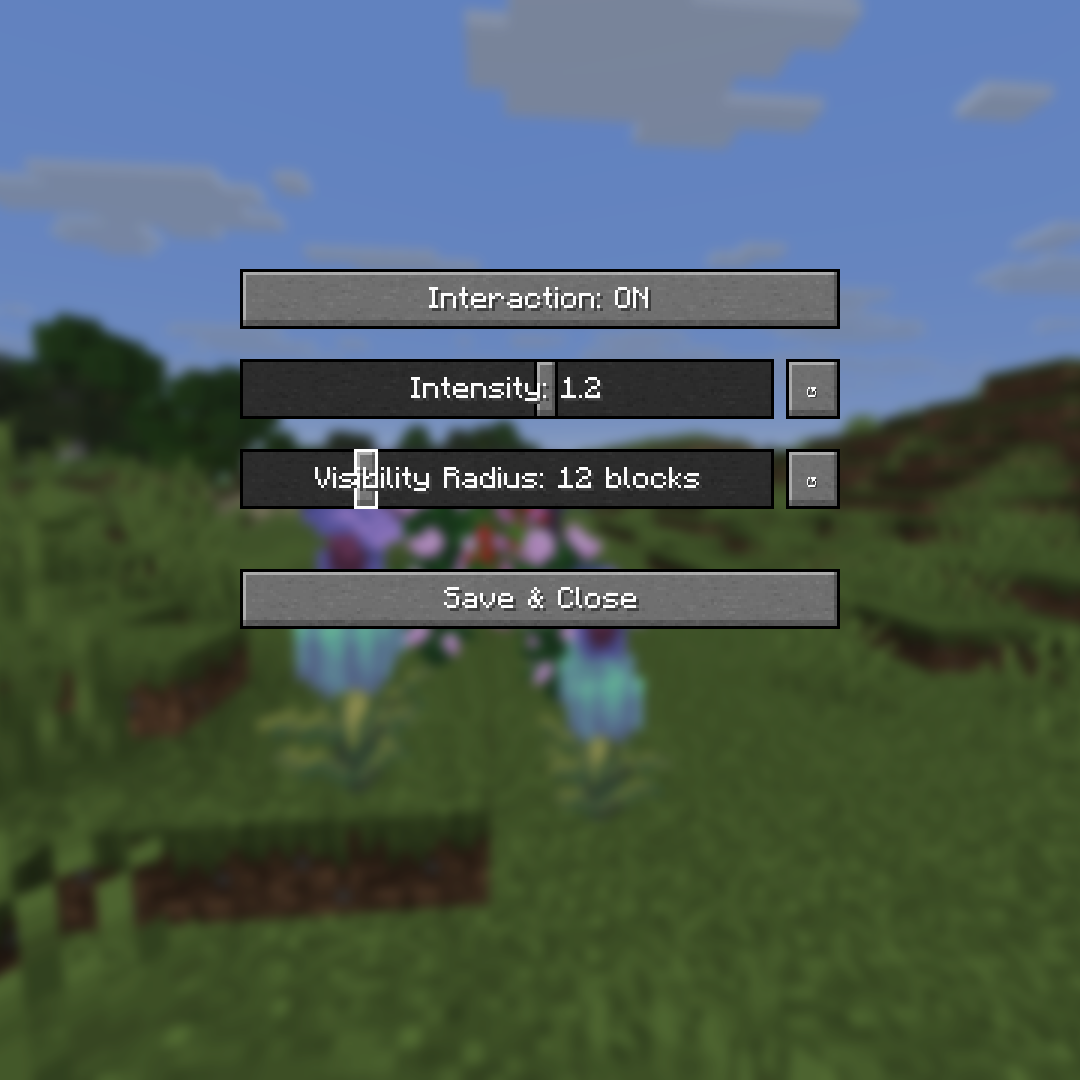
Cada jugador tiene preferencias diferentes cuando se trata de efectos visuales.
Interactive Foliage incluye una pantalla de configuración integrada que te permite personalizar la experiencia a tu gusto.
Opciones disponibles:
Ya sea que prefieras un movimiento sutil o una vegetación altamente reactiva, la decisión está en tus manos.
Interactive Foliage continuará evolucionando con el tiempo.
Características planeadas:
Las sugerencias, comentarios y propuestas de nuevas funciones siempre son bienvenidas.
Integrado en la futura experiencia de "MINECRAFT 2"
-karto
Bring Minecraft's vegetation to life.
Interactive Foliage adds natural movement to grass, flowers, crops and other foliage as entities move through the world. The effect is lightweight, highly compatible and designed to feel like a natural extension of vanilla Minecraft.
As you move through the world, nearby vegetation bends away from your presence and smoothly returns to its original position.
The effect is subtle, immersive and designed to blend naturally into Minecraft's visual style.
Tu navegador no soporta la etiqueta de video.Players aren't the only ones interacting with the world.
Animals naturally push vegetation aside as they move, making forests, plains and farms feel more alive and dynamic.
Tu navegador no soporta la etiqueta de video.Interactive Foliage doesn't only respond to living entities.
Dropped items can also influence nearby vegetation, adding small environmental details that help the world feel more responsive.
Tu navegador no soporta la etiqueta de video.Unlike shader-based foliage solutions, Interactive Foliage performs its deformation directly within Minecraft's rendering pipeline.
This means the effect works naturally with vanilla rendering, Sodium, Iris and most shader packs without requiring a specific visual setup.
Install your preferred shader pack and enjoy the effect immediately.
Tu navegador no soporta la etiqueta de video. Tu navegador no soporta la etiqueta de video.Many existing solutions already offer vegetation physics, but often require specific shader packs or large-scale physics systems.
Interactive Foliage focuses on one thing:
Making vegetation react naturally while remaining lightweight, configurable and highly compatible.
| Feature | Interactive Foliage |
|---|---|
| No shaders required | ✔ |
| Sodium compatible | ✔ |
| Iris compatible | ✔ |
| Works with shaders | ✔ |
| Multiplayer friendly | ✔ |
| Fully configurable | ✔ |
| Dedicated foliage system | ✔ |
| Simple installation | ✔ |
💡 Interactive Foliage does not depend on any specific shader pack.
The effect is rendered directly through Minecraft's rendering pipeline, allowing it to work alongside virtually any shader configuration.
Interactive Foliage uses selective chunk updates and vertex deformation techniques to animate vegetation directly inside Minecraft's rendering pipeline.
Instead of rendering duplicate models or relying on shader-side calculations, the mod only updates foliage where interaction actually occurs.
The result is a responsive and immersive effect with minimal overhead, making it suitable for a wide range of modpacks and hardware configurations.
Every player has a different preference when it comes to visual effects.
Interactive Foliage includes an in-game configuration screen that allows you to customize the experience to your liking.
Available options include:
Whether you want subtle movement or highly reactive vegetation, the choice is yours.
Interactive Foliage will continue to evolve over time.
Planned features include:
Suggestions, feedback and feature requests are always welcome.
Embedded in the future "MINECRAFT 2" experience
-karto
Project description from Modrinth.
Pick your setup
Choose the version and loader you play, then open the matching release.
Check the dependencies, then try the file in a copied instance before changing a world you care about.
Recent files
mc2_interactivefoliage-1.3.0-fabric+26.2.jar
17 Aug 2026
mc2_interactivefoliage-1.3.0-neoforge+26.2.jar
17 Aug 2026
mc2_interactivefoliage-1.3.0-fabric+1.21.11.jar
17 Aug 2026
mc2_interactivefoliage-1.3.0-neoforge+26.1.2.jar
17 Aug 2026
mc2_interactivefoliage-1.3.0-fabric+26.1.2.jar
17 Aug 2026
mc2_interactivefoliage-1.3.0-neoforge+1.21.11.jar
17 Aug 2026
mc2_interactivefoliage-1.3.0-neoforge+1.21.1.jar
17 Aug 2026
mc2_interactivefoliage-1.3.0-fabric+1.21.1.jar
17 Aug 2026
mc2_interactivefoliage-1.3.0-fabric+1.20.1.jar
17 Aug 2026
mc2_interactivefoliage-1.3.0-forge+1.20.1.jar
17 Aug 2026
mc2_interactivefoliage-1.2.0-neoforge+26.2.jar
11 Aug 2026
mc2_interactivefoliage-1.2.0-neoforge+26.1.2.jar
11 Aug 2026
Looking for an older file? The official Modrinth project page is in Resources.