Cloth Config API Needed by Load Support 1.2.2
requiredMatching file found Matched file: 19.0.147+neoforge

Modrinth · Minecraft mod
Shows when the user has too less Java memory allocated, and plays a sound when the game has loaded.
Quick answer
Load Support 1.2.2 targets 1.21.6, 1.21.7, 1.21.8 with NeoForge. It must be installed on the client. Do not install it on the dedicated server. All 1 required mods have matching files.
Where it goes
It must be installed on the client. Do not install it on the dedicated server.
This file is marked client-only.
1.2.2. Change the file and its required mods may change too.
Install Cloth Config API first. We found matching files for this game-version and loader setup.
We only count dependency files that match this setup. A file for another loader does not fill the gap.
Before you install it
Built for Load Support 1.2.2. Pick another file and the loader, install side or required mods may change.
Use 1.2.2. It targets 1.21.6, 1.21.7, 1.21.8 with NeoForge; another release may have different loader, side or dependency requirements.
Install Cloth Config API first. We found matching files for this game-version and loader setup.
It must be installed on the client. Do not install it on the dedicated server.
Use the “Get this file” button beside 1.2.2. It opens that exact file at the source.
About this project
Shows when the player has too less Java memory allocated, and plays a sound when the game has finished loading.
It is fully configurable in config/loadsupport.toml.
The config in config/loadsupport.toml is pretty self explainatory:
loadFinishSound = "minecraft:ui.toast.challenge_complete"
minMemory = 4.0
errorTitle = "Error: Not enough Java memory!"
errorMinMemory = "Please allocate at least {minMemory} GB of Java memory to your Minecraft instance!"
errorCurrentMemory = "You have currently {currentMemory} GB allocated."
memoryInfoLink = "https://github.com/vaporvee/LoadSupport/wiki/How-to-allocate-more-memory-to-your-Minecraft-instance"
{minMemory} and {currentMemory} get replaced by their actual values.
The player doesn't need to wait just to know that they selected the wrong amount of Java Memory.
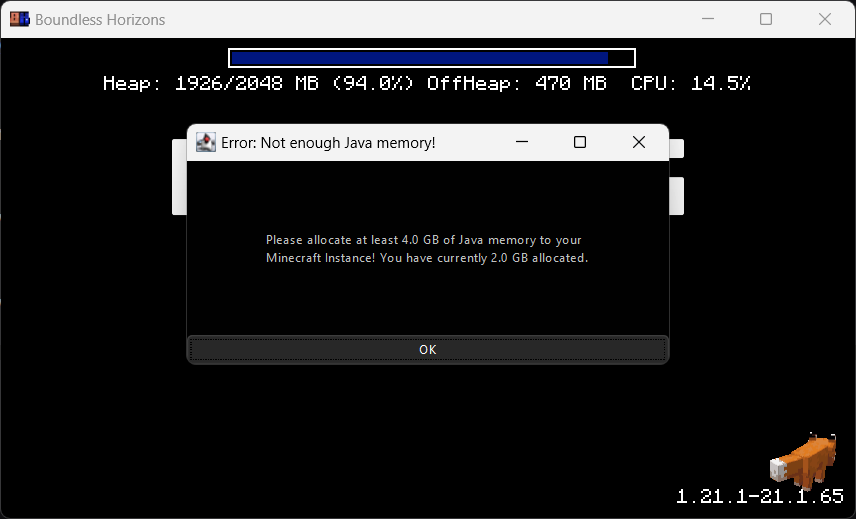
Make sure the player gets the correct performance experience.
Directly know when Minecraft started when beeing in the background.
Project description from Modrinth.
Pick your setup
Choose the version and loader you play, then open the matching release.
Check the dependencies, then try the file in a copied instance before changing a world you care about.
Recent files
loadsupport-neoforge-1.21.6-1.2.2.jar
8 Aug 2025
loadsupport-fabric-1.21.6-1.2.2.jar
8 Aug 2025
loadsupport-neoforge-1.21.6-1.2.1.jar
24 Jun 2025
loadsupport-fabric-1.21.6-1.2.1.jar
24 Jun 2025
loadsupport-neoforge-1.21.1-1.2.1.jar
24 Jun 2025
loadsupport-fabric-1.21.1-1.2.1.jar
24 Jun 2025
loadsupport-neoforge-1.21.1-1.2.0.jar
23 Jun 2025
loadsupport-fabric-1.21.1-1.2.0.jar
23 Jun 2025
loadsupport-1.1.0-fabric-1.21.1.jar
5 Oct 2024
loadsupport-1.1.0-neoforge-1.21.1.jar
5 Oct 2024
loadsupport-1.0.0-fabric-1.21.1.jar
5 Oct 2024
loadsupport-1.0.0-neoforge-1.21.1.jar
5 Oct 2024
Looking for an older file? The official Modrinth project page is in Resources.