Minecraft version
Back to mods 
Modrinth · Minecraft mod
Multitool
Combine all the tools into the Multitool
Choose a version Pick your version below, then grab the matching file.
Quick answer
Which Multitool release matches 1.21.8 Forge?
Best match for your filters v5.0.1+mod
Game version 1.21.5, 1.21.6, 1.21.7
Loader Fabric, Forge, NeoForge
Multitool v5.0.1+mod targets 1.21.5, 1.21.6, 1.21.7 with Fabric, Forge, NeoForge. Installation on the client is optional. Installation on the dedicated server is optional. No extra mods listed for this file.
Where it goes
Is Multitool required on the client, server, or both?
Installation on the client is optional. Installation on the dedicated server is optional.
Client Optional
Dedicated server Optional
Loader for this release Fabric, Forge, NeoForge
Required install it here Optional supported, not mandatory Not supported do not install here Source doesn’t say do not assume
The source marks this as usable on both the client and server.
What else does Multitool v5.0.1+mod need?
v5.0.1+mod on 1.21.8 Forge. Every mod below is checked against that same setup.
This file does not list any required mods. Do not add a library just because a different file uses it.
This file does not list any required or optional mods.
Before you install it
Add Multitool without breaking your instance.
Built for Multitool v5.0.1+mod on 1.21.8 Forge. Pick another file and the loader, install side or required mods may change.
- 01
Stick to this file
Use v5.0.1+mod. It targets 1.21.5, 1.21.6, 1.21.7 with Fabric, Forge, NeoForge; another release may have different loader, side or dependency requirements.
- 02
Bring the mods it needs
This file does not list any required mods. Do not add a library just because a different file uses it.
- 03
Put it on the correct side
Installation on the client is optional. Installation on the dedicated server is optional.
- 04
Pick the file you checked
Use the “Get this file” button beside v5.0.1+mod. It opens that exact file at the source.
About this project
What does Multitool add?
 Multitool
Do you hate it when your whole inventory is cluttered by tools?
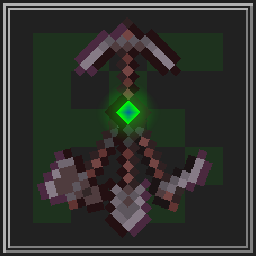
Well, with this data pack you can combine all the tools into the Multitool.


Features
The Multitool can always break blocks meant for the axe, hoe, pickaxe or shovel, no matter what form it is currently in.
If you look at a block, the Multitool switches to a tool suited for that block like an axe to strip logs or a shovel to create paths.
When sneaking while looking at tillable blocks, the Multitool swaps to a hoe, so you can create fresh farmland.
You can enchant the Multitool!
It supports any enchantment that you can normally put onto a tool.
The Multitool has 3 times the durability of a regular tool made from the same material.
Mutlitool even supports resource packs, like this one by Dukette, it turns the Multitool into a halberd!
How to get
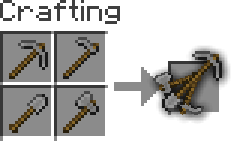
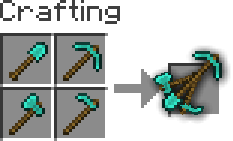
To craft a Multitool, you just need to combine all four types of tools of the same material in the crafting grid.
Adding or removing a Multitool
You can generate your own Multitool data pack simply by configuring a config and building it
This also works for modded tools but note that some mods break data packs so I won't guarantee compatability or support
Install Python and beet
If Python is allready installed, you should just be able to runpip install beetto install beetClone or download the GitHub repository
Add or remove
materialsinmultitool_config.ymland configureoverwrites, for mods where a tool isn't following vanilla's naming schemeYou can easily find the namespace by looking at the item in your inventory after pressing F3 + H, it should be in the form
<namespace>:<material>_<tool>Move to this folder with a terminal and run
beet, it should create a folder calledbuildwith your data pack in it




Project description from Modrinth.
Pick your setup
Multitool by Minecraft version and loader
Choose the version and loader you play, then open the matching release.
Minecraft version
1.21.9
5 loader buildsMinecraft version
1.21.8
5 loader buildsMinecraft version
1.21.7
5 loader buildsMinecraft version
1.21.6
5 loader buildsMinecraft version
1.21.5
5 loader buildsMinecraft version
1.21.4
5 loader buildsMinecraft version
1.21.3
5 loader buildsMinecraft version
1.21.2
5 loader buildsMinecraft version
1.21.1
5 loader buildsMinecraft version
1.21
5 loader buildsMinecraft version
1.20.6
3 loader buildsShowing the newest 12 of 28 game versions. Older files are in the list below.
Check the dependencies, then try the file in a copied instance before changing a world you care about.
Recent files
Multitool versions and loaders
v5.0.1+mod
multitool-v5.0.1.jar
9 Aug 2025
Client Optional Server Optional Dependencies No extras listed Listed on Release listing
Check the 1.21.8 · Forge setup 1.21.51.21.61.21.71.21.8 release
Looking for an older file? The official Modrinth project page is in Resources.
 mod
CurseForge + Modrinth · Minecraft
Safra
Don’t mess with the server Play Minecraft with your friends in 2 clicks via P2P
 mod
Modrinth · Minecraft
(ST) Locator Radar
Converts the locator bar into a mob radar.
 mod
Modrinth · Minecraft
Enchantment Tomes
adds new book like items that can be enchant with specific gear piece enchants then combined with your gear