Minecraft version
Back to mods 
Modrinth · Minecraft mod
Day Counter
A simple mod for drawing custom UI elements to your screen.
Choose a version Pick your version below, then grab the matching file.
Quick answer
Which Day Counter release matches 1.20.2 Forge?
Best match for your filters 1.1.0
Game version 1.20.1, 1.20.2, 1.20.3
Loader Forge
Day Counter 1.1.0 targets 1.20.1, 1.20.2, 1.20.3 with Forge. It must be installed on the client. Do not install it on the dedicated server. No extra mods listed for this file.
Where it goes
Is Day Counter required on the client, server, or both?
It must be installed on the client. Do not install it on the dedicated server.
Client Required
Dedicated server Not supported
Loader for this release Forge
Required install it here Optional supported, not mandatory Not supported do not install here Source doesn’t say do not assume
This file is marked client-only.
What else does Day Counter 1.1.0 need?
1.1.0 on 1.20.2 Forge. Every mod below is checked against that same setup.
This file does not list any required mods. Do not add a library just because a different file uses it.
This file does not list any required or optional mods.
Before you install it
Add Day Counter without breaking your instance.
Built for Day Counter 1.1.0 on 1.20.2 Forge. Pick another file and the loader, install side or required mods may change.
- 01
Stick to this file
Use 1.1.0. It targets 1.20.1, 1.20.2, 1.20.3 with Forge; another release may have different loader, side or dependency requirements.
- 02
Bring the mods it needs
This file does not list any required mods. Do not add a library just because a different file uses it.
- 03
Put it on the correct side
It must be installed on the client. Do not install it on the dedicated server.
- 04
Pick the file you checked
Use the “Get this file” button beside 1.1.0. It opens that exact file at the source.
About this project
What does Day Counter add?
This clientside mod introduces four new rendering modes to enhance your gameplay experience. Other versions and versions for Fabric, will be released in the future.
Also available on Curseforge.
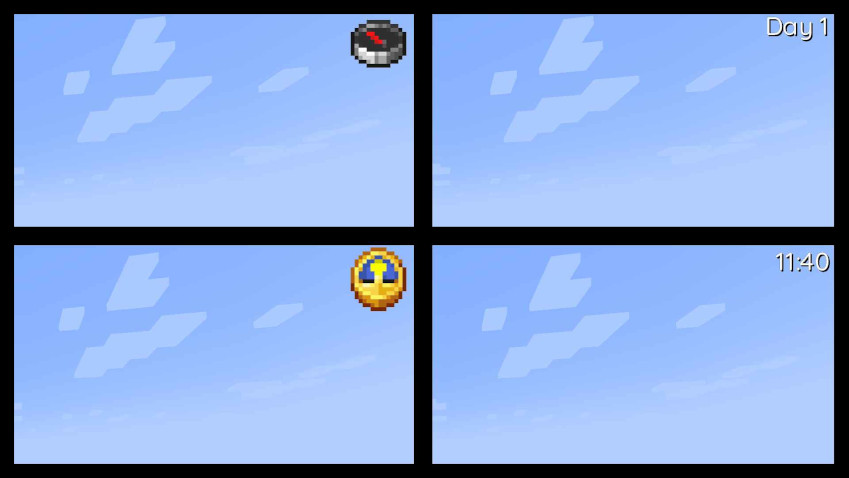
This mod also offers extensive customization options, allowing you to adjust everything from item scale to shadow color and font type. It utilizes a TTF-based font system, making it simple to add and customize your own fonts. To do so, just place or replace a TTF file in the following folder within the jar: assets/daycounter/font. Important: The TTF file name must not contain spaces, special characters, or uppercase letters.
Config:
Spoiler
["Config for Day Counter Mod"]

#Position of the UI element (LEFT|CENTER|RIGHT)
Position = "RIGHT"
#Size of the font
"Font size" = 24
#Font that will be used (minecraft|epilogue-light...)
Font = "quicksand-medium"
#Color of the text in hexadecimal
Textcolor = "0xFFFFFF"
#Color of the text-shadow in hexadecimal
Shadowcolor = "0x000000"
#Render different UI elements (Clock|Compass|Time|Day)
"UI element type" = "Day"
#Should a drop shadow be rendered
"Text has drop shadow" = true
#Render the UI on top of everything
"Render over everything" = false
#Scales the Item UI element
#Range: 0.5 ~ 5.0
"Item Scale Factor" = 3.0
#Offsets the UI position along the X axis
#Range: -1920.0 ~ 1920.0
OffsetX = 0.0
#Offsets the UI position along the Y axis
#Range: -1920.0 ~ 1920.0
OffsetY = 0.0
#Offsets the Shadow position
#Range: -10.0 ~ 10.0
"Shadow Offset" = 1.0
Project description from Modrinth.
Pick your setup
Day Counter by Minecraft version and loader
Choose the version and loader you play, then open the matching release.
Minecraft version
1.20.3
1 loader buildMinecraft version
1.20.2
1 loader buildMinecraft version
1.20.1
1 loader buildCheck the dependencies, then try the file in a copied instance before changing a world you care about.
Recent files
Day Counter versions and loaders
1.1.0
daycounter-1.20.1+4-1.1.0.jar
2 Sept 2024
Client Required Server Not supported Dependencies No extras listed Listed on Release listing
Check the 1.20.2 · Forge setup 1.20.11.20.21.20.31.20.4 release
Looking for an older file? The official Modrinth project page is in Resources.