Fabric API Needed by PlayerCTL Status 1.0.0
requiredMatching file found Matched file: 0.92.12+1.20.1
Modrinth · Minecraft mod
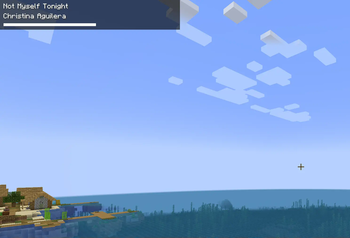
(Linux only) Minecraft mod for showing the current playing song / video on YouTube / Spotify / Netflix / ...
Quick answer
PlayerCTL Status 1.0.0 targets 1.20.1, 1.20.2, 1.20.3 with Fabric. It must be installed on the client. Do not install it on the dedicated server. All 1 required mods have matching files.
Where it goes
It must be installed on the client. Do not install it on the dedicated server.
This file is marked client-only.
1.0.0. Change the file and its required mods may change too.
Install Fabric API first. We found matching files for this game-version and loader setup.
We only count dependency files that match this setup. A file for another loader does not fill the gap.
Before you install it
Built for PlayerCTL Status 1.0.0. Pick another file and the loader, install side or required mods may change.
Use 1.0.0. It targets 1.20.1, 1.20.2, 1.20.3 with Fabric; another release may have different loader, side or dependency requirements.
Install Fabric API first. We found matching files for this game-version and loader setup.
It must be installed on the client. Do not install it on the dedicated server.
Use the “Get this file” button beside 1.0.0. It opens that exact file at the source.
About this project
Minecraft mod for showing the current playing song / video on YouTube / Spotify / Netflix / ...
Only works on systems with playerctl. (not on Windows systems!)
It is recommended to use this with https://modrinth.com/mod/minecraft-playerctl for skipping titles and pause / resume
Project description from Modrinth.
Pick your setup
Choose the version and loader you play, then open the matching release.
Check the dependencies, then try the file in a copied instance before changing a world you care about.
Recent files
playerctl-1.0.0.jar
23 Feb 2025
Looking for an older file? The official Modrinth project page is in Resources.
 mod
Useful crates and bags for Croptopia that will save you storage and look great.
 mod
Capture and share Minecraft moments with a client camera and companion server plugin
Nilmod aiming to fix some bugs in old Minecraft and mods