MixinBootstrap Needed by CreateWorldUI 1.12.2-0.0.4
requiredMatching file found Matched file: 1.1.0
Modrinth · Minecraft mod
Modern Minecraft world creation, backported to 1.7.10 / 1.12.2
Quick answer
CreateWorldUI 1.12.2-0.0.4 targets 1.12.2 with Forge. Installation on the client is optional. Installation on the dedicated server is optional. All 4 required mods have matching files.
Where it goes
Installation on the client is optional. Installation on the dedicated server is optional.
The source marks this as usable on both the client and server.
1.12.2-0.0.4 on 1.12.2. Every mod below is checked against that same setup.
Install MixinBootstrap, MixinBooter, MixinBooter2FermiumBooter, FermiumBooter first. We found matching files for this game-version and loader setup. 1 comes through another mod in the chain.
1 extra mod was pulled in by another dependency. Indented rows show who needs each one. We only count dependency files that match this setup. A file for another loader does not fill the gap.
Before you install it
Built for CreateWorldUI 1.12.2-0.0.4 on 1.12.2. Pick another file and the loader, install side or required mods may change.
Use 1.12.2-0.0.4. It targets 1.12.2 with Forge; another release may have different loader, side or dependency requirements.
Install MixinBootstrap, MixinBooter, MixinBooter2FermiumBooter, FermiumBooter first. We found matching files for this game-version and loader setup. 1 comes through another mod in the chain.
Installation on the client is optional. Installation on the dedicated server is optional.
Use the “Get this file” button beside 1.12.2-0.0.4. It opens that exact file at the source.
About this project
A complete redesign of the Minecraft 1.7.10 / 1.12.2 world creation screen, inspired by the clean and intuitive UI of modern Minecraft.
CreateWorldUI brings a smoother, more organized, and more user‑friendly experience to a classic version of the game.
If you feel the vanilla 1.7.10 / 1.12.2 world creation menu is outdated or cluttered, this mod gives it a fresh, modern upgrade.




World creation options are reorganized into three clear tabs:
This layout mirrors modern Minecraft and makes navigation faster and more intuitive.
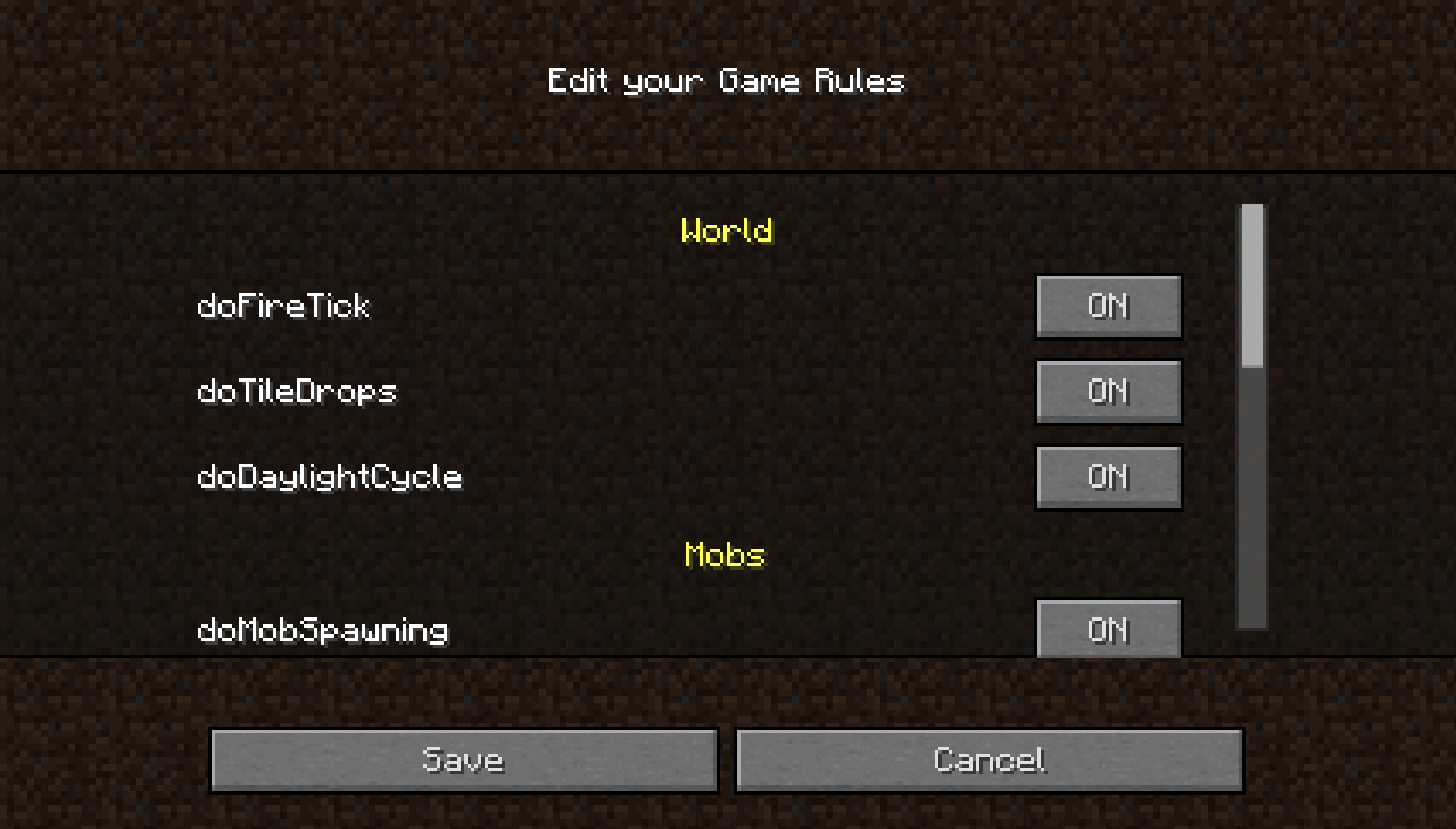
Edit gamerules directly in the UI:
No more typing /gamerule commands manually.


For the smoothest installation and updates, use the Modrinth App.
Downloads through the Modrinth App also help support the project and future development.
A companion resource pack is also provided, enhancing CreateWorldUI and ClearMyBackground with a 1.20.5+‑inspired visual style.
More detailed infomations, see here.
With the release of v4.0.0 CreateWorldUI has achieved its core goals. The mod is now maintained rather than actively developed: you can expect fixes for serious bugs and regressions, but no regular feature additions. Community contributions and pull requests are welcome.
1.7.10:
1.12.2 (One of it):
Project description from Modrinth.
Pick your setup
Choose the version and loader you play, then open the matching release.
Check the dependencies, then try the file in a copied instance before changing a world you care about.
Recent files
ModernCreateWorldUI-1.12.2-0.0.4.jar
28 Sept 2026
ModernCreateWorldUI-1.12.2-0.0.3.jar
18 Aug 2026
ModernCreateWorldUI-1.12.2-0.0.2.jar
25 Jun 2026
ModernCreateWorldUI-1.12.2-0.0.1.jar
19 Jun 2026
Looking for an older file? The official Modrinth project page is in Resources.
 mod
A lightweight Tinkers' Construct addon featuring tools, new materials, and exclusive projectile traits.
 mod
Don't let walls and fences stop you! Jump over them!
 mod
Customize Minecraft's menus with ease!