spark Optional for FabricExporter 1.0.22
optionalMatching file found Matched file: 1.10.187-fabric

Modrinth · Minecraft mod
Fabric mod that adds a Prometheus exporter with general metrics of your server
Quick answer
FabricExporter 1.0.22 targets 26.2 with Fabric. Do not install it on the client. It must be installed on the dedicated server. All 1 required mods have matching files.
Where it goes
Do not install it on the client. It must be installed on the dedicated server.
This file is marked server-only.
1.0.22. Change the file and its required mods may change too.
Install Fabric API first. We found matching files for this game-version and loader setup.
We only count dependency files that match this setup. A file for another loader does not fill the gap.
Before you install it
Built for FabricExporter 1.0.22. Pick another file and the loader, install side or required mods may change.
Use 1.0.22. It targets 26.2 with Fabric; another release may have different loader, side or dependency requirements.
Install Fabric API first. We found matching files for this game-version and loader setup.
Do not install it on the client. It must be installed on the dedicated server.
Use the “Get this file” button beside 1.0.22. It opens that exact file at the source.
About this project
Fabric mod that adds a Prometheus exporter with general metrics of your server.
It's a server-side mod that exposes metrics of your Fabric server in Prometheus format.
So, it requires you to have at least Prometheus installed to collect provided metrics.
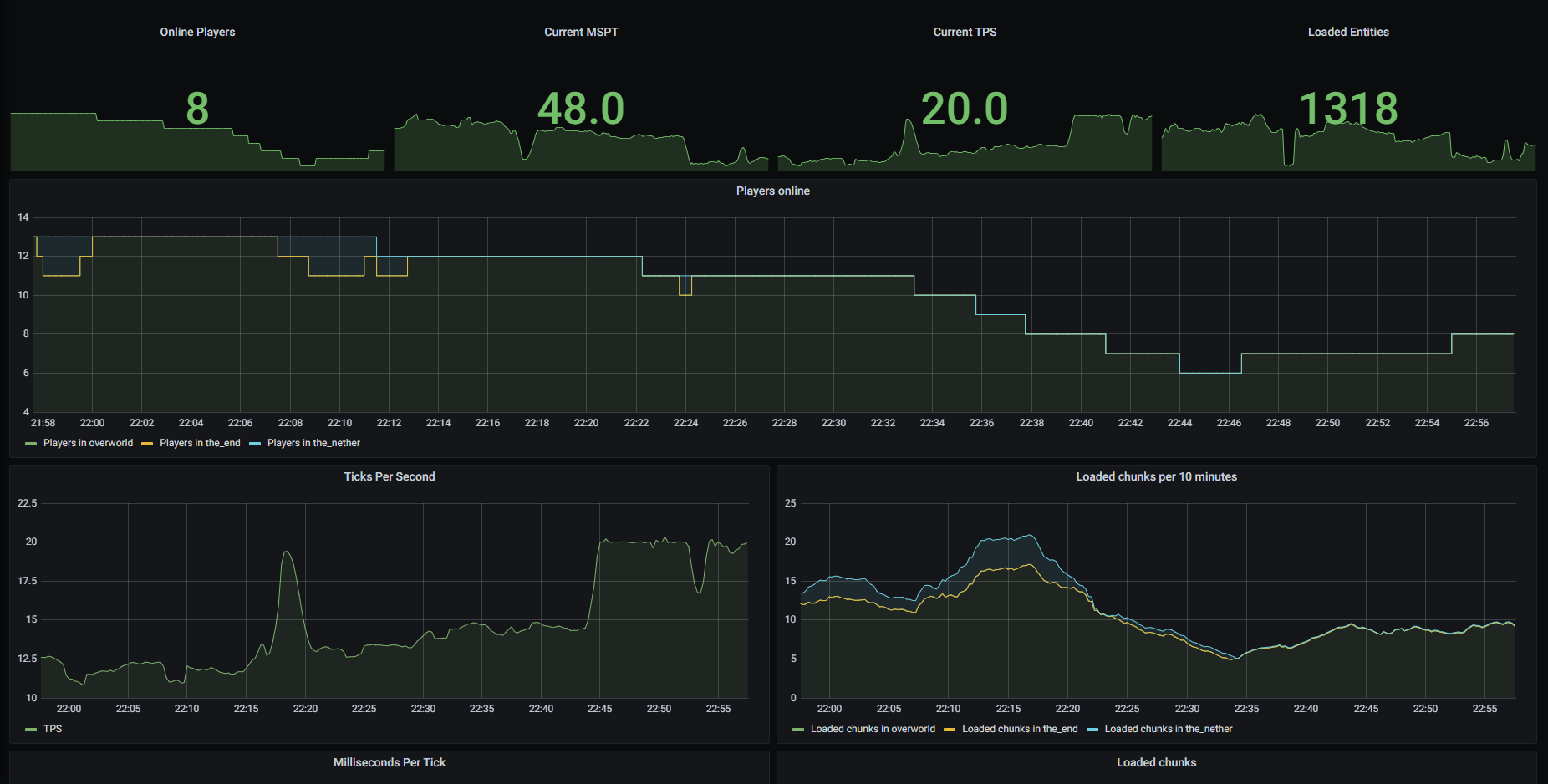
I recommend also using Grafana to visualize data.
If you want to get TPS and MSPT metrics, you should also install Spark as mod for your Fabric server.
Here is a list of metrics that are collected by FabricExporter.
You can disable any of these metrics in config.
| Prometheus name | Description | Config property | Collected by |
|---|---|---|---|
minecraft_loaded_chunks |
Amount of currently loaded chunks on server | enable-loaded-chunks |
Minecraft |
minecraft_total_loaded_chunks |
Amount of total loaded chunks on server | enable-total-loaded-chunks |
Minecraft |
minecraft_mspt |
Count of milliseconds per tick (MSPT) | enable-mspt |
Spark |
minecraft_tps |
Count of ticks per second (TPS) | enable-tps |
Spark |
minecraft_players_online |
Amount of currently online players on your server | enable-players-online |
FabricExporter |
minecraft_entities |
Amount of currently loaded entities on your server | enable-entities |
FabricExporter |
minecraft_handshakes |
Count of handshake requests | enable-handshakes |
FabricExporter |
To use this mod you should have at least Fabric server and Prometheus installed.
mods folder.config/exporter.properties, ensure that server-port value is an open port that can be accessed by your Prometheus and change it if required./etc/prometheus/prometheus.yml by default).sudo nano /etc/prometheus/prometheus.yml
scrape_configs section.127.0.0.1 with address of your server and 25585 with port specified in server-port property in exporter.properties file.- job_name: 'fabric'
static_configs:
- targets: ['127.0.0.1:25585']
sudo service prometheus restart
If you want to use Grafana, you can use my dashboard as template.
I assume that you have already created a Prometheus data source in Grafana.
So, let's import dashboard for FabricExporter.
Create -> Import tab.14492 in "Import via grafana.com" field and click "Load".After your server starts, FabricExporter will create exporter.properties file in the config folder.
You should use this file to configure the mod.
In this file you can see some general settings and metrics settings.
| Property | Description | Default value |
|---|---|---|
server-port |
Port on what the web server will listen for requests | 25585 |
update-interval |
Interval between gauge metrics updates in milliseconds | 1000 |
use-spark |
If set to false, FabricExporter will be independent from Spark |
true |
You can disable any metric that registered via MetricRegistry (all metrics by default) using exporter.properties file.
Names of properties consist of enable and metric name without prefix and _ replaced with -.
For example, if you want to disable minecraft_players_online, you should set enable-players-online to false.
You can also see list of available properties in "Exposed metrics" section.
If you can't find property for some metrics, you can manually add it.
All metrics are enabled by default.
MIT license. Read more in LICENSE
Project description from Modrinth.
Pick your setup
Choose the version and loader you play, then open the matching release.
Showing the newest 12 of 23 game versions. Older files are in the list below.
Check the dependencies, then try the file in a copied instance before changing a world you care about.
Recent files
fabricexporter-26.2-1.0.22.jar
21 Jun 2026
fabricexporter-26.1-1.0.21.jar
31 Mar 2026
fabricexporter-1.0.20.jar
23 Dec 2025
fabricexporter-1.0.19.jar
24 Oct 2025
fabricexporter-1.0.18.jar
24 Oct 2025
fabricexporter-1.0.17.jar
15 Aug 2025
fabricexporter-1.0.16.jar
2 Jul 2025
fabricexporter-1.0.15.jar
24 Jun 2025
fabricexporter-1.0.14.jar
1 Apr 2025
fabricexporter-1.0.14.jar
1 Apr 2025
fabricexporter-1.0.14.jar
4 Jan 2025
fabricexporter-1.0.13.jar
17 Dec 2024
Looking for an older file? The official Modrinth project page is in Resources.
 mod
modNot just another grave mod... Your ghost waits at your death site under a beacon of light, holding every item for a one-click restore to its original slot. Spirit Compass tracking, a 3D grave browser, mob protection, and no physical grave block to lose.
 mod
modA fully wireless item, fluid and energy transportation mod
 mod
modAllows the loading of (Neo)Forge mods in the Fabric ecosystem. Very experimental.