Minecraft version
Back to mods 
Modrinth · Minecraft mod
Slice - Radial hotbar
Turns your hotbar into a customizable radial menu.
Choose a version Pick your version below, then grab the matching file.
Quick answer
Which Slice - Radial hotbar release matches 1.8.9 Forge?
beta file 0.2.0
Game version 1.8.9
Loader Forge
Slice - Radial hotbar 0.2.0 targets 1.8.9 with Forge. It must be installed on the client. Do not install it on the dedicated server. No extra mods listed for this file.
Where it goes
Is Slice - Radial hotbar required on the client, server, or both?
It must be installed on the client. Do not install it on the dedicated server.
Client Required
Dedicated server Not supported
Loader for this release Forge
Required install it here Optional supported, not mandatory Not supported do not install here Source doesn’t say do not assume
This file is marked client-only.
What else does Slice - Radial hotbar 0.2.0 need?
0.2.0 on 1.8.9 Forge. Every mod below is checked against that same setup.
This file does not list any required mods. Do not add a library just because a different file uses it.
This file does not list any required or optional mods.
Before you install it
Add Slice - Radial hotbar without breaking your instance.
Built for Slice - Radial hotbar 0.2.0 on 1.8.9 Forge. Pick another file and the loader, install side or required mods may change.
- 01
Stick to this file
Use 0.2.0. It targets 1.8.9 with Forge; another release may have different loader, side or dependency requirements.
- 02
Bring the mods it needs
This file does not list any required mods. Do not add a library just because a different file uses it.
- 03
Put it on the correct side
It must be installed on the client. Do not install it on the dedicated server.
- 04
Pick the file you checked
Use the “Get this file” button beside 0.2.0. It opens that exact file at the source.
About this project
What does Slice - Radial hotbar add?


Features
- Flexible layout control with adjustable radius, item size, and rotation angles
- Visibility options for slots, numbers, and sprites
- Multiple interaction modes (toggle menu or click-to-select item)
- Configurable inner and outer deadzones
- Hotbar scrolling toggle
- Custom texture pack support
Screenshots
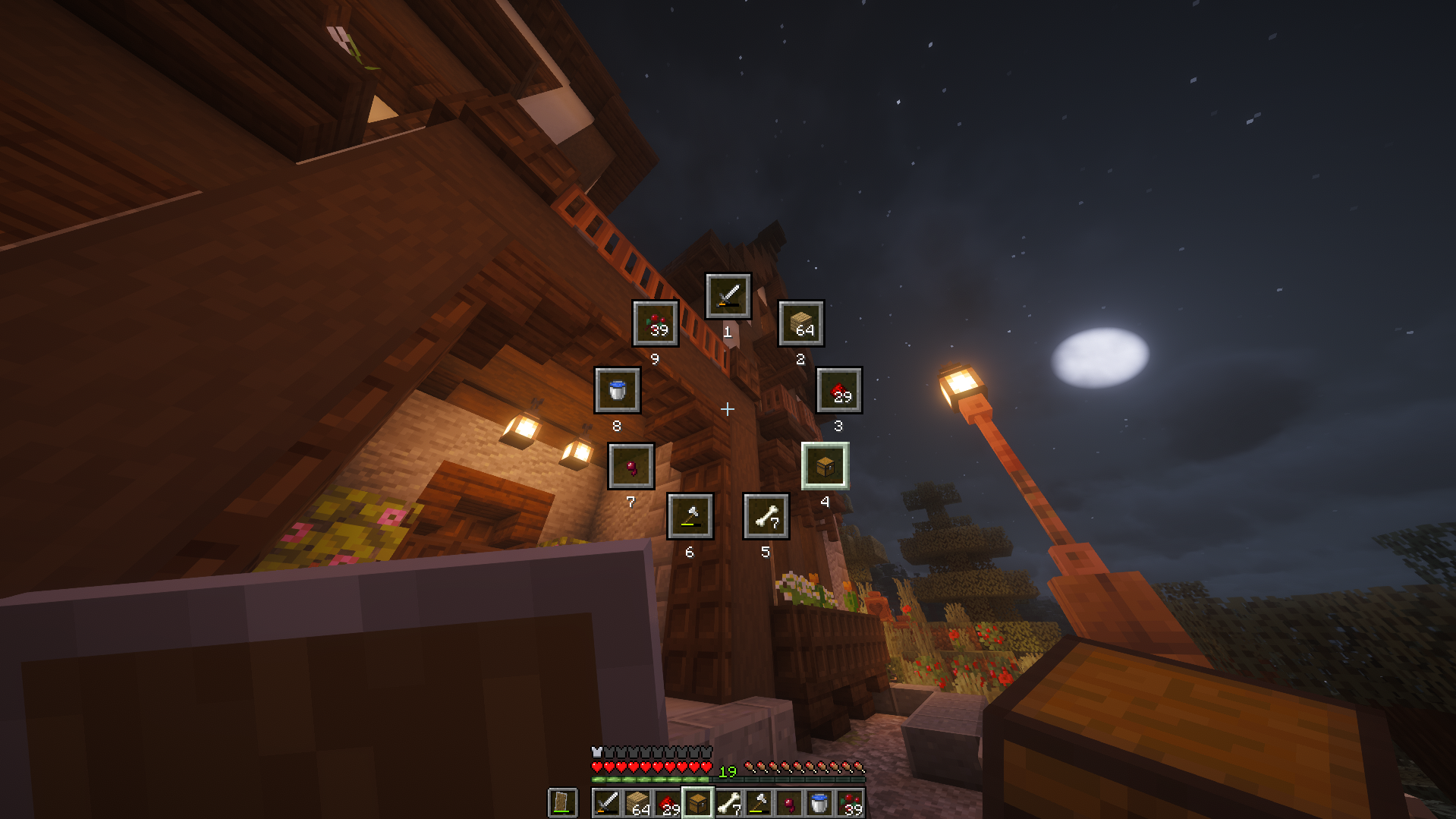
Click to watch the trailer/demo
Supported Versions
✅ - Supported, ❌ - Unsupported, 🔍 - Planned / In development, ⭐ - Long-term maintained
| Version | Loaders | Minimum required version | Latest Slice version | |
|---|---|---|---|---|
| 26.2 | ✅ |


|
26.2.0.0-beta, 65.0.0, 0.18.4 |
1.1.0 |
| 26.1.2 | ✅ |
|
26.1.2.0-beta, 64.0.0, 0.18.4 |
1.1.0 |
| 26.1.1 | ✅ |
|
26.1.1.0-beta, 63.0.1, 0.18.4 |
1.0.2 |
| 26.1 | ✅ |
|
26.1.0.1-beta, 0.18.4 |
1.0.1 |
| 1.21.11 | ✅ |

|
21.11.0, 61.0.0, 0.18.0, 0.30.0-beta |
1.0.0 |
| 1.21.10 | ✅ |
|
21.10.0, 60.0.0, 0.18.0, 0.30.0-beta |
1.0.0 |
| 1.21.9 | ✅ |
|
21.9.0, 59.0.0, 0.17.0, 0.30.0-beta |
1.0.0 |
| 1.21.8 | ❌ | |||
| 1.21.7 | ❌ | |||
| 1.21.6 | ❌ | |||
| 1.21.5 | ❌ | |||
| 1.21.4 | ❌ | |||
| 1.21.3 | ❌ | |||
| 1.21.2 | ❌ | |||
| 1.21.1 | ⭐ |
|
21.1.1, 52.1.0, 0.17.0, 0.27.0 |
1.0.0 |
| 1.21 | ❌ | |||
| 1.20.2 | ❌ | |||
| 1.20.1 | ❌ | |||
| 1.20 | ❌ | |||
| 1.19.4 | ❌ | |||
| 1.19.3 | ❌ | |||
| 1.19.2 | ❌ | |||
| 1.19.1 | ❌ | |||
| 1.19 | ❌ | |||
| 1.18.2 | ❌ | |||
| 1.18.1 | ❌ | |||
| 1.18 | ❌ | |||
| 1.17.1 | ❌ | |||
| 1.17 | ❌ | |||
| 1.16.5 | ❌ | |||
| 1.16.4 | ❌ | |||
| 1.16.3 | ❌ | |||
| 1.16.2 | ❌ | |||
| 1.16.1 | ❌ | |||
| 1.16 | ❌ | |||
| 1.15.2 | ❌ | |||
| 1.15.1 | ❌ | |||
| 1.15 | ❌ | |||
| 1.14.4 | ❌ | |||
| 1.14.3 | ❌ | |||
| 1.14.2 | ❌ | |||
| 1.14.1 | ❌ | |||
| 1.14 | ❌ | |||
| 1.13.2 | ❌ | |||
| 1.13.1 | ❌ | |||
| 1.13 | ❌ | |||
| 1.12.2 | ❌ | |||
| 1.12 | ❌ | |||
| 1.11.2 | ❌ | |||
| 1.11 | ❌ | |||
| 1.10.2 | ❌ | |||
| 1.10 | ❌ | |||
| 1.9.4 | ❌ | |||
| 1.9 | ❌ | |||
| 1.8.9 | ✅ | |
11.15.1.2318 |
0.2.0 |
| 1.8 | ❌ | |||
| 1.7.10 | ❌ |
Dependencies
NeoForge
None
Forge
None
Fabric
| Minecraft version | Minimum FabricAPI version |
|---|---|
| 26.2 | 0.152.1+26.2 |
| 26.1.2 | 0.145.4+26.1.2 |
| 26.1.1 | 0.144.0+26.1 |
| 26.1 | 0.144.0+26.1 |
| 1.21.11 | 0.139.4+1.21.11 |
| 1.21.10 | 0.134.1+1.21.10 |
| 1.21.9 | 0.133.14+1.21.9 |
| 1.21.1 | 0.102.0+1.21.1 |
Quilt
| Minecraft version | Minimum FabricAPI version |
|---|---|
| 1.21.11 | 0.139.4+1.21.11 |
| 1.21.10 | 0.134.1+1.21.10 |
| 1.21.9 | 0.133.14+1.21.9 |
| 1.21.1 | 0.102.0+1.21.1 |
How to customize/configure
 NeoForge
 offers an in-game config menu.
Main Menu > Mods > *Select Slice* > Config
 Forge
I cannot be bothered to implement a config screen for Forge. Please just edit the config file yourself.
 Modrinth
Profile > (⋮) button > Open folder > (Explorer) config > (Explorer) slice-common.toml
 Stock launcher
(File Explorer) %appdata% > .minecraft > config > slice-common.toml
Save the file and use /slice reloadClient to reload the config file.
 Fabric
Download Mod Menu and use their config menu instead.
Main Menu > Mods > *Select Slice* > -Config button next to the name-
 Quilt
Download Mod Menu and use their config menu instead.
Main Menu > Mods > *Select Slice* > -Config button next to the name-
Feedback
Feel free to send feedback on the issues page. Feature requests and bug reports are always welcome! Stars too :)
Credits
- Polyfrost Staff (Listing my mod inside their client)
- Fancy badges (Readme badges)
- Devin's badges (Readme badges)
- jaredlll08 (Multiloader template)
- JannisX11 (Blockbench)
- Ewan Howell (Minecraft title generator)
- Aseprite

Project description from Modrinth.
Pick your setup
Slice - Radial hotbar by Minecraft version and loader
Choose the version and loader you play, then open the matching release.
Minecraft version
26.1.2
3 loader buildsMinecraft version
26.1.1
3 loader buildsMinecraft version
26.1
2 loader buildsMinecraft version
1.21.11
4 loader buildsMinecraft version
1.21.10
4 loader buildsMinecraft version
1.21.9
4 loader buildsMinecraft version
1.21.1
4 loader buildsMinecraft version
1.8.9
1 loader buildCheck the dependencies, then try the file in a copied instance before changing a world you care about.
Recent files
Slice - Radial hotbar versions and loaders
0.2.0
slice-0.2.0.jar
6 Jan 2026
Client Required Server Not supported Dependencies No extras listed Listed on Release listing
Check the 1.8.9 · Forge setup 1.8.9Forge beta
0.2.0
slice-0.2.0.jar
6 Jan 2026
Client Required Server Not supported Dependencies No extras listed Listed on Release listing
Check the 1.8.9 · Forge setup 1.8.9Forge alpha
Looking for an older file? The official Modrinth project page is in Resources.