Minecraft version
Back to mods 
Modrinth · Minecraft mod
Anytag
Place tags on anything, anywhere!
Choose a version Pick your version below, then grab the matching file.
Quick answer
Which Anytag release should I use?
Latest stable file 1.0.1+mod
Game version 1.20.5, 1.20.6, 1.21
Loader Fabric, Forge, Quilt
Anytag 1.0.1+mod targets 1.20.5, 1.20.6, 1.21 with Fabric, Forge, Quilt. Installation on the client is optional. Installation on the dedicated server is optional. No extra mods listed for this file.
Where it goes
Is Anytag required on the client, server, or both?
Installation on the client is optional. Installation on the dedicated server is optional.
Client Optional
Dedicated server Optional
Loader for this release Fabric, Forge, Quilt
Required install it here Optional supported, not mandatory Not supported do not install here Source doesn’t say do not assume
The source marks this as usable on both the client and server.
What else does Anytag 1.0.1+mod need?
1.0.1+mod. Change the file and its required mods may change too.
This file does not list any required mods. Do not add a library just because a different file uses it.
This file does not list any required or optional mods.
Before you install it
Add Anytag without breaking your instance.
Built for Anytag 1.0.1+mod. Pick another file and the loader, install side or required mods may change.
- 01
Stick to this file
Use 1.0.1+mod. It targets 1.20.5, 1.20.6, 1.21 with Fabric, Forge, Quilt; another release may have different loader, side or dependency requirements.
- 02
Bring the mods it needs
This file does not list any required mods. Do not add a library just because a different file uses it.
- 03
Put it on the correct side
Installation on the client is optional. Installation on the dedicated server is optional.
- 04
Pick the file you checked
Use the “Get this file” button beside 1.0.1+mod. It opens that exact file at the source.
About this project
What does Anytag add?
Anytag Datapack (Tag Anything, Anywhere)
Have you ever wanted to place name tags on anything? Now you can! Anytag is a Minecraft Datapack which allows players to craft a special Anytag item through a simple recipe. The item is used so any player can right-click on any block with the item in their hand, which will then place flying text where the player is pointing at and simultaneously consume itself.
Crafting
The recipe for crafting the Anytag item is simple. You just need a name tag and a sign of any kind (Dark oak sign, Oak sign, Spruce sign, etc.) and place them in this order:
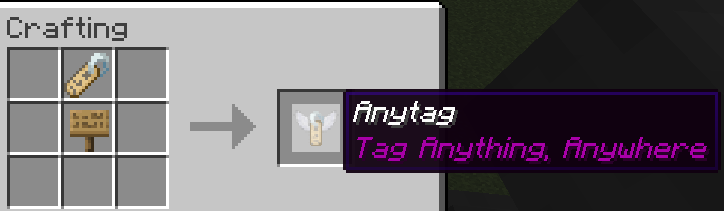
You can rename the Anytag item according to your desires.
Usage
Here is a short depiction of how the Anytag item is crafted and used:
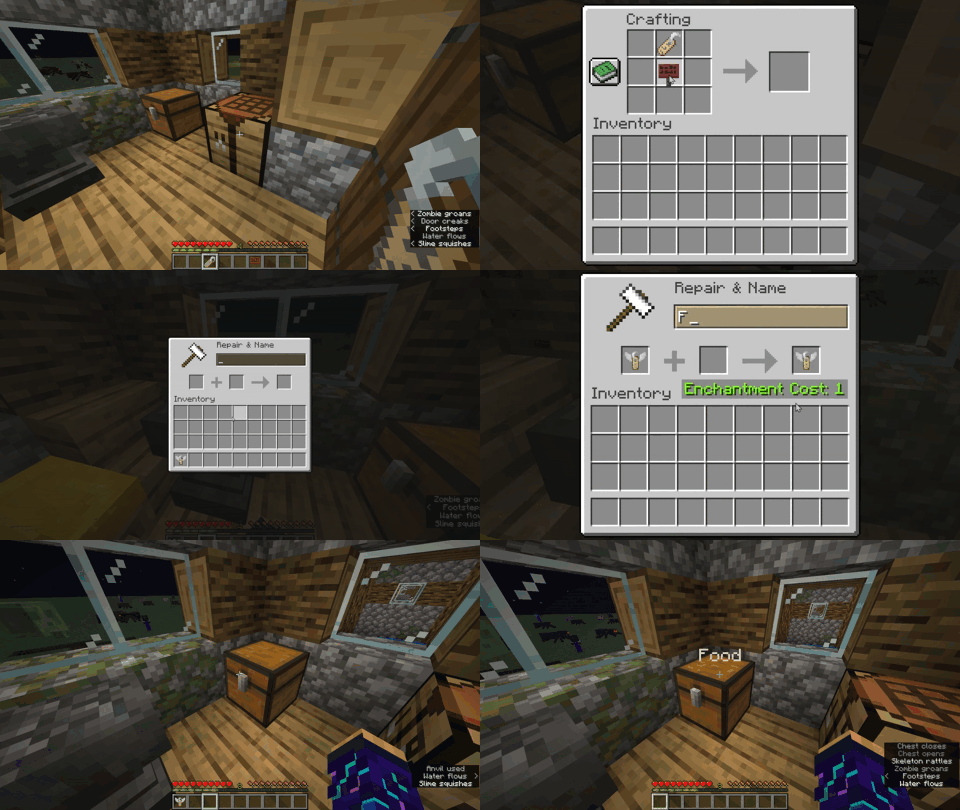
Right-clicking the Anytag item on any block will place flying text with the custom name of Anytag item.
Right-clicking in the middle of flying text will remove the text and drop the previously used Anytag item.
Left-clicking in the middle of flying text will remove the text and drop the name tag item instead of the Anytag item.
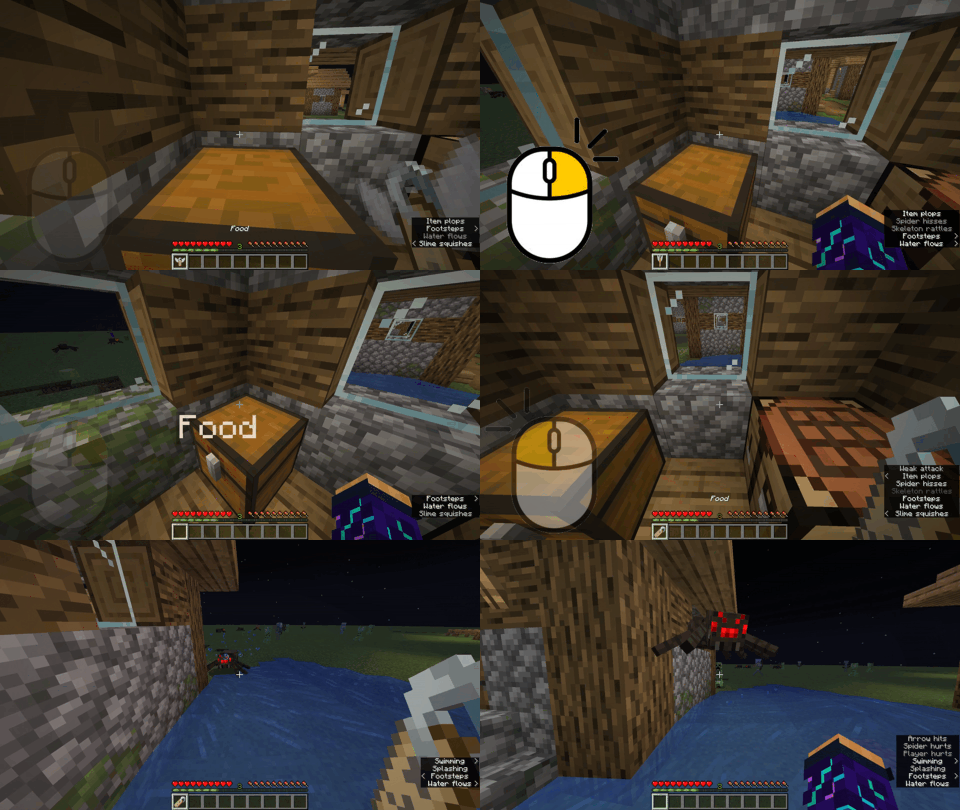
Try pressing
F3 + Bin-game to see the hitbox of the floating text.

Project description from Modrinth.
Pick your setup
Anytag by Minecraft version and loader
Choose the version and loader you play, then open the matching release.
Minecraft version
1.20.6
4 loader buildsMinecraft version
1.20.5
4 loader buildsMinecraft version
1.20.4
4 loader buildsMinecraft version
1.20.3
4 loader buildsMinecraft version
1.20.2
4 loader buildsMinecraft version
1.20.1
4 loader buildsMinecraft version
1.20
4 loader buildsMinecraft version
1.19.4
4 loader buildsCheck the dependencies, then try the file in a copied instance before changing a world you care about.
Recent files
Anytag versions and loaders
1.0.1+mod
anytag-1.0.1.jar
14 Jun 2024
Client Optional Server Optional Dependencies No extras listed Listed on Release listing
Check the 1.21 · Fabric setup 1.20.51.20.61.21Fabric release
1.0.1
Anytag [v1.0.1].zip
14 Jun 2024
Client Optional Server Optional Dependencies No extras listed Listed on Release listing
Check the 1.21 · datapack setup 1.20.51.20.61.21datapack release
1.0.0+mod
anytag-1.0.0.jar
28 May 2024
Client Optional Server Optional Dependencies No extras listed Listed on Release listing
Check the 1.19.4 · Fabric setup 1.19.4FabricForgeQuilt release
1.0.0
Anytag Datapack [v1.0.0].zip
28 May 2024
Client Optional Server Optional Dependencies No extras listed Listed on Release listing
Check the 1.19.4 · datapack setup 1.19.4datapack release
1.0.0+mod
anytag-1.0.0.jar
28 May 2024
Client Optional Server Optional Dependencies No extras listed Listed on Release listing
Check the 1.20.4 · Fabric setup 1.201.20.11.20.21.20.3 release
1.0.0
Anytag Datapack [v1.0.0].zip
28 May 2024
Client Optional Server Optional Dependencies No extras listed Listed on Release listing
Check the 1.20.4 · datapack setup 1.201.20.11.20.21.20.3 release
1.0.0+mod
anytag-1.0.0.jar
28 May 2024
Client Optional Server Optional Dependencies No extras listed Listed on Release listing
Check the 1.20.6 · Fabric setup 1.20.51.20.6FabricForge release
1.0.0
Anytag Datapack [v1.0.0].zip
23 May 2024
Client Optional Server Optional Dependencies No extras listed Listed on Release listing
Check the 1.20.6 · datapack setup 1.20.51.20.6datapack release
Looking for an older file? The official Modrinth project page is in Resources.
 mod
mod CurseForge + Modrinth · Minecraft
OcelotSign
A MishangUC traffic expansion mod featuring standard Chinese mainland road signs, custom sign blocks with pillars, and road markings for realistic city building.
 mod
mod CurseForge + Modrinth · Minecraft
I'm Fast
A mod to remove minecraft moved too quickly! and moved wrongly (speed limits)
 mod
mod Modrinth · Minecraft
Create carpentry
allows you to build whit more realism whit create!