Fabric API Needed by WaxyVision 1.1.1+mc26.3
requiredMatching file found Matched file: 0.166.2+26.3
Modrinth · Minecraft mod
Highlight waxed copper blocks when holding honeycomb
Quick answer
WaxyVision 1.1.1+mc26.3 targets 26.3, 26.3-rc-3 with Fabric. Installation on the client is optional. Installation on the dedicated server is optional. All 1 required mods have matching files.
Where it goes
Installation on the client is optional. Installation on the dedicated server is optional.
The source marks this as usable on both the client and server.
1.1.1+mc26.3. Change the file and its required mods may change too.
Install Fabric API first. We found matching files for this game-version and loader setup.
We only count dependency files that match this setup. A file for another loader does not fill the gap.
Before you install it
Built for WaxyVision 1.1.1+mc26.3. Pick another file and the loader, install side or required mods may change.
Use 1.1.1+mc26.3. It targets 26.3, 26.3-rc-3 with Fabric; another release may have different loader, side or dependency requirements.
Install Fabric API first. We found matching files for this game-version and loader setup.
Installation on the client is optional. Installation on the dedicated server is optional.
Use the “Get this file” button beside 1.1.1+mc26.3. It opens that exact file at the source.
About this project
WaxyVision adds a highlight overlay to waxed blocks that only appears when holding a honeycomb.
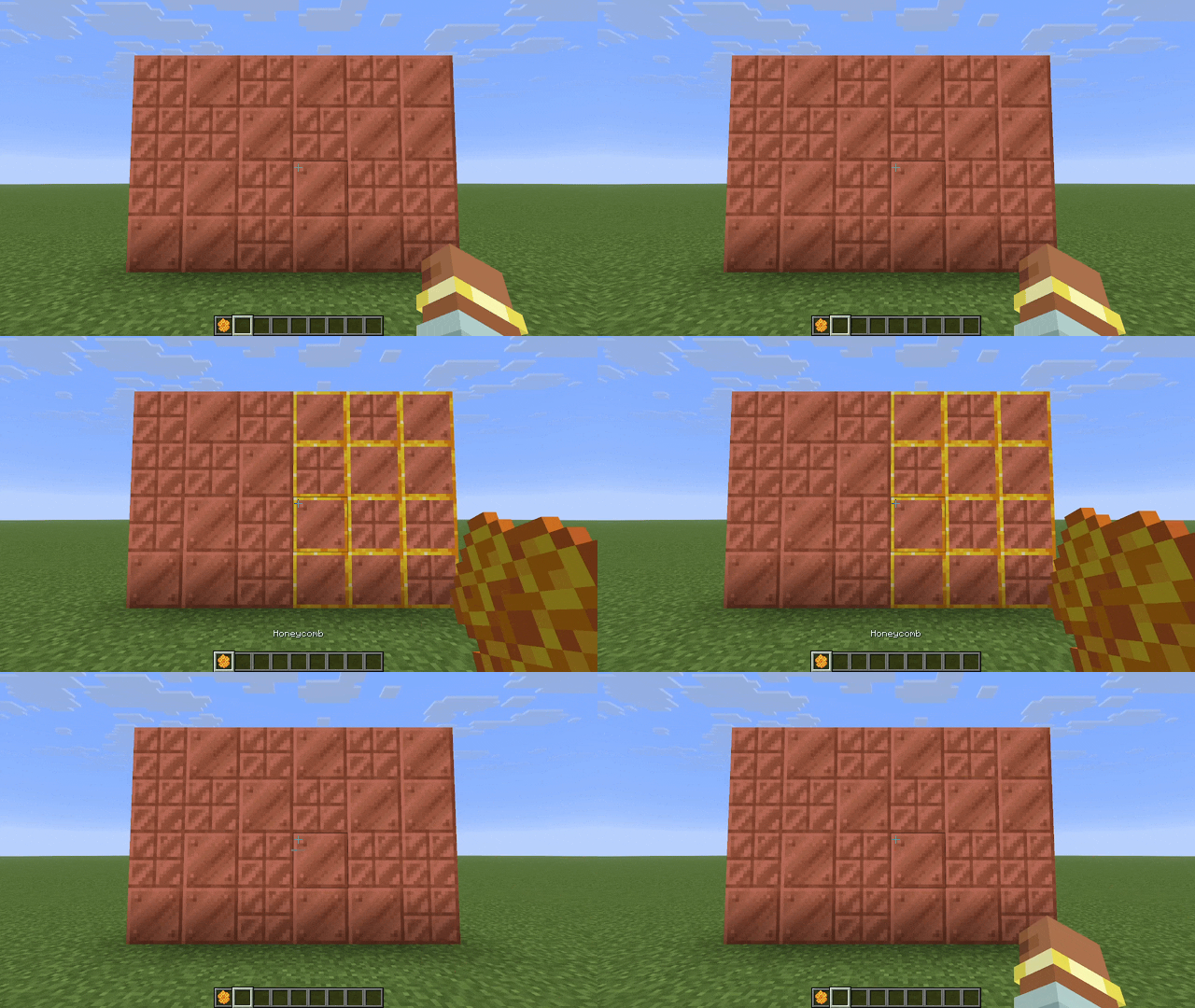
It works on all vanilla waxed copper blocks, as well as copper golems and signs if installed on the server. The behavior is similar to barriers and light blocks, but unlike barriers and light blocks the overlay appears and disappears instantly.
This mod is mostly client-side, however the vanilla server does not tell clients if signs or active copper golems are waxed. Installing the mod on the server will allow displaying waxed signs & copper golems. This will not prevent vanilla clients from joining the server.
Through configuration you can turn the mod on & off, show the overlay even when not holding a honeycomb, and change which items cause the overlay. You can also set keybinds to toggle these settings. Install McQoy for a config GUI and find the keybinds in the keybinds menu.
The config file is located at config/waxyvision.toml
| Option | Type | Default | Description |
|---|---|---|---|
enabled |
boolean | true |
Turns the mod on & off Can be controlled with a keybind |
requireItem |
boolean | true |
If the wax overlay should only appear when the right item is held Can be controlled with a keybind |
waxItems |
item id list | ["minecraft:honeycomb"] |
Which items should cause the wax overlay to appear Invalid item ids will be ignored |
WaxyVision contains native support for these mods:
Support for other mods can be requested on GitHub or added via resourcepack.
Most of the overlays are controlled by resourcepack. See the wiki for a description of the format and the source code for examples.
Entities & block entity renderers are hardcoded and cannot be controlled by resourcepack. This includes:
⚠️ Known issue: block overlays do not work when Modern Fix Dynamic Resources is enabled, and copper golem overlays will not work when Dynamic Entity Rendering is enabled. Copper golems statue overlays will not work with Better Block Entities.
This mod was inspired by a YouTube comment, sadly I cannot remember which video or user it was. The design was inspired by Vanilla Tweaks' Visual Waxed Copper resourcepack.
WaxyVision does not endorse tax evasion
Project description from Modrinth.
Pick your setup
Choose the version and loader you play, then open the matching release.
Check the dependencies, then try the file in a copied instance before changing a world you care about.
Recent files
waxyvision-1.1.1+mc26.3.jar
15 Sept 2026
waxyvision-1.1.1+mc26.1.2.jar
13 Jun 2026
waxyvision-1.1.1+mc26.2.jar
13 Jun 2026
waxyvision-1.1.0+mc26.1.2.jar
13 May 2026
waxyvision-1.0.0+mc26.1.2.jar
12 May 2026
Looking for an older file? The official Modrinth project page is in Resources.
 mod
A suite of integration and compatibility patches for Thermoo-based mods (including Frostiful and Scorchful) and other mods
 mod
Animation studio and content creation tool
 mod
Shows a targeted player's live ping for five seconds after you hit them.