Minecraft version
Back to mods 
CurseForge · Minecraft mod
Clutter No More
Fixes the game's inventory clutter problem by unifying Stairs and Slabs into a single block: Transform your full blocks into other shapes with the press of a keybind!
Choose a version Pick your version below, then grab the matching file.
Quick answer
Which Clutter No More release should I use?
Latest stable file Clutter No More 3.1.1 for 26.3 Neoforge
Game version 26.3
Loader NeoForge
Clutter No More 3.1.1 for 26.3 Neoforge targets 26.3 with NeoForge. The project page does not say whether this file belongs on the client, dedicated server, or both. No extra mods listed for this file.
Where it goes
Is Clutter No More required on the client, server, or both?
The project page does not say whether this file belongs on the client, dedicated server, or both.
Client Source doesn’t say
Dedicated server Source doesn’t say
Loader for this release NeoForge
Required install it here Optional supported, not mandatory Not supported do not install here Source doesn’t say do not assume
The source does not explicitly classify this release as client-only or server-only.
What else does Clutter No More 3.1.1 for 26.3 Neoforge need?
Clutter No More 3.1.1 for 26.3 Neoforge. Change the file and its required mods may change too.
This file does not list any required mods. Do not add a library just because a different file uses it.
This file does not list any required or optional mods.
Before you install it
Add Clutter No More without breaking your instance.
Built for Clutter No More 3.1.1 for 26.3 Neoforge. Pick another file and the loader, install side or required mods may change.
- 01
Stick to this file
Use Clutter No More 3.1.1 for 26.3 Neoforge. It targets 26.3 with NeoForge; another release may have different loader, side or dependency requirements.
- 02
Bring the mods it needs
This file does not list any required mods. Do not add a library just because a different file uses it.
- 03
Put it on the correct side
The project page does not say whether this file belongs on the client, dedicated server, or both.
- 04
Pick the file you checked
Use the “Get this file” button beside Clutter No More 3.1.1 for 26.3 Neoforge. It opens that exact file at the source.
About this project
What does Clutter No More add?
About Clutter No More
No more will your inventory be filled with a thousand slabs and stairs. All you need is a single block. By pressing [Left Alt], you will be able to change a held block's shape into Stairs, Slabs, or even new shapes, such as Vertical Slabs and Steps! No more crafting, no more inventory filling - everything merges with eachother as if they were the same item, and their shape can be changed always, whenever, both when handheld and when in your inventory.
It's quick, and solves the game's inventory clutter problems, a Builder's Best Friend.
Features:
Shape Changing

Automatic Merging
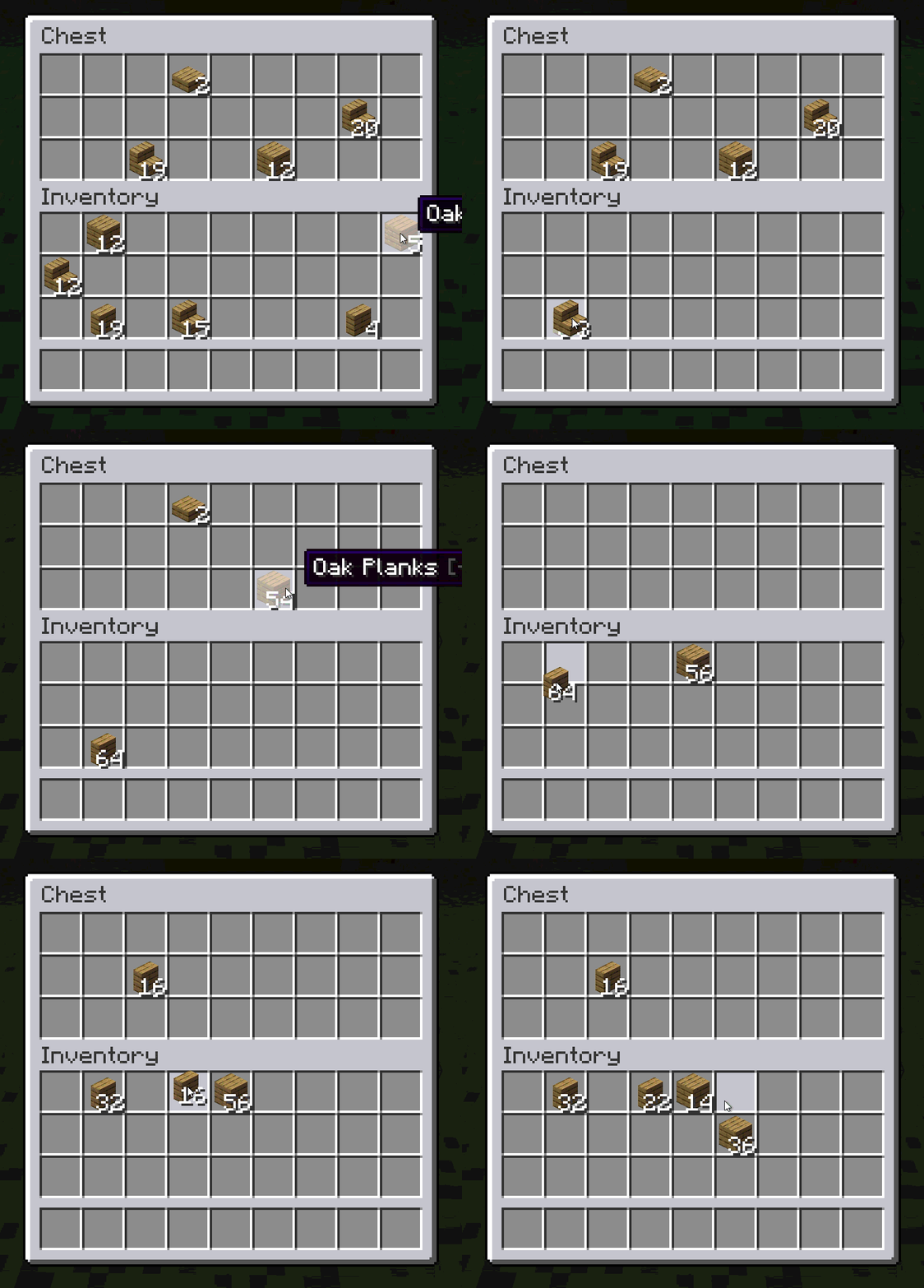
New shapes: Vertical Slabs and Steps
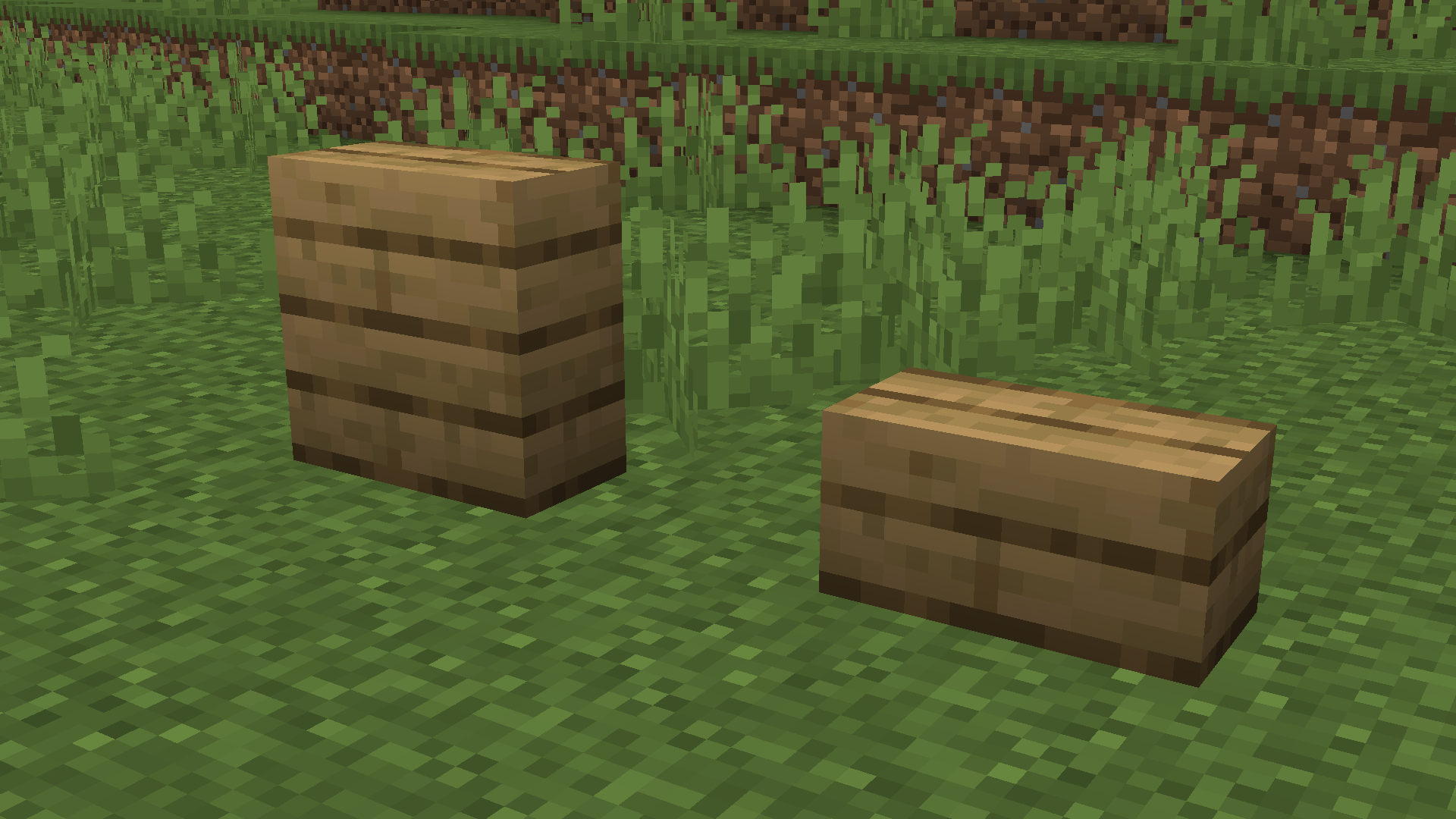
Vertical Stairs and Vertical Steps are also added, but must be enabled in config/clutternomore/startup.toml
Accessibility
Clutter No More also includes various accessibility settings found in the game's options menu or in config/clutternomore/client.toml
More
If you like this mod, have feedback for us, or just want to join our community, then join our Discord!
For another mod that enhances the building experience, check out Offgrid!
Project description from CurseForge.
Pick your setup
Clutter No More by Minecraft version and loader
Choose the version and loader you play, then open the matching release.
Minecraft version
26.2
2 loader buildsMinecraft version
26.1.2
2 loader buildsMinecraft version
1.21.1
2 loader buildsMinecraft version
1.21
2 loader buildsMinecraft version
1.20.1
2 loader buildsCheck the dependencies, then try the file in a copied instance before changing a world you care about.
Recent files
Clutter No More versions and loaders
Clutter No More 3.1.1 for 26.3 Neoforge
clutternomore-neoforge-3.1.1-26.3.jar
1 Nov 2026
Client Source doesn’t say Server Source doesn’t say Dependencies No extras listed Listed on Release listing
Check the 26.3 · NeoForge setup NeoForge26.3 release
Clutter No More 3.1.1 for 26.3 Fabric
clutternomore-fabric-3.1.1-26.3.jar
1 Nov 2026
Client Source doesn’t say Server Source doesn’t say Dependencies 2 required · 2 unchecked Listed on Release listing
Check the 26.3 · Fabric setup Fabric26.3 release
Clutter No More 3.1.1 for 26.2 Neoforge
clutternomore-neoforge-3.1.1-26.2.jar
1 Nov 2026
Client Source doesn’t say Server Source doesn’t say Dependencies No extras listed Listed on Release listing
Check the 26.2 · NeoForge setup NeoForge26.2 release
Clutter No More 3.1.1 for 26.2 Fabric
clutternomore-fabric-3.1.1-26.2.jar
1 Nov 2026
Client Source doesn’t say Server Source doesn’t say Dependencies 2 required · 2 unchecked Listed on Release listing
Check the 26.2 · Fabric setup Fabric26.2 release
Clutter No More 3.1.1 for 26.1.2 Neoforge
clutternomore-neoforge-3.1.1-26.1.2.jar
1 Nov 2026
Client Source doesn’t say Server Source doesn’t say Dependencies No extras listed Listed on Release listing
Check the 26.1.2 · NeoForge setup NeoForge26.1.2 release
Clutter No More 3.1.1 for 26.1.2 Fabric
clutternomore-fabric-3.1.1-26.1.2.jar
1 Nov 2026
Client Source doesn’t say Server Source doesn’t say Dependencies 2 required · 2 unchecked Listed on Release listing
Check the 26.1.2 · Fabric setup Fabric26.1.2 release
Clutter No More 3.1.1 for 1.21.1 Neoforge
clutternomore-neoforge-3.1.1-1.21.1.jar
1 Nov 2026
Client Source doesn’t say Server Source doesn’t say Dependencies No extras listed Listed on Release listing
Check the 1.21.1 · NeoForge setup 1.211.21.1NeoForge release
Clutter No More 3.1.1 for 1.21.1 Fabric
clutternomore-fabric-3.1.1-1.21.1.jar
1 Nov 2026
Client Source doesn’t say Server Source doesn’t say Dependencies 2 required · 2 unchecked Listed on Release listing
Check the 1.21.1 · Fabric setup 1.21Fabric1.21.1 release
Clutter No More 3.1.1 for 1.20.1 Forge
clutternomore-forge-3.1.1-1.20.1.jar
1 Nov 2026
Client Source doesn’t say Server Source doesn’t say Dependencies No extras listed Listed on Release listing
Check the 1.20.1 · Forge setup 1.20.1Forge release
Clutter No More 3.1.1 for 1.20.1 Fabric
clutternomore-fabric-3.1.1-1.20.1.jar
1 Nov 2026
Client Source doesn’t say Server Source doesn’t say Dependencies 2 required · 2 unchecked Listed on Release listing
Check the 1.20.1 · Fabric setup Fabric1.20.1 release
Clutter No More 3.1.0 for 26.3 Neoforge
clutternomore-neoforge-3.1.0+26.3.jar
28 Oct 2026
Client Source doesn’t say Server Source doesn’t say Dependencies No extras listed Listed on Release listing
Check the 26.3 · NeoForge setup NeoForge26.3 release
Clutter No More 3.1.0 for 26.3 Fabric
clutternomore-fabric-3.1.0+26.3.jar
28 Oct 2026
Client Source doesn’t say Server Source doesn’t say Dependencies 2 required · 2 unchecked Listed on Release listing
Check the 26.3 · Fabric setup Fabric26.3 release
Looking for an older file? The official CurseForge project page is in Resources.
 mod
mod Modrinth · Minecraft
Embers and Icicles
An expansion on Fire and Ice, featuring status effects for Burning and Freezing and backports from 26.4.
 mod
mod CurseForge + Modrinth · Minecraft
Energized Power
A technology NeoForge/Fabric mod with many machines.
 mod
mod CurseForge · Minecraft
Magic Mirrors
Magic Mirrors adds new items that consume XP to teleport the player to spawn, or last death location.