Fabric API Needed by ShadowCrates 2.3
requiredMatching file found Matched file: 0.116.18+1.21.1

Modrinth · Minecraft mod
It is a mod that implements the ability to add Crates System on fabric servers. And it has special support for cobblemon items display.
Quick answer
ShadowCrates 2.3 targets 1.21, 1.21.1, 1.21.2 with Fabric. Do not install it on the client. It must be installed on the dedicated server. All 4 required mods have matching files.
Where it goes
Do not install it on the client. It must be installed on the dedicated server.
This file is marked server-only.
2.3. Change the file and its required mods may change too.
Install Fabric API, LuckPerms, Fabric Language Kotlin, Text Placeholder API first. We found matching files for this game-version and loader setup.
We only count dependency files that match this setup. A file for another loader does not fill the gap.
Before you install it
Built for ShadowCrates 2.3. Pick another file and the loader, install side or required mods may change.
Use 2.3. It targets 1.21, 1.21.1, 1.21.2 with Fabric; another release may have different loader, side or dependency requirements.
Install Fabric API, LuckPerms, Fabric Language Kotlin, Text Placeholder API first. We found matching files for this game-version and loader setup.
Do not install it on the client. It must be installed on the dedicated server.
Use the “Get this file” button beside 2.3. It opens that exact file at the source.
About this project
ShadowCrates is a fully customizable Crate System for Minecraft Fabric servers. It allows server administrators to create, configure, and manage crates that players can open using special crate keys. With customizable animations, sounds, and rewards!
/config/shadowcrates/backups/, with JSON restore support./crate create <name> ➜ Create a new crate./crate delete <name> ➜ Delete an existing crate./crate reload ➜ Reload all config files./crate set <name> ➜ Set crate on targeted block./crate unset <name> ➜ Remove crate from block./crate key give <crate> <amt> <player> ➜ Give virtual or physical keys./crate key storage ➜ View your stored keys./crate storage ➜ Claim prizes stored items./crate clearstorage <player> ➜ Deleting items from storage./crate backup now ➜ Manually create a backup./crate backup restore ➜ Restore from the latest backup./crate key clear <player> ➜ Clear keys for player./crate key count <player> <crate> ➜ See stored key count./crate key giveall <amount> <player> ➜ Give all keys to a player.crate.create ➜ for /crate createcrate.delete ➜ for /crate deletecrate.reload ➜ for /crate reloadcrate.set ➜ for /crate setcrate.unset ➜ for /crate unsetcrate.storage ➜ for /crate storagecrate.clearstorage ➜ for /crate clearstoragecrate.key.give ➜ for /crate key givecrate.key.storage ➜ for /crate key storagecrate.key.clear ➜ for /crate key clearcrate.key.count ➜ for /crate key countcrate.key.giveall ➜ for /crate key giveallcrate.backup ➜ for /crate backup now & /crate backup restoreList of animation formats for opening crate:
defaultinstantcsgoslotsvortexwheelpickmeteorList of animation formaats for idle particles:
orbitdual_orbitringpulsespiralspringflowerstarraysrainstacksparklemeteor_rainring_verticalburstcomet📁/config/shadowcrates/config.json
– General settings, messages, and toggles.
📁/config/shadowcrates/crates/*.json
– Crate definitions including items, commands, probabilities, and keys.
📁/config/shadowcrates/menu_preview.json
– Preview GUI configuration.
📁/config/shadowcrates/menu_storage.json
– Crate reward storage GUI.
📁/config/shadowcrates/menu_key_storage.json
– Virtual key storage GUI.
📁/config/shadowcrates/data/
– Stores crate block locations.
📁/config/shadowcrates/backups/
– Auto/manual backup folders
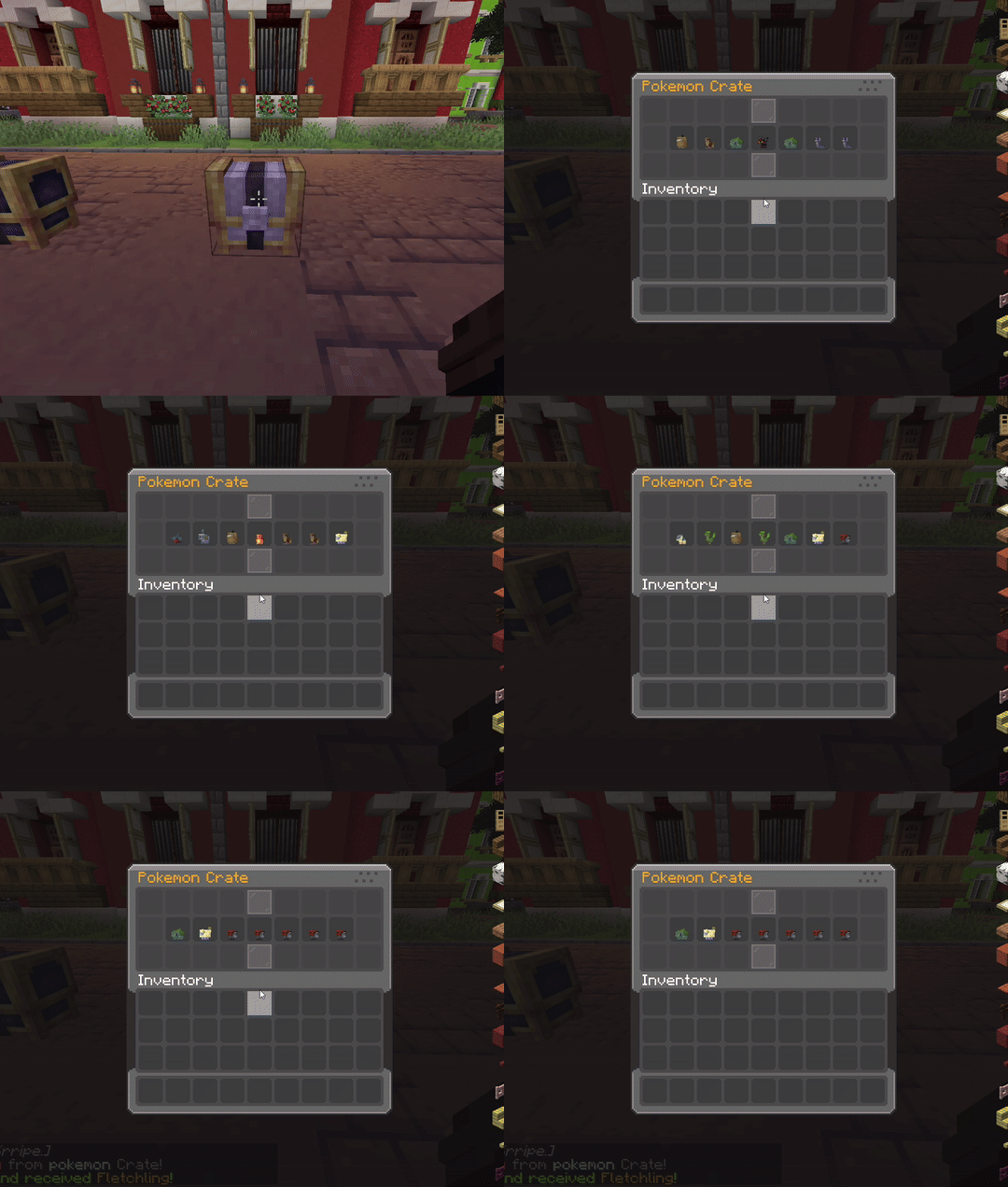
Project description from Modrinth.
Pick your setup
Choose the version and loader you play, then open the matching release.
Check the dependencies, then try the file in a copied instance before changing a world you care about.
Recent files
ShadowCrates-2.3.jar
3 Jan 2026
ShadowCrates-2.2.jar
20 Jun 2025
ShadowCrates-2.1.jar
5 Jun 2025
ShadowCrates-2.0.jar
1 May 2025
ShadowCrates-1.0.jar
18 Apr 2025
ShadowCrates-1.0.jar
11 Apr 2025
Looking for an older file? The official Modrinth project page is in Resources.
 mod
Enhances vanilla wolves with unique personalities (Aggressive, Pacifist, Normal), smarter AI, safety behaviors, and combat improvements.
 mod
Don't skip the night—speed it up. A seamless, simulation-preserving sleep overhaul for Minecraft.
 mod
The custom mod used in the VillageCraft 3 Modpack.