Minecraft version
Back to mods 
Modrinth · Minecraft mod
NightVision
Turn on night vision with a hotkey
Choose a version Pick your version below, then grab the matching file.
Quick answer
Which NightVision release should I use?
Latest stable file 1.2
Game version 26.1.2, 26.2
Loader Fabric, NeoForge
NightVision 1.2 targets 26.1.2, 26.2 with Fabric, NeoForge. It must be installed on the client. Do not install it on the dedicated server. No extra mods listed for this file.
Where it goes
Is NightVision required on the client, server, or both?
It must be installed on the client. Do not install it on the dedicated server.
Client Required
Dedicated server Not supported
Loader for this release Fabric, NeoForge
Required install it here Optional supported, not mandatory Not supported do not install here Source doesn’t say do not assume
This file is marked client-only.
What else does NightVision 1.2 need?
1.2. Change the file and its required mods may change too.
This file does not list any required mods. Do not add a library just because a different file uses it.
This file does not list any required or optional mods.
Before you install it
Add NightVision without breaking your instance.
Built for NightVision 1.2. Pick another file and the loader, install side or required mods may change.
- 01
Stick to this file
Use 1.2. It targets 26.1.2, 26.2 with Fabric, NeoForge; another release may have different loader, side or dependency requirements.
- 02
Bring the mods it needs
This file does not list any required mods. Do not add a library just because a different file uses it.
- 03
Put it on the correct side
It must be installed on the client. Do not install it on the dedicated server.
- 04
Pick the file you checked
Use the “Get this file” button beside 1.2. It opens that exact file at the source.
About this project
What does NightVision add?
NightVision
A simple mod that allows you to turn night vision on and off with the press of a key.

This mod essentially enables the same lightmaps that are used for the real Night Vision effect without actually getting the effect. As a result, this mod is a completely client-side mod and requires no server installation.
Certainly, it's not recommended for normal play, but it is extremely useful when doing creative work and exploring worlds in spectator mode (or creative no-clip mode in the Carpet mod). It allows you to see the entire cave network at once.
The key (default is N) can be changed in the Miscellaneous section of the Controls settings.
The hotkey is set in the Controls settings under Miscellaneous. The default key is N.
Starting in 1.0.5 this should now work correctly even with a shader installed (tested with Sodium/Iris/Complementary Reimagined)
Project description from Modrinth.
Pick your setup
NightVision by Minecraft version and loader
Choose the version and loader you play, then open the matching release.
Minecraft version
26.1.2
2 loader buildsMinecraft version
1.21
2 loader buildsMinecraft version
1.20.4
2 loader buildsMinecraft version
1.20.3
2 loader buildsMinecraft version
1.20.2
2 loader buildsMinecraft version
1.20.1
2 loader buildsMinecraft version
1.20
2 loader buildsMinecraft version
1.19.4
2 loader buildsMinecraft version
1.19.3
2 loader buildsMinecraft version
1.19.2
2 loader buildsMinecraft version
1.19.1
2 loader buildsShowing the newest 12 of 13 game versions. Older files are in the list below.
Check the dependencies, then try the file in a copied instance before changing a world you care about.
Recent files
NightVision versions and loaders
1.2
nightvision-mod-1.2.jar
6 Aug 2026
Client Required Server Not supported Dependencies No extras listed Listed on Release listing
Check the 26.2 · Fabric setup 26.1.226.2FabricNeoForge release
1.1
nightvision-mod-1.1.jar
2 Jul 2024
Client Required Server Not supported Dependencies 1 required · 1 unchecked Listed on Release listing
Check the 1.21 · Fabric setup 1.21FabricNeoForge release
1.0.6
nightvision-mod-1.0.6.jar
6 Jan 2024
Client Required Server Not supported Dependencies No extras listed Listed on Release listing
Check the 1.20.4 · Fabric setup 1.191.19.11.19.21.19.3 release
1.0.5
nightvision-mod-1.0.5.jar
14 Dec 2023
Client Required Server Not supported Dependencies No extras listed Listed on Release listing
Check the 1.20.4 · Fabric setup 1.191.19.11.19.21.19.3 release
1.0.4
nightvision-mod-1.0.4.jar
10 Dec 2023
Client Required Server Not supported Dependencies No extras listed Listed on Release listing
Check the 1.20.4 · Fabric setup 1.201.20.11.20.21.20.3 release
1.0.3
nightvision-mod-1.0.3.jar
24 Nov 2023
Client Required Server Not supported Dependencies No extras listed Listed on Release listing
Check the 1.20.2 · Fabric setup 1.201.20.11.20.2Fabric release
1.0.2
nightvision-1.0.2.jar
8 Jun 2023
Client Required Server Not supported Dependencies 1 required · 1 unchecked Listed on Release listing
Check the 1.20.2 · Fabric setup 1.201.20.11.20.2Fabric release
1.0.1
nightvision-1.0.1.jar
27 Jul 2022
Client Required Server Not supported Dependencies 1 required · 1 unchecked Listed on Release listing
Check the 1.19.1 · Fabric setup 1.191.19.1Fabric release
1.0
nightvision-1.0.jar
16 Jul 2022
Client Required Server Not supported Dependencies No extras listed Listed on Release listing
Check the 1.19 · Fabric setup 1.19Fabric release
Looking for an older file? The official Modrinth project page is in Resources.
 mod
mod CurseForge + Modrinth · Minecraft
ClipChat
A clipboard manager that lives inside the Minecraft chat screen. Open chat, click an entry, and it is inserted at your cursor : no alt-tabbing to find that message, coordinate or command again.
 mod
mod CurseForge + Modrinth · Minecraft
Virtual Redstone Wire (虚拟红石线缆)
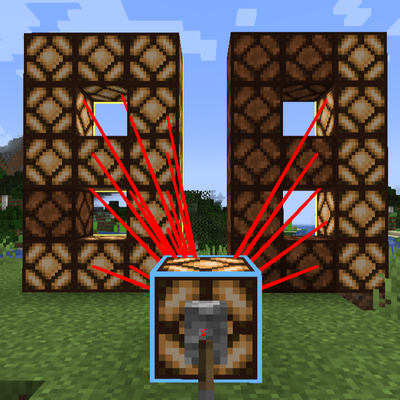
A Minecraft mod for long-distance redstone signal transmission that does not rely on physical redstone blocks, supporting one-to-one, one-to-many, and many-to-one connections.
 mod
mod CurseForge + Modrinth · Minecraft
Aroma Affect
There is something missing in Minecraft. You can see the world, you can hear it, but you've never truly sensed it.