YetAnotherConfigLib (YACL) Needed by Inspect Animations 0.2.7-neoforge+26.3
requiredMatching file found Matched file: 3.9.7+26.3-neoforge

Modrinth · Minecraft mod
Inspect your items with cool animations!
Quick answer
Inspect Animations 0.2.7-neoforge+26.3 targets 26.3 with NeoForge. Installation on the client is optional. Installation on the dedicated server is optional. All 1 required mods have matching files.
Where it goes
Installation on the client is optional. Installation on the dedicated server is optional.
The source marks this as usable on both the client and server.
0.2.7-neoforge+26.3. Change the file and its required mods may change too.
Install YetAnotherConfigLib (YACL) first. We found matching files for this game-version and loader setup.
We only count dependency files that match this setup. A file for another loader does not fill the gap.
Before you install it
Built for Inspect Animations 0.2.7-neoforge+26.3. Pick another file and the loader, install side or required mods may change.
Use 0.2.7-neoforge+26.3. It targets 26.3 with NeoForge; another release may have different loader, side or dependency requirements.
Install YetAnotherConfigLib (YACL) first. We found matching files for this game-version and loader setup.
Installation on the client is optional. Installation on the dedicated server is optional.
Use the “Get this file” button beside 0.2.7-neoforge+26.3. It opens that exact file at the source.
About this project
Inspect Animations adds new animations for items, inspired by the inspect feature from counterstrike.
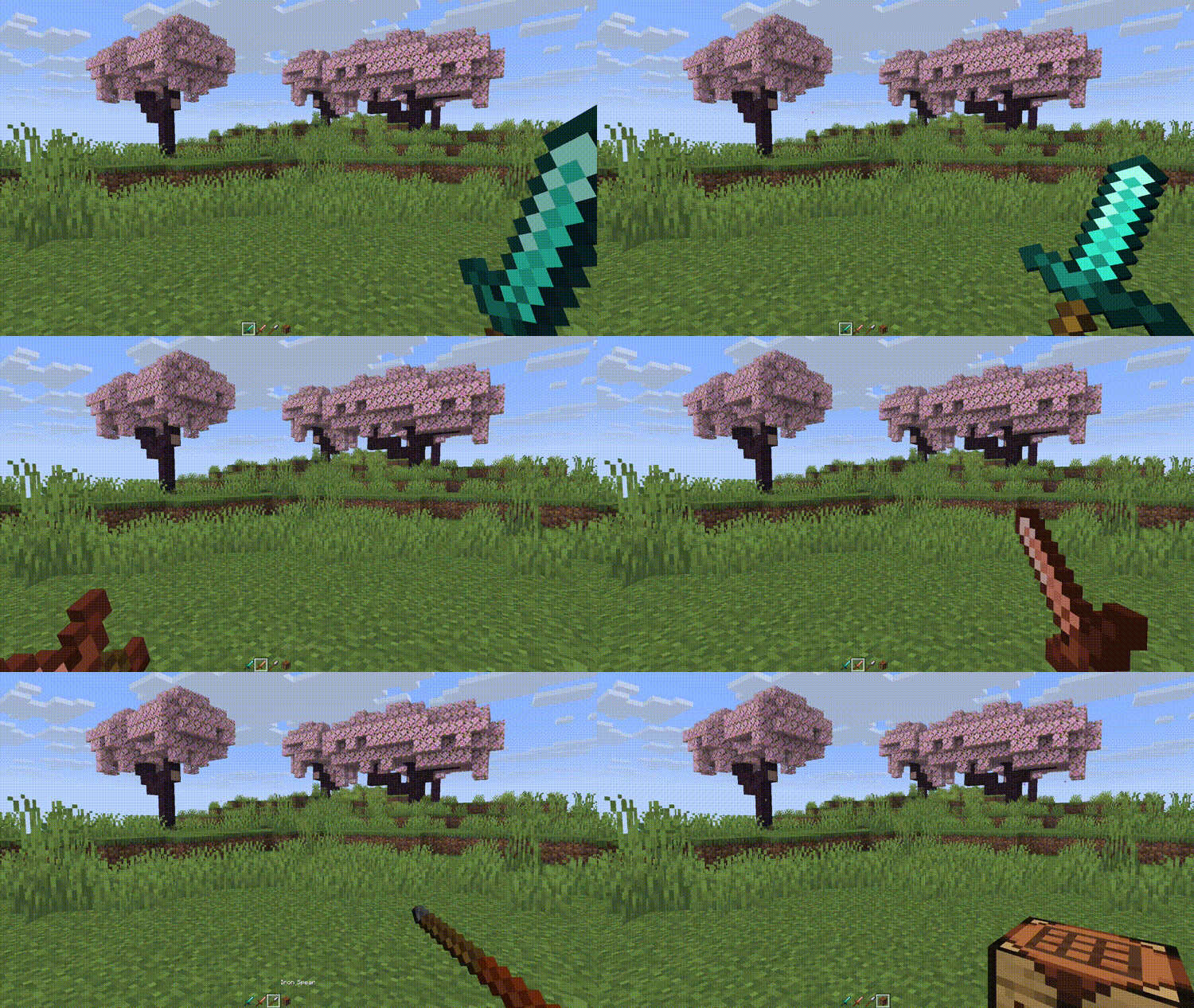
| Animation | |
|---|---|
| Turn | Classic counterstrike inspect animation. |
| Toss | Toss the item up in the air and catch it. |
| Flourish | Twirl the item back and forth like flourishing a sword. |
| Flip | Flip the item around in your hand. |
Press [R] to play the selected animation.
Hold [SHIFT] and press [R] to cycle through the available animations.
Use the gamerule inspect_radius to change the distance from which other players will receive animation packets.
Use the gamerule send_inspections to enable/disable sending animations to players. When setting from false to true, players already in the server will need to re-join to apply changes.
Use Mod Menu to configure the mod:
There are a few experimental options:
You can submit issues on Codeberg or Github
Most of my downloads come from countries where English is not the primary language! If you want to help translate any of my mods to your language, you can go to https://translate.soundsofthesun.net/projects and sign in with github to contribute!

Translation Credits:
| Language | Contributor |
|---|---|
| Turkish | yigitgulyurt |
| Chinese Traditional (HK) | Dogshome |
More translation history can be found on the i18n branch of the source repository.
Project description from Modrinth.
Pick your setup
Choose the version and loader you play, then open the matching release.
Check the dependencies, then try the file in a copied instance before changing a world you care about.
Recent files
inspectanimations-0.2.7-neoforge+26.3.jar
29 Oct 2026
inspectanimations-0.2.7-fabric+26.3.jar
29 Oct 2026
inspectanimations-0.2.7-neoforge+26.2.jar
29 Oct 2026
inspectanimations-0.2.7-fabric+26.2.jar
29 Oct 2026
inspectanimations-0.2.7-neoforge+26.1.2.jar
29 Oct 2026
inspectanimations-0.2.7-fabric+26.1.2.jar
29 Oct 2026
inspectanimations-0.2.7-neoforge+1.21.11.jar
29 Oct 2026
inspectanimations-0.2.7-fabric+1.21.11.jar
29 Oct 2026
inspectanimations-0.2.7-neoforge+1.21.1.jar
29 Oct 2026
inspectanimations-0.2.7-fabric+1.21.1.jar
29 Oct 2026
inspectanimations-0.2.7-fabric+1.20.4.jar
29 Oct 2026
inspectanimations-0.2.7-fabric+1.20.1.jar
29 Oct 2026
Looking for an older file? The official Modrinth project page is in Resources.
 mod
Bed Chat Hider is a client-only Fabric mod that adds a simple "Hide Chat" / "Show Chat" toggle button next to the "Leave Bed" button while sleeping.
 mod
Allows players to adjust their flight speed in Creative and Spectator modes with dynamic mouse-scroll tuning, sprint momentum, and anti-rubberbanding.
 mod
Enhances vanilla wolves with unique personalities (Aggressive, Pacifist, Normal), smarter AI, safety behaviors, and combat improvements.