Fabric API Needed by AutomaticMemories 1.1.2-1.21
requiredMatching file found Matched file: 0.116.18+1.21.1

Modrinth · Minecraft mod
A simple mod that periodically takes screenshots, capturing memories of your Minecraft experience.
Quick answer
AutomaticMemories 1.1.2-1.21 targets 1.21, 1.21.1, 1.21.2 with Fabric. It must be installed on the client. Do not install it on the dedicated server. All 1 required mods have matching files.
Where it goes
It must be installed on the client. Do not install it on the dedicated server.
This file is marked client-only.
1.1.2-1.21. Change the file and its required mods may change too.
Install Fabric API first. We found matching files for this game-version and loader setup. 1 comes through another mod in the chain.
1 extra mod was pulled in by another dependency. Indented rows show who needs each one. We only count dependency files that match this setup. A file for another loader does not fill the gap.
Before you install it
Built for AutomaticMemories 1.1.2-1.21. Pick another file and the loader, install side or required mods may change.
Use 1.1.2-1.21. It targets 1.21, 1.21.1, 1.21.2 with Fabric; another release may have different loader, side or dependency requirements.
Install Fabric API first. We found matching files for this game-version and loader setup. 1 comes through another mod in the chain.
It must be installed on the client. Do not install it on the dedicated server.
Use the “Get this file” button beside 1.1.2-1.21. It opens that exact file at the source.
About this project
Automatic Memories periodically takes screenshots, capturing memories of your Minecraft experience.
This mod takes screenshots at set intervals, so when you return, you'll find hundreds of unexpected snapshots capturing your time in the game.
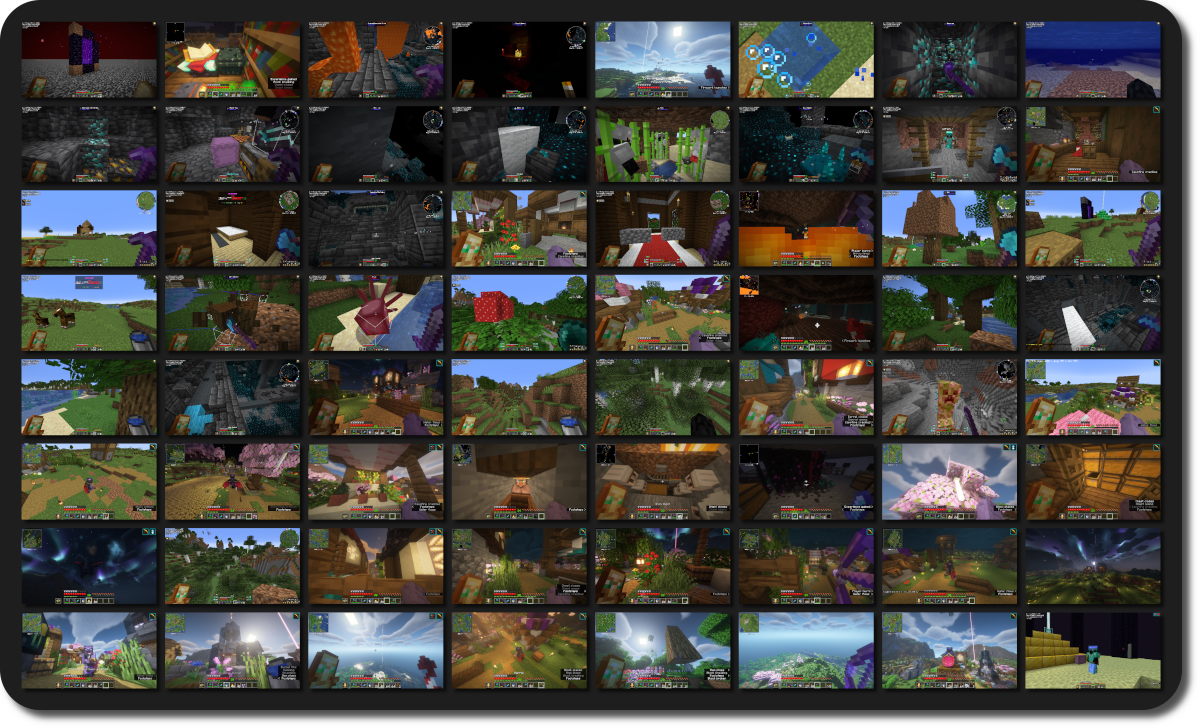
There's a few YouTube videos that compile years' worth of accidentally taken screenhots, offering an unexpected glimpse into the players' long-term experience in Minecraft.
Unfortunately, if you rarely mispress keys or have a keyboard without dedicated function keys, you might miss out on this unique perspective of your playtime.
This mod solves this by automatically taking a screenshot every 3 hours by default, over time giving you a catalog of random screenshots!

AutomaticMemories is a simple and lightweight mod, but it still offers plenty of configuration options, allowing you to tailor it to your exact preferences.
Cloth Config API and ModMenu are required to configure the mod.
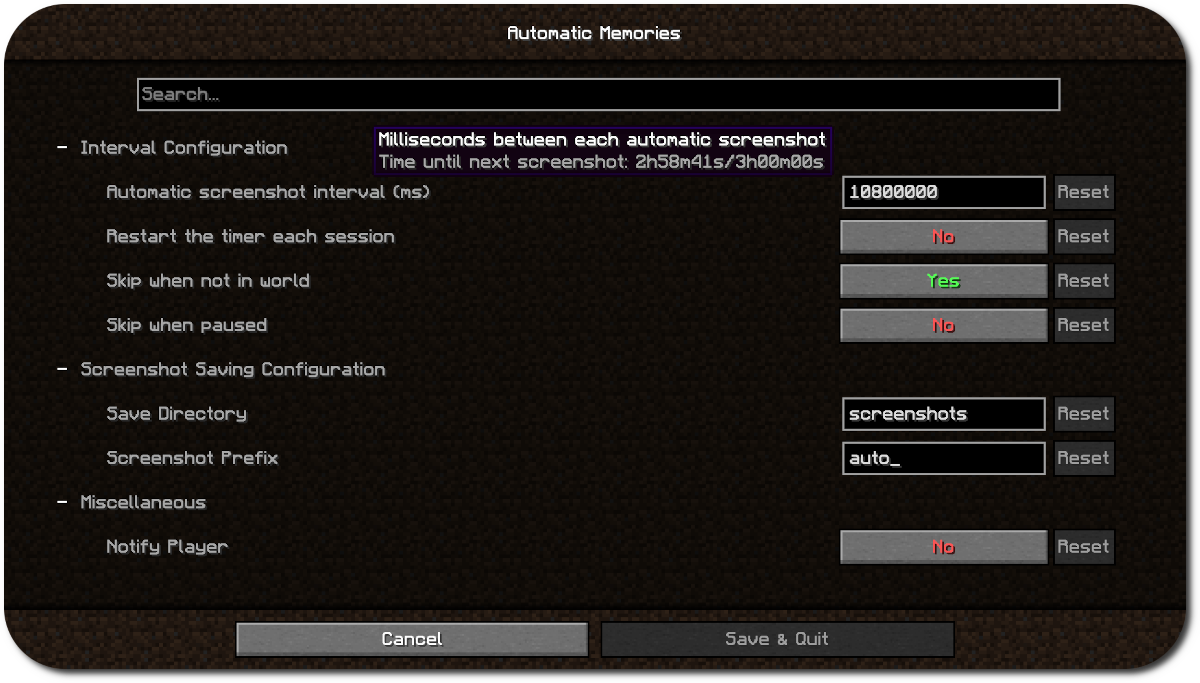
Using the configuration you can make the screenshots more or less frequent, save them in a different folder, or skip taking a screenshot when you aren't in game.
By default, this mod will carry over the timer between sessions. For exmaple, if you set the interval to every four hours and play for three hours one day, the next time you play it will take a screenshot one hour in.
This is useful since you probably won't often play for as long as your interval is, which would mean the mod wouldn't ever take a screenshot. Leaving "Restart timer each session" disabled solves this.
Project description from Modrinth.
Pick your setup
Choose the version and loader you play, then open the matching release.
Showing the newest 12 of 21 game versions. Older files are in the list below.
Check the dependencies, then try the file in a copied instance before changing a world you care about.
Recent files
AutomaticMemories-1.1.2-1.21.jar
4 Feb 2026
AutomaticMemories-1.1.2-1.21.4.jar
4 Feb 2026
AutomaticMemories-1.1.2-1.21.5.jar
4 Feb 2026
AutomaticMemories-1.1.1-1.21.4.jar
29 Jul 2025
AutomaticMemories-1.1.1-1.21.5.jar
12 Jul 2025
AutomaticMemories-1.1.1-1.21.jar
12 Jul 2025
AutomaticMemories-1.1.0-1.21.5.jar
7 Jun 2025
AutomaticMemories-1.1.0-1.21.jar
7 Jun 2025
AutomaticMemories-1.0.0.jar
8 Sept 2024
Looking for an older file? The official Modrinth project page is in Resources.
 mod
This mod ports the locator bar mechanic to the mobs.
 mod
Applied Kinetics's integration with Create
 mod
A lightweight Tinkers' Construct addon featuring tools, new materials, and exclusive projectile traits.