Minecraft version
Back to mods 
Modrinth · Minecraft mod
BlockTuner_Continue
A mod that helps you tune note blocks. (Continue from xwjcool123/BlockTunerMod)
Choose a version Pick your version below, then grab the matching file.
Quick answer
Which BlockTuner_Continue release matches 1.21.4?
Best match for your filters 1.2.2
Game version 1.21.4, 1.21.5
Loader Fabric
BlockTuner_Continue 1.2.2 targets 1.21.4, 1.21.5 with Fabric. Installation on the client is optional. Installation on the dedicated server is optional. No extra mods listed for this file.
Where it goes
Is BlockTuner_Continue required on the client, server, or both?
Installation on the client is optional. Installation on the dedicated server is optional.
Client Optional
Dedicated server Optional
Loader for this release Fabric
Required install it here Optional supported, not mandatory Not supported do not install here Source doesn’t say do not assume
The source marks this as usable on both the client and server.
What else does BlockTuner_Continue 1.2.2 need?
1.2.2 on 1.21.4. Every mod below is checked against that same setup.
This file does not list any required mods. Do not add a library just because a different file uses it.
This file does not list any required or optional mods.
Before you install it
Add BlockTuner_Continue without breaking your instance.
Built for BlockTuner_Continue 1.2.2 on 1.21.4. Pick another file and the loader, install side or required mods may change.
- 01
Stick to this file
Use 1.2.2. It targets 1.21.4, 1.21.5 with Fabric; another release may have different loader, side or dependency requirements.
- 02
Bring the mods it needs
This file does not list any required mods. Do not add a library just because a different file uses it.
- 03
Put it on the correct side
Installation on the client is optional. Installation on the dedicated server is optional.
- 04
Pick the file you checked
Use the “Get this file” button beside 1.2.2. It opens that exact file at the source.
About this project
What does BlockTuner_Continue add?
BlockTuner (Fabric Mod)
About
This is the fabric version of BlockTuner and requires fabric API.
If you are using forge, you can check out the forge version by A_Peng215.
If you want the data pack for older versions of Minecraft, please visit this page.
Instructions
Installation
Put this mod in your mods folder. You also need to install Fabric API if you haven't installed it yet.
This mod also works on servers and require no client installation.
You can get the latest version here or find a specific release here
How to Use BlockTuner
Ctrl + Right click on a note block to open up tuning UI. Placing a note block while holding Ctrl also opens the UI automatically.
Ctrl to show the note of the note block at crosshair.
Ctrl + Middle click on note blocks to pick up readily tuned note blocks.
Right click note blocks with blaze rods to play with right clicks without tuning.
[!NOTE]
- If you are using BlockTuner 1.0.0 (Minecraft 1.18.2) or lower, you don't need to hold
Ctrlto open up the tuning UI. Instead, use/blocktunerto toggle this.- If you have Tweakeroo installed and have no access to the
Ctrlkey, please go to Tweakaroo configs, findflexibleBlockPlacementOffsetunderHot Keysand set it to something else. e.g.Right Alt. Sorry for the inconvenience.
Tuning UI
Top-right corner (from left to right)
 Play mode - toggle whether the GUI will turn off immediately upon clicking a note on the piano keyboard.
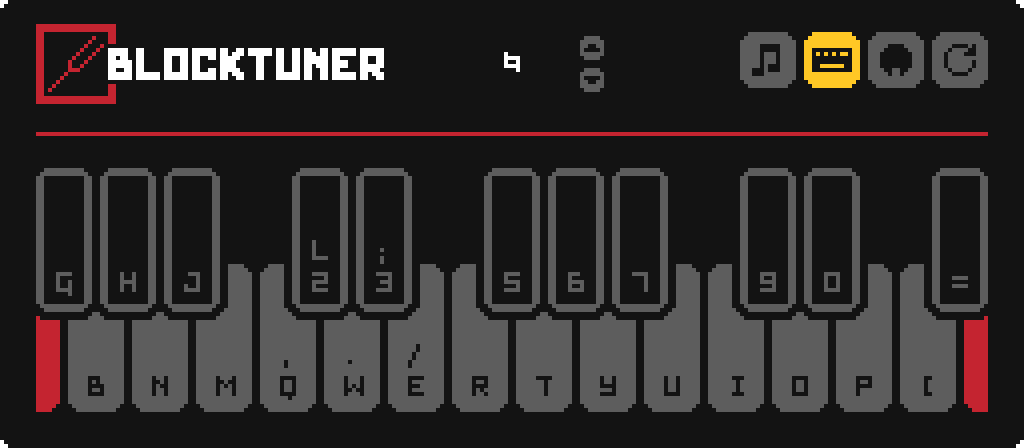
 Typing keyboard to piano keyboard - toggle whether you want to play the piano keyboard using your computer keyboard.
 MIDI Device - Click to cycle through available MIDI input devices. The icon shows red if the device is currently unavailable. This usually means it is being used by another program.
Keyboard Mapping:
Credits
Localization
- Russian - Felix14-v2 (Currently outdated)
- Japanese - misaka10843 & hakkaku
Forge Port
License
Copyright (C) 2021, xwjcool;
Copyright (C) 2025, Lumine1909;
This program is free software: you can redistribute it and/or modify it under the terms of the GNU General Public License as published by the Free Software Foundation, either version 3 of the License, or (at your option) any later version.
This program is distributed in the hospe that it will be useful, but WITHOUT ANY WARRANTY; without even the implied warranty of MERCHANTABILITY or FITNESS FOR A PARTICULAR PURPOSE. See the GNU General Public License for more details.
You should have received a copy of the GNU General Public License along with this program. If not, see https://www.gnu.org/licenses/.
Project description from Modrinth.
Pick your setup
BlockTuner_Continue by Minecraft version and loader
Choose the version and loader you play, then open the matching release.
Minecraft version
26.1.2
1 loader buildMinecraft version
26.1.1
1 loader buildMinecraft version
26.1
1 loader buildMinecraft version
1.21.11
1 loader buildMinecraft version
1.21.10
1 loader buildMinecraft version
1.21.9
1 loader buildMinecraft version
1.21.8
1 loader buildMinecraft version
1.21.7
1 loader buildMinecraft version
1.21.6
1 loader buildMinecraft version
1.21.5
1 loader buildMinecraft version
1.21.4
1 loader buildCheck the dependencies, then try the file in a copied instance before changing a world you care about.
Recent files
BlockTuner_Continue versions and loaders
1.2.2
BlockTuner-fabric-1.2.2.jar
12 Apr 2025
Client Optional Server Optional Dependencies No extras listed Listed on Release listing
Check the 1.21.4 · Fabric setup 1.21.41.21.5Fabric release
1.2.1
BlockTuner-fabric-1.2.1.jar
10 Apr 2025
Client Optional Server Optional Dependencies No extras listed Listed on Release listing
Check the 1.21.4 · Fabric setup 1.21.41.21.5Fabric release
1.2.0
BlockTuner-fabric-1.2.0.jar
3 Apr 2025
Client Optional Server Optional Dependencies 1 required · 1 unchecked Listed on Release listing
Check the 1.21.4 · Fabric setup 1.21.41.21.5Fabric release
Looking for an older file? The official Modrinth project page is in Resources.