Minecraft version
Back to mods 
Modrinth · Minecraft mod
Flat Items
Renders items and blocks as flat, like in older versions of the game
Choose a version Pick your version below, then grab the matching file.
Quick answer
Which Flat Items release should I use?
Latest stable file 1.1.1+26.2
Game version 26.2
Loader NeoForge
Flat Items 1.1.1+26.2 targets 26.2 with NeoForge. It must be installed on the client. Do not install it on the dedicated server. No extra mods listed for this file.
Where it goes
Is Flat Items required on the client, server, or both?
It must be installed on the client. Do not install it on the dedicated server.
Client Required
Dedicated server Not supported
Loader for this release NeoForge
Required install it here Optional supported, not mandatory Not supported do not install here Source doesn’t say do not assume
This file is marked client-only.
What else does Flat Items 1.1.1+26.2 need?
1.1.1+26.2. Change the file and its required mods may change too.
This file does not list any required mods. Do not add a library just because a different file uses it.
This file does not list any required or optional mods.
Before you install it
Add Flat Items without breaking your instance.
Built for Flat Items 1.1.1+26.2. Pick another file and the loader, install side or required mods may change.
- 01
Stick to this file
Use 1.1.1+26.2. It targets 26.2 with NeoForge; another release may have different loader, side or dependency requirements.
- 02
Bring the mods it needs
This file does not list any required mods. Do not add a library just because a different file uses it.
- 03
Put it on the correct side
It must be installed on the client. Do not install it on the dedicated server.
- 04
Pick the file you checked
Use the “Get this file” button beside 1.1.1+26.2. It opens that exact file at the source.
About this project
What does Flat Items add?
Flat Items
This mod renders items as flat, like in older versions of the game. It's a rewrite of Noryea's mod Fast Items.
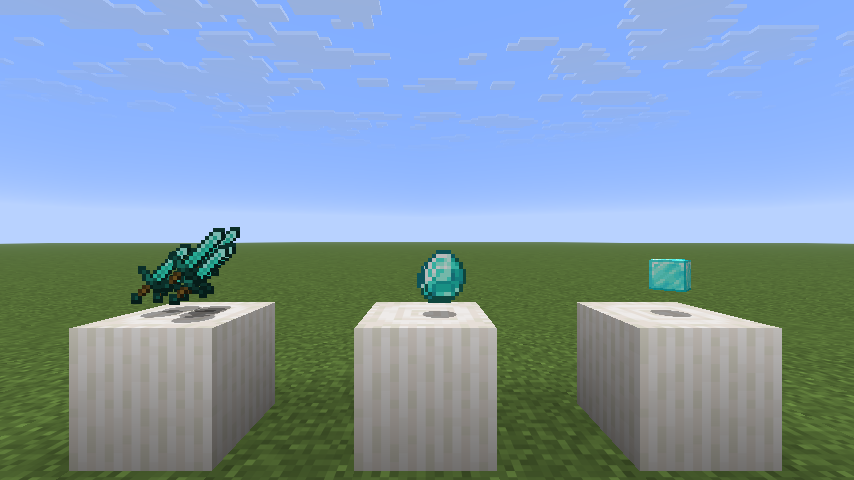
Settings
These settings can be changed in-game with NeoForge's config screen or with Mod Menu in Fabric.
enabled / Render Items as Flat: Enables/disables the mod.
affect_3d / Affect 3D Models: Determines whether 3D models like blocks will also be display as flat.
render_sides / Render Sides of Items: Renders the sides of items whilst still making them face the player. Makes for a nice, subtle 3D effect!
enlarge_3d / Enlarge 3D Models: Matches the size of flattened 3D models to 2D ones.
facing / Billboard: Determines whether flattened items will face the player's eyes or the screen.
Project description from Modrinth.
Pick your setup
Flat Items by Minecraft version and loader
Choose the version and loader you play, then open the matching release.
Minecraft version
1.21.11
2 loader buildsMinecraft version
1.21.10
2 loader buildsMinecraft version
1.21.9
2 loader buildsCheck the dependencies, then try the file in a copied instance before changing a world you care about.
Recent files
Flat Items versions and loaders
1.1.1+26.2
flat_items-neoforge-26.2-1.1.1.jar
8 Aug 2026
Client Required Server Not supported Dependencies No extras listed Listed on Release listing
Check the 26.2 · NeoForge setup 26.2NeoForge release
1.1.1+26.2
flat_items-fabric-26.2-1.1.1.jar
8 Aug 2026
Client Required Server Not supported Dependencies No extras listed Listed on Release listing
Check the 26.2 · Fabric setup 26.2Fabric release
1.1.0
flat_items-fabric-1.21.9-1.1.0.jar
21 Jan 2026
Client Required Server Not supported Dependencies No extras listed Listed on Release listing
Check the 1.21.10 · Fabric setup 1.21.101.21.9Fabric release
1.1.0
flat_items-neoforge-1.21.9-1.1.0.jar
21 Jan 2026
Client Required Server Not supported Dependencies No extras listed Listed on Release listing
Check the 1.21.10 · NeoForge setup 1.21.101.21.9NeoForge release
1.1.0
flat_items-neoforge-1.21.11-1.1.0.jar
21 Jan 2026
Client Required Server Not supported Dependencies No extras listed Listed on Release listing
Check the 1.21.11 · NeoForge setup 1.21.11NeoForge release
1.1.0
flat_items-fabric-1.21.11-1.1.0.jar
21 Jan 2026
Client Required Server Not supported Dependencies No extras listed Listed on Release listing
Check the 1.21.11 · Fabric setup 1.21.11Fabric release
1.0.0
flat_items-neoforge-1.21.11-1.0.0.jar
19 Jan 2026
Client Required Server Not supported Dependencies No extras listed Listed on Release listing
Check the 1.21.11 · NeoForge setup 1.21.11NeoForge release
1.0.0
flat_items-fabric-1.21.11-1.0.0.jar
19 Jan 2026
Client Required Server Not supported Dependencies No extras listed Listed on Release listing
Check the 1.21.11 · Fabric setup 1.21.11Fabric release
1.0.0
flat_items-fabric-1.21.9-1.0.0.jar
19 Jan 2026
Client Required Server Not supported Dependencies No extras listed Listed on Release listing
Check the 1.21.10 · Fabric setup 1.21.101.21.9Fabric release
1.0.0
flat_items-neoforge-1.21.9-1.0.0.jar
19 Jan 2026
Client Required Server Not supported Dependencies No extras listed Listed on Release listing
Check the 1.21.10 · NeoForge setup 1.21.101.21.9NeoForge release
Looking for an older file? The official Modrinth project page is in Resources.
 mod
CurseForge + Modrinth · Minecraft
Hodgepodge
A Hodgepodge of Fixes
 mod
Modrinth · Minecraft
Zombified Player - Kill Your Inner Zombie
This Mod spawns a zombified version of the player after death.
 mod
CurseForge · Minecraft
Enchantress
Expanding enchanting to a complex system, with leveling, rituals, runes, higher enchantment levels and more to come