Minecraft version
Back to mods 
Modrinth · Minecraft mod
Drawing
Draw things in your Minecraft world!
Choose a version Pick your version below, then grab the matching file.
Quick answer
Which Drawing release matches 1.16.4 datapack?
Best match for your filters dp
Game version 1.16, 1.16.1, 1.16.2
Loader datapack
Drawing dp targets 1.16, 1.16.1, 1.16.2 with datapack. Installation on the client is optional. Installation on the dedicated server is optional. No extra mods listed for this file.
Where it goes
Is Drawing required on the client, server, or both?
Installation on the client is optional. Installation on the dedicated server is optional.
Client Optional
Dedicated server Optional
Loader for this release datapack
Required install it here Optional supported, not mandatory Not supported do not install here Source doesn’t say do not assume
The source marks this as usable on both the client and server.
What else does Drawing dp need?
dp on 1.16.4 datapack. Every mod below is checked against that same setup.
This file does not list any required mods. Do not add a library just because a different file uses it.
This file does not list any required or optional mods.
Before you install it
Add Drawing without breaking your instance.
Built for Drawing dp on 1.16.4 datapack. Pick another file and the loader, install side or required mods may change.
- 01
Stick to this file
Use dp. It targets 1.16, 1.16.1, 1.16.2 with datapack; another release may have different loader, side or dependency requirements.
- 02
Bring the mods it needs
This file does not list any required mods. Do not add a library just because a different file uses it.
- 03
Put it on the correct side
Installation on the client is optional. Installation on the dedicated server is optional.
- 04
Pick the file you checked
Use the “Get this file” button beside dp. It opens that exact file at the source.
About this project
What does Drawing add?
Drawing Datapack
This datapack adds Paint which can be used to draw things in 3D!
How to use
To get Paint, you need to drop any dye on a crafting table. This will create a Paint item of the same color.
To use Paint, you need to hold the item and press F (to move it to your offhand). This will start drawing 4 blocks away from you. You can move around and rotate your camera to form shapes and lines!
To get an Eraser, just drop an Iron Ingot on the crafting table. Then, you can hold it and press F again to remove paint in front of you. The radius of the eraser is around one block.
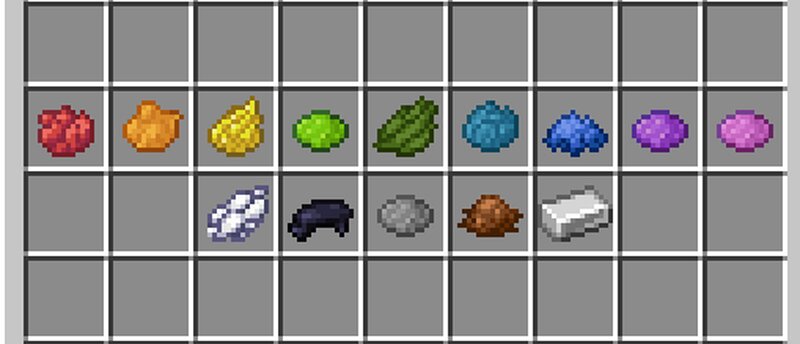
Project description from Modrinth.
Pick your setup
Drawing by Minecraft version and loader
Choose the version and loader you play, then open the matching release.
Minecraft version
1.19.2
4 loader buildsMinecraft version
1.19.1
4 loader buildsMinecraft version
1.19
4 loader buildsMinecraft version
1.18.2
4 loader buildsMinecraft version
1.18.1
4 loader buildsMinecraft version
1.18
4 loader buildsMinecraft version
1.17.1
4 loader buildsMinecraft version
1.17
4 loader buildsMinecraft version
1.16.5
4 loader buildsMinecraft version
1.16.4
4 loader buildsMinecraft version
1.16.3
4 loader buildsShowing the newest 12 of 15 game versions. Older files are in the list below.
Check the dependencies, then try the file in a copied instance before changing a world you care about.
Recent files
Drawing versions and loaders
dp
drawing.zip
30 Dec 2022
Client Optional Server Optional Dependencies No extras listed Listed on Release listing
Check the 1.16.4 · datapack setup 1.161.16.11.16.21.16.3 release
Looking for an older file? The official Modrinth project page is in Resources.
 mod
CurseForge + Modrinth · Minecraft
Supplementaries
Vanilla+ additions: Jars, signposts, faucets, weather vanes spring launchers, sconces, planters, lights, decoration and automation
 mod
Modrinth · Minecraft
RightClickHarvest
Allows you to harvest crops with right click
 mod
Modrinth · Minecraft
CMD + Delete
Fix macOS text navigation shortcuts in chat/books/signs/etc & allows custom shortcuts: get native cmd + backspace, option + delete, cmd + arrows, and more!