Minecraft version
Back to mods 
CurseForge · Minecraft mod
Motion Capture
Allows you to record and replay player movements
Choose a version Pick your version below, then grab the matching file.
Quick answer
Which Motion Capture release should I use?
Latest stable file Mocap-FABRIC-26.2-1.3.10.jar
Game version 26.2
Loader Fabric
Motion Capture Mocap-FABRIC-26.2-1.3.10.jar targets 26.2 with Fabric. The project page does not say whether this file belongs on the client, dedicated server, or both. No extra mods listed for this file.
Where it goes
Is Motion Capture required on the client, server, or both?
The project page does not say whether this file belongs on the client, dedicated server, or both.
Client Source doesn’t say
Dedicated server Source doesn’t say
Loader for this release Fabric
Required install it here Optional supported, not mandatory Not supported do not install here Source doesn’t say do not assume
The source does not explicitly classify this release as client-only or server-only.
What else does Motion Capture Mocap-FABRIC-26.2-1.3.10.jar need?
Mocap-FABRIC-26.2-1.3.10.jar. Change the file and its required mods may change too.
This file does not list any required mods. Do not add a library just because a different file uses it.
This file does not list any required or optional mods.
Before you install it
Add Motion Capture without breaking your instance.
Built for Motion Capture Mocap-FABRIC-26.2-1.3.10.jar. Pick another file and the loader, install side or required mods may change.
- 01
Stick to this file
Use Mocap-FABRIC-26.2-1.3.10.jar. It targets 26.2 with Fabric; another release may have different loader, side or dependency requirements.
- 02
Bring the mods it needs
This file does not list any required mods. Do not add a library just because a different file uses it.
- 03
Put it on the correct side
The project page does not say whether this file belongs on the client, dedicated server, or both.
- 04
Pick the file you checked
Use the “Get this file” button beside Mocap-FABRIC-26.2-1.3.10.jar. It opens that exact file at the source.
About this project
What does Motion Capture add?
About
Motion Capture is a mod that allows you to record and replay player movements. It is created mainly for people who want to create complex scenes in Minecraft without using real players.
It records:
-movements
-sprinting, jumping, swimming, sneaking
-swinging hands
-using items
-items in hands and armor
-states like being on fire, being invisible, or glowing
-placing, breaking and interacting with blocks
-nearby entities and riding them
After you save recording, you can create a scene to which you can add multiple recordings or other scenes with parameters like player name, skin, position offset, or start delay.
How to use
- First, you need to start recording using
/mocap recording start. It will record all your movements or movements of a player given as an argument. - Then, you can stop recording using
/mocap recording stopand save it with/mocap recording save [name]. - Use
/mocap playing start [name] (player_name) (mineskin_url)to play recording. - You can also create scenes to which you can add multiple recordings or other scenes, with parameters like player name, position offset, or start delay.
- To create scene use
/mocap scenes add (scene_name). Then, add your recording using/mocap scenes addTo [scene_name] [recording_name](delay) (x_offset) (y_offset) (z_offset) (player_name) (skin_source_type) (skin_source)(you can skip arguments in round brackets if you want). - To play scene use
/mocap playing start .[scene_name]- you need to put a dot before the scene name. - By putting a dot before name, when using
/mocap scenes addTo [...], you can also add scenes to other scenes.
Commands
/mocap recording [...] - Recording player movements
/mocap recordings [...] - Managing recording files
/mocap scenes [...] - Creating and modifying scenes
/mocap playing [...] - Playing scenes and recordings
/mocap settings [...] - Shows and modifies settings
/mocap info - Displays information about mod
/mocap help - Displays help message
Example
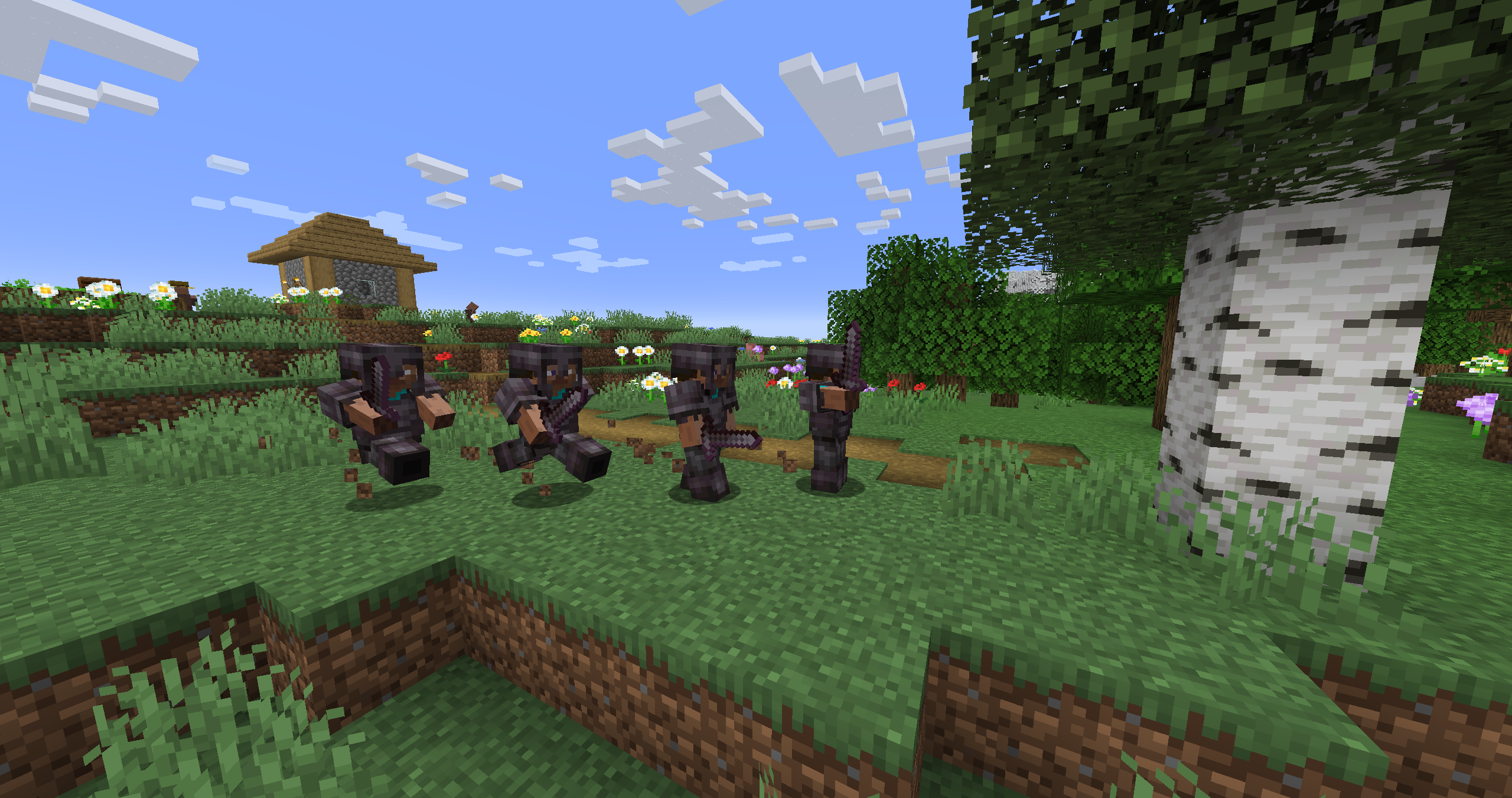
Simple example of one recording used 4 times in a scene with time and position offset
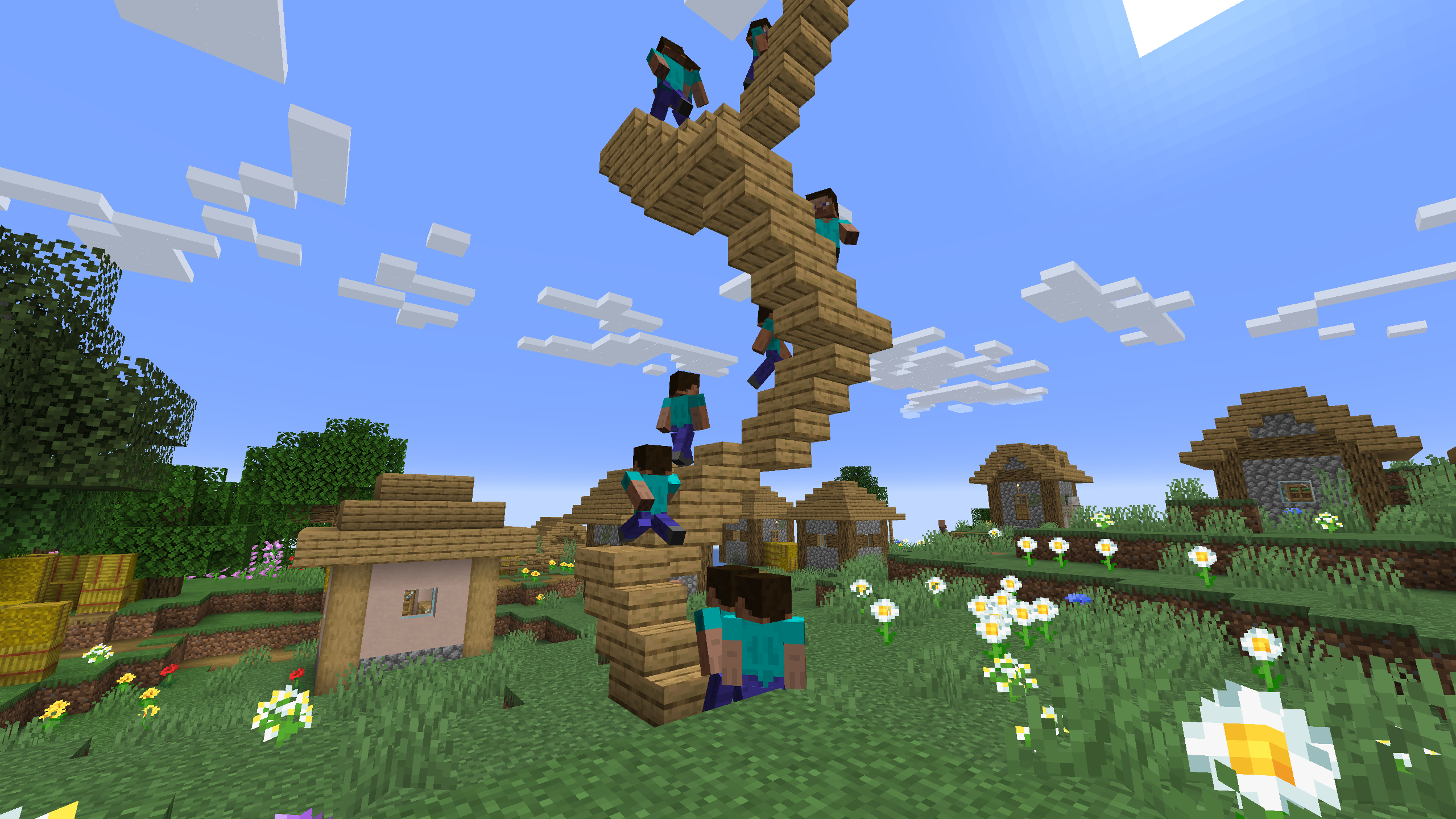
One recording of climbing stairs used multiple times in a scene with start delay
Discord: https://discord.gg/nzDETZhqur
Project description from CurseForge.
Pick your setup
Motion Capture by Minecraft version and loader
Choose the version and loader you play, then open the matching release.
Minecraft version
26.1.2
2 loader buildsMinecraft version
26.1.1
2 loader buildsMinecraft version
26.1
2 loader buildsMinecraft version
1.21.11
2 loader buildsMinecraft version
1.21.10
2 loader buildsMinecraft version
1.21.9
2 loader buildsMinecraft version
1.21.8
2 loader buildsMinecraft version
1.21.7
2 loader buildsMinecraft version
1.21.6
2 loader buildsMinecraft version
1.21.5
2 loader buildsMinecraft version
1.21.4
2 loader buildsShowing the newest 12 of 28 game versions. Older files are in the list below.
Check the dependencies, then try the file in a copied instance before changing a world you care about.
Recent files
Motion Capture versions and loaders
Mocap-FABRIC-26.2-1.3.10.jar
22 Jun 2026
Client Source doesn’t say Server Source doesn’t say Dependencies No extras listed Listed on Release listing
Check the 26.2 · Fabric setup Fabric26.2 release
Mocap-NEOFORGE-26.2-1.3.10.jar
22 Jun 2026
Client Source doesn’t say Server Source doesn’t say Dependencies No extras listed Listed on Release listing
Check the 26.2 · NeoForge setup NeoForge26.2 release
Mocap-FABRIC-26.1-1.3.10.jar
30 Mar 2026
Client Source doesn’t say Server Source doesn’t say Dependencies 1 required · 1 unchecked Listed on Release listing
Check the 26.1.2 · Fabric setup Fabric26.126.1.126.1.2 release
Mocap-NEOFORGE-26.1-1.3.10.jar
30 Mar 2026
Client Source doesn’t say Server Source doesn’t say Dependencies No extras listed Listed on Release listing
Check the 26.1.2 · NeoForge setup NeoForge26.126.1.126.1.2 release
Mocap-FABRIC-1.21.11-1.4-alpha-10.jar
31 Dec 2025
Client Source doesn’t say Server Source doesn’t say Dependencies 1 required · 1 unchecked Listed on Release listing
Check the 1.21.11 · Fabric setup Fabric1.21.11 alpha
Mocap-NEOFORGE-1.21.11-1.4-alpha-10.jar
31 Dec 2025
Client Source doesn’t say Server Source doesn’t say Dependencies No extras listed Listed on Release listing
Check the 1.21.11 · NeoForge setup NeoForge1.21.11 alpha
Mocap-FABRIC-1.21.10-1.4-alpha-10.jar
31 Dec 2025
Client Source doesn’t say Server Source doesn’t say Dependencies 1 required · 1 unchecked Listed on Release listing
Check the 1.21.10 · Fabric setup Fabric1.21.91.21.10 alpha
Mocap-NEOFORGE-1.21.10-1.4-alpha-10.jar
31 Dec 2025
Client Source doesn’t say Server Source doesn’t say Dependencies No extras listed Listed on Release listing
Check the 1.21.10 · NeoForge setup NeoForge1.21.91.21.10 alpha
Mocap-FABRIC-1.21.8-1.4-alpha-10.jar
31 Dec 2025
Client Source doesn’t say Server Source doesn’t say Dependencies 1 required · 1 unchecked Listed on Release listing
Check the 1.21.8 · Fabric setup Fabric1.21.81.21.61.21.7 alpha
Mocap-NEOFORGE-1.21.8-1.4-alpha-10.jar
31 Dec 2025
Client Source doesn’t say Server Source doesn’t say Dependencies No extras listed Listed on Release listing
Check the 1.21.8 · NeoForge setup 1.21.81.21.61.21.7NeoForge alpha
Mocap-FABRIC-1.21.5-1.4-alpha-10.jar
31 Dec 2025
Client Source doesn’t say Server Source doesn’t say Dependencies 1 required · 1 unchecked Listed on Release listing
Check the 1.21.5 · Fabric setup Fabric1.21.5 alpha
Mocap-NEOFORGE-1.21.5-1.4-alpha-10.jar
31 Dec 2025
Client Source doesn’t say Server Source doesn’t say Dependencies No extras listed Listed on Release listing
Check the 1.21.5 · NeoForge setup 1.21.5NeoForge alpha
Looking for an older file? The official CurseForge project page is in Resources.
 mod
mod CurseForge + Modrinth · Minecraft
Create: Numismatics Utils
Utilities for Create: Numismatics! Display Account Balance on your HUD with the Bank Meter and remotely access your account with the Portable Bank Terminal
 mod
mod CurseForge · Minecraft
TikTok Chaos
Turn TikTok LIVE likes, gifts, comments, and follows into safe, configurable events in your NeoForge singleplayer world.
 mod
mod CurseForge · Minecraft
Usu's Item Model Delay
Lets resource packs add delay, particles and sound item-model property transitions across conditional, range-dispatch, and select properties.