MariesLib Needed by Nourished 0.2.7-beta.4
requiredMatching file found Matched file: 0.1.2-beta.2

Modrinth · Minecraft mod
Nourished is a nutrition mod for NeoForge 1.21.1 that tracks 5 food groups, rewards a varied diet, and applies balance buffs and neglect penalties. Includes an on-screen HUD, diet screen, and configurable modules for servers and modpacks.
Quick answer
Nourished 0.2.7-beta.4 targets 1.21.1 with NeoForge. Installation on the client is optional. Installation on the dedicated server is optional. 1 required mod needs a matching file.
Where it goes
Installation on the client is optional. Installation on the dedicated server is optional.
The source marks this as usable on both the client and server.
0.2.7-beta.4. Change the file and its required mods may change too.
Install MariesLib, Modonomicon, Cloth Config API first, but 1 required mod has no matching file for this setup. Do not mix loader builds to force a match.
We only count dependency files that match this setup. A file for another loader does not fill the gap.
Before you install it
Built for Nourished 0.2.7-beta.4. Pick another file and the loader, install side or required mods may change.
Use 0.2.7-beta.4. It targets 1.21.1 with NeoForge; another release may have different loader, side or dependency requirements.
Install MariesLib, Modonomicon, Cloth Config API first, but 1 required mod has no matching file for this setup. Do not mix loader builds to force a match.
Installation on the client is optional. Installation on the dedicated server is optional.
Use the “Get this file” button beside 0.2.7-beta.4. It opens that exact file at the source.
About this project





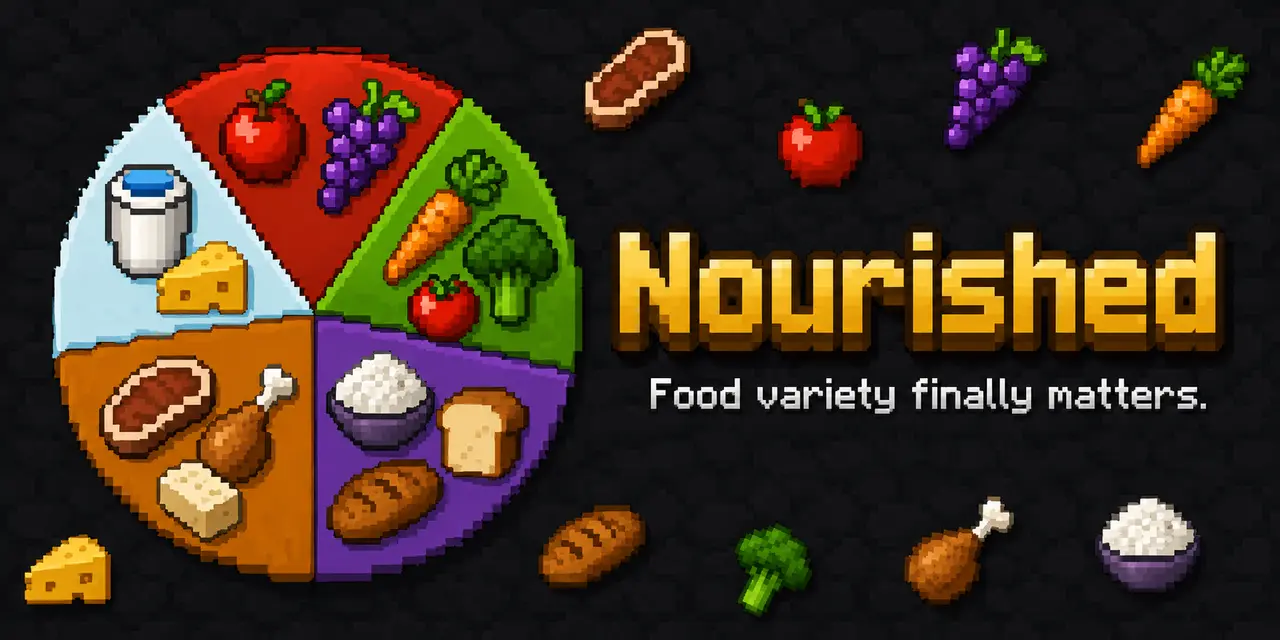
Minecraft's food system has always been simple: eat until you're full.
Nourished turns food into a configurable nutrition system for NeoForge 1.21.1. Track six food groups, build a varied diet, manage your calorie intake, and deal with the consequences of neglecting your nutrition.
Everything is modular and configurable, so Nourished can be adapted to your modpack or server rather than forcing a single way of playing. This applies across config, datapacks, KubeJS, custom nutrients, custom milestones, food overrides, compatibility, module toggles, and the in-game appearance editor.
🟢 Recommended Version
Always use the newest version of Nourished. Newer releases may include major feature, UI, compatibility, and bug-fix improvements over previous versions. Older versions are primarily intended for compatibility with existing modpacks.⚠️ Upcoming Change: Classic UI Removal
The Classic UI will be removed in Nourished 0.2.8-beta.The newer Dynamic UI is now the recommended interface and will become the standard going forward. If you are still using the Classic UI, we recommend switching to the Dynamic UI before upgrading to 0.2.8.


Dynamic UI is Nourished's modular interface system, designed to make the HUD and diet screen highly configurable without relying on hardcoded layouts.
UI elements are organized into independent modules that can be customized individually, including their position, size, colors, and other visual properties. This allows the interface to be adjusted to fit different screen resolutions, UI layouts, and player preferences.
The system is designed to be extensible, making it possible to add new UI modules and customization options without rebuilding the entire interface.
Features:
Dynamic UI replaces Nourished's older interaction-based UI controls with a proper modular editing system, providing a cleaner foundation for expanding UI customization over time.
📸 Screenshots were taken with the PureBDCraft resource pack & custom edits. The UI works with vanilla textures, but will appear in the default Minecraft style.
| What you see | What it means |
|---|---|
| Trend arrows | Whether each group is rising or falling |
| Balance score | How evenly distributed your nutrition is |
| Active effects | What your current diet is doing to you |
| Calorie tracking | Daily calorie intake at a glance |
| Recently eaten | What you've eaten recently |
| Neglected categories | What you should probably eat next |
Every panel has its own Appearance window, opened alongside edit mode, for styling it without ever touching a config file.
Every nutrient bar gets its own color slot, independent of the others. Recolor Grains, Vegetables, Proteins, Fruits, Sugars, and Dairy individually to match your pack or taste.
Each nutrient bar has its own glow, independently toggleable and tunable:
Bars that are critical or low can pulse to draw your eye, tied into the same visibility system that auto-hides or reveals bars at custom thresholds.
Every setting here writes straight to config in the background, so anything you set through the in-game editor is saved automatically and shows up the same way in config/nourished/ if you'd rather hand-edit it later.
Eating consistently pays off over time. Nourished tracks cumulative intake for each food group and grants milestone rewards as you build healthy habits.
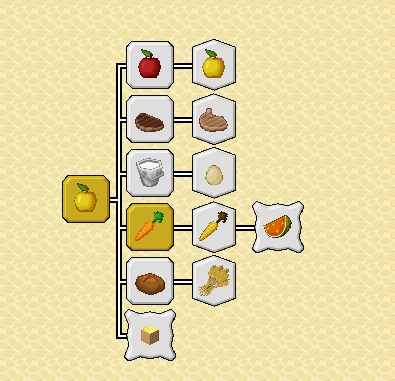
Each food group has its own three-tier progression:
There is also a hidden Perfectly Balanced milestone for maintaining all five balance-tracked food groups (Grains, Vegetables, Proteins, Fruits, and Dairy — Sugars sits outside the balance system) at once.
Milestones grant temporary buffs and unlock entries in your Advancements tab.
Milestone goals, reward effects, and durations are fully configurable. Modpack authors can also register entirely custom milestones through datapacks.
When all five balance-tracked food groups — Grains, Vegetables, Proteins, Fruits, and Dairy — are above 75%, you receive:
Let any single group drop below 25%, and a neglect penalty kicks in:
| Group | Neglect Penalty |
|---|---|
| 🌾 Grains | Weakness I |
| 🥦 Vegetables | Slowness I |
| 🥩 Proteins | Mining Fatigue I |
| 🍎 Fruits | Unluck I |
| 🍬 Sugars | — |
| 🥛 Dairy | — |
Sugars and Dairy have no penalty effect by default. The Sugars group is still tracked and factored into your overall balance score, even though it sits outside the Health Boost/Regeneration buff above.
This behavior is configurable.
Your body doesn't just burn energy from being hungry; it burns energy from doing things now.
Nourished tracks your actual activity and factors it into your nutrient needs.
Every activity module is independently toggleable. Turn off combat costs, disable starvation penalties, or run the entire system; it's up to you.
Each module's cost and HUD color are configurable.
Everything is backed by real per-player tracking:
Activity data is recorded day-by-day rather than simply estimated.
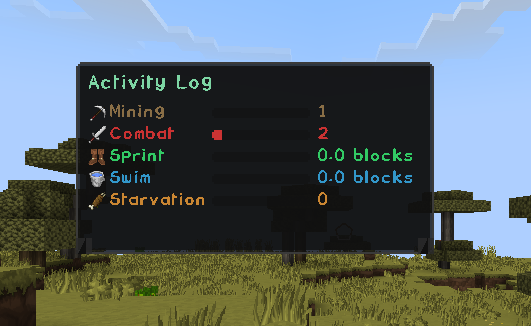
The Activity Log HUD is optional and can be repositioned, resized, or hidden entirely. Each statistic includes a live bar relative to your own personal best.
Milestones can also be set on activity trackers through datapacks or KubeJS, allowing modpack authors to reward goals such as the following:
This option can be turned off in the configs.
Calories are the backbone of Nourished's nutrition system.
Every food you eat adds to or subtracts from your daily calorie total, and staying within your calorie goal matters alongside hitting your nutrient targets.
Your calorie total updates in real time and persists across sessions, with complete history retained for previous days.
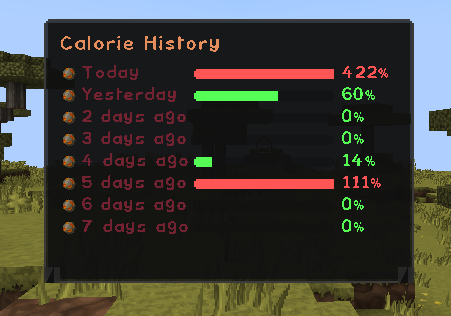
The Calorie Log HUD is optional and can be repositioned, resized, or hidden entirely.
A compact, draggable overlay displays the following:
Each day is shown as a percentage of your calorie goal, with the display changing once you go over your target.
Eating something that changes your calorie total now produces a quick on-screen notification showing the food's name and calorie change.
You can see exactly what just happened without opening a menu.
The diet screen ties everything together with:
Every panel can be independently repositioned, resized, and scaled.
Like everything else in Nourished, calorie goals and thresholds are configurable, and the system is datapack- and KubeJS-friendly for modpack authors who want to tune it further. This option can also be turned off in the configs.
Eating the same food repeatedly becomes less effective over time, so rotating what you eat always pays off.
Nourished uses a memory system that naturally fades over time. Foods you've avoided recover their full nutritional value as your food memory fades.
The result is simple:
The more varied your diet, the more effective it becomes.
Vanilla Minecraft prevents you from eating when your hunger and saturation are already full.
Nourished allows you to continue eating for nutritional purposes even when your saturation bar is full.
Light foods such as berries and snacks can be eaten for their nutrients without restoring saturation, while heavier meals follow vanilla eating rules by default.
Both behaviors are configurable through:
enableBlockHeavySourcesenableBlockLightSourceServer administrators have full control over how these eating restrictions behave.
Eating raw or undercooked food has consequences.
Nourished tracks a gut health value for every player. Gut health degrades when you eat raw food and recovers over time through cooked food and dietary variety.
Raw foods are classified into four tiers:
| Tier | Effect |
|---|---|
| Fine | No penalty |
| Mild | Minor debuff, short duration |
| Medium | Moderate debuff, longer duration |
| Severe | Strong debuff, extended duration |
Eating the same raw food repeatedly within its memory window increases your sensitivity to it. The more you repeatedly eat the same raw food, the worse the penalty becomes.
Gut health recovers passively and recovers faster when you:
Resistance can also be built over time, reducing the scale of raw-food penalties.
Everything is configurable, including:
Configuration is handled through:
config/nourished/raw_food.json
Nourished works with modded food items that use vanilla FoodProperties.
You do not need to write integration code for basic nutrition tracking.
Bundled compatibility data helps foods from popular farming and cooking mods appear on your nutrient bars out of the box.
For edge cases, server owners can adjust behavior through configuration files and tags.
| Mod | Status |
|---|---|
| Farmer's Delight | ✅ Supported |
| Pam's HarvestCraft 2 | ✅ Supported |
| Croptopia | ✅ Supported |
| Farm & Charm | ✅ Supported |
| Butchery | ✅ Supported |
| Herbs & Harvest | ✅ Supported |
| Spice of Life: Onion | ✅ Supported |
| KubeJS | ✅ Scripting hooks |
| JEI / REI / EMI | ✅ Tooltips in recipe viewers |
| Other mods with edible food items | ✅ Works with standard food items |
Everything ships with sensible defaults.
Server owners and modpack authors can tune Nourished without touching Java.
Add, remove, or replace effects through:
config/nourished/effects.json
Configure:
enableBlockHeavySourcesenableBlockLightSourceCustomize:
All configuration lives under:
config/nourished/
Save and share complete configuration snapshots using a single share code.
Use:
/nourished scan_analysis
to analyze all loaded food items and generate classification reports under the following:
config/nourished/scanner_analysis/
The scanner produces:
multi_value_recommendations.json: foods confidently assigned to one or more nutrient groupsunassigned_sources.txt: foods that could not be classified automatically and need manual reviewscanner_metrics.txt: summary statistics across the full item registryRecommended tag entries can be copied into your datapack to make classifications permanent.
Unassigned items can be manually tagged using the example below.
Most customization happens inside:
config/nourished/
after the first launch.
This includes:
Nourished also ships bundled defaults under:
data/nourished/
These include nutrient tags, compatibility entries, and presets.
Advanced pack authors can override supported data through datapacks where applicable. Configuration files remain the primary method for server-side tuning.
The in-game food scanner can help inspect and assign foods in singleplayer and write generated tag files into the world's datapack folder for manual review.
Create the following file inside your datapack:
your_datapack/
└── data/
    └── nourished/
        └── tags/
            └── item/
                └── nutrients/
                    └── vegetables.json
{
  "replace": false,
  "values": [
    {
      "id": "pamhc2foodextended:honeyglazedcarrotsitem",
      "required": false
    }
  ]
}
"replace": false means your entries are merged with Nourished's defaults rather than replacing them.
Nourished provides optional KubeJS integration for modpack authors.
KubeJS must be installed separately.
Scripts go in:
kubejs/server_scripts/
kubejs/startup_scripts/
KubeJS support is split across two layers:
MarieEvents.*.NourishedEvents.*.NourishedEvents.nutrientChanged(event => {
if (event.nutrientKey === 'proteins' && event.newValue < 0.25) {
event.player.tell('Eat some protein!')
}
})
NourishedEvents.nutrientModifier(event => {
if (event.nutrientKey === 'vegetables') {
event.amount *= 2
}
})
NourishedEvents.foodEaten(event => {
event.nutrientDeltas.forEach((value, key) => {
console.log(key + ': ' + value)
})
})
Also available:
nutrientCriticalnutrientExcessrawFoodPenaltygutHealthChangedImportant:
sourceConsumedis a generic MariesLib event and does not exposenutrientKeyornewValue. UsenutrientChangedwhen you need nutrition-specific information.
MariesLib's own value-tracking events (valueChanged, valueDeltaModifier, valueCritical, valueExcess, sourceConsumed, decayTick, playerSynced) power the framework internally. They are not currently exposed as standalone KubeJS bindings — for KubeJS scripting, use the NourishedEvents.* aliases above, which cover the same data for nutrition purposes.
NourishedAPI.registerNutrient({
    id: 'omega3',
    displayName: 'Omega-3',
    color: 0x4AA3FF,
    decayRate: 0.0012,
    critical: 0.12,
    low: 0.30,
    excess: 0.90
})
See API.md on GitHub for the full event and binding reference.
The Old UI is Nourished's legacy interface — the original HUD and diet screen layout from before Dynamic UI existed. It's retained for compatibility with older setups and is no longer receiving new UI features.
Maintained for backward compatibility only. Planned for removal in 0.2.8-beta.
| Requirement | Version |
|---|---|
| Minecraft | 1.21.1 |
| NeoForge | 21.1.x |
| Marie's Lib | v0.1.2-beta+ |
| Cloth Config | Required at runtime |
| Modonomicon | Required — in-game guide |
| Java | 21 |
Important: Marie's Lib is a required dependency. Patchouli has been fully replaced by Modonomicon, which is now a required dependency.
Found a bug, have a suggestion, or need help?
Please include logs, screenshots, or reproduction steps when reporting an issue.
MIT License
Nourished is free to use in modpacks, forks, and addons.
Project description from Modrinth.
Pick your setup
Choose the version and loader you play, then open the matching release.
Check the dependencies, then try the file in a copied instance before changing a world you care about.
Recent files
nourished-0.2.7-beta.4.jar
24 Nov 2026
nourished-0.2.7-beta.3.jar
7 Nov 2026
nourished-0.2.7-beta.2.jar
2 Oct 2026
nourished-0.2.7-beta.1-Hotfix.jar
1 Sept 2026
nourished-0.2.7-beta.1.jar
1 Sept 2026
nourished-0.2.7-beta.jar
25 Jul 2026
nourished-0.2.6-beta.5.jar
2 Jul 2026
nourished-0.2.6-beta.4.jar
28 Jun 2026
nourished-0.2.6-beta.3.jar
22 Jun 2026
nourished-0.2.6-beta.2.jar
19 Jun 2026
nourished-0.2.6-beta.1-Hotfix.jar
16 Jun 2026
nourished-0.2.6-beta.1.jar
16 Jun 2026
Looking for an older file? The official Modrinth project page is in Resources.
 mod
MariesLib is a shared NeoForge 1.21.1 library powering Marie’s mods. It provides runtime item classification, mod compatibility discovery, registry infrastructure, and developer utilities
 mod
A companion mod to my other mod "Life On The Prairie" this time focused on the Rainforests of the Still Life world
 mod
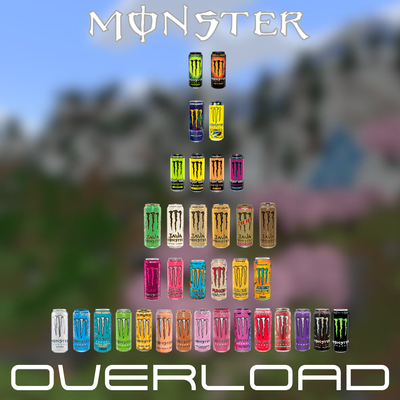
Add a boost of energy to your Minecraft world with the Monster Energy Mod! This mod introduces multiple energy drink variants inspired by Monster designed to enhance the gameplay.