Minecraft version
Back to mods 
Modrinth · Minecraft mod
TropiHunterBoard
Mod client that adds a HUD overlay for the Tropimon server's hunt board. Includes a complete in-game Cobblemon wiki.
Choose a version Pick your version below, then grab the matching file.
Quick answer
Which TropiHunterBoard release should I use?
Latest stable file 1.4.0
Game version 1.21.1
Loader Fabric
TropiHunterBoard 1.4.0 targets 1.21.1 with Fabric. It must be installed on the client. Do not install it on the dedicated server. No extra mods listed for this file.
Where it goes
Is TropiHunterBoard required on the client, server, or both?
It must be installed on the client. Do not install it on the dedicated server.
Client Required
Dedicated server Not supported
Loader for this release Fabric
Required install it here Optional supported, not mandatory Not supported do not install here Source doesn’t say do not assume
This file is marked client-only.
What else does TropiHunterBoard 1.4.0 need?
1.4.0. Change the file and its required mods may change too.
This file does not list any required mods. Do not add a library just because a different file uses it.
This file does not list any required or optional mods.
Before you install it
Add TropiHunterBoard without breaking your instance.
Built for TropiHunterBoard 1.4.0. Pick another file and the loader, install side or required mods may change.
- 01
Stick to this file
Use 1.4.0. It targets 1.21.1 with Fabric; another release may have different loader, side or dependency requirements.
- 02
Bring the mods it needs
This file does not list any required mods. Do not add a library just because a different file uses it.
- 03
Put it on the correct side
It must be installed on the client. Do not install it on the dedicated server.
- 04
Pick the file you checked
Use the “Get this file” button beside 1.4.0. It opens that exact file at the source.
About this project
What does TropiHunterBoard add?
HunterBoard
Fabric client mod for Minecraft 1.21.1 that adds a HUD overlay for Tropimon's hunt board and Cobblemon.
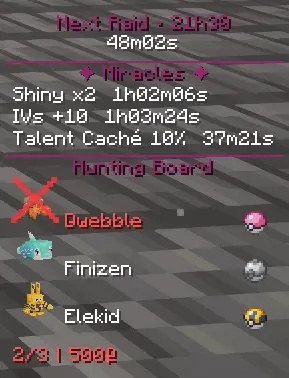
This mod automatically reads the hunts from the board (TropimodClient) and permanently displays the Pokémon to capture with the required ball, spawn info, and auto-validation when you complete a hunt on your screen.
Fonctionnalites
Features
In-game HUD
- Permanent display of current hunts with the 3D model of each Pokémon, its name, and the required ball
- multiple display modes
- Can be hidden with the B key
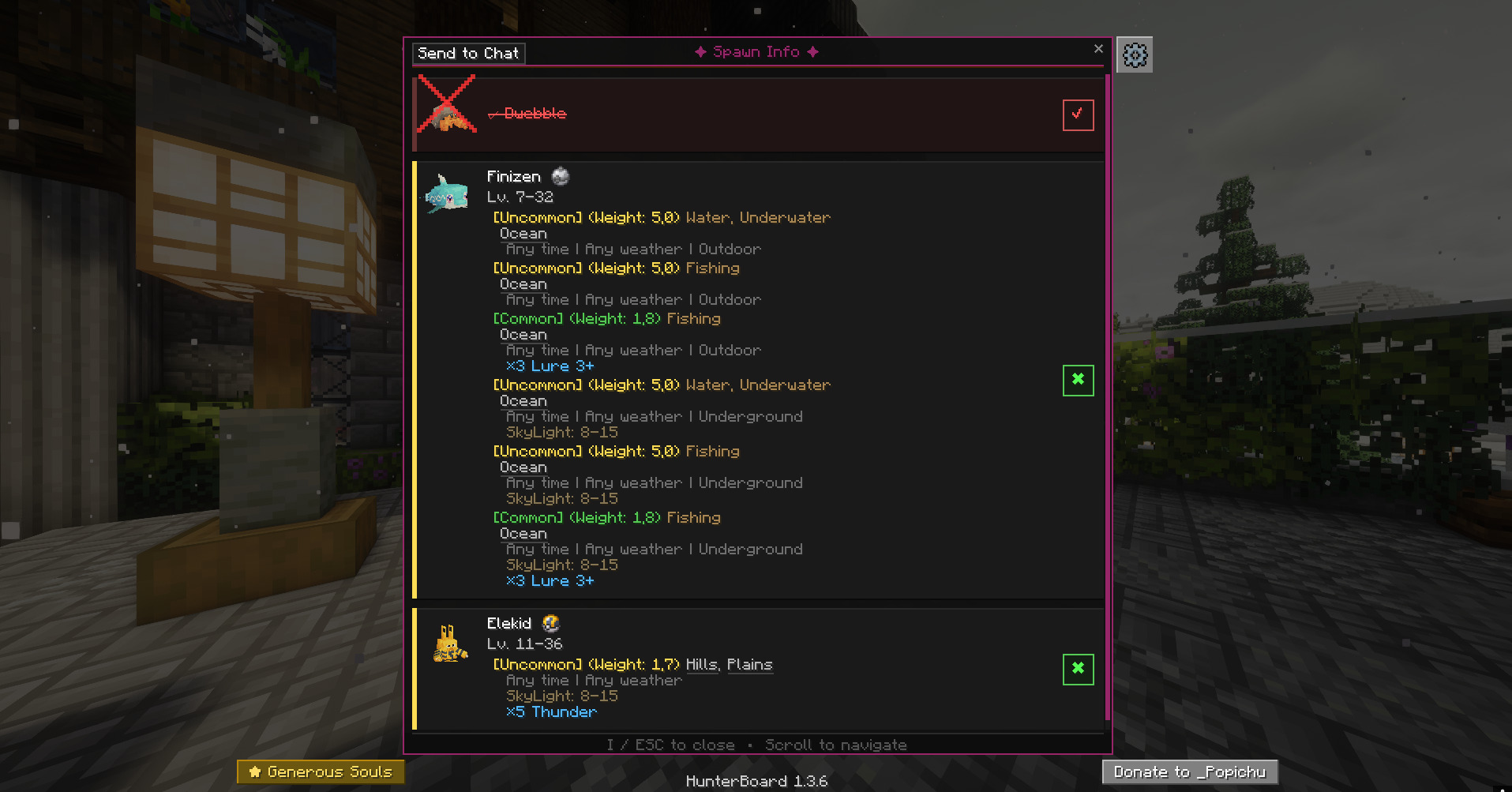
Info screen (I key)
- Detailed card for each Pokemon in the hunt: tier, reward, ball required
- Spawn data: biomes, times, weather, levels, rarity and much more — loaded directly from Cobblemon files (also works on servers)
- 3D model of the Pokémon on each map
- Automatic catch detection on hunt completion
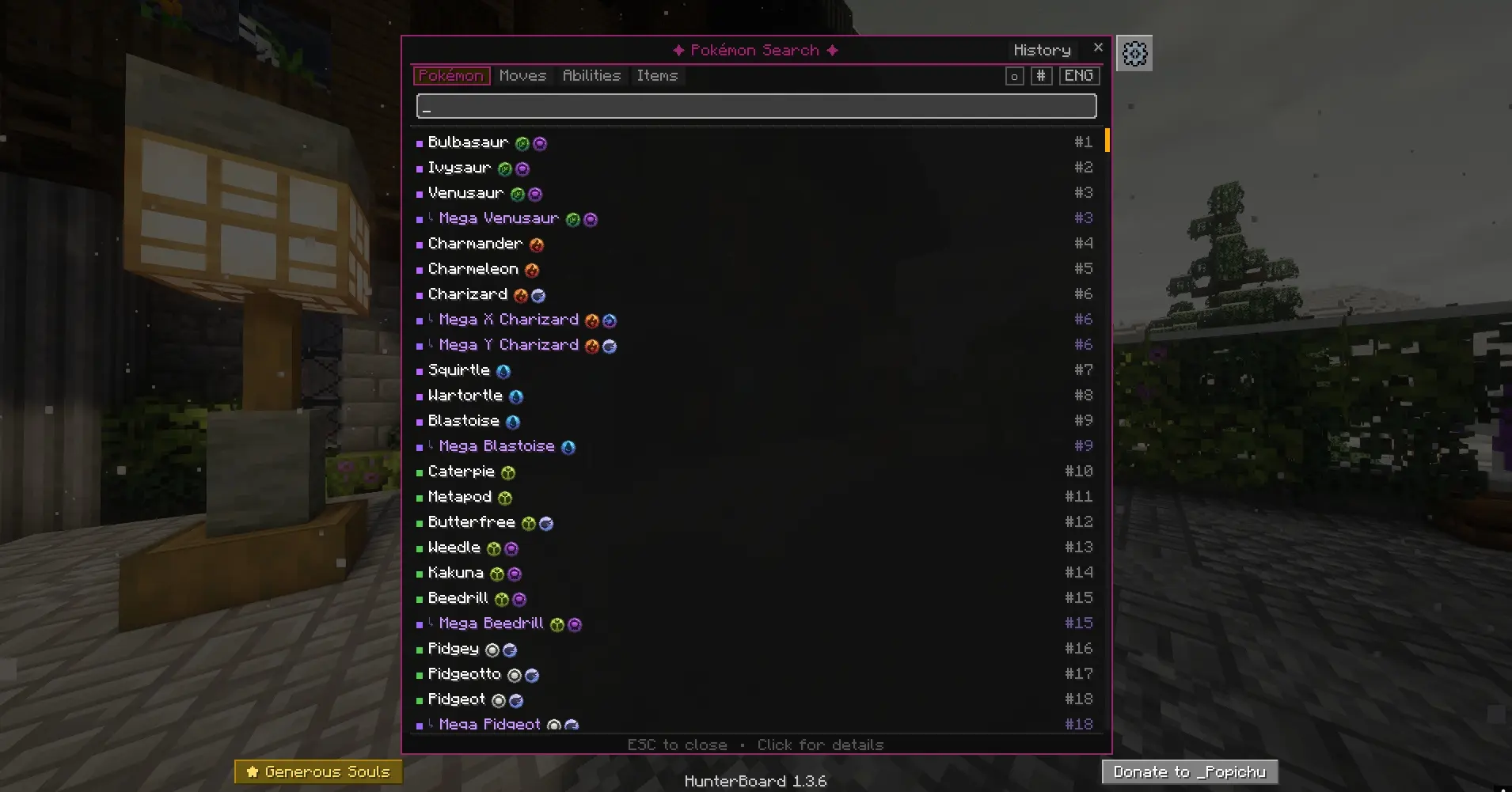
Pokemon Search (O key)
- Search among all Pokemon in Cobblemon by name
- Rarity indicator (common, uncommon, rare, ultra-rare)
- Click on a Pokemon to see its complete profile
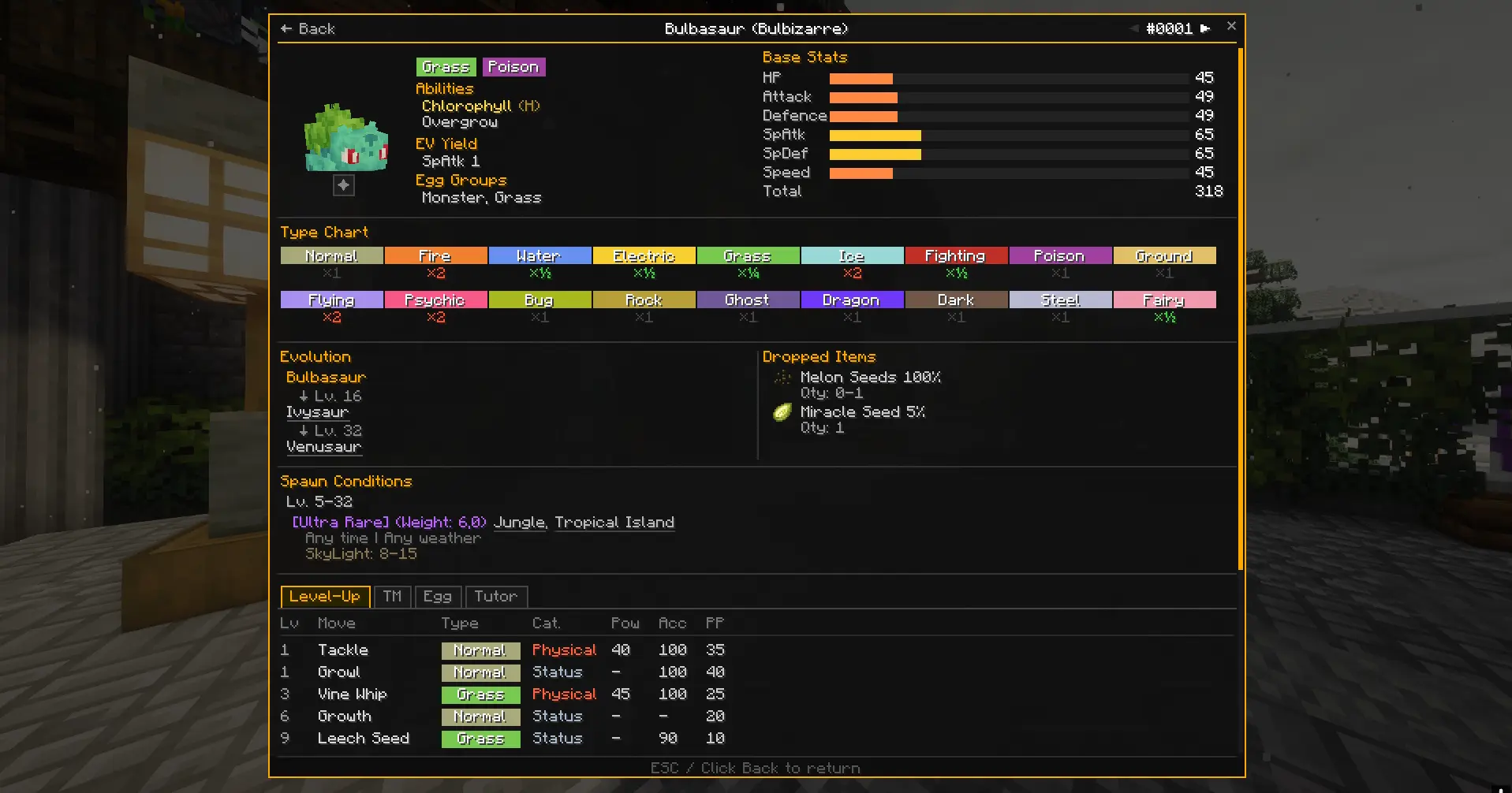
Pokemon Card
- Detailed view of a Pokemon accessible from the search
- All possible spawns with biomes, weather conditions, times, and levels
Setup
- Play with the Tropimon modpack (Modrinth or official launcher)
- Put the HunterBoard
.jarfile in themods/folder
Keys
| Key | Action |
|---|---|
| B | Show/hide HUD |
| I | Open hunt info screen |
| O | Open Pokemon search |
| $ | Quick switch between HUD modes |
The keys can be reconfigured in the Minecraft options (Controls > HunterBoard).
Project description from Modrinth.
Pick your setup
TropiHunterBoard by Minecraft version and loader
Choose the version and loader you play, then open the matching release.
Check the dependencies, then try the file in a copied instance before changing a world you care about.
Recent files
TropiHunterBoard versions and loaders
1.4.0
hunterboard-1.4.0+cobblemon.1.8.1.jar
16 Sept 2026
Client Required Server Not supported Dependencies No extras listed Listed on Release listing
Check the 1.21.1 · Fabric setup 1.21.1Fabric release
1.3.10
hunterboard-1.3.10.jar
23 Jul 2026
Client Required Server Not supported Dependencies No extras listed Listed on Release listing
Check the 1.21.1 · Fabric setup 1.21.1Fabric release
1.3.9
hunterboard-1.3.9.jar
16 Jul 2026
Client Required Server Not supported Dependencies No extras listed Listed on Release listing
Check the 1.21.1 · Fabric setup 1.21.1Fabric release
1.3.8
hunterboard-1.3.8.jar
24 Apr 2026
Client Required Server Not supported Dependencies No extras listed Listed on Release listing
Check the 1.21.1 · Fabric setup 1.21.1Fabric release
1.3.7
hunterboard-1.3.7.jar
8 Mar 2026
Client Required Server Not supported Dependencies No extras listed Listed on Release listing
Check the 1.21.1 · Fabric setup 1.21.1Fabric release
1.3.6
hunterboard-1.3.6.jar
2 Mar 2026
Client Required Server Not supported Dependencies No extras listed Listed on Release listing
Check the 1.21.1 · Fabric setup 1.21.1Fabric release
1.3.5
hunterboard-1.3.5.jar
27 Feb 2026
Client Required Server Not supported Dependencies No extras listed Listed on Release listing
Check the 1.21.1 · Fabric setup 1.21.1Fabric release
1.3.4
hunterboard-1.3.4.jar
19 Feb 2026
Client Required Server Not supported Dependencies No extras listed Listed on Release listing
Check the 1.21.1 · Fabric setup 1.21.1Fabric release
1.3.3
hunterboard-1.3.3.jar
18 Feb 2026
Client Required Server Not supported Dependencies No extras listed Listed on Release listing
Check the 1.21.1 · Fabric setup 1.21.1Fabric release
1.3.2
hunterboard-1.3.2.jar
13 Feb 2026
Client Required Server Not supported Dependencies No extras listed Listed on Release listing
Check the 1.21.1 · Fabric setup 1.21.1Fabric release
1.3.1
hunterboard-1.3.1.jar
12 Feb 2026
Client Required Server Not supported Dependencies No extras listed Listed on Release listing
Check the 1.21.1 · Fabric setup 1.21.1Fabric release
1.3.0
hunterboard-1.3.0.jar
11 Feb 2026
Client Required Server Not supported Dependencies No extras listed Listed on Release listing
Check the 1.21.1 · Fabric setup 1.21.1Fabric release
Looking for an older file? The official Modrinth project page is in Resources.
 mod
mod CurseForge + Modrinth · Minecraft
Tab Info
Shows useful player stats like deaths, kills, playtime, position, and current dimension to everyone through a compact, configurable readout in the player list.
 mod
mod CurseForge + Modrinth · Minecraft
Multicount
a Qol mod that allows players to create and switch between multiple saves
 mod
mod CurseForge + Modrinth · Minecraft
Vine Cork
Stop vines from growing using a shear (only required server-side)