Minecraft version
Back to mods 
Modrinth · Minecraft mod
Customizable Player Models
Customize your minecraft avatar!
Choose a version Pick your version below, then grab the matching file.
Quick answer
Which Customizable Player Models release should I use?
Latest stable file 26.3v0.6.27b-fabric
Game version 26.3-snapshot-5
Loader Fabric
Customizable Player Models 26.3v0.6.27b-fabric targets 26.3-snapshot-5 with Fabric. Installation on the client is optional. Installation on the dedicated server is optional. No extra mods listed for this file.
Where it goes
Is Customizable Player Models required on the client, server, or both?
Installation on the client is optional. Installation on the dedicated server is optional.
Client Optional
Dedicated server Optional
Loader for this release Fabric
Required install it here Optional supported, not mandatory Not supported do not install here Source doesn’t say do not assume
The source marks this as usable on both the client and server.
What else does Customizable Player Models 26.3v0.6.27b-fabric need?
26.3v0.6.27b-fabric. Change the file and its required mods may change too.
This file does not list any required mods. Do not add a library just because a different file uses it.
This file does not list any required or optional mods.
Before you install it
Add Customizable Player Models without breaking your instance.
Built for Customizable Player Models 26.3v0.6.27b-fabric. Pick another file and the loader, install side or required mods may change.
- 01
Stick to this file
Use 26.3v0.6.27b-fabric. It targets 26.3-snapshot-5 with Fabric; another release may have different loader, side or dependency requirements.
- 02
Bring the mods it needs
This file does not list any required mods. Do not add a library just because a different file uses it.
- 03
Put it on the correct side
Installation on the client is optional. Installation on the dedicated server is optional.
- 04
Pick the file you checked
Use the “Get this file” button beside 26.3v0.6.27b-fabric. It opens that exact file at the source.
About this project
What does Customizable Player Models add?
Customizable Player Models
Create a custom avatar using the built-in editor.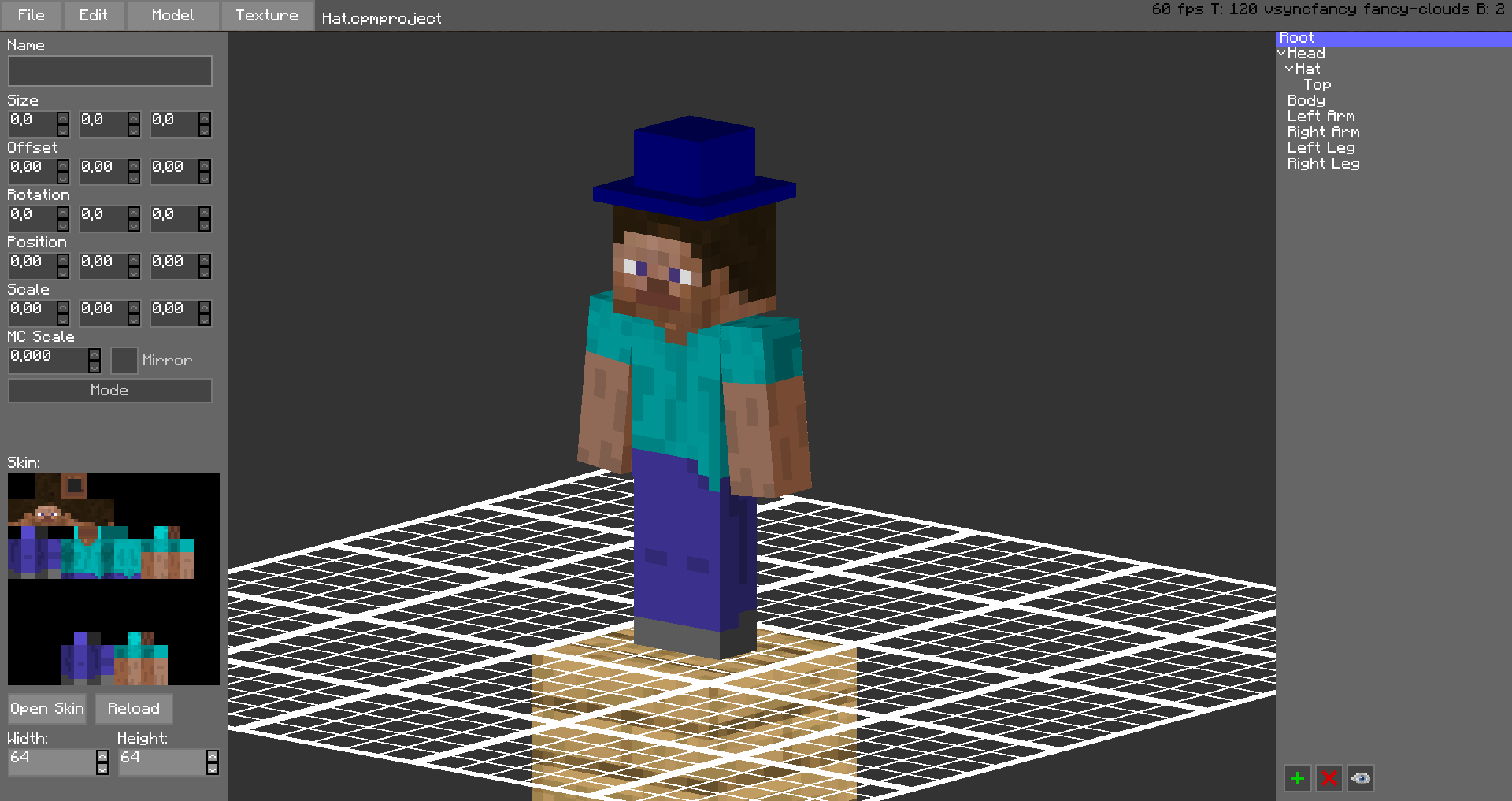
The models are stored in unused space on your Minecraft Skin, or as a Gist on GitHub.
Upload the exported image file as your skin to load the custom model.
Browse uploaded models on the Models Website.
The additional parts can have custom textures, higher resolution skins can be used (Steve skin from Soartex Fanver - Vanilla)
Parts of the normal player model can be hidden or moved around.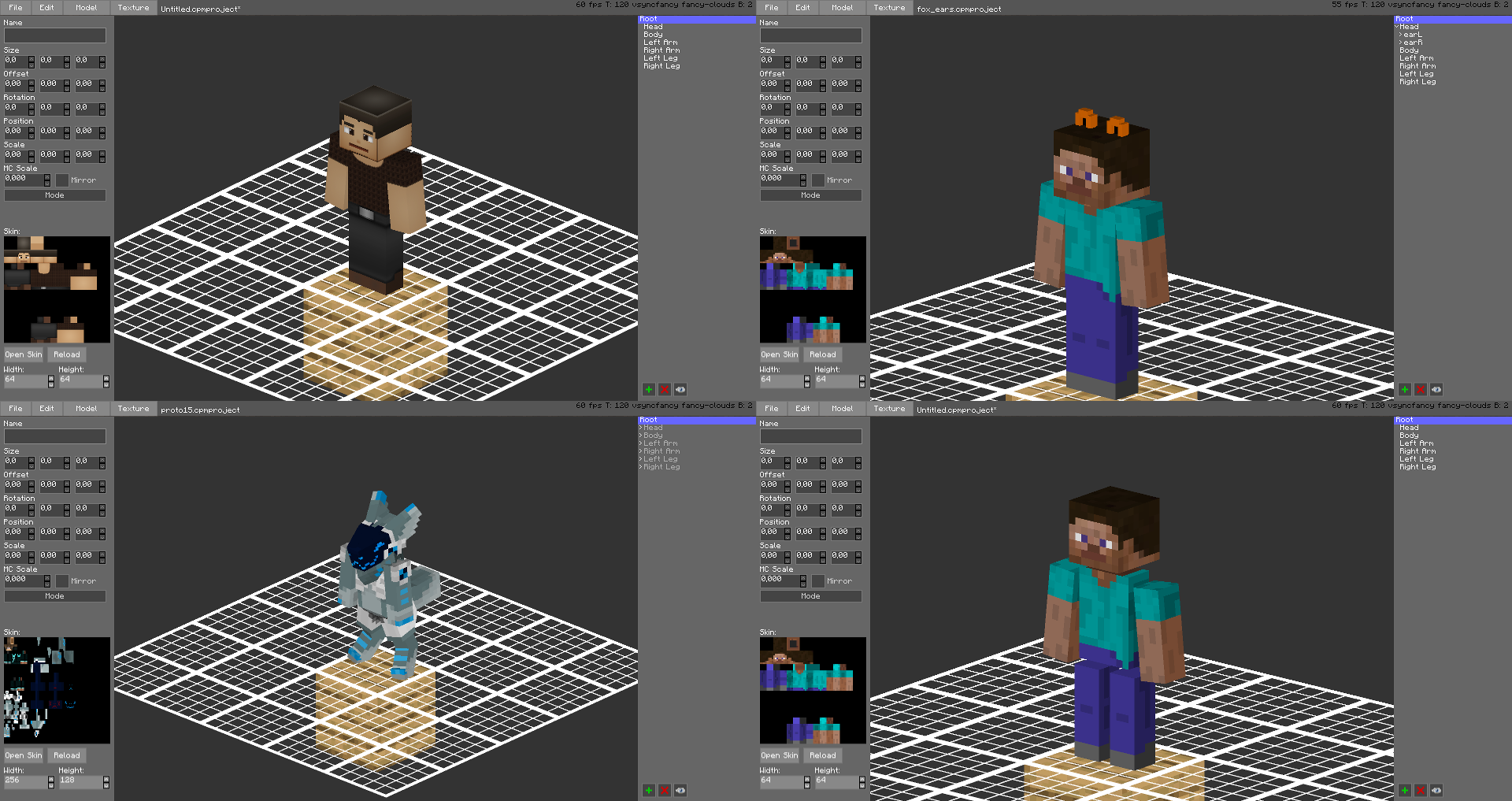
You can even make parts of your skin "glow" like a glow squid.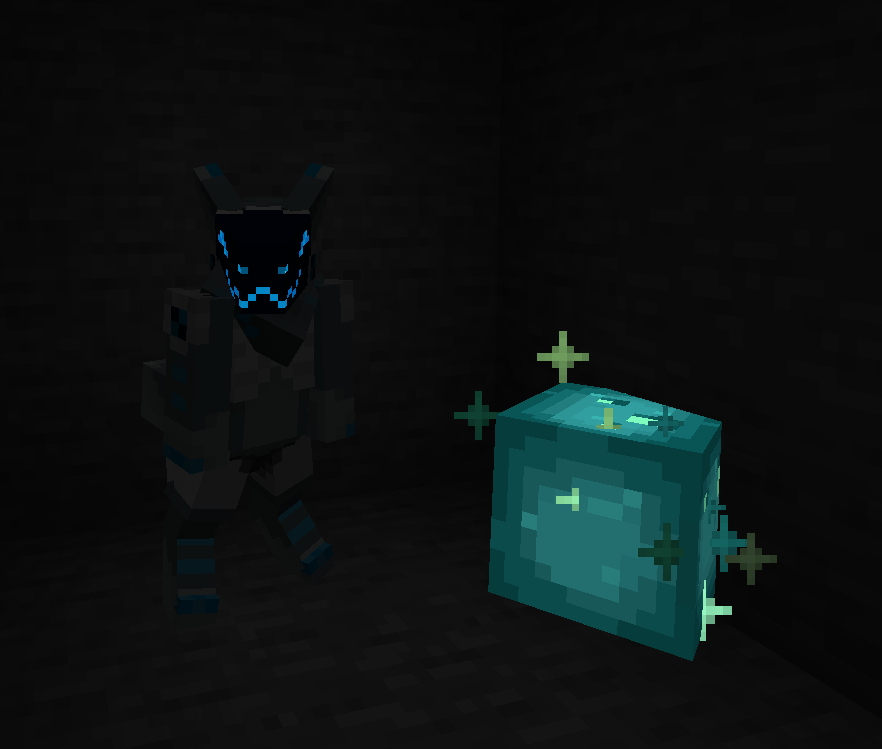
Plugin for Bukkit/Spigot servers for changing skins ingame (not required): https://github.com/tom5454/CustomPlayerModels/releases
Project description from Modrinth.
Pick your setup
Customizable Player Models by Minecraft version and loader
Choose the version and loader you play, then open the matching release.
Minecraft version
26.3-snapshot-5
1 loader buildMinecraft version
26.3-snapshot-2
1 loader buildMinecraft version
26.2-snapshot-8
1 loader buildMinecraft version
26.2
3 loader buildsMinecraft version
26.1.2
4 loader buildsMinecraft version
26.1.1
4 loader buildsMinecraft version
26.1
4 loader buildsMinecraft version
1.21.11
4 loader buildsMinecraft version
1.21.10
4 loader buildsMinecraft version
1.21.9
1 loader buildMinecraft version
1.21.8
4 loader buildsShowing the newest 12 of 56 game versions. Older files are in the list below.
Check the dependencies, then try the file in a copied instance before changing a world you care about.
Recent files
Customizable Player Models versions and loaders
26.3v0.6.27b-fabric
CustomPlayerModels-Fabric-26.3-0.6.27b.jar
26 Jul 2026
Client Optional Server Optional Dependencies No extras listed Listed on Release listing
Check the 26.3-snapshot-5 · Fabric setup 26.3-snapshot-5Fabric release
26.2v0.6.27b-fabric
CustomPlayerModels-Fabric-26.2-0.6.27b.jar
26 Jul 2026
Client Optional Server Optional Dependencies No extras listed Listed on Release listing
Check the 26.2 · Fabric setup 26.2Fabric release
26.2v0.6.27b-forge
CustomPlayerModelsLexForge-26.2-0.6.27b.jar
26 Jul 2026
Client Optional Server Optional Dependencies No extras listed Listed on Release listing
Check the 26.2 · Forge setup 26.2Forge release
26.2v0.6.27b-neoforge
CustomPlayerModels-26.2-0.6.27b.jar
26 Jul 2026
Client Optional Server Optional Dependencies No extras listed Listed on Release listing
Check the 26.2 · NeoForge setup 26.2NeoForge release
Paperv0.6.27a-paper
CustomPlayerModels-Paper-0.6.27a.jar
5 Jul 2026
Client Optional Server Optional Dependencies No extras listed Listed on Release listing
Check the 26.1.2 · folia setup 1.211.21.11.21.21.21.3 release
Bukkitv0.6.27a-bukkit
CustomPlayerModels-Bukkit-0.6.27a.jar
5 Jul 2026
Client Optional Server Optional Dependencies No extras listed Listed on Release listing
Check the 26.1.2 · bukkit setup 1.8.81.10.21.12.21.14.4 release
26.3v0.6.27a-fabric
CustomPlayerModels-Fabric-26.3-0.6.27a.jar
5 Jul 2026
Client Optional Server Optional Dependencies No extras listed Listed on Release listing
Check the 26.3-snapshot-2 · Fabric setup 26.3-snapshot-2Fabric release
26.2v0.6.27a-fabric
CustomPlayerModels-Fabric-26.2-0.6.27a.jar
5 Jul 2026
Client Optional Server Optional Dependencies No extras listed Listed on Release listing
Check the 26.2 · Fabric setup 26.2Fabric release
26.2v0.6.27a-forge
CustomPlayerModelsLexForge-26.2-0.6.27a.jar
5 Jul 2026
Client Optional Server Optional Dependencies No extras listed Listed on Release listing
Check the 26.2 · Forge setup 26.2Forge release
26.2v0.6.27a-neoforge
CustomPlayerModels-26.2-0.6.27a.jar
5 Jul 2026
Client Optional Server Optional Dependencies No extras listed Listed on Release listing
Check the 26.2 · NeoForge setup 26.2NeoForge release
26.1v0.6.27a-fabric
CustomPlayerModels-Fabric-26.1-0.6.27a.jar
5 Jul 2026
Client Optional Server Optional Dependencies No extras listed Listed on Release listing
Check the 26.1.2 · Fabric setup 26.126.1.126.1.2Fabric release
26.1v0.6.27a-forge
CustomPlayerModelsLexForge-26.1-0.6.27a.jar
5 Jul 2026
Client Optional Server Optional Dependencies No extras listed Listed on Release listing
Check the 26.1.2 · Forge setup 26.126.1.126.1.2Forge release
Looking for an older file? The official Modrinth project page is in Resources.
 mod
mod CurseForge + Modrinth · Minecraft
Fusion (Connected Textures)
Fusion allows resource packs to use additional texture and model types such as connected textures!
 mod
mod CurseForge + Modrinth · Minecraft
Simple World Downloader
Allows you to download worlds from servers.
 mod
mod Modrinth · Minecraft
Eslium
Predicts server actions - general latency/ping effects optimizer