Mod Menu Optional for NoTextureRotations 1.0.5+1.21.11
optionalMatching file found Matched file: 17.0.1

Modrinth · Minecraft mod
Prevent Block Texture Rotations
Quick answer
NoTextureRotations 1.0.5+1.21.11 targets 1.21.11 with Fabric. It must be installed on the client. Do not install it on the dedicated server. All 1 required mods have matching files.
Where it goes
It must be installed on the client. Do not install it on the dedicated server.
This file is marked client-only.
1.0.5+1.21.11. Change the file and its required mods may change too.
Install Fabric API first. We found matching files for this game-version and loader setup. 1 comes through another mod in the chain.
1 extra mod was pulled in by another dependency. Indented rows show who needs each one. We only count dependency files that match this setup. A file for another loader does not fill the gap.
Before you install it
Built for NoTextureRotations 1.0.5+1.21.11. Pick another file and the loader, install side or required mods may change.
Use 1.0.5+1.21.11. It targets 1.21.11 with Fabric; another release may have different loader, side or dependency requirements.
Install Fabric API first. We found matching files for this game-version and loader setup. 1 comes through another mod in the chain.
It must be installed on the client. Do not install it on the dedicated server.
Use the “Get this file” button beside 1.0.5+1.21.11. It opens that exact file at the source.
About this project
A Fabric mod to prevent coordinate exploits based on texture rotation and position offsets. Or if you prefer how it looks!
Compatible with Vanilla MC, Sodium, and custom texture/resource packs
This mod provides multiple modes to select from:
note: a chunk section is a 16x16x16 part of a chunk. no modes are vulnerable to absolute x or z coords being cracked.
| visual variation | deterministic | security issues/notes | |
|---|---|---|---|
| no rotations | none | yes | none |
| random | high | no | none |
| stable random | high | per game session | y coord and xz section coords can be cracked if many examples provided |
| repeating chunk | medium | yes | xyz section coords can be cracked |
There are two ways to configure the mod in-game:
The configuration file is located at: .minecraft/config/no-texture-rotations.json
Many blocks like grass, dirt, and stone have variations that rotate or change their textures slightly.
Texture variants are not inherently bad, they make the game visually more interesting as they prevent blocks from looking "same-y" when many are next to each other.
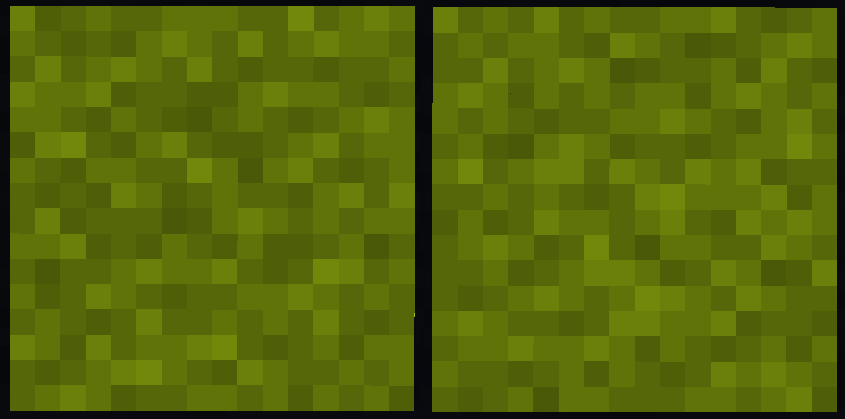
The problem is that the "random" number used to select the variant is seeded by the block's position in-game. No world seed is required.
Offsets work similarly, some blocks like flowers offset their position from the center of the block with a "random" offset.
Any screenshots or videos that show examples of these blocks are susceptible to an attacker cracking the block coordinates.
On anarchy servers, this can be particularly powerful - leading to bases with images or videos shared being found.
This is not a new discovery, the method has been known since at least before 2018 and is still regularly used today
for finding panorma seeds. Example: https://youtu.be/gE1dMNCyofs?t=57
more detailed explanation: https://gitea.com/ChromeCrusher/Texploit-Guide
some examples of public coord cracking tools:
Project description from Modrinth.
Pick your setup
Choose the version and loader you play, then open the matching release.
Showing the newest 12 of 29 game versions. Older files are in the list below.
Check the dependencies, then try the file in a copied instance before changing a world you care about.
Recent files
NoTextureRotations-1.0.5+1.21.11.jar
28 Sept 2026
NoTextureRotations-1.0.5+26.x.jar
28 Sept 2026
NoTextureRotations-1.0.5+1.21.2.jar
28 Sept 2026
NoTextureRotations-1.0.5+1.21.jar
28 Sept 2026
NoTextureRotations-1.0.5+1.19.x.jar
28 Sept 2026
NoTextureRotations-1.0.5+1.20.x.jar
28 Sept 2026
NoTextureRotations-1.0.4+26.1.jar
21 Mar 2026
NoTextureRotations-1.0.4+1.21.11.jar
9 Dec 2025
NoTextureRotations-1.0.4+1.21.2.jar
4 Jun 2025
NoTextureRotations-1.0.4+1.21.jar
4 Jun 2025
NoTextureRotations-1.0.4+1.20.x.jar
4 Jun 2025
NoTextureRotations-1.0.4+1.19.x.jar
4 Jun 2025
Looking for an older file? The official Modrinth project page is in Resources.
 mod
Darkness? Never heard of it
 mod
Soulslike leveling for Minecraft: stage attribute points, preview every stat before and after, and confirm your build in one press.
 mod
All-in-one storage that grows from a chest network on day one to channel-free cell drives, autocrafting and quantum bridges, plus vaults, drawers and backpacks.