Text Placeholder API Optional for Custom Server MOTD 1.2+1.21.2
optionalMatching file found Matched file: 2.5.2+1.21.3
Modrinth · Minecraft mod
Gives you many options to customize your servers appearance from the server menu.
Quick answer
Custom Server MOTD 1.2+1.21.2 targets 1.21.2, 1.21.3 with Fabric. Do not install it on the client. It must be installed on the dedicated server. 1 required mod needs a matching file.
Where it goes
Do not install it on the client. It must be installed on the dedicated server.
This file is marked server-only.
1.2+1.21.2 on 1.21.2. Every mod below is checked against that same setup.
Install Fabric API first, but 1 required mod has no matching file for this setup. Do not mix loader builds to force a match.
We only count dependency files that match this setup. A file for another loader does not fill the gap.
Before you install it
Built for Custom Server MOTD 1.2+1.21.2 on 1.21.2. Pick another file and the loader, install side or required mods may change.
Use 1.2+1.21.2. It targets 1.21.2, 1.21.3 with Fabric; another release may have different loader, side or dependency requirements.
Install Fabric API first, but 1 required mod has no matching file for this setup. Do not mix loader builds to force a match.
Do not install it on the client. It must be installed on the dedicated server.
Use the “Get this file” button beside 1.2+1.21.2. It opens that exact file at the source.
About this project
This mod gives you access to customize your server join screen.
You can change your MOTD, icon, player count, max players and the hover players.
It also supports Placeholder API.
The icon is now a link instead of locally. Why?, this is because you can now have a link that has a changing picture, and it will update to it every 10 sec.
Important If you don't want one of the features you can easily turn them off bye commenting out them in the config.
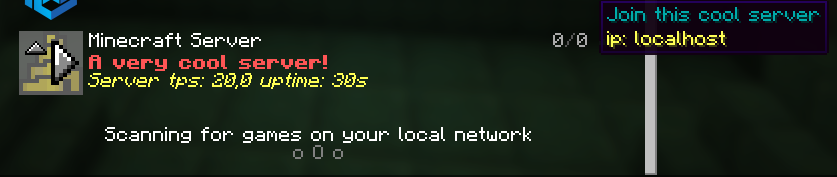

In your motd if you use placeholders you need to place it between two "", For example "%server:time%"
#Motd text (uses vanilla system, use this tool https://mctools.org/motd-creator), You can also use the normal vannila color codes. They are located here (https://minecraft.wiki/w/Formatting_codes)
motd: A minecraft server

# From here remove "#" if you want to use a feature

#Potho link (use this if you want to change the photo at the same time as the server is running)

#link-to-photo: link

#If you want to change the max player count, (Only visual, not changing your player count)
#max-player-count: 420

#If you want to change the current player count, (Only visual)
#player-count: 69

#Hover text for player amount, max 12, (Only visual)
#plyer-list:
  #- steve
Get BisectHosting and save 25% off for new customers using code Lukas at checkout. Thanks for your support - it helps me develop this and other mods I make! #ad
Project description from Modrinth.
Pick your setup
Choose the version and loader you play, then open the matching release.
Showing the newest 12 of 14 game versions. Older files are in the list below.
Check the dependencies, then try the file in a copied instance before changing a world you care about.
Recent files
CustomMotd-1.2+1.21.2.jar
22 Oct 2024
Looking for an older file? The official Modrinth project page is in Resources.
 mod
A Minecraft mod that adds customizable timestamps to chat!
 mod
Totem of Undying now protects you from any type of damage
 mod
Pull dropped items toward the one you aim at