Minecraft version
Back to mods 
Modrinth · Minecraft mod
PlayerNoticeBoard
A mod adding a notice board that allow players to create quests for others.
Choose a version Pick your version below, then grab the matching file.
Quick answer
Which PlayerNoticeBoard release matches 26.1.2?
Best match for your filters 1.2-26.1
Game version 26.1, 26.1.1, 26.1.2
Loader Fabric
PlayerNoticeBoard 1.2-26.1 targets 26.1, 26.1.1, 26.1.2 with Fabric. Installation on the client is optional. Installation on the dedicated server is optional. No extra mods listed for this file.
Where it goes
Is PlayerNoticeBoard required on the client, server, or both?
Installation on the client is optional. Installation on the dedicated server is optional.
Client Optional
Dedicated server Optional
Loader for this release Fabric
Required install it here Optional supported, not mandatory Not supported do not install here Source doesn’t say do not assume
The source marks this as usable on both the client and server.
What else does PlayerNoticeBoard 1.2-26.1 need?
1.2-26.1 on 26.1.2. Every mod below is checked against that same setup.
This file does not list any required mods. Do not add a library just because a different file uses it.
This file does not list any required or optional mods.
Before you install it
Add PlayerNoticeBoard without breaking your instance.
Built for PlayerNoticeBoard 1.2-26.1 on 26.1.2. Pick another file and the loader, install side or required mods may change.
- 01
Stick to this file
Use 1.2-26.1. It targets 26.1, 26.1.1, 26.1.2 with Fabric; another release may have different loader, side or dependency requirements.
- 02
Bring the mods it needs
This file does not list any required mods. Do not add a library just because a different file uses it.
- 03
Put it on the correct side
Installation on the client is optional. Installation on the dedicated server is optional.
- 04
Pick the file you checked
Use the “Get this file” button beside 1.2-26.1. It opens that exact file at the source.
About this project
What does PlayerNoticeBoard add?
PlayerNoticeBoard
A mod adding a notice board that lets players create quests for others.
You can create two types of quests:
Harvest quests — ask for a quantity of any item, up to a full inventory (2304, i.e. 36 stacks of 64).
Hunting quests — ask to kill a specific player.
For each quest you can place up to two stacks of rewards. When someone completes the quest they receive the rewards, and you receive the requested items.
Press J at any time to check your ongoing contracts, even far from a notice board.
How a contract lives
- You create it at a notice board. The reward items are taken from your inventory.
- It shows up on the board as Available. Anyone can accept it except its creator — and, for a hunt, except the target. You can accept as many contracts as you want.
- The acceptor either completes it or abandons it. Abandoning puts the contract back on the board (with a fresh timer) for someone else.
- The creator can delete a contract as long as nobody has accepted it. Once accepted, it must be abandoned by its acceptor before it can be deleted.
Rules
- You cannot accept your own contract.
If you are the target of a hunt, you cannot accept it. - A harvest contract is completed from My Contracts once you carry the requested amount; the items are then taken from your inventory.
- A hunt contract cannot be closed manually: it completes only when the target dies and the kill is credited to the acceptor. Deaths the attacker provoked count too (e.g. "X burned to a crisp while fighting Y"); a death with no attacker does not count.
- Only the acceptor can complete or abandon. Only the creator can delete.
- If a contract expires, its rewards are returned to the creator.
- Every event (created, accepted, completed, abandoned, deleted) notifies the players involved in the chat, with a short sound.
The Create tab lets you write a contract:
- Harvest — pick the objective item, then the quantity (1 to 2304) and a time limit.
- Hunt — pick the target player (you cannot target yourself) and a time limit.
- Rewards — drag up to two stacks from your inventory into the two slots.
- A live preview on the right shows exactly what other players will read.
- The Seal stamp creates the contract.
The time limit is entered in seconds (e.g. 600 = 10 minutes).
Three tabs at the top of the board:
- Contract Board — every available and in-progress contract. Click one to accept it.
- Create — the creation menu described above; your inventory is displayed below the panel.
- My Contracts — the contracts you accepted or created. Select one, then:
Complete (acceptor only) — hands in the requested items and pays out the rewards;
Abandon (acceptor only) — the contract returns to the board;
Delete (creator only, and only while nobody has accepted it).
Each row shows the relevant player's head, the creator, the objective, the rewards and the remaining time.
Crafting Recipe
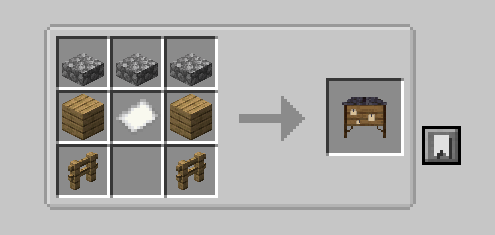
The Notice board
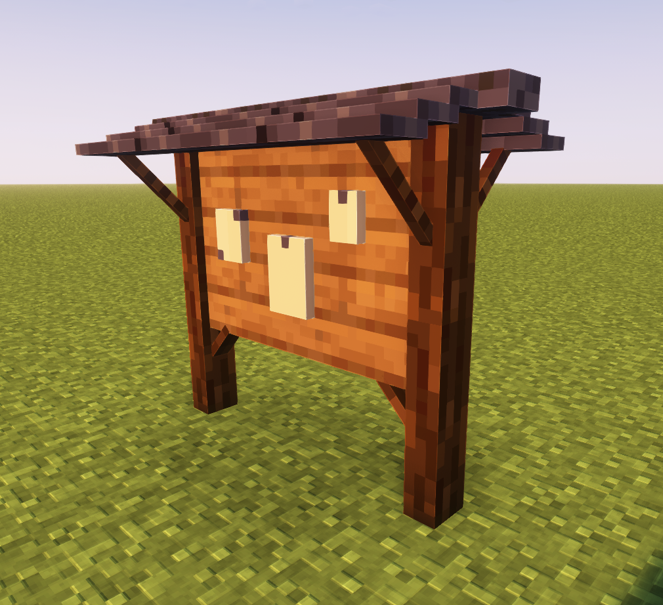
Creation Menu
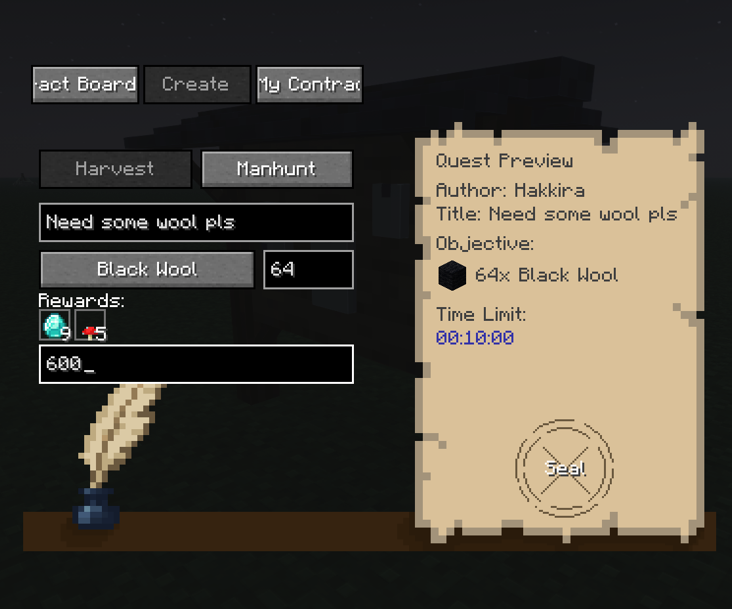
GUI
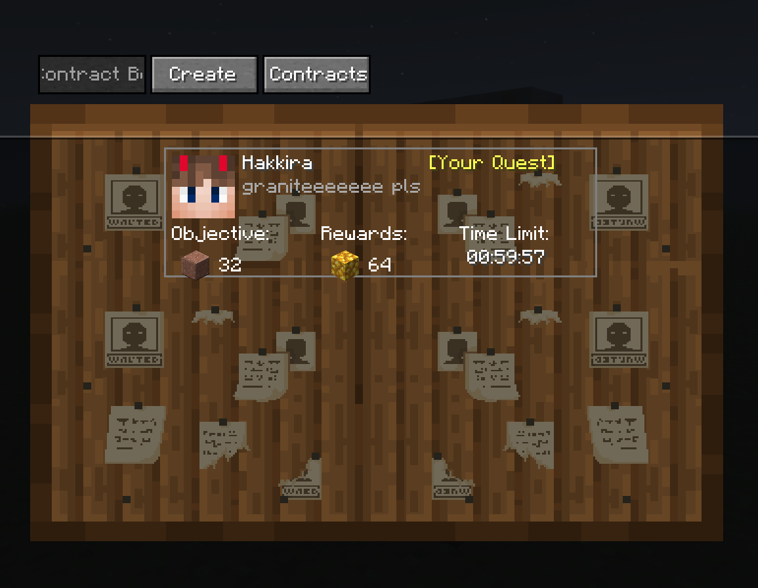
Project description from Modrinth.
Pick your setup
PlayerNoticeBoard by Minecraft version and loader
Choose the version and loader you play, then open the matching release.
Minecraft version
26.2
1 loader buildMinecraft version
26.1.2
1 loader buildMinecraft version
26.1.1
1 loader buildMinecraft version
26.1
1 loader buildMinecraft version
1.21.1
1 loader buildCheck the dependencies, then try the file in a copied instance before changing a world you care about.
Recent files
PlayerNoticeBoard versions and loaders
1.2-26.1
contrats-1.2-26.1.jar
2 Nov 2026
Client Optional Server Optional Dependencies No extras listed Listed on Release listing
Check the 26.1.2 · Fabric setup 26.126.1.126.1.2Fabric release
Looking for an older file? The official Modrinth project page is in Resources.
 mod
CurseForge + Modrinth · Minecraft
VO: Better Dogs
Enhances vanilla wolves with unique personalities (Aggressive, Pacifist, Normal), smarter AI, safety behaviors, and combat improvements.
 mod
CurseForge + Modrinth · Minecraft
Antarchy
Adding 45+ mobs, 8+ bosses, 3 fleshed out dimensions, and more
 mod
CurseForge + Modrinth · Minecraft
Open In Inventory
Open guidebooks, backpacks, handhelds and more with a single click in inventory