Mod Menu Needed by Compact F3 Plus 1.1.2 for Fabric 1.19.2
requiredMatching file found Matched file: Mod Menu v4.1.2 for 1.19.2
CurseForge · Minecraft mod
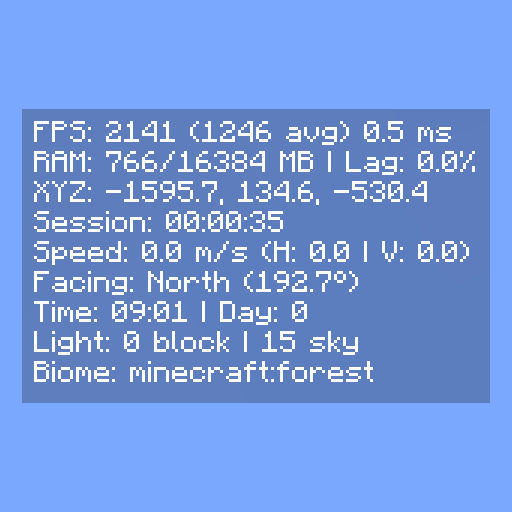
a mod that replaces the vanilla F3 with a clean, minimal hud overlay.
Quick answer
Compact F3 Plus 1.1.2 for Fabric 1.19.2 targets 1.19.2 with Fabric, Quilt. The project page does not say whether this file belongs on the client, dedicated server, or both. All 5 required mods have matching files.
Where it goes
The project page does not say whether this file belongs on the client, dedicated server, or both.
The source does not explicitly classify this release as client-only or server-only.
1.1.2 for Fabric 1.19.2 on 1.19.2. Every mod below is checked against that same setup.
Install Mod Menu, Cloth Config API (Fabric/Forge/NeoForge), Fabric API, Cloth Config API and 1 more first. We found matching files for this game-version and loader setup.
We only count dependency files that match this setup. A file for another loader does not fill the gap.
Before you install it
Built for Compact F3 Plus 1.1.2 for Fabric 1.19.2 on 1.19.2. Pick another file and the loader, install side or required mods may change.
Use 1.1.2 for Fabric 1.19.2. It targets 1.19.2 with Fabric, Quilt; another release may have different loader, side or dependency requirements.
Install Mod Menu, Cloth Config API (Fabric/Forge/NeoForge), Fabric API, Cloth Config API and 1 more first. We found matching files for this game-version and loader setup.
The project page does not say whether this file belongs on the client, dedicated server, or both.
Use the “Get this file” button beside 1.1.2 for Fabric 1.19.2. It opens that exact file at the source.
About this project
A minimal, fully customizable HUD overlay for NeoForge, Forge and Fabric that replaces the vanilla F3 debug screen with a clean, readable interface.
F3 opens the compact HUD instead of the vanilla debug screen.F8 (rebindable in Controls).Every element can be individually toggled. The HUD can be anchored to any screen corner with adjustable X and Y offsets.
Settings are saved to
config/compactf3plus-client.toml (NeoForge, Forge)
config/compactf3plus.json (Fabric)
and accessible via Mod Menu (Fabric) or the NeoForge / Forge mod list.
Project description from CurseForge.
Pick your setup
Choose the version and loader you play, then open the matching release.
Showing the newest 12 of 21 game versions. Older files are in the list below.
Check the dependencies, then try the file in a copied instance before changing a world you care about.
Recent files
compactf3plus-1.1.2-fabric-1.19.2.jar
22 Feb 2026
compactf3plus-1.1.2.jar
22 Feb 2026
Looking for an older file? The official CurseForge project page is in Resources.
 mod
LDLib is a libarary mod for custom rendering, modular gui.
 mod
This mod is a remake of Old Mod TofuCraft made by tsuteto. add soybean As a new all-purpose food!
 mod
Adds a quest system designed to make info conveyance in modpacks far more intuitive!