Female Gender Mod Optional for Hide Your Armor 1.7.1
optionalMatching file found Matched file: 5.0.0+mc26.3-fabric

Modrinth · Minecraft mod
Fabric mod that allows you to toggle armor visibility with WGFM support.
Quick answer
Hide Your Armor 1.7.1 targets 26.3 with Fabric, NeoForge. It must be installed on the client. Do not install it on the dedicated server. No extra mods listed for this file.
Where it goes
It must be installed on the client. Do not install it on the dedicated server.
This file is marked client-only.
1.7.1 on Fabric. Every mod below is checked against that same setup.
This file does not list any required mods. Do not add a library just because a different file uses it.
We only count dependency files that match this setup. A file for another loader does not fill the gap.
Before you install it
Built for Hide Your Armor 1.7.1 on Fabric. Pick another file and the loader, install side or required mods may change.
Use 1.7.1. It targets 26.3 with Fabric, NeoForge; another release may have different loader, side or dependency requirements.
This file does not list any required mods. Do not add a library just because a different file uses it.
It must be installed on the client. Do not install it on the dedicated server.
Use the “Get this file” button beside 1.7.1. It opens that exact file at the source.
About this project



Client-side mod for hiding or setting transparency of your armor. Works locally by default, and optionally syncs to other players if the server has it too.
Opacity, not just on/off
Every piece has a slider from 0% to 100%. Drag it and see the change instantly on the preview doll. No need to re-equip anything.
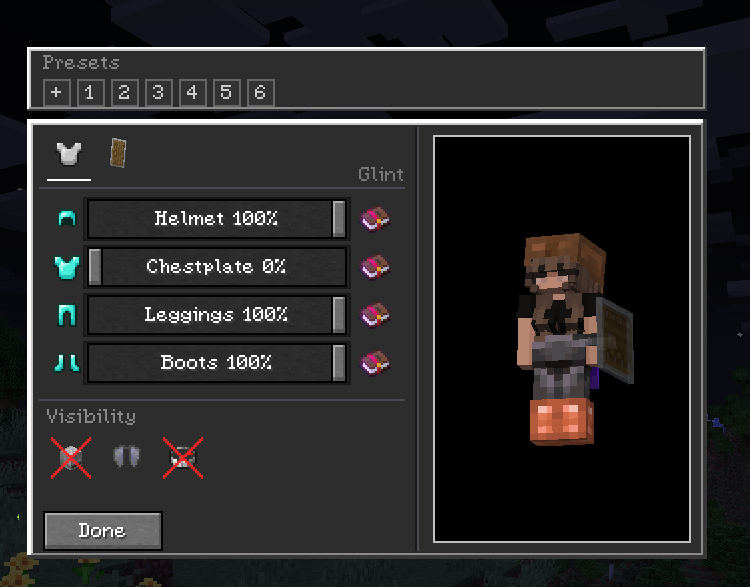
Two tabs
Armor / Offhand.
Live preview
The config screen doesn't pause the game. You can view the preview model and it updates in real time. Settings save to config/hidearmor.json when you close the screen.
Presets
Save your current sliders as a preset and apply it later. Right-click a preset to delete it.
Wildfire Female Gender Mod compat
If you use WGFM, breast armor layers follow your chestplate opacity and the glint toggles work on those meshes too.
Esc to close and save.The mod is client-side only. You can join vanilla servers fine – your settings just stay local.
If you want others to see you the way you configured it, turn on Multiplayer Sync (compass icon in the top-right of the config screen). When enabled, your config is sent to the server and the server relays it to other players who also have the mod.
| You | Server | Others see your opacity? |
|---|---|---|
| Singleplayer / LAN | – | Yes |
| Modded server | Mod installed | Yes |
| Vanilla / no mod | Not installed | No – stays local |
Players without the mod just see normal armor. No crashes or desyncs.
Universal jar works on both loaders (built with Architectury + Forgix).
Fabric API is required on Fabric. No extra dependencies on NeoForge.
No commands. Config is at config/hidearmor.json and is edited inside the game. You can back it up or delete it to reset.
MIT – see LICENSE.
Developed with ❤️ by G10W5.
Project description from Modrinth.
Pick your setup
Choose the version and loader you play, then open the matching release.
Check the dependencies, then try the file in a copied instance before changing a world you care about.
Recent files
HideYourArmor-1.7.1+mc26.3-universal.jar
23 Oct 2026
HideYourArmor-1.7.1+mc26.1.2-universal.jar
23 Oct 2026
HideYourArmor-1.7.0-universal.jar
23 Sept 2026
HideYourArmor-1.6.1-universal.jar
26 Aug 2026
HideYourArmor-1.6.0-universal.jar
14 Jul 2026
hidearmor-1.5.4.jar
9 Jul 2026
hidearmor-1.5.3-beta.jar
4 Jul 2026
hidearmor-1.5.2-beta.jar
1 Jul 2026
hidearmor-1.5.1-beta.jar
30 Jun 2026
hidearmor-1.5.0-alpha.jar
30 Jun 2026
hidearmor-1.4.3.jar
20 Mar 2026
hidearmor-1.4.2.jar
13 Mar 2026
Looking for an older file? The official Modrinth project page is in Resources.
 mod
Tameable eagles that hunt, scout and fly at your side.
 mod
Adds vanilla-style scythes with area damage, extended reach, and a unique life-steal enchantment. A perfect balance between swords and axes.
 mod
A bridge/proxy allowing you to connect to Minecraft: Java Edition servers with Minecraft: Bedrock Edition.