Minecraft version
Back to mods 
Modrinth · Minecraft mod
Potion Bar
Potion bar mod that adds a progress bar for potions
Choose a version Pick your version below, then grab the matching file.
Quick answer
Which Potion Bar release matches 26.2?
Best match for your filters 1.5.3-fabric
Game version 26.2
Loader Fabric
Potion Bar 1.5.3-fabric targets 26.2 with Fabric. It must be installed on the client. Do not install it on the dedicated server. No extra mods listed for this file.
Where it goes
Is Potion Bar required on the client, server, or both?
It must be installed on the client. Do not install it on the dedicated server.
Client Required
Dedicated server Not supported
Loader for this release Fabric
Required install it here Optional supported, not mandatory Not supported do not install here Source doesn’t say do not assume
This file is marked client-only.
What else does Potion Bar 1.5.3-fabric need?
1.5.3-fabric on 26.2. Every mod below is checked against that same setup.
This file does not list any required mods. Do not add a library just because a different file uses it.
This file does not list any required or optional mods.
Before you install it
Add Potion Bar without breaking your instance.
Built for Potion Bar 1.5.3-fabric on 26.2. Pick another file and the loader, install side or required mods may change.
- 01
Stick to this file
Use 1.5.3-fabric. It targets 26.2 with Fabric; another release may have different loader, side or dependency requirements.
- 02
Bring the mods it needs
This file does not list any required mods. Do not add a library just because a different file uses it.
- 03
Put it on the correct side
It must be installed on the client. Do not install it on the dedicated server.
- 04
Pick the file you checked
Use the “Get this file” button beside 1.5.3-fabric. It opens that exact file at the source.
About this project
What does Potion Bar add?
🧪 Potion Bar
Potion Bar adds clean and simple progress bars for active potion effects.
No more guessing — see exactly how much time is left for each effect, with a bar and an icon on the side.

✅ Features:
- Displays potion duration as a progress bar
- Colored bars depending on the potion type
- Fully client-side — no need to install on servers
⚙️ Commands:
Position Hud:
- /potionbar position center (default)
- /potionbar position left
- /potionbar position right
- /potionbar position custom — opens HUD editor (drag & drop)
Show Vanilla effects:
- /potionbar vanilaEffects show
- /potionbar vanilaEffects hide (default)
Timer system:
- /potionbar timer on — enable potion effect timer
- /potionbar timer off — disable potion effect timer
- /potionbar timer left — show timer on the left
- /potionbar timer right — show timer on the right (default)
- /potionbar timer above — show timer above the icon
- /potionbar timer below — show timer below the icon
Custom icons:
- /potionbar CustomIcons on — enable custom textures (default)
- /potionbar CustomIcons off — disable (vanilla textures)
Level:
- /potionbar level on — enable level effects (default)
- /potionbar level off — disable level effects
📸 Screenshots:
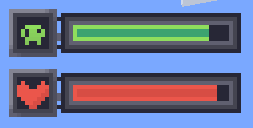

🧪 Stay informed. Stay alive. Use Potion Bar.
Project description from Modrinth.
Pick your setup
Potion Bar by Minecraft version and loader
Choose the version and loader you play, then open the matching release.
Minecraft version
26.2
1 loader buildMinecraft version
26.1.2
1 loader buildMinecraft version
26.1.1
1 loader buildMinecraft version
26.1
1 loader buildMinecraft version
1.21.11
1 loader buildMinecraft version
1.21.10
1 loader buildMinecraft version
1.21.9
1 loader buildMinecraft version
1.21.8
1 loader buildMinecraft version
1.21.7
1 loader buildMinecraft version
1.21.6
1 loader buildMinecraft version
1.21.5
1 loader buildShowing the newest 12 of 20 game versions. Older files are in the list below.
Check the dependencies, then try the file in a copied instance before changing a world you care about.
Recent files
Potion Bar versions and loaders
1.5.3-fabric
potion-bar-1.5.3-fabric.jar
12 Sept 2026
Client Required Server Not supported Dependencies No extras listed Listed on Release listing
Check the 26.2 · Fabric setup 26.2Fabric release
1.4.5-fabric
potion-bar-1.4.5-fabric.jar
2 Jul 2026
Client Required Server Not supported Dependencies No extras listed Listed on Release listing
Check the 26.2 · Fabric setup 26.2Fabric release
Looking for an older file? The official Modrinth project page is in Resources.