Minecraft version
Back to mods 
CurseForge · Minecraft mod
Inventory Overlay (HUD)
This mod displays your inventory directly on the HUD without needing to open it.
Choose a version Pick your version below, then grab the matching file.
Quick answer
Which Inventory Overlay (HUD) release should I use?
Latest stable file inventoryoverlay-26.3-4.2.0.jar
Game version 26.3
Loader Fabric
Inventory Overlay (HUD) inventoryoverlay-26.3-4.2.0.jar targets 26.3 with Fabric. The project page does not say whether this file belongs on the client, dedicated server, or both. No extra mods listed for this file.
Where it goes
Is Inventory Overlay (HUD) required on the client, server, or both?
The project page does not say whether this file belongs on the client, dedicated server, or both.
Client Source doesn’t say
Dedicated server Source doesn’t say
Loader for this release Fabric
Required install it here Optional supported, not mandatory Not supported do not install here Source doesn’t say do not assume
The source does not explicitly classify this release as client-only or server-only.
What else does Inventory Overlay (HUD) inventoryoverlay-26.3-4.2.0.jar need?
inventoryoverlay-26.3-4.2.0.jar. Change the file and its required mods may change too.
This file does not list any required mods. Do not add a library just because a different file uses it.
This file does not list any required or optional mods.
Before you install it
Add Inventory Overlay (HUD) without breaking your instance.
Built for Inventory Overlay (HUD) inventoryoverlay-26.3-4.2.0.jar. Pick another file and the loader, install side or required mods may change.
- 01
Stick to this file
Use inventoryoverlay-26.3-4.2.0.jar. It targets 26.3 with Fabric; another release may have different loader, side or dependency requirements.
- 02
Bring the mods it needs
This file does not list any required mods. Do not add a library just because a different file uses it.
- 03
Put it on the correct side
The project page does not say whether this file belongs on the client, dedicated server, or both.
- 04
Pick the file you checked
Use the “Get this file” button beside inventoryoverlay-26.3-4.2.0.jar. It opens that exact file at the source.
About this project
What does Inventory Overlay (HUD) add?
Now with Resource Pack Compatibility! (See below)

Inventory Overlay is a simple utility mod designed to keep you informed of your resources without needing to open your inventory screen. It renders a clean, customizable grid of your main inventory slots directly on your game interface.
| FEATURES |
|---|
| Live HUD Display | See your 27 main inventory slots (excluding the hotbar) at all times |
|---|---|
| Toggleable Visibility | Easily show or hide the overlay with a single keypress |
| Dynamic Positioning | Choose where the overlay sits on your screen using an anchor system |
| Custom Transparency | Adjust the background opacity to suit your visual preference |
| Shine Animation | A sleek, 45-degree white line slides across newly occupied slots to instantly notify you when an item enters an empty slot |
| Resource Pack Compatible | Custom resource packs that retexture the hotbar are automatically reflected |
| HOW TO USE |
|---|
Simply press  to toggle the visibility of the overlay.
| CONFIGURATION |
|---|
If you have Mod Menu installed, you can customize your experience:
| Horizontal Anchor | Align the overlay to the Left, Center, or Right of your screen |
|---|---|
| Vertical Anchor | Align the overlay to the Top, Center, or Bottom |
| X & Y Offsets (px) | Fine-tune the position with pixel-perfect adjustments |
| Container Alpha (%) | Control the background transparency |
| REQUIREMENTS |
|---|
| Minecraft Version | Fabric Loader |
|---|---|
| 1.21 - 26.2 | 0.18.6 |
| 26.3 | 0.19.5 |
- Fabric API
- Cloth Config API (1.21.x)
- YetAnotherConfigLib (26.x)
- Mod Menu (recommended for easy in-game configuration)
| CLIENT-SIDE ONLY |
|---|
All functionality is done client-side and is compatible with vanilla servers.
| FREE & OPEN SOURCE |
|---|
This is a completely free project. I'm not asking for donations or "buy me a coffee" contributions. If you enjoy the mod, the best way to support it is by:
- Leaving a rating/review
- Sharing it with friends
- Reporting any bugs you find
| GALLERY |
|---|
Shine Animation

Vanilla / Gui's HUD & UI Edition / Jirniy's Pink HUD
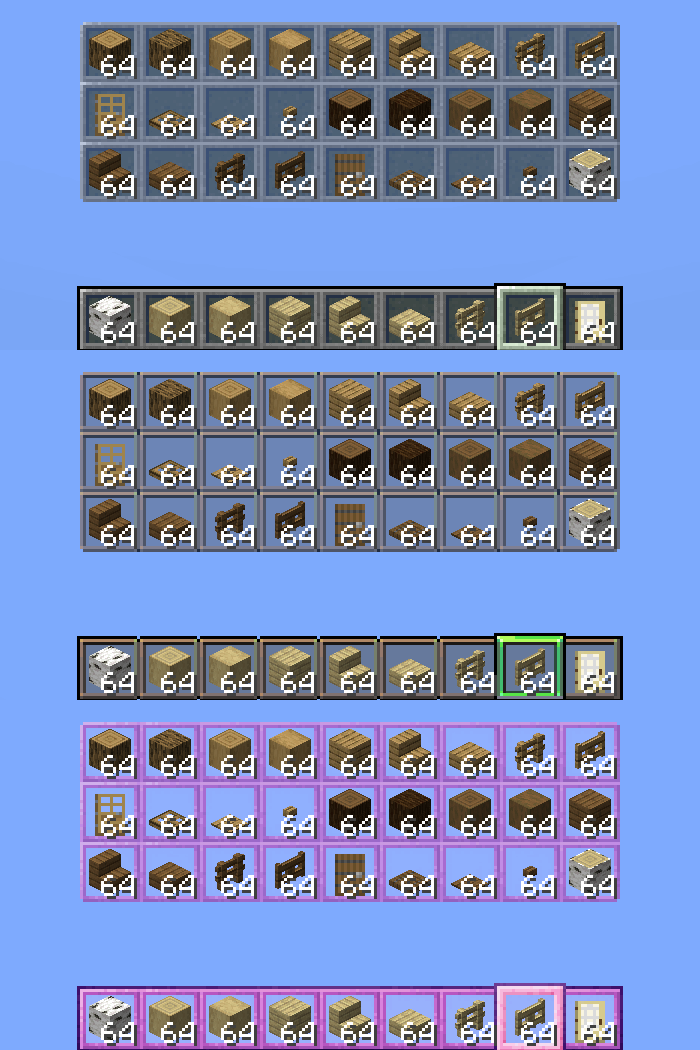
Project description from CurseForge.
Pick your setup
Inventory Overlay (HUD) by Minecraft version and loader
Choose the version and loader you play, then open the matching release.
Minecraft version
26.2
1 loader buildMinecraft version
26.1.2
1 loader buildMinecraft version
26.1.1
1 loader buildMinecraft version
26.1
1 loader buildMinecraft version
1.21.11
1 loader buildMinecraft version
1.21.10
1 loader buildMinecraft version
1.21.9
1 loader buildMinecraft version
1.21.8
1 loader buildMinecraft version
1.21.7
1 loader buildMinecraft version
1.21.6
1 loader buildMinecraft version
1.21.5
1 loader buildShowing the newest 12 of 17 game versions. Older files are in the list below.
Check the dependencies, then try the file in a copied instance before changing a world you care about.
Recent files
Inventory Overlay (HUD) versions and loaders
inventoryoverlay-26.3-4.2.0.jar
11 Nov 2026
Client Source doesn’t say Server Source doesn’t say Dependencies No extras listed Listed on Release listing
Check the 26.3 · Fabric setup Fabric26.3 release
inventoryoverlay-26.2-4.1.0.jar
19 Jul 2026
Client Source doesn’t say Server Source doesn’t say Dependencies No extras listed Listed on Release listing
Check the 26.2 · Fabric setup Fabric26.2 release
inventoryoverlay-26.1.x-4.1.0.jar
19 Jul 2026
Client Source doesn’t say Server Source doesn’t say Dependencies No extras listed Listed on Release listing
Check the 26.1.2 · Fabric setup Fabric26.126.1.126.1.2 release
inventoryoverlay-26.1.x-4.0.0.jar
18 May 2026
Client Source doesn’t say Server Source doesn’t say Dependencies No extras listed Listed on Release listing
Check the 26.1.2 · Fabric setup Fabric26.126.1.126.1.2 release
inventoryoverlay-1.21.9_1.21.11-3.1.0.jar
27 Apr 2026
Client Source doesn’t say Server Source doesn’t say Dependencies No extras listed Listed on Release listing
Check the 1.21.11 · Fabric setup Fabric1.21.91.21.101.21.11 release
inventoryoverlay-1.21.6_1.21.8-3.1.0.jar
27 Apr 2026
Client Source doesn’t say Server Source doesn’t say Dependencies No extras listed Listed on Release listing
Check the 1.21.8 · Fabric setup Fabric1.21.81.21.61.21.7 release
inventoryoverlay-1.21.2_1.21.5-3.1.0.jar
27 Apr 2026
Client Source doesn’t say Server Source doesn’t say Dependencies No extras listed Listed on Release listing
Check the 1.21.5 · Fabric setup Fabric1.21.51.21.41.21.3 release
inventoryoverlay-1.21.5_1.21.11-3.0.0.jar
12 Apr 2026
Client Source doesn’t say Server Source doesn’t say Dependencies No extras listed Listed on Release listing
Check the 1.21.11 · Fabric setup Fabric1.21.81.21.51.21.6 release
inventoryoverlay-1.21.2_1.21.4-3.0.0.jar
12 Apr 2026
Client Source doesn’t say Server Source doesn’t say Dependencies No extras listed Listed on Release listing
Check the 1.21.4 · Fabric setup Fabric1.21.41.21.31.21.2 release
inventoryoverlay-1.21_1.21.1-3.0.0.jar
12 Apr 2026
Client Source doesn’t say Server Source doesn’t say Dependencies No extras listed Listed on Release listing
Check the 1.21.1 · Fabric setup 1.21Fabric1.21.1 release
inventoryoverlay-2.0.0.jar
24 Mar 2026
Client Source doesn’t say Server Source doesn’t say Dependencies No extras listed Listed on Release listing
Check the 1.21.11 · Fabric setup Fabric1.21.11 release
inventoryoverlay-1.2.0.jar
24 Jan 2026
Client Source doesn’t say Server Source doesn’t say Dependencies No extras listed Listed on Release listing
Check the 1.21.11 · Fabric setup Fabric1.21.101.21.11 release
Looking for an older file? The official CurseForge project page is in Resources.
 mod
CurseForge · Minecraft
Roast of the Carrot
A mod that enables cooking carrots and golden carrots for better effects, and introduces more carrot related foods.
 mod
CurseForge · Minecraft
Fletching Works
This mod gives vanilla's fletching table a real GUI and nine new arrow types — explosive, lightning-calling, teleporting and more — crafted from a tip, a stick and a feather. For Fabric on Minecraft 1.21.11.
 mod
CurseForge · Minecraft
MTR Map Overlay
Real-Shape MTR tracks and routes overlay on Xaero's World Map / JourneyMap