Minecraft version
Back to mods 
Modrinth · Minecraft mod
The Sixth Sense
Provides clean and simple visual alerts for incoming threats.
Choose a version Pick your version below, then grab the matching file.
Quick answer
Which The Sixth Sense release should I use?
Latest stable file 1.2.0
Game version 1.21.1
Loader Fabric
The Sixth Sense 1.2.0 targets 1.21.1 with Fabric. It must be installed on the client. Do not install it on the dedicated server. No extra mods listed for this file.
Where it goes
Is The Sixth Sense required on the client, server, or both?
It must be installed on the client. Do not install it on the dedicated server.
Client Required
Dedicated server Not supported
Loader for this release Fabric
Required install it here Optional supported, not mandatory Not supported do not install here Source doesn’t say do not assume
This file is marked client-only.
What else does The Sixth Sense 1.2.0 need?
1.2.0. Change the file and its required mods may change too.
This file does not list any required mods. Do not add a library just because a different file uses it.
This file does not list any required or optional mods.
Before you install it
Add The Sixth Sense without breaking your instance.
Built for The Sixth Sense 1.2.0. Pick another file and the loader, install side or required mods may change.
- 01
Stick to this file
Use 1.2.0. It targets 1.21.1 with Fabric; another release may have different loader, side or dependency requirements.
- 02
Bring the mods it needs
This file does not list any required mods. Do not add a library just because a different file uses it.
- 03
Put it on the correct side
It must be installed on the client. Do not install it on the dedicated server.
- 04
Pick the file you checked
Use the “Get this file” button beside 1.2.0. It opens that exact file at the source.
About this project
What does The Sixth Sense add?

The Sixth Sense adds compact, animated warnings for nearby danger and an ability that reveals hidden threats. Minecraft-style visuals display important information without cluttering your screen.
This page describes version 1.2.0 for Minecraft 1.21.1 / Fabric. Features in older releases may differ.
The Sixth Sense
Press Shift + H when no mob is targeting you. Nearby threats appear as flickering silhouettes; creatures that notice you become brighter and more distinct. You also move faster and become harder to detect.
Sixth Sense

- Range: 52 blocks · Duration: 60 seconds
- Requirement: level 20 · Cost: 109 XP
- Recovery: sleep through one night before using it again
The XP cost remains the same at higher levels. A slim hotbar indicator shows the remaining time.
After the ability ends, looking directly at the sun becomes uncomfortable. Shade or a carved pumpkin protects your eyes until you rest.
Eye strain and sunlight

Distant Shots
While drawing your bow, subtle crosshair markers predict hits beyond 16 blocks on creatures, wooden buttons and End crystals. For arcing shots, targets below the crosshair are highlighted: red indicates a likely kill, while orange indicates a non-lethal hit. Damage is estimated.
Bow-hit prediction

Nearby Dangers
Warnings respond to nearby activity. A warning about an armed mob or projectile doesn't necessarily mean you're being targeted.
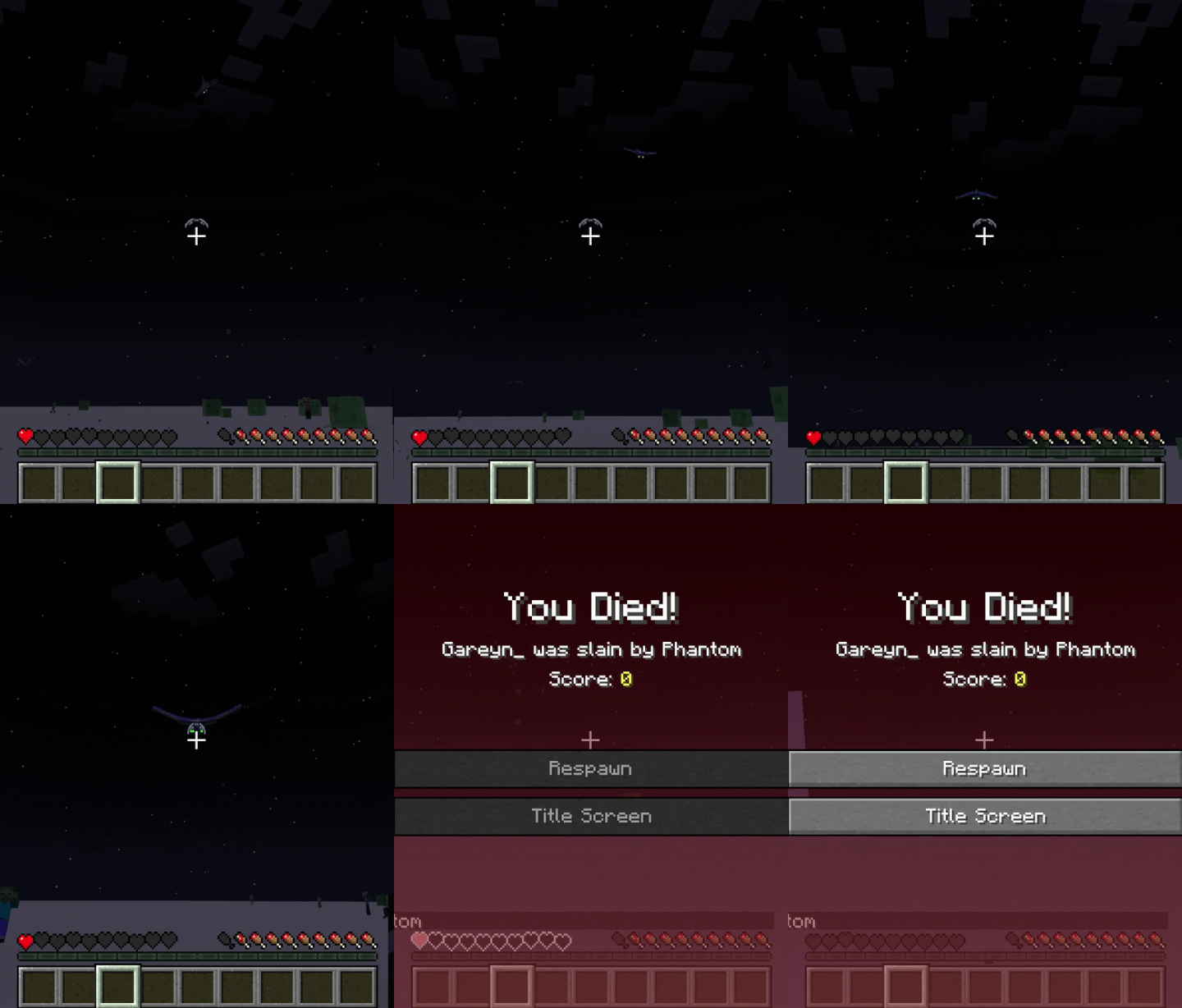
Phantom
A compact winged warning appears near your crosshair. Green eyes indicate a dive; white eyes indicate retreat. The wings fold inward as the Phantom approaches.
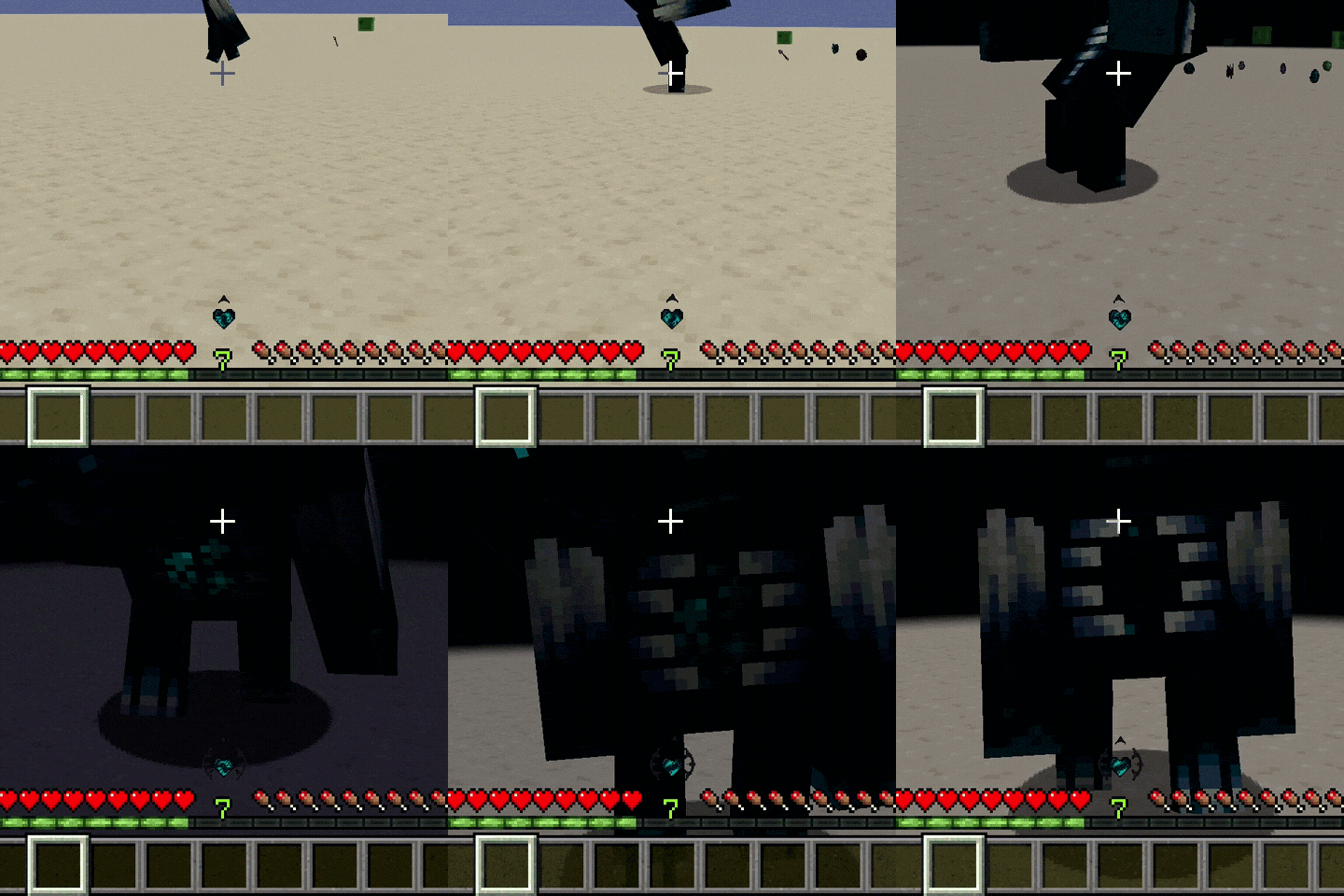
Warden
A directional heartbeat grows more urgent as the Warden approaches. Dark thorns signal its attention and react to hits and low health.
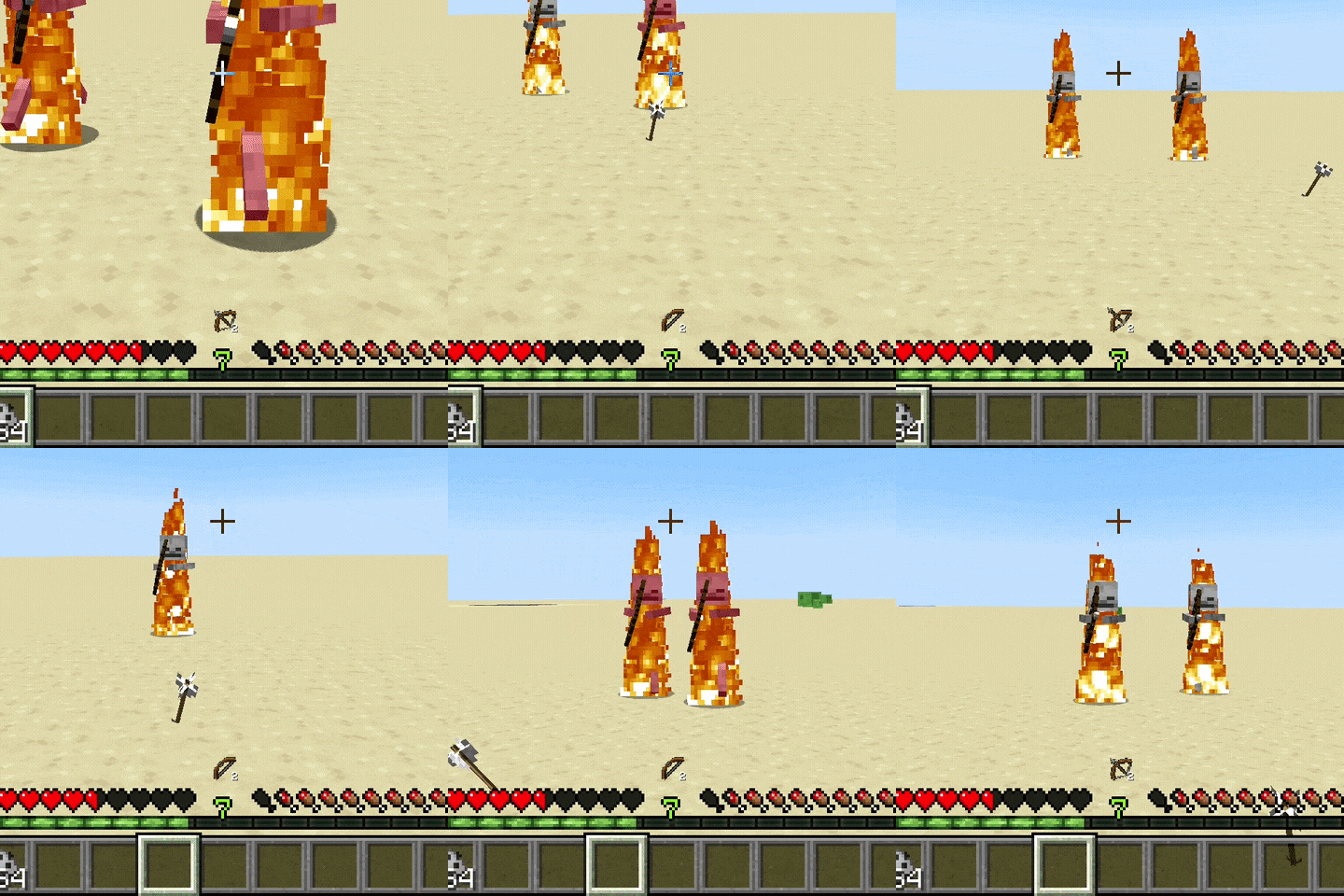
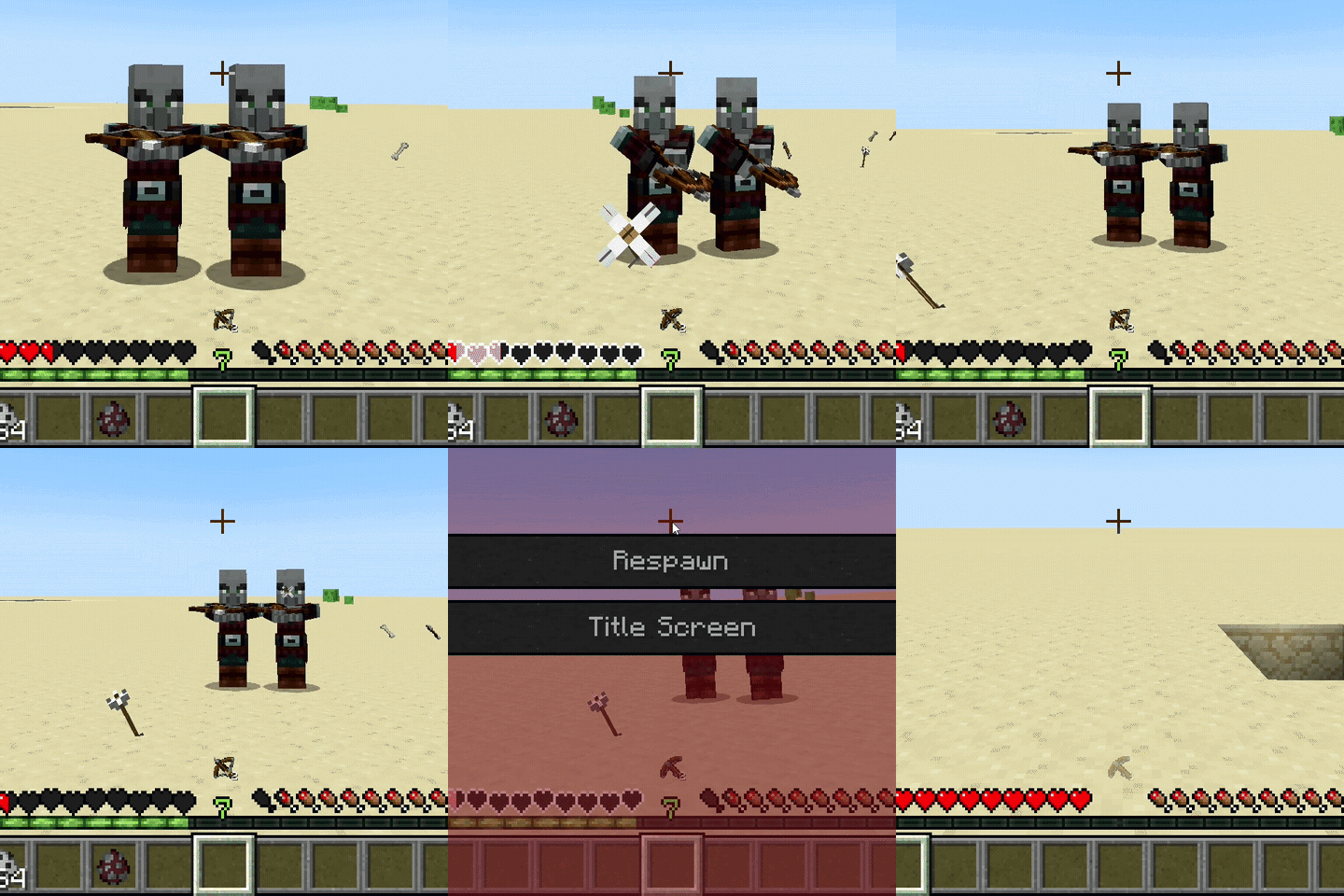
Bows and crossbows
Animated warnings show when nearby mobs draw their bows or load their crossbows. A counter appears when multiple threats are detected.
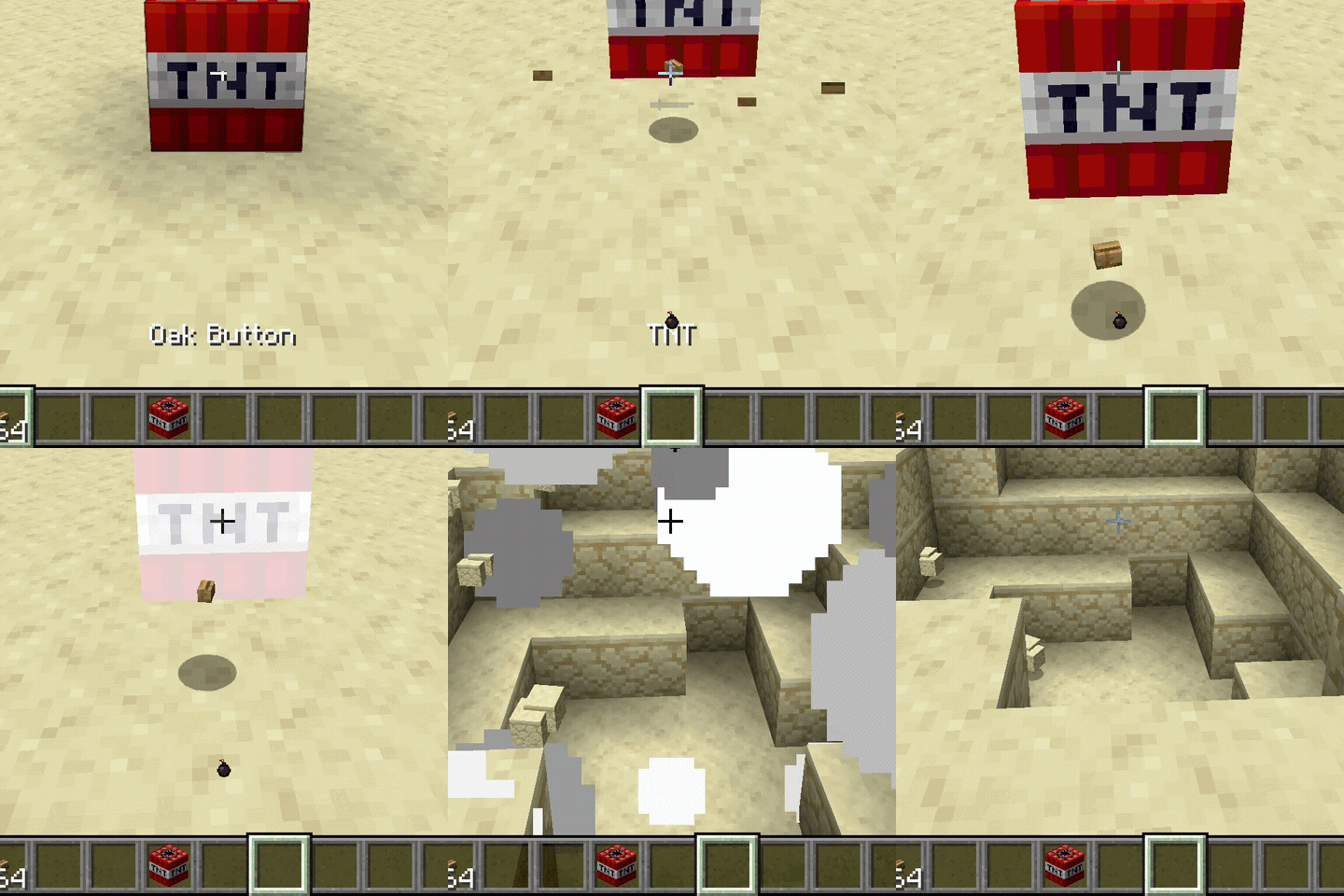
Explosions
An animated warning tracks Creepers, primed TNT and ignited TNT minecarts as they approach detonation.
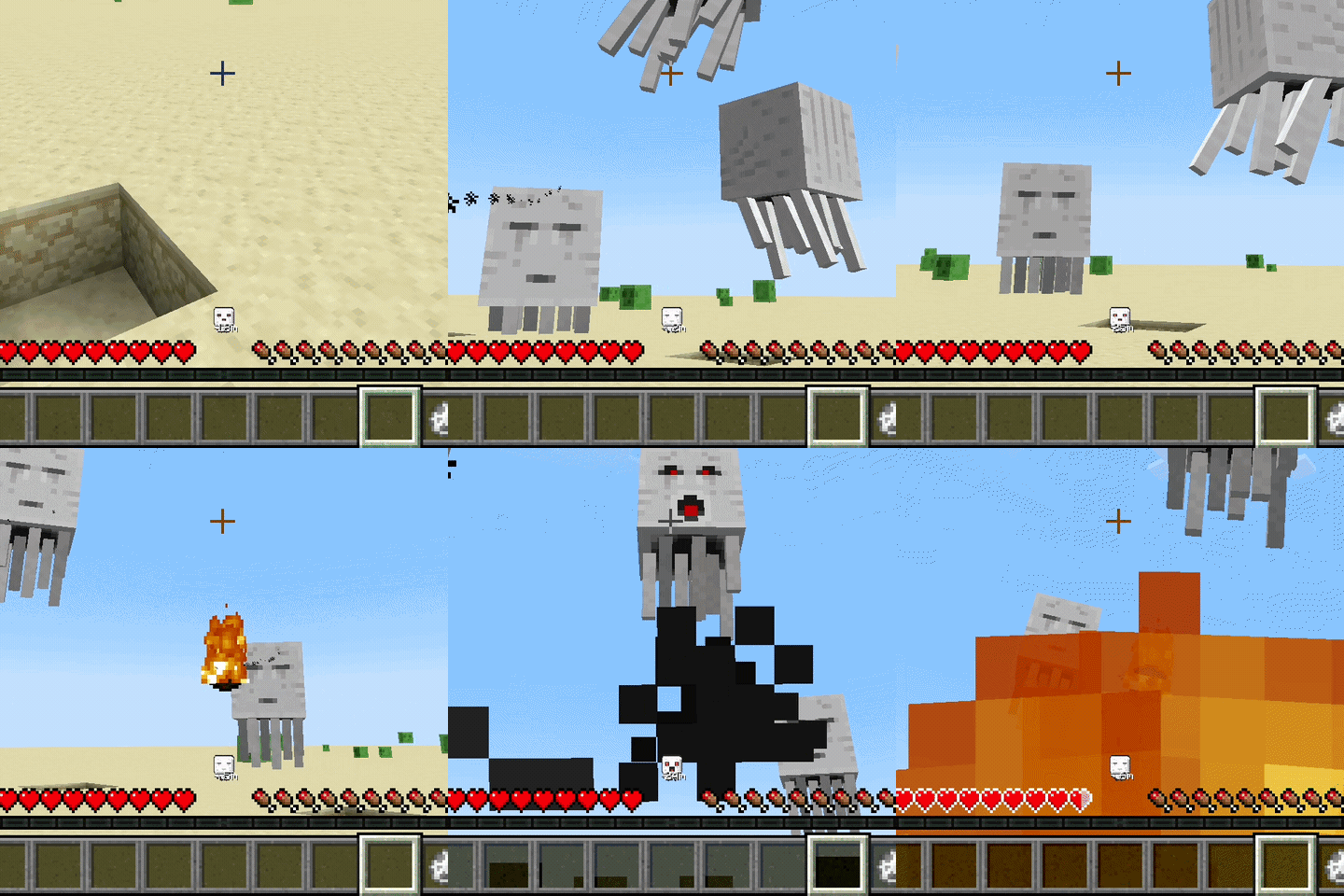
Ghast
An animated Ghast head reacts to nearby attack activity and fireballs. An optional distance readout helps you judge the threat.
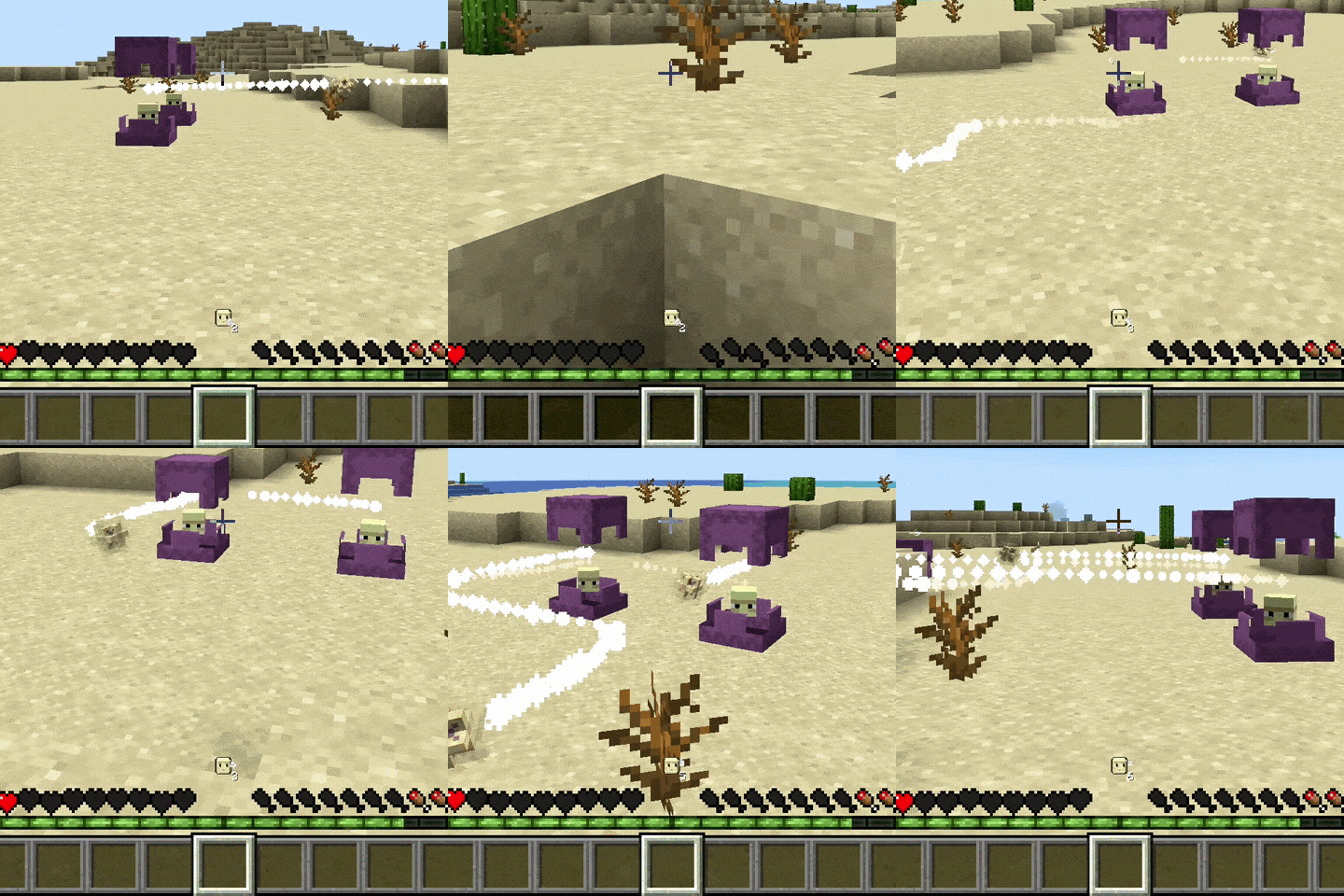
Shulker
A Shulker icon with an orbiting projectile warns of nearby Shulker bullets. A counter appears when several are detected.
Raids
Find the nearest detected raider with its name, direction, distance and coordinates. Optional highlighting helps locate hidden raiders.
Optional Inner Voice
Brief thoughts warn you about hunger, eye strain and dangerous drops. As messages appear, pixels from the leftmost health heart form a small floating sphere.
Enable Inner voice (Experimental) under Settings → Special. It is off by default; essential ability notifications still appear when it is disabled.
Inner voice animation

Settings
Press H to open the HUD editor and settings. Drag elements to move them, use the mouse wheel to resize them, and use the grid to align them. Choose individual warnings, preview animations and enable reduced motion.
HUD editor

Settings

Installation and Multiplayer
Requires Java 21+, Fabric Loader 0.19.2+ and Fabric API for Minecraft 1.21.1. Place the mod in your mods folder.
- Singleplayer: all features are available.
- Multiplayer: warnings work without a server installation. The active Sixth Sense ability requires the matching mod and Fabric API on both client and server.
The interface follows Minecraft's selected language: English, Turkish, German, French, Spanish, Japanese and Simplified Chinese. Other languages fall back to English.
Project description from Modrinth.
Pick your setup
The Sixth Sense by Minecraft version and loader
Choose the version and loader you play, then open the matching release.
Minecraft version
1.21.1
1 loader buildMinecraft version
1.20.1
2 loader buildsCheck the dependencies, then try the file in a copied instance before changing a world you care about.
Recent files
The Sixth Sense versions and loaders
1.2.0
the-sixth-sense-1.2.0.jar
1 Nov 2026
Client Required Server Not supported Dependencies No extras listed Listed on Release listing
Check the 1.21.1 · Fabric setup 1.21.1Fabric release
1.1.1
sixthsense-1.1.1.jar
9 Sept 2026
Client Required Server Not supported Dependencies No extras listed Listed on Release listing
Check the 1.20.1 · Forge setup 1.20.1Forge release
1.1.1
the-sixth-sense-1.1.1.jar
8 Sept 2026
Client Required Server Not supported Dependencies No extras listed Listed on Release listing
Check the 1.21.1 · Fabric setup 1.21.1Fabric release
1.1.0
sixthsense-1.1.0.jar
13 Jun 2026
Client Required Server Not supported Dependencies No extras listed Listed on Release listing
Check the 1.20.1 · Forge setup 1.20.1Forge release
1.1.0
the-sixth-sense-1.1.0.jar
13 Jun 2026
Client Required Server Not supported Dependencies No extras listed Listed on Release listing
Check the 1.21.1 · Fabric setup 1.21.1Fabric release
1.0.5
sixthsense-1.0.5.jar
1 Jun 2026
Client Required Server Not supported Dependencies No extras listed Listed on Release listing
Check the 1.20.1 · Forge setup 1.20.1Forge release
1.0.5
the-sixth-sense-1.0.5.jar
30 May 2026
Client Required Server Not supported Dependencies No extras listed Listed on Release listing
Check the 1.21.1 · Fabric setup 1.21.1Fabric release
1.0.4
sixthsense-1.0.4.jar
29 May 2026
Client Required Server Not supported Dependencies No extras listed Listed on Release listing
Check the 1.20.1 · Fabric setup 1.20.1Fabric release
1.0.4
the-sixth-sense-1.0.4.jar
29 May 2026
Client Required Server Not supported Dependencies No extras listed Listed on Release listing
Check the 1.21.10 · Fabric setup 1.21.10Fabric release
1.0.4
the-sixth-sense-1.0.4.jar
28 May 2026
Client Required Server Not supported Dependencies No extras listed Listed on Release listing
Check the 1.21.1 · Fabric setup 1.21.1Fabric release
Looking for an older file? The official Modrinth project page is in Resources.
 mod
CurseForge + Modrinth · Minecraft
ExtraQuests [FTB Quests]
Addon adds new tasks, rewards and functions.
 mod
CurseForge · Minecraft
Resource Bees
Automate your resource gathering with 9 unique resource-producing bees and custom hives!
 mod
CurseForge + Modrinth · Minecraft
Tinkers' Gadgets
A lightweight Tinkers' Construct addon featuring tools, new materials, and exclusive projectile traits.