Mod Menu Optional for ImagineBook 1.2.9
optionalMatching file found Matched file: 7.2.2

Modrinth · Minecraft mod
Clientside images in books
Quick answer
ImagineBook 1.2.9 targets 1.20.1 with Fabric. It must be installed on the client. Do not install it on the dedicated server. All 1 required mods have matching files.
Where it goes
It must be installed on the client. Do not install it on the dedicated server.
This file is marked client-only.
1.2.9. Change the file and its required mods may change too.
Install Fabric API first. We found matching files for this game-version and loader setup.
We only count dependency files that match this setup. A file for another loader does not fill the gap.
Before you install it
Built for ImagineBook 1.2.9. Pick another file and the loader, install side or required mods may change.
Use 1.2.9. It targets 1.20.1 with Fabric; another release may have different loader, side or dependency requirements.
Install Fabric API first. We found matching files for this game-version and loader setup.
It must be installed on the client. Do not install it on the dedicated server.
Use the “Get this file” button beside 1.2.9. It opens that exact file at the source.
About this project
(reads as "Image in book")
This mod allows you to add images to your books. Mod is fully clientside so you can add images even on servers, and other mod users also will see them.
You can use https://imgur.com/ to upload images
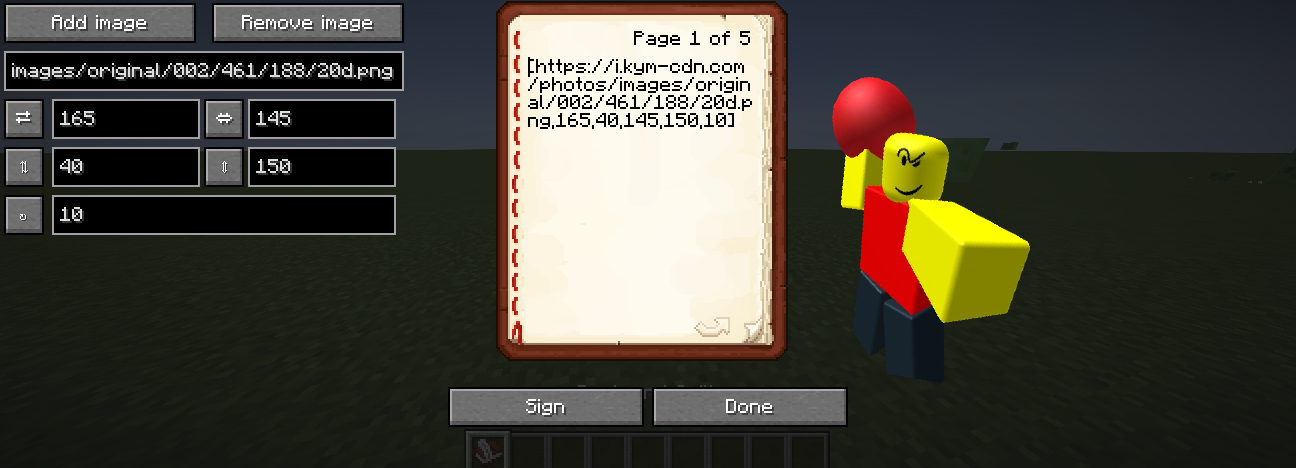
You can add image even if you don't have mod installed using mod's image format: [url,x,y,width%,height%,rotation°]
Project description from Modrinth.
Pick your setup
Choose the version and loader you play, then open the matching release.
Showing the newest 12 of 13 game versions. Older files are in the list below.
Check the dependencies, then try the file in a copied instance before changing a world you care about.
Recent files
imaginebook-fabric-1.2.9+1.20.1.jar
16 Nov 2025
imaginebook-fabric-1.2.9+1.21.10.jar
16 Nov 2025
imaginebook-forge-1.2.9+1.20.1.jar
16 Nov 2025
imaginebook-fabric-1.2.9+1.21.3.jar
16 Nov 2025
imaginebook-neoforge-1.2.9+1.21.1.jar
16 Nov 2025
imaginebook-fabric-1.2.9+1.21.1.jar
16 Nov 2025
imaginebook-fabric-1.2.9+1.20.4.jar
16 Nov 2025
imaginebook-fabric-1.2.9+1.21.4.jar
16 Nov 2025
imaginebook-neoforge-1.2.9+1.21.3.jar
16 Nov 2025
imaginebook-neoforge-1.2.9+1.21.10.jar
16 Nov 2025
imaginebook-neoforge-1.2.9+1.21.4.jar
16 Nov 2025
imaginebook-fabric-1.2.9+1.21.5.jar
16 Nov 2025
Looking for an older file? The official Modrinth project page is in Resources.
 mod
modWynncraft-specific camera utilities, inspired by the mod Nimble.
 mod
modA lightweight utility for completely removing items via simple JSON configuration.
 mod
modDisposable public fixture for testing the Modpacks.ch GitHub catalogue flow