Fabric API Needed by Label My Items 1.0.1+1.21.11
requiredMatching file found Matched file: 0.141.6+1.21.11
Modrinth · Minecraft mod
Adds item labels, which can label items
Quick answer
Label My Items 1.0.1+1.21.11 targets 1.21.11 with Fabric. Installation on the client is optional. Installation on the dedicated server is optional. All 1 required mods have matching files.
Where it goes
Installation on the client is optional. Installation on the dedicated server is optional.
The source marks this as usable on both the client and server.
1.0.1+1.21.11. Change the file and its required mods may change too.
Install Fabric API first. We found matching files for this game-version and loader setup.
We only count dependency files that match this setup. A file for another loader does not fill the gap.
Before you install it
Built for Label My Items 1.0.1+1.21.11. Pick another file and the loader, install side or required mods may change.
Use 1.0.1+1.21.11. It targets 1.21.11 with Fabric; another release may have different loader, side or dependency requirements.
Install Fabric API first. We found matching files for this game-version and loader setup.
Installation on the client is optional. Installation on the dedicated server is optional.
Use the “Get this file” button beside 1.0.1+1.21.11. It opens that exact file at the source.
About this project
A basic mod that adds the Item Label and the Eraser, which are used together to manage item labels.
Item labels appear in the tooltip of an item:
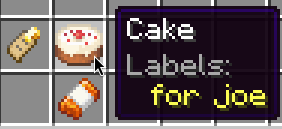
To create a label, get an Item Label and right-click on it with a Name Tag. The created label will reflect the custom name of the Name Tag.
Item Labels can contain multiple labels, showing one per line in the tooltip.
The eraser removes all labels from an item.
Project description from Modrinth.
Pick your setup
Choose the version and loader you play, then open the matching release.
Check the dependencies, then try the file in a copied instance before changing a world you care about.
Recent files
item_labels-1.0.1+1.21.11.jar
5 Aug 2026
item_labels-1.0.1+1.21.10.jar
8 Oct 2025
item_labels-1.0.1+1.21.9.jar
1 Oct 2025
item_labels-1.0.1+1.21.8.jar
1 Oct 2025
item_labels-1.0.1+1.21.7.jar
1 Oct 2025
item_labels-1.0.1+1.21.6.jar
1 Oct 2025
item_labels-1.0.1+1.21.5.jar
1 Oct 2025
item_labels-1.0.1+1.21.4.jar
1 Oct 2025
item_labels-1.0.1+1.21.3.jar
1 Oct 2025
item_labels-1.0.1+1.21.2.jar
1 Oct 2025
item_labels-1.0.1+1.21.1.jar
1 Oct 2025
item_labels-1.0.0+1.21.7.jar
25 Sept 2025
Looking for an older file? The official Modrinth project page is in Resources.
 mod
modCustomize any Minecraft command to your own alias!
 mod
modthis mod expands on Minecraft 26.1 (Tiny Takeover)
 mod
modBuild actual minecraft biomes, block by block, wherever you want.