LAN Operators Needed by NgrokLAN Reyoung 1.16.5-1.0rc1
requiredMatching file found Matched file: 1.0.0

Modrinth · Minecraft mod
remake of Ngrok-LAN by Alujjdnd but make for 1.16.5
Quick answer
NgrokLAN Reyoung 1.16.5-1.0rc1 targets 1.16, 1.16.1, 1.16.2 with Fabric. It must be installed on the client. Do not install it on the dedicated server. 1 required mod needs a matching file.
Where it goes
It must be installed on the client. Do not install it on the dedicated server.
This file is marked client-only.
1.16.5-1.0rc1 on 1.16.2. Every mod below is checked against that same setup.
Install LAN Operators, Cloth Config API (Fabric/Forge/NeoForge), Mod Menu first, but 1 required mod has no matching file for this setup. Do not mix loader builds to force a match.
We only count dependency files that match this setup. A file for another loader does not fill the gap.
Before you install it
Built for NgrokLAN Reyoung 1.16.5-1.0rc1 on 1.16.2. Pick another file and the loader, install side or required mods may change.
Use 1.16.5-1.0rc1. It targets 1.16, 1.16.1, 1.16.2 with Fabric; another release may have different loader, side or dependency requirements.
Install LAN Operators, Cloth Config API (Fabric/Forge/NeoForge), Mod Menu first, but 1 required mod has no matching file for this setup. Do not mix loader builds to force a match.
It must be installed on the client. Do not install it on the dedicated server.
Use the “Get this file” button beside 1.16.5-1.0rc1. It opens that exact file at the source.
About this project
COPYRIGHT: NgrokLAN Reyoung is forked of Ngrok-LAN by Alujjdnd but make for 1.16.5 and the description is all in README.MD in Alujjdnd Ngrok-LAN repos
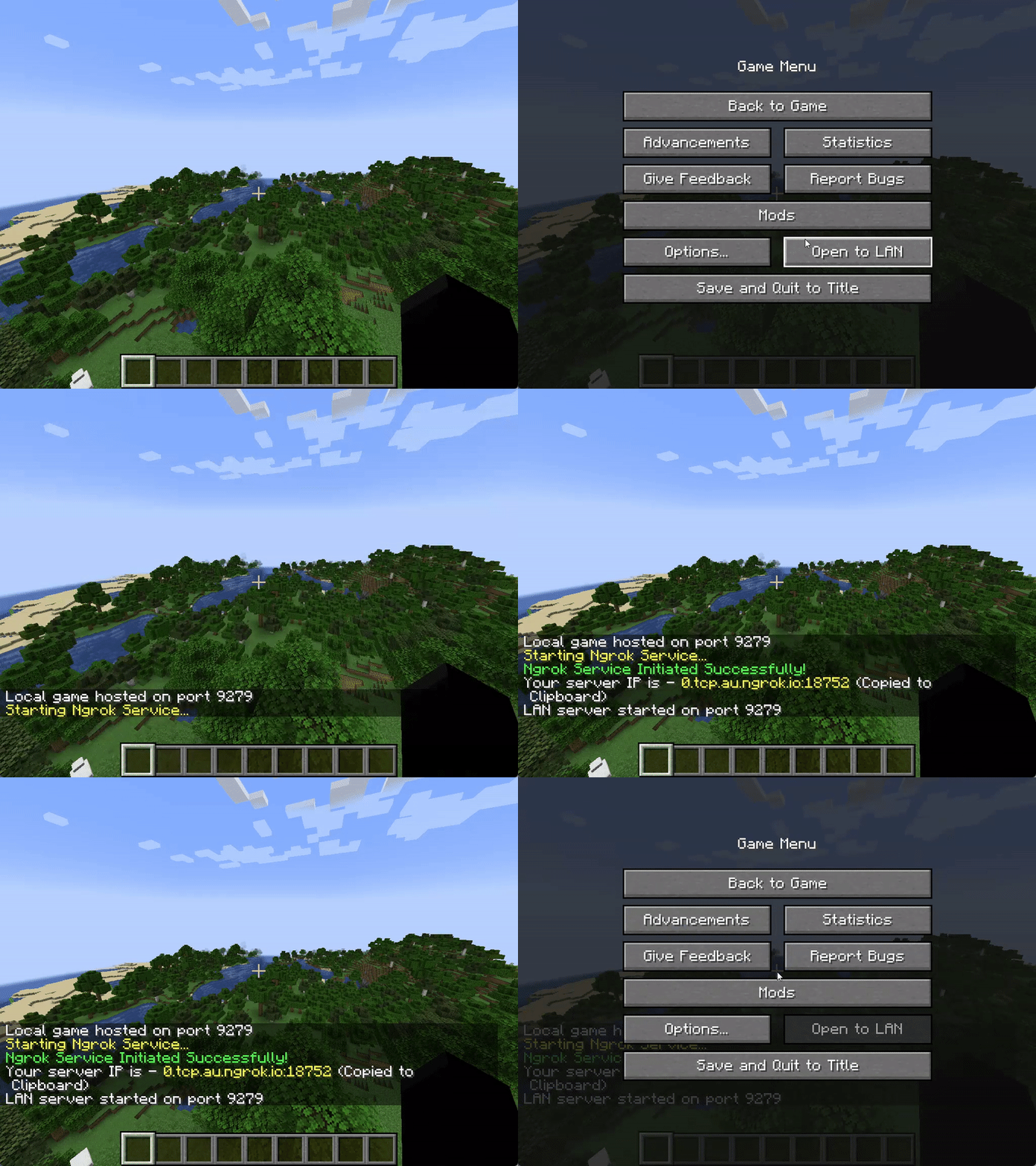
Ngrok LAN is a Fabric mod that enables you to share your singleplayer world with your friends across the globe, all via
clicking on the new "Open Public Server" button! This mod uses Ngrok, a free service to ease the creation of servers, as
the main service to "tunnel" your connection to the internet, and will generate a link for your friends to connect to
after you click on "Open Public Server".
For more on how Ngrok-LAN works, check out What is Ngrok.
The mod requires the following mods:
| Field | Description |
|---|---|
| "Enabled?" | This will enable/disable the mod, so you can configure whether the world is shared with Ngrok |
| "Ngrok Auth Token" | This is the field to input your Ngrok auth token, see getting your auth token |
| "Region" | This is where you can select the region of the Ngrok datacenter that you wish to use, use ones that are closest to you to minimise latency |
| "Require Authentication" | Ticking this box will start the server in online mode. If this box is unchecked, the server will be started in offline mode. This is mainly for when the other players are using cracked Minecraft accounts. |
| "Spawn Protection Radius" | Prevents non-opped players from breaking and placing blocks within X blocks of spawn |
| Code | Region |
|---|---|
| US | United States |
| EU | Europe |
| AP | Asia/Pacific |
| AU | Australia |
| SA | South America |
| JP | Japan |
| IN | India |
We suggest to use LanOperators to /op or /deop someone, which its public at Modrinth and Curseforge
or will be remake by me:)
| Error Message | Resolution |
|---|---|
| An attempt was made to access a socket in a way forbidden by its access permissions. | Restart "Host Network Service" under the "Services" program |
| The authtoken you specified does not look like a proper ngrok tunnel (ERR_NGROK_105) | Check that your auth token is valid, and is correctly inputted into the mod config |
| Your account is limited to simultaneous ngrok agent session... | Check that you are not running any other tunnels with this auth token, try change to regions if you are still getting this error |
Please open a new issue in Issues
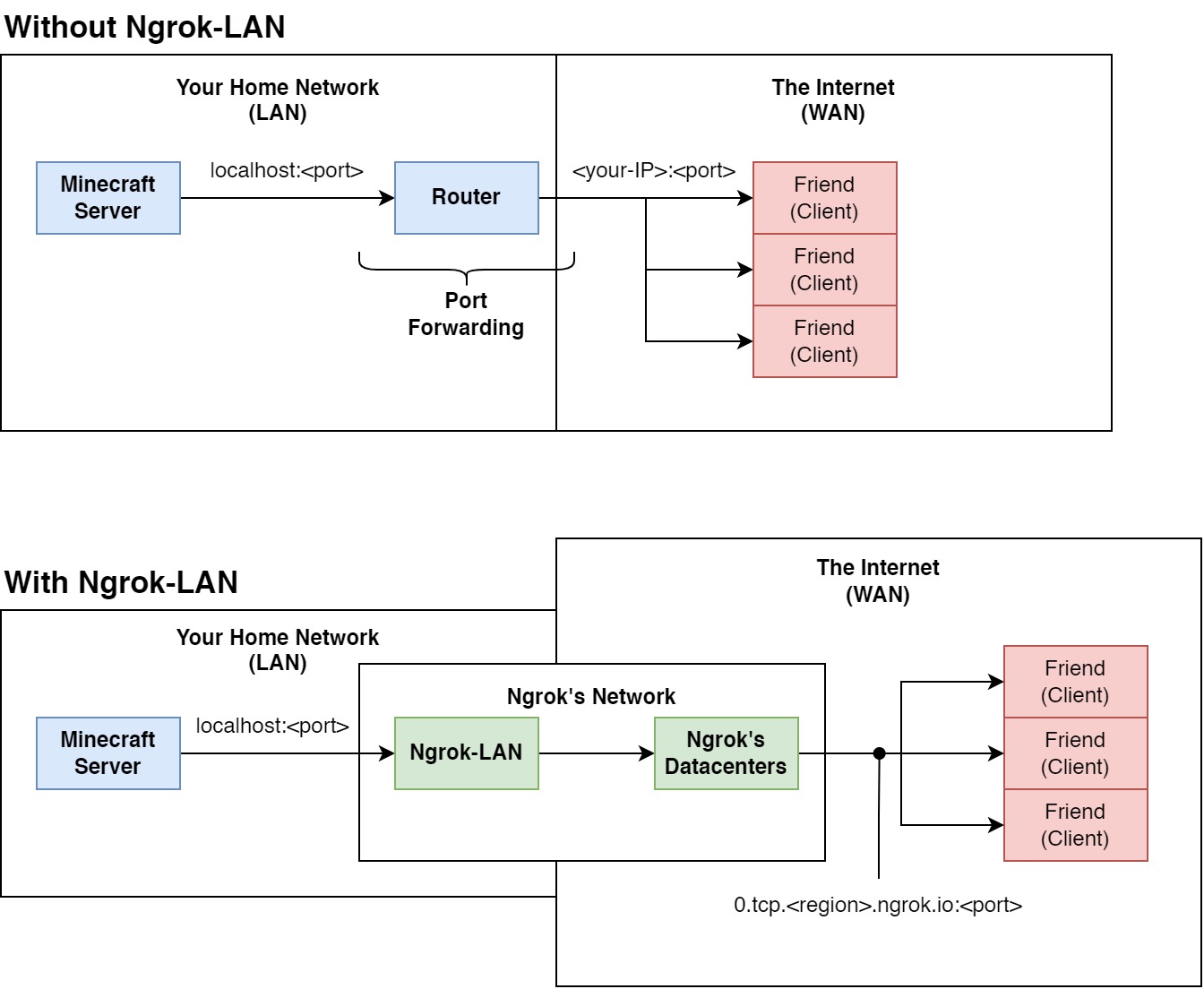
Ngrok is a free service that exposes your applications running locally to the internet, without port forwarding.
Usually, when setting up a Minecraft server, you would have to open the server, and "forward" your port through your
router. Port forwarding "publishes" your server to the internet, so anyone with you IP can join. Think of this as your
router "forwarding" the network packets from your server (part of your local network) to your friends (part of the wider
internet).
Using Ngrok, however, we don't need to forward the port. All the internet traffic is routed through an application (
Ngrok-LAN in this case), then their datacentres. Ngrok provides us with a link in return, that we can give to our
friends to connect to our server. This doesn't require any other configuration on your side - as long as you have
internet, and an Ngrok account, you can host your singleplayer world to your friends across the globe.
The mod only requires a free Ngrok account. The free tier for Ngrok allows you to have 1 free online tunnel
simultaenously, which means that, with one Ngrok free account, you can only host 1 Ngrok-LAN server at the same time.
The paid tiers allows you to have custom domains and more simultaenous online tunnels, but custom domains are not yet
supported in this mod.
More pricing info please refer to Ngrok's website
Please refer to Incompatibilities to find a list of incompatible mods.
Currently, only Proximity Voice Chat mods are incompatible. This is unlikely to be fixed.
This mod is available under the MIT license.
Project description from Modrinth.
Pick your setup
Choose the version and loader you play, then open the matching release.
Check the dependencies, then try the file in a copied instance before changing a world you care about.
Recent files
ngrok-lan-expose-mod-1.16.5-1.0rc1.jar
23 Jan 2024
Looking for an older file? The official Modrinth project page is in Resources.
 mod
Improves your keys & controls setup by providing modifier keys and making multi-functional keys a thing.
 mod
Flattens the ever-increasing anvil and enchantment costs and makes renaming items always cost 1 level
 mod
This mod increases damage to moving minecarts; the faster they move, the higher the damage, with virtually no damage limit!