Minecraft version
Back to mods 
Modrinth · Minecraft mod
ItemGlint:Relight
A rewrite version of ItemGlint mod, presenting more features and visualized config UI.
Choose a version Pick your version below, then grab the matching file.
Quick answer
Which ItemGlint:Relight release should I use?
beta file 0.3.0+1.21.1
Game version 1.21.1
Loader NeoForge
ItemGlint:Relight 0.3.0+1.21.1 targets 1.21.1 with NeoForge. It must be installed on the client. Do not install it on the dedicated server. No extra mods listed for this file.
Where it goes
Is ItemGlint:Relight required on the client, server, or both?
It must be installed on the client. Do not install it on the dedicated server.
Client Required
Dedicated server Not supported
Loader for this release NeoForge
Required install it here Optional supported, not mandatory Not supported do not install here Source doesn’t say do not assume
This file is marked client-only.
What else does ItemGlint:Relight 0.3.0+1.21.1 need?
0.3.0+1.21.1. Change the file and its required mods may change too.
This file does not list any required mods. Do not add a library just because a different file uses it.
This file does not list any required or optional mods.
Before you install it
Add ItemGlint:Relight without breaking your instance.
Built for ItemGlint:Relight 0.3.0+1.21.1. Pick another file and the loader, install side or required mods may change.
- 01
Stick to this file
Use 0.3.0+1.21.1. It targets 1.21.1 with NeoForge; another release may have different loader, side or dependency requirements.
- 02
Bring the mods it needs
This file does not list any required mods. Do not add a library just because a different file uses it.
- 03
Put it on the correct side
It must be installed on the client. Do not install it on the dedicated server.
- 04
Pick the file you checked
Use the “Get this file” button beside 0.3.0+1.21.1. It opens that exact file at the source.
About this project
What does ItemGlint:Relight add?
Introduction
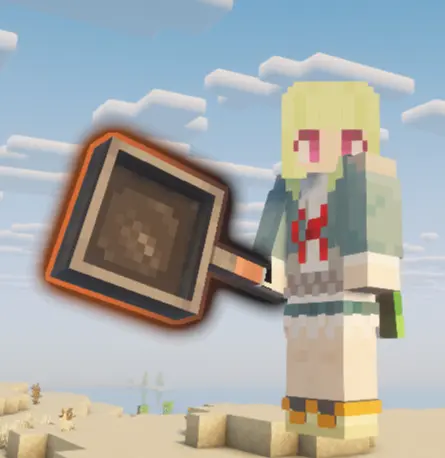
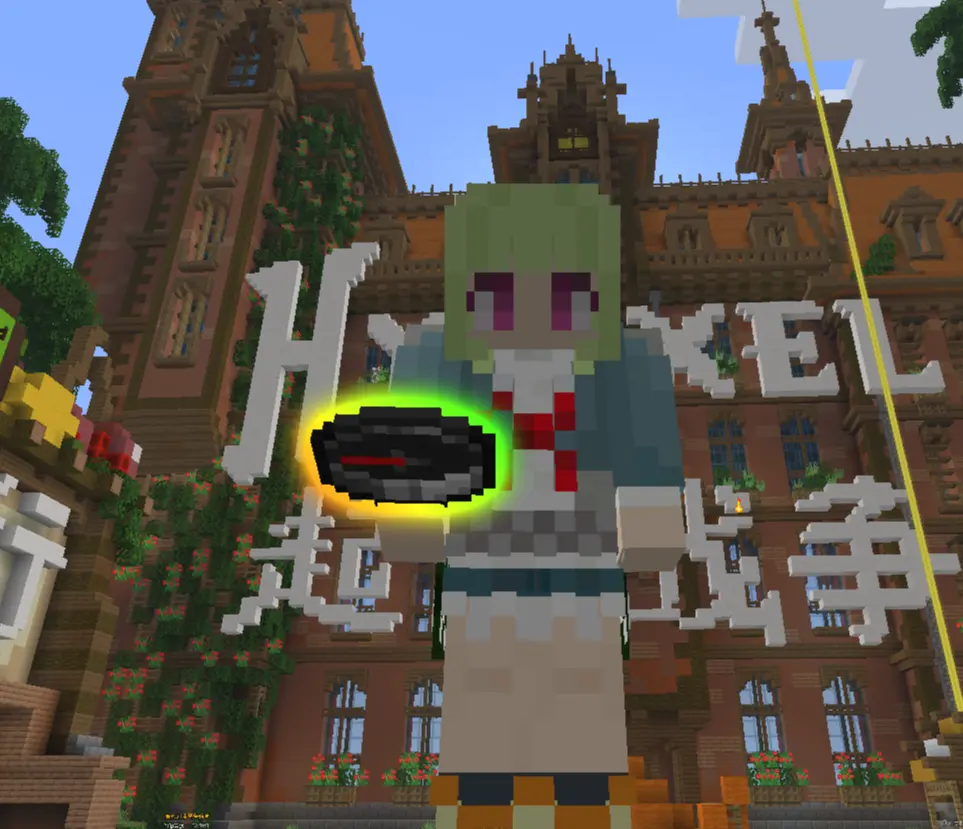
ItemGlint:Relight provides rich outline rendering for held items, GUI items, and third-person held items in Minecraft, with excellent compatibility and a high degree of customization.
Usage
Press the configuration GUI hotkey (default "I" key) in-game, or install the "modmenu" mod and click the configuration button in the mod list, to open the mod's configuration screen. The configuration interface offers visual parameter controls and real-time preview, allowing you to easily adjust all outline parameters for items.
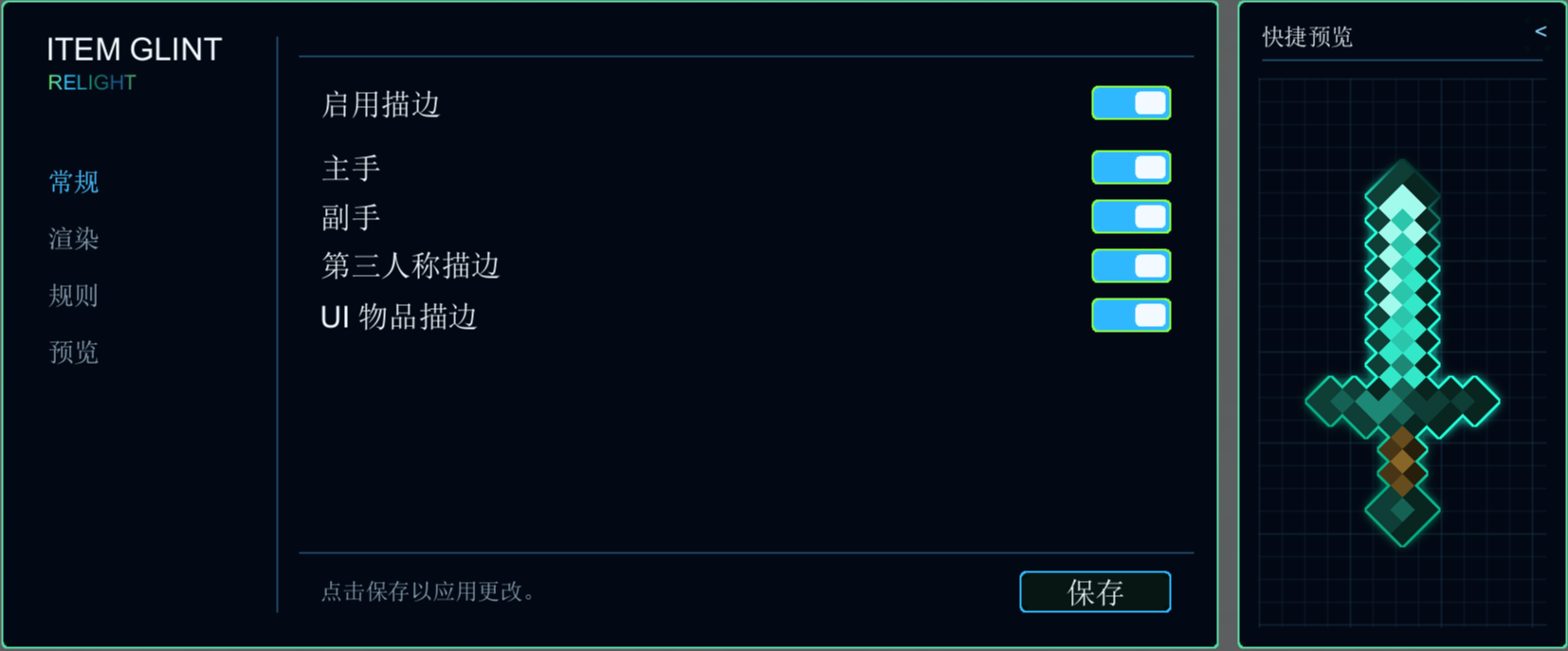
Outline Effect
The item outline effect is enabled by default and applies to all items (including modded items). Players can customize the rules for outline application in the "Rules" section of the configuration interface, including adding whitelists, blacklists, and matching items by item NBT. The mod also includes three built-in preset rule groups for players to use.
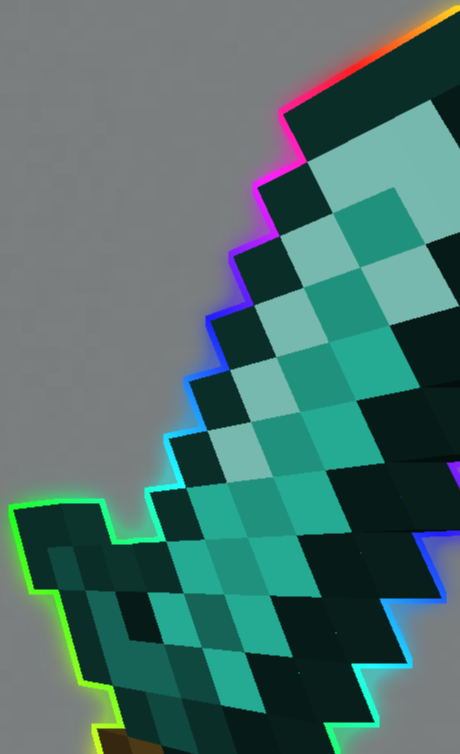
Compatibility
Caution!!!
As this mod modifies the game's core rendering logic to a certain extent, perfect compatibility with all other mods cannot be guaranteed. In case of game crashes or rendering errors, please consider disabling or removing this mod first.
Resource Packs
This mod generates outlines in real-time using item models and is compatible with most resource packs.
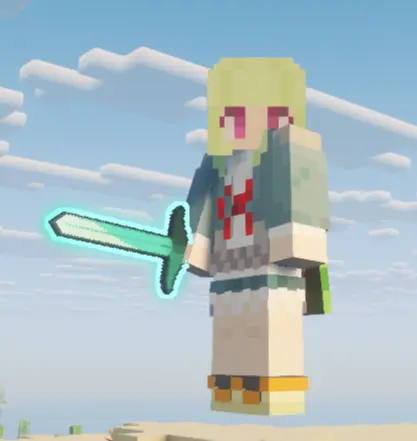
Shaders
This mod has special compatibility for shader loading with Sodium + Iris Shaders, ensuring that outlines render correctly even when shaders are enabled.
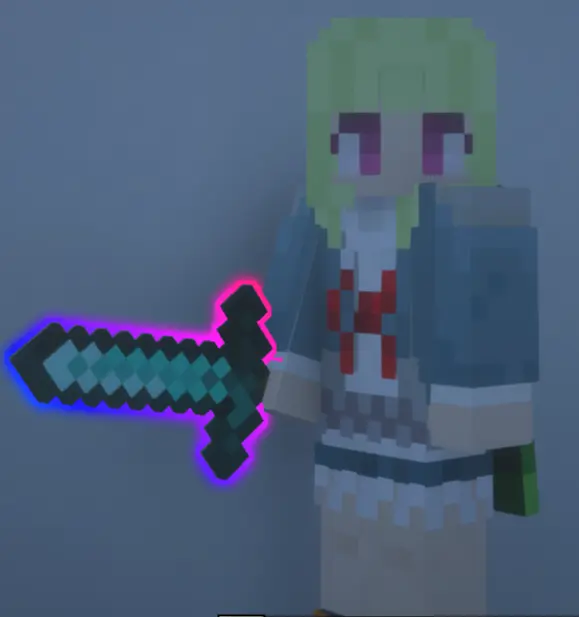
Mods
This mod supports rendering outlines for items added by other mods. However, due to differences in rendering methods for modded item models, some mod items may experience texture sampling errors or fail to render outlines.
Multiplayer
This mod is a client-side only mod and can be used in multiplayer servers when installed solely on the client.
简介
ItemGlint:Relight为minecraft的手持物品/GUI物品/第三人称手持物品提供了丰富的描边功能,同时有较好的兼容性以及极高的可自定义度。
使用方法
在游戏内按下开启配置界面的快捷键(默认"I"键)或安装“modmenu”模组后在模组列表中点击配置按钮,即可打开模组的配置界面。配置界面提供可视化的参数控制以及实时预览,可以轻松调整物品描边的所有参数。
描边效果
物品描边效果默认开启后作用于所有物品(包括模组物品),玩家可以在配置界面的“规则”界面对描边生效的规则进行自定义。包括添加白名单,黑名单以及通过物品nbt匹配物品。同时模组也内置三个预设规则组供玩家使用。
兼容性
注意!!!
由于本模组一定程度更改了游戏的核心渲染逻辑,无法保证能够与其他所有模组完美兼容,当出现游戏崩溃以及渲染错误时请优先考虑禁用或删除本模组。
材质
本模组使用物品模型实时生成描边,可兼容大部分材质包。
光影
本模组针对sodium + iris shaders的光影加载做了特殊兼容,支持在装在光影的情况下正常渲染描边。
模组
本模组支持对其他模组中添加的物品渲染描边,但是由于模组物品模型的渲染方式不一,部分模组物品可能会出现材质采样错误或无法绘制描边的情况。
多人游戏
本模组为纯客户端模组,可在仅客户端安装的情况下进入多人游戏。
Project description from Modrinth.
Pick your setup
ItemGlint:Relight by Minecraft version and loader
Choose the version and loader you play, then open the matching release.
Minecraft version
26.2
1 loader buildMinecraft version
26.1.2
1 loader buildMinecraft version
1.21.11
1 loader buildMinecraft version
1.21.1
2 loader buildsCheck the dependencies, then try the file in a copied instance before changing a world you care about.
Recent files
ItemGlint:Relight versions and loaders
0.3.0+1.21.1
itemglintrelight-neoforge-1.21.1-0.3.0+1.21.1.jar
18 Nov 2026
Client Required Server Not supported Dependencies No extras listed Listed on Release listing
Check the 1.21.1 · NeoForge setup 1.21.1NeoForge beta
0.3.0+1.21.1-fix
itemglintrelight-fabric-1.21.1-0.3.0+1.21.1.jar
18 Nov 2026
Client Required Server Not supported Dependencies No extras listed Listed on Release listing
Check the 1.21.1 · Fabric setup 1.21.1Fabric beta
0.3.0+26.3-fix
itemglintrelight-fabric-26.3-0.3.0+26.3.jar
5 Nov 2026
Client Required Server Not supported Dependencies No extras listed Listed on Release listing
Check the 26.3 · Fabric setup 26.3Fabric beta
0.3.0+1.21.1
itemglintrelight-fabric-1.21.1-0.3.0+1.21.1.jar
3 Nov 2026
Client Required Server Not supported Dependencies No extras listed Listed on Release listing
Check the 1.21.1 · Fabric setup 1.21.1Fabric beta
0.3.0+26.3
itemglintrelight-fabric-26.3-0.3.0+26.3.jar
16 Oct 2026
Client Required Server Not supported Dependencies No extras listed Listed on Release listing
Check the 26.3 · Fabric setup 26.3Fabric beta
0.3.0+26.1.2
itemglintrelight-fabric-26.1.2-0.3.0+26.1.2.jar
15 Oct 2026
Client Required Server Not supported Dependencies No extras listed Listed on Release listing
Check the 26.1.2 · Fabric setup 26.1.2Fabric beta
0.3.0+1.21.11
itemglintrelight-fabric-1.21.11-0.3.0+1.21.11.jar
26 Sept 2026
Client Required Server Not supported Dependencies No extras listed Listed on Release listing
Check the 1.21.11 · Fabric setup 1.21.11Fabric beta
0.3.0+26.2
itemglintrelight-fabric-26.2-0.3.0+26.2.jar
26 Sept 2026
Client Required Server Not supported Dependencies No extras listed Listed on Release listing
Check the 26.2 · Fabric setup 26.2Fabric beta
0.2.0+1.21.11
itemglintrelight-fabric-1.21.11-0.2.0+1.21.11.jar
11 Sept 2026
Client Required Server Not supported Dependencies No extras listed Listed on Release listing
Check the 1.21.11 · Fabric setup 1.21.11Fabric beta
0.1.0+1.21.11
itemglintrelight-fabric-1.21.11-0.1.0+1.21.11.jar
18 Aug 2026
Client Required Server Not supported Dependencies No extras listed Listed on Release listing
Check the 1.21.11 · Fabric setup 1.21.11Fabric beta
Looking for an older file? The official Modrinth project page is in Resources.
 mod
CurseForge + Modrinth · Minecraft
Ponderer - 思索者
Ponderer is an in-game Ponder authoring tool for players and modpack creators. You can build, edit, and iterate tutorial scenes directly in Minecraft without leaving the game or writing scripts first.
 mod
CurseForge + Modrinth · Minecraft
Wanderers Campsite
Adds a cozy, naturally generating Wanderer's Campsite structure to your world, featuring colorful wool tents, decorative details, and a custom loot chest to discover!
 mod
Modrinth · Minecraft
Poly+ (PolyPlus)
The best world hosting and friends mod. By Polyfrost, best with OneClient.