Minecraft version
Back to mods 
Modrinth · Minecraft mod
Item Filter
A configurable Fabric item filter block that works like a hopper with filter slots and toggleable filter mode.
Choose a version Pick your version below, then grab the matching file.
Quick answer
Which Item Filter release should I use?
Latest stable file 1.2.0
Game version 1.21.1
Loader Fabric
Item Filter 1.2.0 targets 1.21.1 with Fabric. Installation on the client is optional. Installation on the dedicated server is optional. No extra mods listed for this file.
Where it goes
Is Item Filter required on the client, server, or both?
Installation on the client is optional. Installation on the dedicated server is optional.
Client Optional
Dedicated server Optional
Loader for this release Fabric
Required install it here Optional supported, not mandatory Not supported do not install here Source doesn’t say do not assume
The source marks this as usable on both the client and server.
What else does Item Filter 1.2.0 need?
1.2.0. Change the file and its required mods may change too.
This file does not list any required mods. Do not add a library just because a different file uses it.
This file does not list any required or optional mods.
Before you install it
Add Item Filter without breaking your instance.
Built for Item Filter 1.2.0. Pick another file and the loader, install side or required mods may change.
- 01
Stick to this file
Use 1.2.0. It targets 1.21.1 with Fabric; another release may have different loader, side or dependency requirements.
- 02
Bring the mods it needs
This file does not list any required mods. Do not add a library just because a different file uses it.
- 03
Put it on the correct side
Installation on the client is optional. Installation on the dedicated server is optional.
- 04
Pick the file you checked
Use the “Get this file” button beside 1.2.0. It opens that exact file at the source.
About this project
What does Item Filter add?
Item Filter
Item Filter is a Minecraft Fabric mod that adds a configurable, high-speed item filter block.
It works like a hopper, but with filter slots, a toggleable filter mode, and adjustable transfer speeds of up to 640×. Choose which items are allowed to pass through, or disable filtering to transfer any item.
Showcase
Features
| Feature | Description |
|---|---|
| 🧰 Item Filter Block | Adds a custom hopper-like block focused on item filtering. |
| ⚡ High-Speed Transfers | Transfers full stacks without the vanilla hopper cooldown. |
| 🚀 Adjustable Speed | Configure transfer speeds from 1× to 640×. |
| ⚙️ Mod Menu Integration | Adjust transfer speed through the Mod Menu configuration screen. |
| 🌐 Multiplayer Support | Server-controlled transfer speed for consistent multiplayer behavior. |
| 🔍 Configurable Filter | Choose which items are allowed to pass through. |
| 🔘 Toggleable Mode | Switch between filtered mode and unrestricted item transfers. |
| ⬇️ Pulls From Above | Extracts items from chests, barrels, furnaces, smokers, and other inventories. |
| 📦 Double Chest Support | Supports large chests and trapped large chests. |
| 🧲 Dropped Item Pickup | Collects dropped items from above. |
| ↪️ Directional Output | Outputs items in the direction the block is facing. |
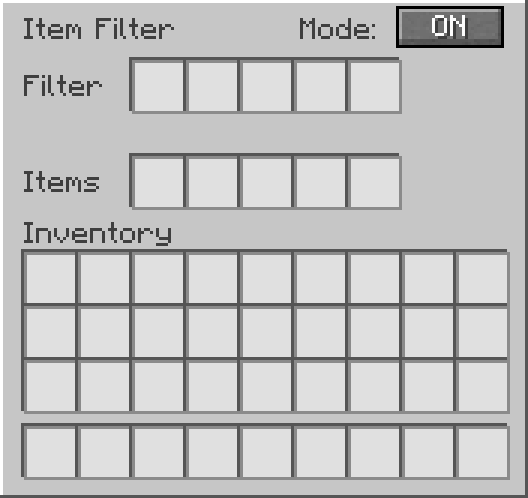
| 🖥️ Custom GUI | Includes filter slots, internal item slots, and an ON/OFF button. |
How It Works
Place the Item Filter like a vanilla hopper.
Items can enter from the top through hoppers, be pulled directly from inventories above, or be collected as dropped items.
Items leave through the direction the block is facing.
Whenever possible, items transfer directly between inventories without passing through the internal storage slots.
Inside the GUI:
- Filter slots define which items are allowed to pass.
- Items slots work as the internal inventory.
- Mode ON allows only filtered items.
- Mode OFF allows any item to pass through.
When filter mode is ON, only items matching the filter slots can enter the Item Filter.
When filter mode is OFF, the Item Filter allows any item to pass through.
Transfer Speed
Starting with version 1.2.0, Item Filter features high-speed transfers with adjustable throughput.
Transfer speed ranges from 1× to 640×, with 640× enabled by default.
Transfer Speed Reference
| Setting | Maximum Transfer Rate |
|---|---|
| 1× | 10 items/s |
| 32× | 320 items/s |
| 64× | 640 items/s |
| 128× | 1,280 items/s |
| 256× | 2,560 items/s |
| 320× | 3,200 items/s |
| 640× | 6,400 items/s |
Transfer rates are theoretical maximums at 20 TPS. Actual performance depends on available items, destination capacity, inventory restrictions, and server performance.
Configuration
With Mod Menu installed, navigate to:
Mods → Item Filter → Configure → Transfer Speed
Choose your preferred speed and save the configuration.
In single-player, transfer speed can be configured locally. On dedicated servers, the server administrator controls the transfer speed for all players.
Mod Menu is optional and is not required on dedicated servers.
Recipe
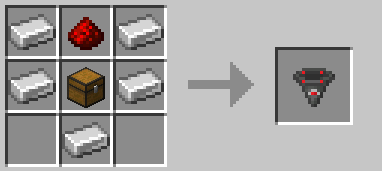
GUI Preview
Support
Need help, found a bug, or want to suggest something?
Join the Discord support forum:
License
This project is licensed under the MIT License.
Project description from Modrinth.
Pick your setup
Item Filter by Minecraft version and loader
Choose the version and loader you play, then open the matching release.
Check the dependencies, then try the file in a copied instance before changing a world you care about.
Recent files
Item Filter versions and loaders
1.2.0
itemfilter-1.2.0.jar
21 Oct 2026
Client Optional Server Optional Dependencies No extras listed Listed on Release listing
Check the 1.21.1 · Fabric setup 1.21.1Fabric release
1.1.0
itemfilter-1.1.0.jar
10 May 2026
Client Optional Server Optional Dependencies No extras listed Listed on Release listing
Check the 1.21.1 · Fabric setup 1.21.1Fabric release
1.0.1
itemfilter-1.0.1.jar
10 May 2026
Client Optional Server Optional Dependencies No extras listed Listed on Release listing
Check the 1.21.1 · Fabric setup 1.21.1Fabric release
1.0.0
itemfilter-1.0.0.jar
10 May 2026
Client Optional Server Optional Dependencies No extras listed Listed on Release listing
Check the 1.21.1 · Fabric setup 1.21.1Fabric release
Looking for an older file? The official Modrinth project page is in Resources.
 mod
mod CurseForge + Modrinth · Minecraft
Disc Jockey Plus
(Play Note Block Songs In Minecraft!) NBS SONGS!! Original mod is Disc Jockey. This project just upgraded it and added some features. 原作品为 Disc Jockey,此项目只是对它进行了升级,加装了一些功能。 仅此而已
 mod
mod CurseForge + Modrinth · Minecraft
Cobblemon Villager overhaul - [ADDON]
This mod makes you now use cobbledollars instead of emeralds
 mod
mod CurseForge + Modrinth · Minecraft
More Banner Features
Banners on Horses, Boats, Happy Ghasts, as Capes, Hats, more layers and more!